
How many moments of pure inspiration have vanished while you waited for a login screen to load or fumbled for a forgotten password? The digital world often feels like a series of gates and tolls, demanding your personal data before allowing you to think. Using a no-login text editor offers a different path, one where the distance between a flickering thought and a written word is reduced to nothing. It’s a return to the simplicity of a fresh sheet of paper, but with the quiet efficiency of modern technology.
You likely feel the weight of account fatigue and the subtle anxiety of knowing your private notes are stored on distant corporate servers. It’s a common burden in an era where new 2026 privacy laws in states like Indiana and Kentucky highlight just how much of our personal data is constantly at risk. This article will show you how to reclaim your focus using frictionless, no-registration tools designed for immediate mental clarity. We’ll look at the psychological benefits of a clean writing canvas and how to maintain a zero-trace digital footprint while you work.
Key Takeaways
- Learn why a no-login text editor acts as a frictionless gateway, helping you bypass account fatigue and start writing the moment inspiration strikes.
- Understand the mechanics of local-first software, which ensures your private thoughts remain in your browser’s memory instead of on a corporate server.
- Discover the benefits of minimalist environments that strip away the distraction factors found in complex, registration-heavy cloud suites.
- Identify the best scenarios for anonymous writing, such as capturing fleeting ideas or drafting sensitive letters that require a zero-trace digital footprint.
- Explore how a dedicated Quick Notes Canvas can transform your digital workspace into a serene sanctuary that respects your privacy and mental lightness.
The Rise of Account Fatigue: Why We Crave a No-Login Text Editor
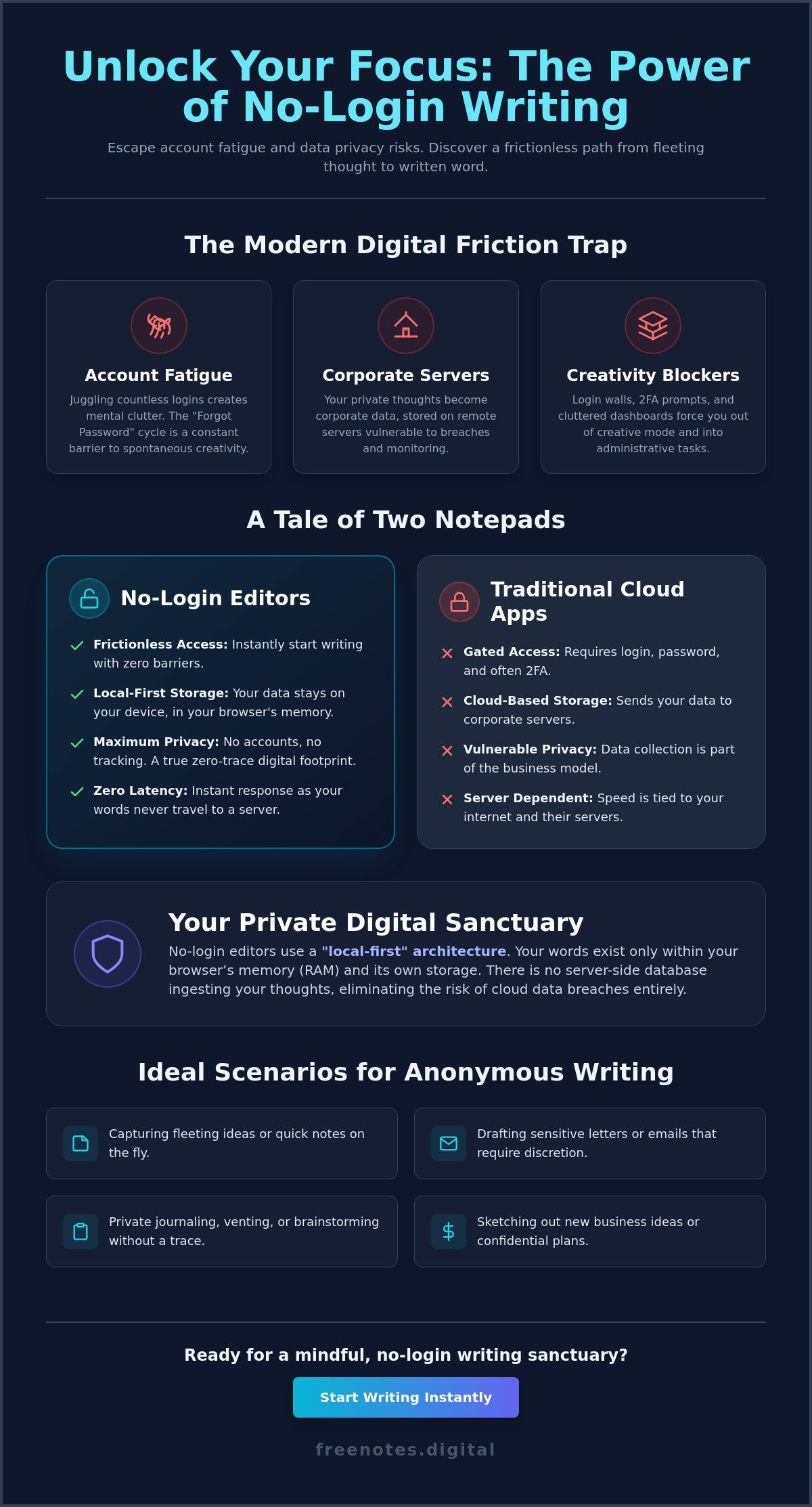
The modern digital experience often feels like walking through a series of locked doors. Before you can record a single thought, you’re usually asked to verify your identity, agree to updated terms, or navigate a cluttered dashboard. A no-login text editor serves as a quiet, frictionless gateway to immediate productivity, stripping away the technical noise that stands between you and your creativity. It’s a tool built for the moments when your ideas are moving faster than your ability to remember a password.
In our current digital climate, account fatigue has become a genuine psychological burden. By the start of 2026, with new state-level privacy laws in Indiana and Kentucky highlighting the risks of data collection, many of us have reached a breaking point. We’re tired of managing hundreds of digital keys. We crave environments that don’t demand our email addresses in exchange for a blank page. Choosing a minimalist, anonymous workspace isn’t just about speed; it’s an act of digital minimalism that preserves your mental energy for the work that actually matters.
The Barrier of the Signup Screen
Mandatory logins are the silent killers of spontaneity. When a brilliant brainstorm strikes, the last thing you need is a “Forgot Password” link or a two-factor authentication prompt. These hurdles break your flow state, forcing your brain to switch from creative expression to administrative problem-solving. Beyond the irritation, there is a hidden cost to these “free” accounts. Most platforms treat your email and personal habits as currency, building a profile of your creative life for their own benefit. Frictionless Entry is the core of modern user experience, defining a service that prioritizes the user’s immediate needs over the collection of their personal data.
Reclaiming Your Digital Anonymity
There is a profound sense of peace in knowing that no one is watching your rough drafts. Temporary, no-account tools are often the wisest choice for sensitive drafting, whether you’re venting your frustrations in a private letter or sketching out a new business idea. When you use a no-login text editor, you’re stepping into a private sanctuary where your raw, unedited thoughts aren’t being indexed by a corporate server. It’s about safety and discretion. When considering your personal security practices, reducing your digital footprint by avoiding unnecessary accounts is a foundational step toward true privacy. By choosing a tool that stays out of your way, you protect the sanctity of your creative process and keep your ideas exactly where they belong: with you.
How Browser-Based Editors Protect Privacy Without Cloud Storage
The traditional digital landscape often forces a trade-off between convenience and privacy. Most writing platforms act as a window into a massive, distant warehouse where your data is cataloged and stored. A no-login text editor flips this dynamic entirely. Instead of sending your thoughts to a remote server, these tools utilize a “local-first” architecture. This design ensures that your device remains the beginning and the end of your data’s journey, providing a level of security that cloud-based systems simply cannot match.
When you type into a local-first editor, your words exist within your browser’s active memory (RAM) and its own internal storage system. There is no server-side database waiting to ingest your personal reflections or sensitive drafts. This “no-server” processing is the ultimate defense against the data breaches that have become so common. By keeping the data path short and contained within your own hardware, the risk of a cloud leak is eliminated. You are the sole guardian of your workspace.
The Magic of Local Processing
The beauty of this architecture lies in its silence and speed. Because your words never travel to a remote server during the writing process, there is zero latency. You don’t have to wait for a server handshake to confirm that your text has been saved. This immediate response creates a sense of fluidity that supports your creative flow. It’s a restorative way to work, knowing that your intellectual property isn’t being transmitted across the internet. This localized approach respects your personal space, providing a quiet sanctuary where you can explore ideas without the invisible weight of external monitoring.
Understanding Browser Persistence
A common concern with browser-based tools is whether your work will vanish if you accidentally close a tab. Modern browser APIs have solved this through persistent local storage. Your browser acts as a vault, not just a window. It uses a small, secure portion of your hard drive to hold your text even if you refresh the page or lose your internet connection. This ensures your notes remain available exactly where you left them, without ever needing a cloud sync. If you’re looking for a place to experience this immediate, secure environment, you might enjoy using a Quick Notes Canvas to capture your next big idea. This technology creates a stable, reliable workspace that values your time and your privacy in equal measure. It is a modern solution for those who prioritize discretion and mental clarity in their daily writing habits.
Comparing No-Login Tools vs. Traditional Cloud Notepads
Choosing between a traditional cloud notepad and a no-login text editor is often a choice between digital weight and mental lightness. Large cloud suites offer the convenience of synchronization across every device you own, but this benefit comes with a persistent digital tether. Every word you type is immediately categorized, synced, and stored in a distant warehouse. This constant background activity creates a subtle cognitive load, a feeling that your workspace is never truly empty or entirely your own. In contrast, a minimalist canvas offers the security of isolation, providing a fast lane for transient, high-value information that doesn’t need to live forever in a database.
Traditional applications often suffer from data bloat, encouraging users to hoard every scrap of thought. Over time, this leads to a cluttered digital environment that can feel overwhelming rather than helpful. The environmental and cognitive impact of this bloat is significant, requiring more energy to process. Just as you might check out Zonnepanelen Brabant B.V. to see how sustainable energy can create a more independent physical space, choosing minimalist software helps you reclaim a sense of mental order. You’re no longer managing a library; you’re simply using a tool.
Security Through Isolation
There is a unique safety in a tool that cannot sync. While competitors often focus on sharing features, true privacy is found in a zero-knowledge environment where the provider sees nothing. By eliminating the single point of failure inherent in a centralized cloud account, you protect your private memos from large-scale data breaches. This is particularly relevant as technical privacy teams have reported being understaffed in recent years, with staff sizes dropping significantly. When you use a no-login text editor, you’re taking personal security into your own hands. You aren’t trusting a corporate security team to guard your drafts; you’re ensuring there is nothing on their servers to steal.
Frictionless vs. Feature-Rich
The “Serenity Gap” is the difference in mental clarity you feel when moving from a cluttered interface to a clean one. A simple scratchpad is often superior to a heavy document processor because it respects your focus. The best feature of a no-login tool is frequently what it lacks. Consider these benefits of a minimalist environment:
- No sidebars: Your peripheral vision stays clear of folders and files.
- No menus: You spend zero time formatting and all your time thinking.
- No alerts: The interface never interrupts your flow with update notifications or sync errors.
When you choose a minimalist canvas, you’re choosing to reduce the friction between your mind and the page. It’s a sophisticated way to work that prioritizes your well-being over a long list of features you may never use. This approach turns writing into a restorative practice rather than another digital chore. If you want to explore the full landscape of distraction-free tools available today, our guide to the best minimalist writing app online options for focused minds in 2026 offers a comprehensive look at the most serene environments built for creative flow.
Practical Use Cases for an Anonymous Web Notepad
While the psychological benefits of a minimalist workspace are clear, the true value of a no-login text editor reveals itself through its daily versatility. This isn’t just a tool for professional writers; it is a flexible, digital scratchpad for anyone who needs to process information without the overhead of a permanent file system. Creators often use these canvases for quick thought capture, ensuring that a fleeting spark of inspiration is recorded before it can be crowded out by the noise of the day. By providing a clean slate that requires zero setup, these editors act as a reliable partner in your creative journey. For those who want to turn these captured thoughts into a powerful digital presence, you can discover Digital-PR to explore specialized blog marketing and SEO strategies.
For those handling sensitive information, such as drafting a private letter or temporarily holding a complex password, an anonymous notepad offers a necessary layer of discretion. There is no account trail and no persistent history for a third party to index. Students have also found these tools invaluable for clean transcription during lectures. Instead of fighting with the formatting quirks of a heavy word processor, they can focus entirely on the speaker’s words, moving the text to a permanent home only after the lecture has ended. Similarly, developers and researchers use these editors as a neutral ground to strip away hidden formatting from code snippets or data points, ensuring a “clean” transfer between different platforms.
Instant Brainstorming and Ideation
The absence of a traditional “Save” button can be surprisingly liberating. When you know a document isn’t being automatically filed into a permanent archive, you feel more comfortable engaging in raw, unedited brain dumps. This lack of permanence encourages a deeper level of honesty and experimentation. You can explore a thought to its natural conclusion and then simply close the tab, leaving your mental space as clear as the canvas you just used. It turns writing into a restorative exercise in clarity rather than a chore of organization.
Secure Dictation and Voice-to-Text
One of the most powerful modern applications for these tools is the ability to bridge the gap between speech and text without a digital footprint. Many researchers prefer local-only transcription for confidential interviews because it ensures the audio data isn’t being processed or stored on a corporate cloud. You can experience this same level of privacy and ease by using a Free Voice to Text Note Taking Tool to dictate your thoughts hands-free. This integration allows you to maintain your creative flow even when you aren’t at a keyboard, providing a sophisticated way to capture insights through a secure, local-first workflow. It respects the sanctity of your voice as much as the privacy of your written words.
Free Notes App: Your Mindful, No-Login Writing Sanctuary
The digital tools we choose act as the architecture of our thoughts. When that architecture is cluttered with login screens and data tracking, our creativity often feels confined. Free Notes App was created to be a no-login text editor that functions as a serene sanctuary for your mind. It prioritizes mental lightness and speed, ensuring that you can transition from a state of distraction to one of deep focus in seconds. By removing the traditional barriers of entry, it invites you to return to the simple joy of writing for yourself without the weight of digital oversight.
The core of this experience is a local-only promise. Your thoughts, drafts, and voice memos never leave your device. This architecture transforms your browser into a private vault where your intellectual property remains entirely under your control. It’s a modern solution that respects your privacy without requiring a complex setup. Whether you’re using the minimalist typing canvas or the integrated voice-to-text features, you can work with the confidence that no corporate server is indexing your rough ideas. It’s a tool designed to stay out of your way until the exact moment it is needed, acting as a quiet enabler of your best work. Writers seeking a broader comparison of focused environments may also find value in reviewing the top minimalist writing app online choices available in 2026 to understand how different tools serve different creative needs.
Designed for Serenity
The interface is clean and evocative, intentionally stripped of the menus and sidebars that often fragment our attention. It projects the personality of a mindful assistant, a quiet and reliable companion that supports your process without shouting for your attention. This design philosophy reduces the cognitive load of writing, allowing your mind to move with a purposeful grace. The app acts as a protective guardian of your creative process, providing a sophisticated space where your ideas can breathe and grow without external pressure. It balances professional utility with a gentle, mindful atmosphere that makes every writing session feel restorative.
Starting Your Journey Without a Single Click
There is a unique freedom in the instant-on nature of this workspace. You don’t need to navigate a dashboard or manage a profile to begin. You can simply open the Quick Notes Canvas and start capturing your next big idea immediately. This frictionless approach allows you to embrace the freedom of anonymous, private writing as a restorative daily habit. It is time to reclaim your focus and protect your peace. By choosing a no-login text editor that values your well-being, you’re making a commitment to your own mental clarity and creative independence. Step into a space that respects your time, your privacy, and the fluidity of your thoughts.
Embrace the Freedom of Your Private Workspace
Reclaiming your creative focus doesn’t have to be a struggle against complex software or mandatory signups. You’ve seen how removing the friction of account fatigue allows your thoughts to flow with purposeful grace. By choosing a no-login text editor, you ensure that your private drafts remain exactly that: private. There is a deep, restorative peace in knowing that no data is stored on external servers and that your mental energy is reserved entirely for the page in front of you.
Whether you’re capturing transient insights through instant voice-to-text integration or simply need a zero-registration creative sanctuary for a quick brainstorm, the right tools respect your time and your peace. It’s time to let go of digital clutter and return to the simplicity of a clean, responsive canvas. Your ideas deserve a space where they can unfold without interruption or monitoring.
Begin your frictionless writing session now at Free Notes App and discover how mental lightness can transform your daily process. Trust in the quiet support of a workspace designed for your well-being. Your next great insight is waiting for a place to land.
Frequently Asked Questions
Is my text saved if I close the browser tab in a no-login editor?
Your text is typically preserved through your browser’s local storage even if you close the tab or refresh the page. This technology allows the no-login text editor to remember your work without needing a remote account. However, since the data lives only on your specific device, it won’t be there if you switch to a different computer or clear your browser’s cache. It’s a reliable way to maintain a temporary workspace while ensuring your ideas stay under your physical control.
Can anyone else see the notes I write in an anonymous text editor?
No one else can see your notes because the processing happens entirely within your own browser. Unlike cloud-based suites that transmit data to external servers, an anonymous editor keeps your words inside your device’s memory. This architecture creates a private sanctuary where your rough drafts and sensitive thoughts remain invisible to the provider and third-party trackers. It’s a sophisticated solution for those who prioritize digital discretion and personal space.
What is the difference between a no-login editor and a private browser window?
A private browser window focuses on hiding your browsing history from your device, while a no-login text editor focuses on providing a functional writing environment without data harvesting. While both support anonymity, a text editor offers specific tools like a Quick Notes Canvas or voice-to-text features. Using them together provides a layered approach to privacy, ensuring that your writing session leaves no trace on the web or in your local history.
Are no-login text editors safe for storing passwords or sensitive data?
These editors are excellent for the temporary drafting of sensitive information because they don’t store your data on corporate servers. They act as a safe, transient scratchpad for passwords or private letters that you intend to move elsewhere. Because there is no account to hack, you bypass the risks associated with large-scale cloud breaches. Just remember to clear your work once you’re finished to maintain the highest level of personal security.
Do I need to download any software to use a browser-based notepad?
You don’t need to download or install any software to begin writing. These tools are designed to work instantly within your existing web browser, providing a seamless transition from thought to text. This zero-install approach reduces technical friction and keeps your system clean. It’s the perfect solution for creators who need an immediate, high-quality writing environment without the commitment of a traditional application or the clutter of extra files on their hard drive.
How does voice-to-text work without an account or cloud processing?
Modern browsers include built-in speech recognition APIs that process your voice directly on your device. When you use a Free Voice to Text Note Taking Tool, your spoken words are converted into text locally rather than being sent to a distant server for analysis. This method respects the sanctity of your voice, providing a fast and secure way to record ideas hands-free. It’s a mindful integration of technology that prioritizes your privacy while supporting your creative flow.
Can I export my notes from a no-login editor to a permanent file?
Yes, you can easily move your notes to a permanent home by copying the text or using a simple save function. Most users treat these editors as a starting point or a quiet foyer for their ideas. Once your brainstorm is complete, you can transfer the polished content into your preferred long-term storage or document processor. This flexibility allows you to enjoy a serene writing environment while maintaining a structured final archive.
Why would I use a no-login editor instead of Google Docs or Microsoft Word?
You might choose a no-login editor to escape the digital weight and distractions inherent in heavy cloud suites. While those platforms are powerful for collaboration, they often come with account fatigue and the constant feeling of being monitored. A minimalist canvas provides a restorative alternative that values your mental clarity and privacy. It’s about choosing a tool that stays out of your way, allowing you to reclaim your focus in a quiet, sophisticated sanctuary.