
What if the greatest obstacle to your next great chapter isn’t writer’s block, but the very software you use to capture it? In an era where over 4 million books were published in the U.S. during 2025, the digital noise has never been louder. Most tools clutter your screen with complex toolbars and persistent notifications that pull you away from your creative rhythm. Finding a minimalist writing app online that respects your need for silence is no longer a luxury; it’s a necessity for anyone seeking to turn fleeting thoughts into enduring prose.
You likely feel the weight of mental friction every time a flashy interface demands your attention or a privacy concern makes you hesitate. It’s exhausting to fight against your own workspace when you simply want to reach a state of flow. This guide promises to lead you toward the most serene environments available in 2026, where your ideas can breathe and your data remains your own. We will explore the finest tools designed to strip away digital debris, from elegant one-time purchase options like iA Writer and Scrivener to the latest free version of FocusWriter, ensuring you find the perfect sanctuary for your words.
Key Takeaways
- Discover how stripping away digital clutter can lower your cognitive load and restore your natural creative flow.
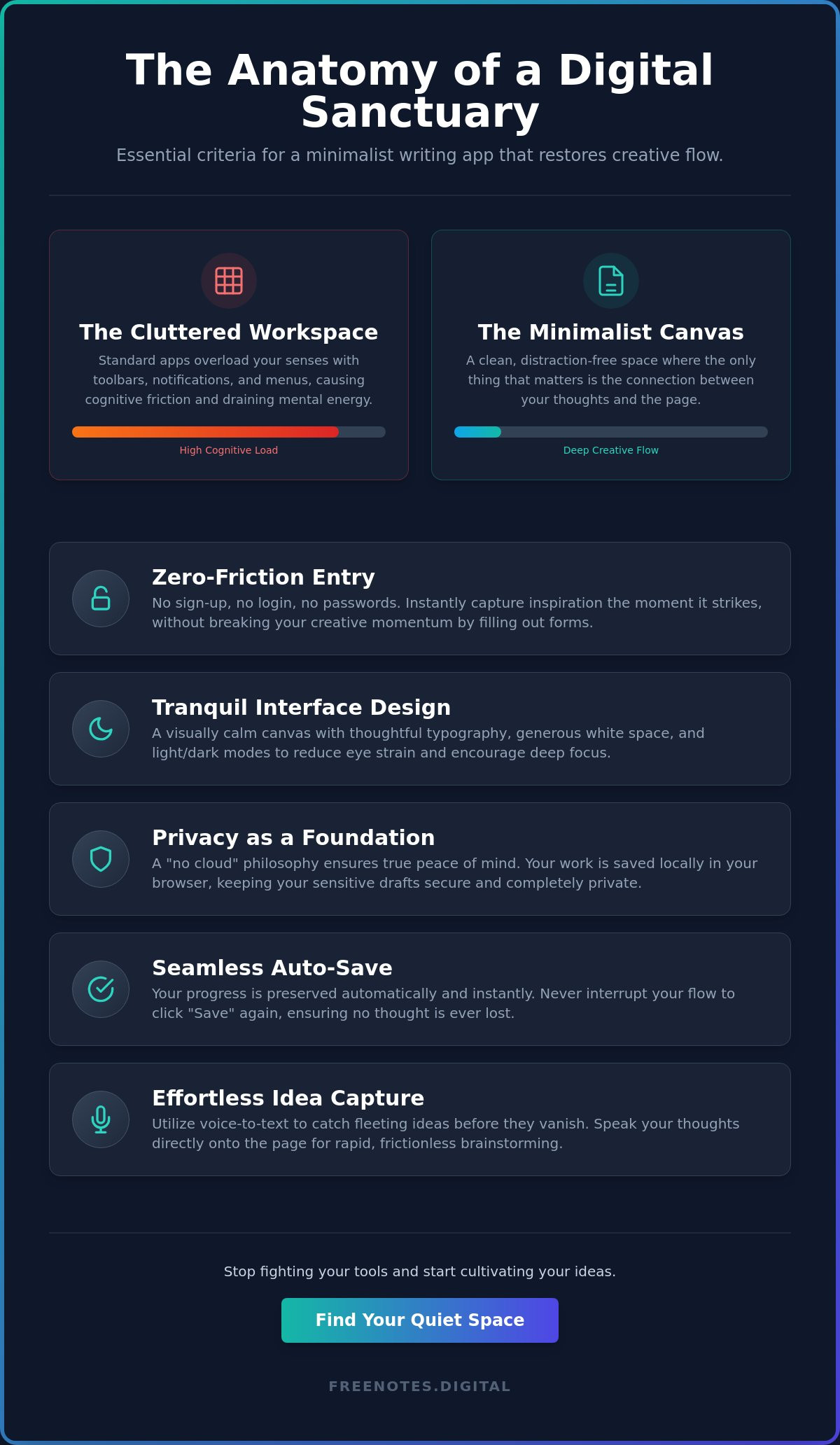
- Identify the core features of a high quality minimalist writing app online, from zero-friction entry to a visually serene canvas.
- Learn why local browser storage provides a more secure and private sanctuary for your work than standard cloud syncing.
- Explore the benefits of a free voice to text note taking tool for capturing fleeting ideas before they vanish.
- Understand how a no cloud philosophy can offer true peace of mind while protecting your most sensitive drafts.
The Rise of Minimalist Writing: Why Less is More for Your Mind
Modern word processors often feel like a crowded room when you need a quiet garden. Every menu, ribbon, and blinking icon competes for your attention; it’s a phenomenon known as “feature bloat.” This overload doesn’t just look messy; it costs you mental energy. By the time you’ve adjusted the margins and selected a font, your initial spark of inspiration has often flickered out. Choosing a minimalist writing app online provides an immediate antidote to this exhaustion, offering a clean space where the only thing that matters is the next word.
The concept of a “digital sanctuary” has become vital for creative work in 2026. As the volume of digital content continues to explode, with over 4 million books published in the U.S. alone last year, the competition for your focus is fierce. To combat this, there is a significant return to single-purpose, high-focus tools. These applications don’t try to be everything to everyone. Instead, they act as a quiet, reliable assistant that stays out of the way until the exact moment you need to capture a thought. This movement toward simplicity isn’t about a lack of features, but rather the intentional removal of friction between your mind and the page.
The Science of Distraction-Free Environments
Your brain is naturally wired to notice movement and contrast. In a traditional editor, every toolbar update or cloud-sync icon triggers a subtle task-switching response that drains your cognitive reserves. This prevents you from entering a deep flow state, that elusive window where time disappears and writing feels effortless. A dedicated distraction-free editor acts as a protective shield for your concentration. By eliminating visual clutter, you reduce decision fatigue and allow your thoughts to unfold with purposeful grace. Mental lightness is the feeling of having no barriers between your internal voice and the digital page.
Reclaiming Your Focus from the Cloud
The “always-on” nature of modern technology creates a quiet, persistent anxiety that many writers find draining. You might worry about your connection dropping or feel pressured by the constant visibility of sync notifications and version histories. Offline-first or local-only tools foster a sense of security and groundedness that cloud-dependent systems often lack. When you use a minimalist writing app online that prioritizes local storage, you reclaim your personal space. This shift allows you to stop managing complex software mechanics and start cultivating your ideas in a secure, private environment. It’s a transition from digital maintenance to pure, uninhibited creative expression.
Essential Criteria for a Minimalist Writing App Online
Selecting the right minimalist writing app online requires looking beyond the mere absence of buttons. It is about finding a digital environment that respects your time and your mental space. A truly helpful companion doesn’t demand your data or your identity before it allows you to speak; it offers an immediate, open invitation to create. The best tools prioritize a sense of mental lightness, ensuring that the transition from a fleeting thought to a visible sentence is as smooth as possible.
The Beauty of No-Registration Access
Every “Sign Up” button is a wall. It forces you to stop, remember a password, and verify an email, which effectively severs your connection to your initial inspiration. Opting for The Serene Path to Writing means choosing a no-login text editor that serves as an ultimate creative sanctuary. This anonymity allows for uninhibited brainstorming. You can explore raw, messy ideas without the feeling that they are being tracked, categorized, or stored in a permanent account.
Interface Design for Tranquility
Visual serenity is achieved through the thoughtful use of white space and elegant typography. These elements aren’t just decorative; they set a specific mood that encourages focusing without distraction. Whether you prefer the crisp clarity of light mode or the soft embrace of dark mode, the interface should feel like a custom-tailored workspace. An auto-save feature acts as a silent guardian here, ensuring your progress is preserved without you ever having to interrupt your rhythm to click a button.
Privacy is the foundation of peace. A high-quality minimalist writing app online focuses on local-first processing. This means your private reflections stay on your device rather than being sent to a distant server. By keeping your data local, you eliminate the quiet anxiety of potential leaks or unauthorized access. It is about maintaining a clear, secure boundary around your personal creative process, allowing you to write with total honesty.
Modern tools must also accommodate the fluid nature of human thought. Sometimes, the hands simply cannot keep up with the speed of the mind. This is where instant capture becomes essential, supporting both traditional typing and fluid voice-to-text dictation. When you are ready to share or archive your work, simple export flexibility ensures you can move your text seamlessly into other formats. For those moments when you need to speak your thoughts into existence, using a tool like the Quick Notes Canvas can provide that effortless transition from voice to text without any technical friction.
Top Minimalist Writing Apps for Quiet Reflection in 2026
In a world struggling against a tsunami of digital distractions, finding the right minimalist writing app online becomes a deeply personal journey. The tools available in 2026 vary in their philosophy, yet they all share a common goal: protecting your mental space. Whether you seek a rigid structure or a fluid, open canvas, these selected applications provide the quiet reflection necessary for meaningful work. They act as silent partners in your creative process, ensuring that your environment remains as calm as your intentions.
Calmly Writer remains an industry favorite for those who love the rhythm of a traditional typewriter. Its “Focus Mode” highlights only the paragraph you are currently crafting, gently fading the rest of your text into the background. For the purists, ZenPen offers a truly empty canvas. There are no menus or settings to fiddle with; you simply arrive and begin. Writer.bighugelabs.com appeals to those who appreciate a nostalgic, distraction-free classic interface, reminiscent of early computing where the text was the sole focus and nothing else existed to pull at your attention.
Calmly Writer vs. ZenPen: A Study in Simplicity
Choosing between these two depends on your specific creative needs. Calmly Writer excels when you need a gentle nudge to stay in the present moment, making it ideal for longer projects like a 5,000-word essay where the sheer volume of text might otherwise feel overwhelming. ZenPen, with its target word count feature, is often the better choice for a 100-word poem or a quick journal entry. While some writers appreciate the markdown support found in these tools for easy formatting, others find it adds an extra layer of complexity that they would rather avoid. It’s about finding the level of craftsmanship that feels most supportive to you.
Voice-to-Text: The Modern Minimalist Secret
Sometimes the most minimalist approach involves letting go of the keyboard entirely. Dictation allows for writing at the speed of thought, capturing ideas before the inner critic has a chance to intervene. This method is particularly restorative for long sessions, as it significantly reduces the physical strain on your hands and back. By using a minimalist writing app online that integrates these features, you can maintain your flow while resting your body. To explore this method further, you can visit Free Voice to Text Online: A Serene Sanctuary for Your Private Thoughts.
The Free Notes App stands out as a versatile choice for these quick drafts. It combines the ease of a Free Voice to Text Note Taking Tool with the elegant simplicity of the Quick Notes Canvas. It’s designed to stay out of your way, acting as a quiet enabler for your most spontaneous reflections. This balance of modern innovation and human-centric design ensures that your focus remains exactly where it should: on the evolution of your ideas.
Privacy and Security: The Tranquillity of Local Storage
Deep focus requires more than just a clean interface. It demands a sense of absolute safety. When you use a minimalist writing app online, the question of where your words go is just as important as how they look on the screen. Traditional cloud syncing services store your drafts on remote servers, which introduces a subtle, lingering worry about who might be watching or what might happen during a data breach. True tranquility comes from the “No Cloud” philosophy, where your private thoughts remain exactly where they belong: on your own device.
This local approach provides a protective barrier against the modern trend of using personal data for AI training. By ensuring that your text never leaves your browser, you prevent your unique voice and original ideas from being harvested by large language models without your consent. It is a high level of craftsmanship that respects both your intellectual property and your personal space. You can write with total honesty, knowing that your digital sanctuary is truly private and unmonitored.
Understanding Browser-Based Local Processing
Local processing works by using your browser’s internal memory to save your progress in real time. Unlike traditional software, there is no central database that can be breached by outside parties. Your words are stored as temporary data within your own cache, making it nearly impossible for anyone else to access them. Using voice notes without account requirements is the safest way to dictate private thoughts because your voice never travels across the open web. This methodical approach ensures that your creative process remains an intimate conversation between you and the digital page.
Managing Your Temporary Workspace
While local storage offers incredible security, it also encourages a healthy “clean slate” writing habit. Because the data is temporary, you are prompted to export your final draft before closing your session. This ritual of finishing and saving your work elsewhere provides a satisfying sense of closure and mental lightness. When you are done, simply clearing your browser data ensures total anonymity, leaving no trace of your session behind. It is a purposeful way to keep your digital environment as fresh and unburdened as your mind.
If you are ready to experience this level of discretion and security, you can begin your next project on a Quick Notes Canvas today. This tool is designed to provide reliable, unobtrusive support while keeping your data strictly local and secure, allowing you to reach a state of flow without the weight of privacy concerns. Using a minimalist writing app online that prioritizes your peace of mind is the ultimate gift to your creative self.
Frictionless Thought Capture with Free Notes App
The most effective tool is often the one you don’t have to learn. While other platforms might require a lengthy onboarding process or a complex manual, the Free Notes App is designed for the writer who needs to capture an idea right now. It functions as a quiet, reliable assistant that stays out of your way until the exact moment it’s needed. By providing a minimalist writing app online that values your immediate creative impulse, this platform ensures that no thought is lost to the friction of a complicated interface.
The Quick Notes Canvas offers a seamless transition from the spoken word to the written page. You can begin by using the Free Voice to Text Note Taking Tool to dump your raw thoughts into the workspace without touching a keyboard. Once your ideas are visible, the transition to manual editing is fluid and intuitive. This process respects the fragile nature of new ideas, allowing them to evolve from a spoken breath into a polished sentence with purposeful grace.
Your Quiet Assistant for Daily Brainstorms
Imagine you’re walking through a park or commuting when a sudden insight strikes. In these moments, your mental energy is best spent on the idea itself rather than on navigating a menu. The minimalist interface of the Free Notes App mirrors the fluidity of your own thoughts. There is something deeply restorative about seeing your spoken words instantly turn into text on a clean, white background. It reduces the cognitive load of traditional drafting, making the act of brainstorming feel like a natural extension of your mind rather than a technical chore. This simplicity allows you to maintain your flow state even when you’re on the move. For writers who want to capture ideas without the burden of login fatigue, exploring voice notes without account sign-up offers a truly frictionless path from inspiration to text.
Getting Started: A Mindful Approach
Beginning your first session on freenotes.digital is a simple, mindful act. There are no accounts to create and no settings to configure; you simply arrive and begin. To maximize your focus, try following the “Z-pattern” of the interface. Start your gaze at the top left to confirm your tools are ready, then let your attention sweep across to the center where your text resides. This layout is designed to guide your eyes naturally toward your work, keeping distractions at the periphery.
Embracing a Sanctuary for Your Words
Reclaiming your focus starts with choosing an environment that values your mental peace over its own features. We’ve explored how the right minimalist writing app online serves as a digital sanctuary, protecting your flow state from the noise of the modern web. By prioritizing local-first storage and removing the barrier of account registration, you ensure your ideas remain entirely your own. This intentional simplicity allows you to move beyond the technical maintenance of software and return to the pure, restorative act of creation.
It’s time to let your thoughts breathe without the weight of complex interfaces. You can begin your journey to mental clarity on the Free Notes App, where simplicity meets sophisticated privacy. This tool offers a high level of craftsmanship with no registration required, local-only privacy, and integrated high-speed voice-to-text. It acts as a quiet, reliable assistant that stays out of your way until the exact moment you need it. Trust in the quiet strength of your own voice and give your ideas the space they deserve to flourish.
Frequently Asked Questions
What is a minimalist writing app and why should I use one?
A minimalist writing app is a digital workspace designed to strip away distractions like complex toolbars, ribbons, and notifications. You should use one to achieve a deeper state of flow and reduce the cognitive load caused by feature-heavy software. These tools provide a serene environment that allows your thoughts to unfold naturally on the page without the mental friction of managing a complicated interface.
Is my data safe if I use a minimalist writing app online without an account?
Yes, your data is exceptionally safe because it remains stored locally within your browser cache rather than on a remote server. This “No Cloud” approach ensures that your private reflections never leave your device, providing a secure sanctuary for your ideas. By avoiding the need for an account, you also eliminate the risk of your personal information being exposed in a database breach.
Can I use voice-to-text with a minimalist writing app?
Absolutely, as many modern tools now integrate dictation to help you write at the speed of thought. Using a Free Voice to Text Note Taking Tool allows you to capture raw ideas instantly without the physical strain of typing. This method is particularly restorative for long drafting sessions, as it lets you rest your hands while your spoken words appear seamlessly on the digital canvas.
How do I save my work if there is no cloud sync?
You save your work by exporting your text directly to your device before you close your browser session. Since a minimalist writing app online often prioritizes local privacy, the responsibility of archiving the final draft rests with you. This ritual of exporting your work provides a satisfying sense of closure and ensures that you maintain total control over your own files at all times.
Are minimalist writing apps better for novelists or bloggers?
These apps are beneficial for both novelists and bloggers, as they cater to anyone who needs a distraction-free environment for drafting. Novelists often appreciate the visual silence when working on long, complex chapters. Bloggers and journalists find the Quick Notes Canvas ideal for rapid brainstorming and outlines, allowing them to move from a spark of inspiration to a structured draft with purposeful grace.
Do these apps support markdown or formatting?
Many minimalist tools support basic markdown, allowing you to add headers, lists, and emphasis without cluttering the screen with buttons. The goal is to provide just enough structure to organize your thoughts while maintaining the aesthetic elegance of an empty page. This balance ensures that your workspace remains clean and unobtrusive, staying out of the way until the exact moment you need to format a section.
Is there a cost to use the Free Notes App?
No, the Free Notes App is completely free for all writers seeking a quiet, reliable workspace. It provides essential features like the Quick Notes Canvas and voice-to-text capabilities without the need for a premium subscription or hidden fees. This accessibility is part of a human-centric philosophy that values simplicity and well-being, ensuring that every writer has a secure space to explore their ideas.
Can I use these tools on my mobile browser?
Yes, most of these web-based tools are fully responsive and designed to work seamlessly within your mobile browser. This flexibility allows you to capture sudden insights or continue your writing journey whenever inspiration strikes. Whether you are at your desk or on the move, a minimalist writing app online provides a consistent, stress-free experience that adapts to your personal creative rhythm.