
Why does the simple act of capturing a thought often feel like a battle against your own tools? You shouldn’t have to navigate a maze of login screens or endure distracting pop-ups just to dictate and edit text online. Most modern platforms demand your data and your attention before they’ll even listen to your voice. This constant friction creates a barrier between your mind and the page, turning a moment of inspiration into a digital chore. It’s exhausting to worry about whether your private reflections are being stored on a corporate server or used to train a distant algorithm.
You deserve a space that respects your privacy and your focus. This guide helps you reclaim your creative flow using a mindful, browser-based approach that processes everything locally on your device. We’ll explore how to set up a minimalist workspace that transforms your spoken words into polished prose without a single download or subscription fee. By the end, you’ll have a serene environment where your ideas can breathe and your voice becomes the most elegant tool in your kit. Discover how to move from spoken thought to refined text with total tranquility and effortless movement.
Key Takeaways
- Bridge the gap between the speed of your thoughts and the limitations of typing to maintain a continuous creative flow.
- Discover how to dictate and edit text online using local browser processing to ensure your private ideas never leave your device.
- Eliminate mental friction by choosing tools that offer instant access without the distraction of complex logins or registrations.
- Implement a simple two-step capture template that separates raw expression from the refining process for clearer results.
- Transform your digital workspace into a restorative environment using a quiet, reliable assistant designed for mental lightness.
Beyond Typing: The Evolution of an Online Notepad with Voice Typing
The way we capture ideas has undergone a quiet, profound transformation. For decades, the keyboard acted as a gatekeeper, forcing fluid thoughts into the rigid, mechanical rhythm of finger-tapping. This traditional approach often creates a bottleneck where brilliant concepts evaporate before they can be fully formed on the screen. To dictate and edit text online is no longer just a niche shortcut for busy professionals; it’s a return to a more natural, human form of expression. Modern workspaces have evolved from static digital paper into responsive canvases that listen, allowing your ideas to flow at the speed of your own voice.
This evolution reflects a shift from clinical transcription toward a more mindful and creative process. Early iterations of this technology were often cumbersome and required specialized hardware. If you look at the history of speech recognition technology, you’ll see a trajectory that moved from bulky machines to the elegant, lightweight browser tools we enjoy today. We’ve moved past the era of heavy, downloadable software that clutters your hard drive and demands constant updates. Instead, the modern online notepad provides a serene, immediate environment where you can speak your mind and see your words appear with effortless grace.
The Psychology of Speaking Your Thoughts
There’s a unique mental freedom that comes when you remove the physical barrier of a keyboard. When you speak, you bypass the self-censorship that often occurs during the slow process of typing. This allows you to organize internal chaos and discover connections between ideas that might have remained hidden. Vocal drafting is the restorative practice of externalizing thoughts to achieve mental clarity and emotional lightness. By using your voice, you invite a sense of play and spontaneity back into your creative work, making the act of writing feel less like a chore and more like a conversation with your own potential.
Why “Online” Doesn’t Have to Mean “Public”
A common hesitation with web-based tools is the fear that your private reflections are being stored on a distant corporate server. Many people assume that “online” automatically equals “public” or “cloud-stored.” However, the landscape is changing. We’re entering a privacy-first era where sophisticated tools use local browser processing to handle your voice data. This means the audio stays on your device, and the text is generated right there in your browser tab. It’s a sophisticated way to dictate and edit text online without ever compromising your personal space or the security of your most sensitive ideas.
Essential Criteria for Choosing a Voice-to-Text Notepad
Selecting a platform to dictate and edit text online should be an act of self-care, not a technical hurdle. When your mind is brimming with ideas, the last thing you need is a complex dashboard filled with buttons you’ll never use. The most effective tools prioritize a seamless balance between high accuracy and radical simplicity. While some platforms boast endless integrations, they often sacrifice the very tranquility required for deep thought. You might find that built-in dictation tools provide a functional starting point, but they rarely offer the dedicated, distraction-free environment necessary for refining your spoken words into elegant prose.
A truly supportive assistant stays out of your way. It should offer instant access across all your devices without demanding the installation of intrusive mobile apps that drain your battery and clutter your screen. This cross-device fluidity ensures that whether you’re at your desk or walking in a park, your workspace is always ready. If you value this sense of immediate clarity, starting your session with a Quick Notes Canvas can be a restorative way to begin your creative day.
Frictionless Entry and Immediate Use
Spontaneous ideas are fragile and fleeting. If a tool requires you to navigate a multi-step login process or verify an email address, the spark of inspiration often vanishes before the page even loads. The “No Sign-Up” rule is a fundamental requirement for a mindful workflow. By choosing an instant browser canvas over an account-based system, you protect your mental energy for the actual task of creation. For more on this approach, consider reading The Quick Online Scratchpad: A Guide to Effortless Idea Capture to see how zero-friction access transforms your daily habit of dictate and edit text online.
The Aesthetic of a Mindful Workspace
The visual environment of your notepad directly impacts your cognitive load. A clean, smooth interface with ample white space acts as a quiet sanctuary for your thoughts. Minimalist design isn’t just about looking modern; it’s about removing the visual noise that triggers anxiety and breaks your concentration. Much like how AlphaLux Cleaning creates a serene physical environment by removing clutter, a tool that avoids feature bloat functions as a reliable, unobtrusive assistant that respects your personal space. This aesthetic of elegance and mental clarity allows you to move through your notes with a purposeful grace, ensuring that your digital environment feels as organized and light as you want your mind to be.
The Privacy Paradox: Why Local Browser Processing is the Safest Way to Dictate
In a world where digital footprints are often tracked, finding a private space to dictate and edit text online can feel like a rare luxury. Most users assume that for a tool to be powerful, it must store your data in the cloud. This belief creates a privacy paradox where we trade our most intimate thoughts for the convenience of digital capture. While many traditional platforms emphasize encrypted servers, the truth is that even the best encryption involves a third party. The safest way to handle your ideas isn’t through a better lock on a corporate door; it’s by never sending your data through that door in the first place.
Local browser processing offers a technically elegant solution. Instead of sending your voice to a distant server, the conversion happens entirely within your current session. This approach turns the tool into a quiet, reliable assistant that respects your boundaries. Beyond just privacy, this method is a cornerstone of voice typing as an inclusive technology, providing a secure way for everyone to express themselves without fear of surveillance or data harvesting.
How Local Storage Works for Your Peace of Mind
Think of your browser as a Guardian of Ideas. When you use a tool that relies on local storage, your notes exist only as long as you want them to. They reside in a private vault within your browser’s temporary memory. This means your spoken words are never harvested for advertising or used to train machine learning models without your consent. For those who seek a truly Free Voice to Text Online: A Serene Sanctuary for Your Private Thoughts is essential. It provides the mental lightness that comes from knowing your brainstorming sessions are for your eyes and ears only.
The Risks of Permanent Cloud Records
Permanent digital footprints can be heavy. Sometimes, you just need a mental scratchpad to work through a difficult concept or vent a fleeting frustration. Many cloud-based services create a permanent record that follows you forever. By choosing a transient, local-only workspace, you gain the freedom to speak without self-censorship. You don’t have to worry about your digital history haunting you later. If you’re using a shared computer, this privacy is even more vital. Simply closing the tab clears your session, leaving no trace behind. It’s a sophisticated way to dictate and edit text online while maintaining absolute control over your personal space.
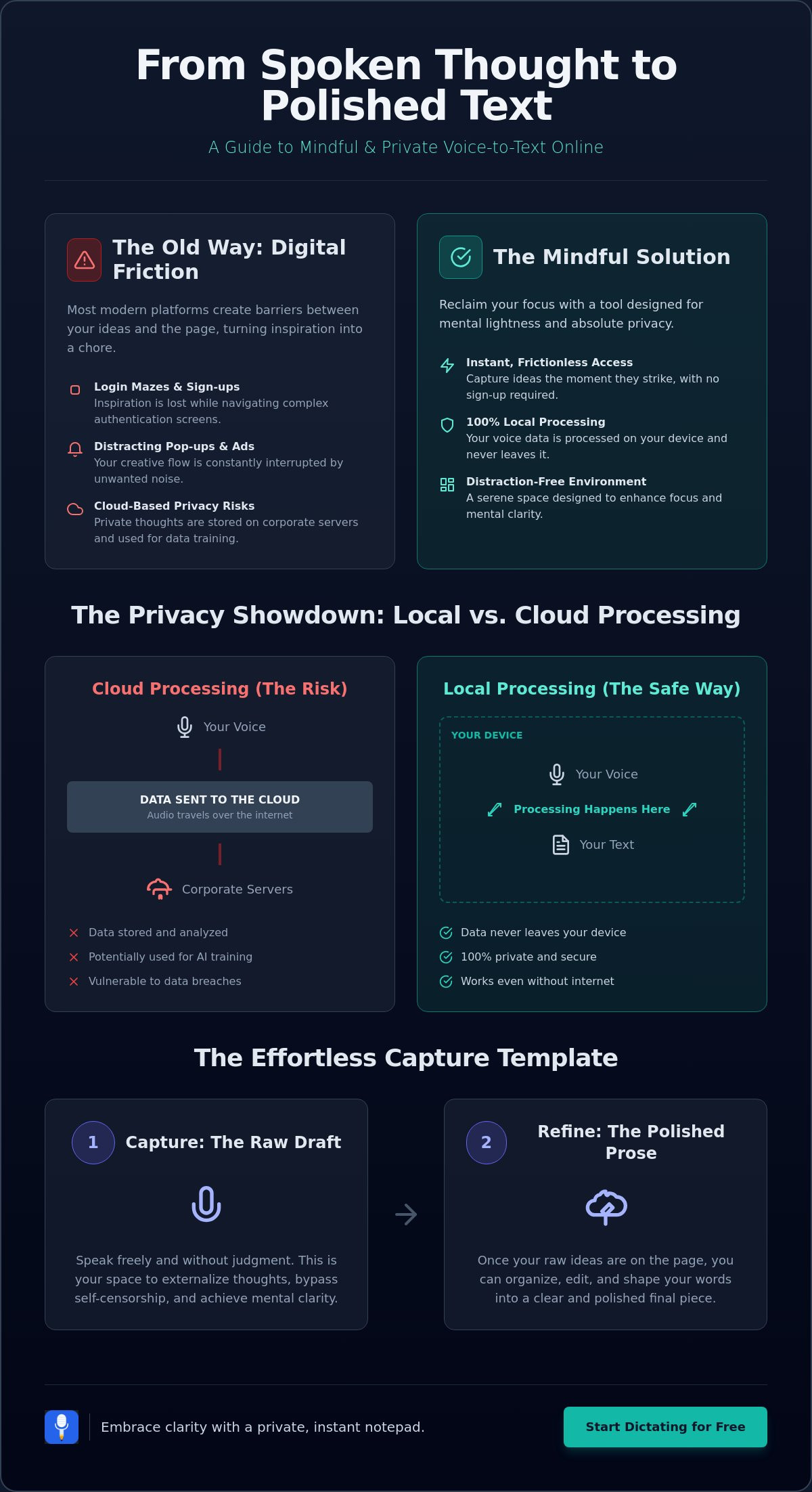
A Template for Effortless Idea Capture and Editing
Creating a polished piece of writing doesn’t have to be a stressful endeavor. When you choose to dictate and edit text online, you’re embracing a methodology that prizes the raw energy of your ideas over the perfection of the first draft. This template transforms the process into a creative ritual, allowing you to move from a spark of inspiration to a finished document with methodical grace. By following a structured path, you ensure that the transition from spoken word to written prose remains fluid and restorative.
The journey begins with the “Brain Dump” phase. Here, your only goal is uninhibited expression. Speak your thoughts as they arrive, without pausing to correct grammar or worry about structure. This phase is about capturing the essence of your message while your mind is most active. Once your thoughts are on the screen, move to the “Initial Cleanse.” This is where you gently remove vocal fillers, stutters, and repetitive phrases. It’s a meditative step that clears the visual clutter, leaving behind the core of your argument. Finally, engage in structural refinement and a final polish, organizing dictated blocks into a coherent flow and smoothing out the spoken rhythm into written elegance.
The Dictate and Edit Workflow
To implement this effectively, start with a Free Voice to Text Note Taking Tool that allows for immediate capture. Using a browser-based canvas means you can speak your first draft and then immediately begin the refining process in the same window. This proximity reduces the mental friction of switching between different applications. Whether you’re working on a Quick Notes Canvas or a longer essay, the ability to edit text online directly in your browser ensures that your momentum isn’t lost. If you’re ready to experience this flow, you can start using our tool to capture your first draft today.
Harnessing the Power of Spoken Fluidity
The rhythm of your speech often leads to more authentic writing because it mirrors the natural cadence of human thought. When you dictate, you capture the nuances and emotional tone that can sometimes be flattened by the mechanical nature of typing. This approach is incredibly effective for maintaining a personal journal, drafting creative stories, or even summarizing meeting notes with a sense of presence. By staying in the moment, you protect the fluidity of thought that makes your writing unique. This template ensures that you dictate and edit text online in a way that respects your creative voice while providing the clarity your readers deserve. For businesses aiming to reach those readers more effectively, you can explore Marketing Agency opportunities with Exclusive Business Marketing.
Embracing Clarity with Free Notes App
The Free Notes App is more than a utility; it’s a quiet, reliable assistant designed to blend into the background of your daily life. When you choose to dictate and edit text online, you shouldn’t be met with a wall of demands for your email address or personal details. We believe that registration-free access is the ultimate form of digital respect. It acknowledges that your time is valuable and your thoughts are yours alone. By removing the barrier of a login screen, we provide a gateway to immediate expression, allowing you to capture ideas the moment they arrive. If you want to go deeper on this philosophy, how to capture ideas without an account using a quick voice to do list online offers a practical guide to eliminating registration fatigue from your creative workflow entirely.
This Free Voice to Text Note Taking Tool prioritizes your well-being by ensuring that the process of organization feels restorative rather than burdensome. It offers a sophisticated way to dictate and edit text online while maintaining the mental lightness that comes from absolute privacy. It’s a modern approach to a human-centric philosophy, where the tool exists to support your creative process without ever intruding upon your personal space. There is a profound sense of relief in knowing that your reflections remain exactly where they belong: with you.
Your Digital Scratchpad for Mindful Creation
The Quick Notes Canvas serves as a sanctuary for uninhibited brainstorming. Within this space, the clutter of the outside world fades away, replaced by a clean interface that encourages deep focus. Simplicity is the highest form of sophistication in note-taking. By opting for a refined interface that avoids feature bloat, the app allows you to engage with your thoughts in their purest form. This minimalist environment acts as a restorative agent, helping you transform chaotic mental energy into a structured, elegant record of your day. It’s about achieving clarity through a workspace that respects the fluidity of your mind.
Getting Started: A Path to Serene Productivity
You can begin your journey toward a more harmonious workflow right now. There are no downloads to wait for and no complex setups to navigate. Simply open the canvas and let your voice lead the way. By establishing a habit of regular dictation, you invite a sense of quiet reflection into your routine. This practice helps you stay grounded and organized, regardless of how busy your schedule becomes. If you’re ready to leave behind the friction of traditional tools, experience the serenity of the Free Notes App today and discover how effortless digital clarity can be.
Step Into a World of Mental Lightness
The journey from a cluttered mind to a polished document doesn’t have to be filled with digital noise. By choosing to dictate and edit text online through a mindful approach, you reclaim the natural rhythm of your thoughts. We’ve explored how local browser processing protects your privacy and how a minimalist workspace removes the friction that often stalls creativity. You now have the template to transform spoken fluidity into refined written prose without the weight of corporate surveillance or complex software.
It’s time to experience a tool that respects your personal space and your creative process. Our Quick Notes Canvas is entirely free, requiring no registration and no hidden cloud storage fees. Because all data processing happens locally on your device, your private reflections remain yours alone. This ensures a restorative experience where you can focus on your ideas rather than your security settings. Start your mindful note-taking journey with Free Notes App today. Embrace the clarity that comes when your digital assistant stays out of the way, leaving you free to explore your ideas with purposeful grace.
Frequently Asked Questions
Is it possible to dictate and edit text online for free without a subscription?
Yes, you can access our tool without any recurring fees or hidden costs. The Quick Notes Canvas is designed to be entirely free, allowing you to speak your thoughts and refine them directly in your browser. This approach ensures that your creative process remains light and accessible, providing a professional workspace that doesn’t require a financial commitment or a complex subscription model.
How secure is a browser-based notepad if it doesn’t use cloud storage?
Local processing is inherently more secure because your data never leaves your personal machine. By avoiding cloud storage, you eliminate the risk of server-side data breaches or unauthorized access by corporate entities. Your browser acts as a private vault, keeping your sensitive reflections within your own environment and ensuring that your intellectual property remains under your absolute control.
Can I use an online notepad with voice typing on my mobile phone?
You can easily use our tool through any modern mobile browser without the need for intrusive app downloads. This allows you to dictate and edit text online while you’re traveling or enjoying a quiet walk. It’s a fluid way to capture spontaneous ideas as they arrive, ensuring that your digital workspace is always as mobile and flexible as your thoughts.
What happens to my notes if I close my browser tab?
Because we prioritize your privacy through local, transient storage, your notes are cleared once the tab is closed. This intentional design provides a clean slate for every new session and ensures that no digital footprint remains on your device. It’s an ideal solution for those who want a private “mental scratchpad” that doesn’t haunt your digital history or clutter your storage.
Do I need to download any special software or extensions for voice-to-text?
No downloads or installations are necessary to begin your session. The tool leverages the sophisticated speech recognition capabilities already built into your modern web browser. This removes the friction of software updates and hard drive clutter, allowing you to move from a moment of inspiration to a full draft in just a single click.
How does local processing protect my privacy compared to standard cloud-based editors?
Unlike mainstream cloud-based editors that transmit audio data to external servers, local processing keeps every byte of information on your own machine. This prevents your voice from being used for model training or data mining by large corporations. By choosing a tool focused on local execution, you ensure that your spoken thoughts never enter the public internet, providing a level of discretion that server-dependent services simply cannot match.
Can I edit the text manually after I finish dictating?
The interface is a fully interactive canvas that allows you to type, delete, and reorganize your text manually at any time. You can switch between speaking and typing seamlessly to handle structural refinements or to remove vocal fillers. This flexibility is what makes the tool a quiet, reliable assistant for both the “brain dump” and the final polishing phases as you dictate and edit text online.
Is there a limit to how much text I can dictate in one session?
There are no artificial limits or time caps on your dictation sessions. You’re encouraged to speak for as long as you need to fully externalize your thoughts and achieve mental clarity. The workspace expands to accommodate your flow, providing a steady and methodical environment that stays out of the way until your work is complete.