
What if the simple act of recording a thought didn’t require a password, a cloud sync, or a cluttered dashboard? We’ve all felt that spark of inspiration fade while waiting for a heavy application to load or worrying about where our private data might end up. It’s frustrating when the tools meant to help us actually create more mental noise. You deserve a quick online scratchpad that respects your focus and your privacy, acting as a quiet companion rather than a demanding taskmaster.
In this guide, you’ll discover how to transform those fleeting moments of clarity into organized insights using a frictionless, browser-based canvas. We’ll show you how to maintain a clean, serene space to write that stays entirely within your control. By prioritizing local processing and instant access, you can move from a state of distraction to one of calm productivity. Let’s explore how the right minimalist tools, such as a Quick Notes Canvas, can provide the restorative organization and mental lightness your creative process needs.
Key Takeaways
- Discover how a temporary digital canvas eliminates the friction of traditional apps, allowing you to capture fleeting ideas the moment they arrive.
- Understand why a quick online scratchpad requires a zero-registration approach to protect your creative momentum from the distraction of logins.
- Learn to evaluate different note-taking methods, favoring those that offer local processing for a truly private and secure writing environment.
- Implement simple daily rituals, such as the “Five-Minute Brain Dump,” to clear mental clutter and invite a sense of restorative organization.
- Find out how tools like the Quick Notes Canvas act as a quiet, reliable assistant that supports your focus without demanding your data.
What is a Quick Online Scratchpad and Why Do You Need One?
Think of your mind as a busy intersection where ideas arrive and depart with a speed that can feel overwhelming. A quick online scratchpad is a temporary digital canvas crafted specifically for these fleeting moments. It isn’t meant to be a permanent vault or a complex database; instead, it serves as a gentle, welcoming space where thoughts can land softly. This tool eliminates the common “blank page syndrome” by removing every possible barrier to entry. There are no folders to name, no accounts to verify, and no heavy formatting bars to navigate. It acts as a mental bridge, connecting the spark of a raw thought to the eventual structure of a permanent record. While many grew up using a simple text editor for basic tasks, the modern scratchpad elevates this experience by focusing on the feeling of the interface and the absolute speed of the capture.
The Role of a Scratchpad in Reducing Cognitive Load
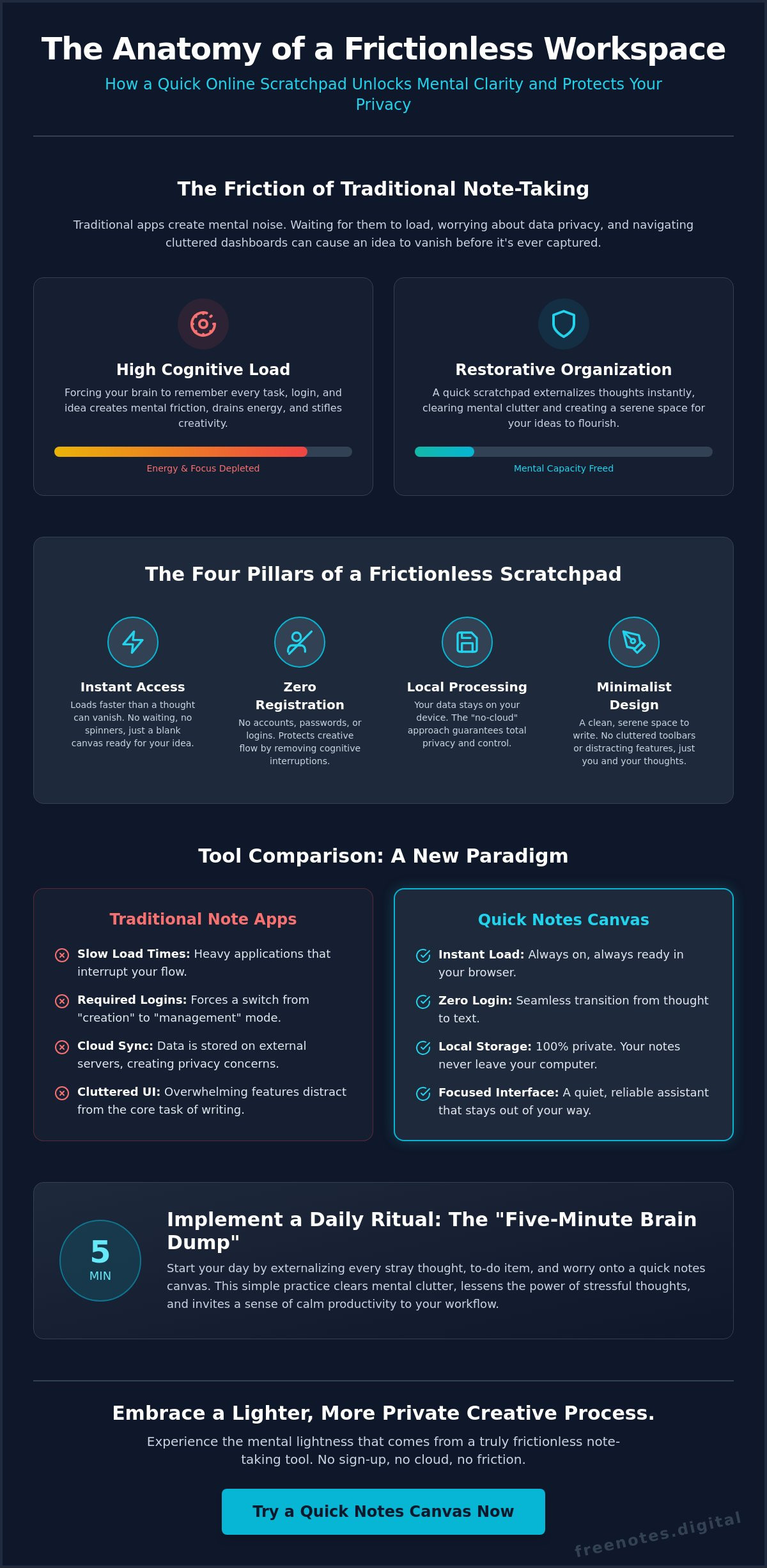
Our working memory is a precious and limited resource. When we force ourselves to remember every task, deadline, or stray creative insight, we create a sense of internal friction that drains our energy. Using a quick online scratchpad for a “brain dump” allows you to externalize these thoughts immediately, freeing up your mental capacity for the creative task at hand. It’s a practice that offers deep psychological relief, as the act of writing down a stressful thought often lessens its power over your focus. This isn’t just about being more productive; it’s about protecting your well-being. By clearing the clutter, you invite a sense of mental lightness that allows your true creativity to flourish in a serene, unburdened environment.
While a scratchpad helps individuals manage personal cognitive load, mission-critical environments often require more robust solutions, such as the visualization and collaboration platforms provided by Activu Corporation, to help teams process vast amounts of data without becoming overwhelmed.
Digital vs. Physical Scratchpads: The Modern Advantage
The tactile nature of paper is lovely, but the modern digital workspace offers a fluidity that physical tools simply cannot match. Dictating your thoughts into a Free Voice to Text Note Taking Tool or typing them into a browser tab keeps pace with the rapid, natural flow of your mind. You don’t have to hunt for a specific notebook or worry about losing a loose scrap of paper. A Quick Notes Canvas is always present, acting as a quiet and reliable assistant waiting in the background of your daily workflow. Digital text also provides the gift of future movement. Your captured insights can be effortlessly edited, reorganized, or moved into your primary workspace when the time is right, ensuring that no good idea is ever left behind because it was too difficult to transcribe later.
The Anatomy of a Frictionless Digital Workspace
A workspace shouldn’t feel like a hurdle. It should feel like an open door. For a quick online scratchpad to be truly effective, it must load faster than the thought can vanish. This level of responsiveness is the heartbeat of a frictionless environment. When you eliminate the need for accounts and passwords, you protect the fragile state of creative flow. Logins are more than just a technical step; they’re a cognitive interruption that forces you to switch from “creation mode” to “management mode.” This shift can be jarring enough to break your concentration entirely. By removing these barriers, you create a space where the transition from thought to text is as smooth as breathing, allowing you to remain deeply immersed in your own insights.
Multi-modal capture is another pillar of this design. Sometimes, typing feels right for structured thinking. Other times, the raw speed of speech is necessary to keep up with a rapid brainstorm that threatens to outpace your typing skills. A versatile tool allows you to switch between these modes without friction or complex menu navigation. This flexibility ensures that your digital sanctuary adapts to your needs in the moment, whether you’re at a desk or capturing a thought on the move. You can find this balance of speed and simplicity with a Quick Notes Canvas designed for immediate capture. It acts as a quiet enabler, staying out of the way until the exact second your inspiration arrives.
Privacy Through Local Storage
Local processing is defined as data that stays on your device and never travels to an external server. This “no-cloud” philosophy represents the gold standard for private brainstorming because it places you in total control of your information. There’s a deep, restorative serenity that comes from knowing your private reflections aren’t being tracked, indexed, or stored in a database. It allows you to be completely honest with yourself on the page, free from the subtle pressure of digital surveillance. When your quick online scratchpad operates locally, it functions as a protective guardian for your ideas, ensuring that your mental workspace remains as private as a physical diary kept under lock and key.
The Power of Voice-to-Text Integration
Speaking your ideas aloud is often the most natural way to capture a complex stream of consciousness. Voice-to-text technology removes the physical barrier of the keyboard, allowing your thoughts to flow directly into your workspace while they are still fresh and vibrant. This is particularly useful when ideas are coming too fast for your fingers to keep up or when you want to capture the specific emotional tone of a thought. By integrating dictation, a scratchpad becomes a more human-centric tool. It honors the way we naturally process and share information, making effective digital note-taking feel like a seamless extension of your own mind. If you want to go deeper into this practice, learning how to dictate and edit text online using a mindful, browser-based approach can help you transform spoken words into polished prose without any friction.
Comparing Instant Note-Taking Methods: From Code to Canvases
Finding the right home for a transient thought is a delicate balance. You might be tempted by the raw simplicity of a browser hack or the feature-rich complexity of a massive cloud platform. However, a true quick online scratchpad occupies a unique space between these extremes. It provides the structure needed to feel secure without the weight that slows you down. Choosing the right method is about more than just finding a blank space; it’s about selecting an environment that honors your creative momentum and protects your focus from unnecessary noise.
Why Browser Hacks Often Fall Short
Minimalists often favor the “contenteditable” trick, where a single line of code turns a blank tab into a text area. While this is undeniably fast, it lacks the supportive environment required for true peace of mind. There are several reasons why these snippets often feel incomplete:
- No Auto-Save: Most browser hacks don’t retain your text if you accidentally close the tab or if your browser crashes.
- Sterile Interface: A raw HTML page lacks the inviting, sophisticated atmosphere that encourages a flow state.
- Zero Formatting: Without basic structural tools, your brainstorm can quickly become a tangled wall of text that’s difficult to parse later.
The risk of losing data with a single misplaced click can create a subtle, underlying anxiety. This friction defeats the purpose of a tool meant to reduce stress.
The Problem with Heavy Cloud-Based Note Apps
On the other end of the spectrum, massive productivity suites offer every feature imaginable. Yet, this abundance comes with a hidden cost. The constant hum of notifications and the pressure of complex folder structures can be deeply distracting when you just need to jot something down. There’s also a “privacy tax” to consider. Storing your most private, unpolished brainstorms on external servers can feel like an intrusion into your personal space. These heavy platforms are powerful for long-term storage, but they feel cumbersome in the moments you need a quick online scratchpad. They demand too much of your attention before you’ve even written a single word.
A dedicated tool like a Quick Notes Canvas offers a middle path. It provides a “clean start” every time you open it, ensuring that your previous work doesn’t clutter your current focus. This intentional reset is essential for achieving mental clarity. It allows you to approach each new brainstorm with a fresh perspective, unburdened by the remnants of yesterday’s tasks. By balancing speed with essential, local-first features, you create a mindful sanctuary where your evolving ideas can breathe and grow without the weight of a complex database.
Mental clarity is rarely found in a crowded mind. It requires a deliberate space where thoughts can be unraveled without judgment or distraction. Integrating a quick online scratchpad into your daily rhythm transforms it from a simple utility into a restorative sanctuary. This isn’t just about capturing tasks; it’s about creating a ritual that allows your brain to breathe. By externalizing the noise, you make room for the insights that truly matter.
Step 1: Establishing an Instant Access Point
The most effective tools are those that require zero effort to reach. You can achieve this by pinning the Free Notes App tab in your browser or adding it to your favorites bar for immediate availability. When your scratchpad is always a click away, it becomes a reliable landing zone for every stray piece of information that crosses your path. This permanence in your digital environment offers a subtle psychological benefit. Knowing you have a dedicated “thought sanctuary” reduces the background anxiety of forgetting something important. You no longer need to hold onto ideas with a tight grip; you can let them go, trusting they are safe in your private workspace.
Step 2: The Daily Brain Dump Ritual
Begin your morning by using the Quick Notes Canvas for a five-minute unfiltered writing session. This practice, often called a brain dump, helps clear the cognitive debris that accumulates overnight. If you prefer a more fluid approach, use the Free Voice to Text Note Taking Tool to capture “morning pages” or initial dreams while they’re still fresh. Speaking your thoughts allows you to record a complex stream of consciousness without the physical barrier of a keyboard. Once your canvas is full, take a moment to categorize your notes. Distinguish between actionable items that need to move to your permanent system and transient thoughts that have served their purpose.
Clearing your canvas regularly is a vital part of maintaining digital minimalism. It ensures that every time you return to your quick online scratchpad, you’re greeted by a clean, serene environment. This intentional reset signals to your mind that the previous cycle is complete and you’re ready for new inspiration. Refine the essential points, move them to your long-term storage, and then hit clear. This simple act of letting go is as restorative as the writing itself, leaving you with a sense of mental lightness that carries through the rest of your day.
Free Notes App: Your Private Sanctuary for Effortless Idea Flow
A Tool That Stays Out of Your Way
True sophistication lies in simplicity. Our minimalist interface is carefully crafted to foster deep focus by removing the clutter that often plagues modern software. We believe that the lack of a registration process is a fundamental mark of respect for your time and mental energy. You shouldn’t have to navigate a login screen or manage a password just to record a fleeting insight. This fluidity of movement allows the app to stay in the background until the exact moment you need it. It provides a harmonious experience where the tool adapts to your rhythm, rather than forcing you to adapt to its mechanics. It’s a quick online scratchpad that feels like a natural extension of your own mind, providing a sense of reliable, unobtrusive support. If you’ve ever lost a brilliant idea to a login wall, our guide on how to capture ideas without an account shows you how to use a quick voice to do list online to preserve your creative spark the moment it strikes.
Embracing Mental Lightness Today
Great ideas are fragile. They deserve a safe, instant place to land before they vanish back into the busyness of the day. By choosing a workspace that prioritizes speed and discretion, you’re investing in your own well-being and creative longevity. Experience the restorative power of a clean, silent canvas that waits for your next spark of inspiration. There’s a profound sense of lightness that comes from knowing your mental workspace is clear and your ideas are protected. Take a moment to breathe and experience clarity with our quick notes canvas. Your thoughts are ready to flow; give them the sanctuary they deserve so they can eventually grow into something more permanent.
Embrace a Lighter Creative Process
Refining your ideas starts with a clear space and a quiet mind. You’ve seen how removing the friction of forced logins and the weight of heavy cloud-based applications can transform your daily brainstorms into moments of restorative organization. By choosing a tool that prioritizes local-only browser storage, you ensure your private reflections remain entirely yours, protected within your own environment. This commitment to privacy allows you to be completely honest on the page, fostering a deeper connection with your creative self.
A quick online scratchpad isn’t just about speed; it’s about honoring the natural, fluid rhythm of your thoughts. Whether you prefer the tactile feel of typing or the intuitive ease of instant voice-to-text conversion, having a dedicated landing zone allows your inspiration to land safely without interruption. You deserve a workspace that stays out of the way until the exact moment it’s needed, acting as a silent, reliable companion in your journey toward mental clarity.
Ready to reclaim your focus? Start your mindful note-taking journey on freenotes.digital and experience the freedom of zero-registration capture today. Step into a more harmonious digital sanctuary and let your best ideas flourish in a space built for tranquility.
Frequently Asked Questions
Is a quick online scratchpad secure for private thoughts?
Yes, a quick online scratchpad is highly secure because your data never leaves your device. By utilizing local processing, your private thoughts are kept within the browser environment rather than being stored on external cloud servers. This approach ensures a tranquil writing experience where you remain the sole guardian of your ideas, free from the tracking or surveillance often found in more complex digital tools.
Can I use a scratchpad without an internet connection?
You can continue to capture your thoughts even if your connection falters. Once the Quick Notes Canvas is loaded in your browser, the writing process happens locally on your machine. This means you don’t need a constant internet connection to maintain your creative flow. It provides a steady, reliable space for your brainstorms whether you are in a quiet cafe or traveling through areas with limited service.
Do I need to create an account to use Free Notes App?
You don’t need to create an account or provide any personal information to begin writing. We believe that the lack of a login is essential for maintaining a state of mental lightness and creative momentum. By removing the hurdle of registration, we offer a sophisticated and welcoming atmosphere where you can move from a spark of inspiration to a recorded note in a single, fluid motion.
What happens to my notes if I close the browser tab?
Your notes are typically preserved through local browser storage, ensuring they are still there when you return. However, because this is a temporary digital canvas, it’s a good practice to move essential insights to a permanent home once your brainstorm is complete. This habit reinforces a philosophy of digital minimalism, allowing you to regularly clear the space and approach each new session with a refreshed and unburdened perspective.
How does voice-to-text work on a browser-based scratchpad?
The Free Voice to Text Note Taking Tool uses your browser’s built-in recognition to transcribe your speech instantly. It removes the physical barrier of the keyboard, allowing you to capture a stream of consciousness as naturally as if you were speaking to a quiet, reliable assistant. Simply activate the microphone and watch your thoughts flow onto the screen, preserving the emotional tone and raw energy of your initial brainstorm.
Is there a limit to how much I can write on the scratchpad?
There are no restrictive limits on the length of your brainstorms within the Quick Notes Canvas. You have the freedom to write as much as necessary to fully explore your ideas. While the tool is designed for immediate, transient capture, the space remains open and supportive of your process, allowing you to expand on complex thoughts without feeling rushed or constrained by the interface.
Can I use the scratchpad on my mobile phone browser?
You can easily access the quick online scratchpad on your mobile device by visiting the site through your preferred browser. While we don’t offer a separate mobile app, the web interface is designed to be responsive and fluid on smaller screens. This ensures you have a serene and intuitive space to capture ideas whenever they arrive, whether you’re at your desk or finding inspiration while on the move.
How do I save my notes for later use?
To save your captured insights, simply copy the text and move it into your permanent organizational system. Some users also prefer to download their brainstorms as a simple text file for long-term storage. By treating the scratchpad as a mindful landing zone, you can refine your thoughts before transitioning them to a more permanent record, ensuring that only the most valuable insights occupy your long-term memory.