
What if the most sophisticated tool for your next discussion isn’t a complex, cloud-synced platform, but a quiet, private sanctuary that lives right within your web tab? We’ve all felt that familiar prickle of anxiety when a slow login screen or a cluttered interface stands between us and a fleeting thought. You likely crave a simpler way to stay present, away from the heavy weight of digital noise and the uncertainty of where your sensitive data is stored. Using a dedicated browser notepad for meeting notes can transform these moments of friction into a seamless flow of ideas.
It’s time to move past the mental fatigue caused by over-engineered software. You deserve a writing environment that feels like a gentle companion, offering instant access and the restorative clarity of a blank canvas. In this guide, we’ll explore how to achieve a more serene workflow through local-only storage and intuitive voice-to-text features. You’ll learn how to prioritize your focus and protect your creative process, ensuring that every insight is captured with elegance and ease.
Key Takeaways
- Discover how a lightweight digital sanctuary can alleviate the psychological burden of heavy apps, allowing you to remain present and focused.
- Learn to protect your most sensitive discussions by utilizing local-only storage that keeps your data secure on your own device.
- Evaluate different note-taking frameworks to see why a browser notepad for meeting notes provides the most elegant balance of speed and privacy.
- Master the art of the focused capture by employing voice-to-text tools that mirror the natural fluidity of your thoughts without the need for manual typing.
- Experience the restorative ease of a frictionless canvas that offers instant access and zero registration requirements for a truly stress-free workflow.
Beyond the Clutter: Why Your Meeting Notes Need a Browser Sanctuary
Imagine walking into a meeting with a clean sheet of paper and a quiet mind. There are no pop-ups, no requests to sync your account, and no “new version available” banners demanding your attention. A browser notepad for meeting notes offers this exact digital equivalent. It serves as a lightweight, instant-access digital canvas designed for real-time capture. Unlike traditional software that demands you manage its complex architecture, this tool stays quiet. It allows you to focus on the person speaking rather than the interface you’re typing into.
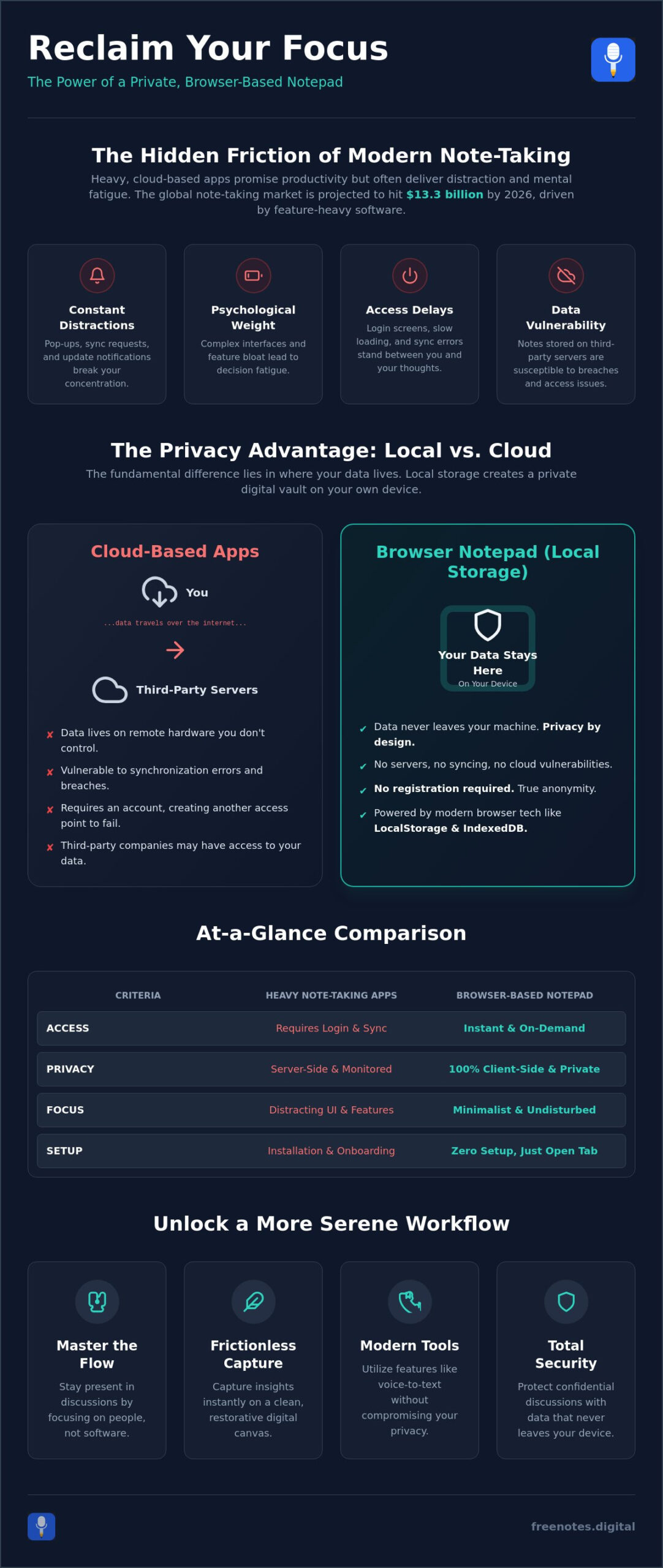
Heavy note-taking applications often carry a psychological weight. With the global note-taking app market reaching a projected value of $13.3 billion in 2026, the sheer volume of competing features can feel overwhelming. In high-stakes professional environments, the pressure to “organize” within a rigid system can actually hinder your ability to listen. When you use a complex platform, your brain splits its energy between the conversation and the software’s hierarchy. By choosing a minimalist browser sanctuary, you move from a mindset of permanent storage to one of active presence. This shift ensures you’re engaged with participants, catching the subtle nuances of the discussion that a distracted mind might miss.
While digital tools provide a sanctuary for your thoughts, the physical layout of your professional environment is equally vital for maintaining a quiet mind. For organizations across Australia, A1 Precision Solutions creates turnkey office and commercial facilities that foster the same sense of focus and purposeful movement.
The Friction of Modern Productivity Tools
Modern tools often promise efficiency but deliver distraction. Login screens and unexpected update notifications interrupt the delicate flow of a professional dialogue. There is a hidden cost to cloud-syncing that many users ignore. Latency issues and the sudden “where did I save that?” fatigue can drain your mental battery before the meeting even ends. A Quick Notes Canvas acts as the antidote to this digital over-engineering. It provides a space where thoughts can land immediately, free from the tethers of account management or server delays. If you’ve ever lost a brilliant idea to the friction of a login screen, an instant online notepad no login required offers the clean, registration-free canvas that keeps your creative momentum intact. You can find a detailed comparison of note-taking software that highlights how different architectures impact user experience, but for many, the simplest path remains the most restorative.
Browser-Based Convenience in 2026
The landscape of web technology has evolved beautifully by 2026. Browsers are no longer just windows to the internet; they are sophisticated environments capable of powerful local processing. This means your browser notepad for meeting notes can handle complex tasks like voice-to-text without ever sending your data to a remote server. For those in strict corporate security environments, the “no download” nature of these tools is a significant requirement. It bypasses the need for IT department approvals and ensures that your workspace is accessible on any device, at any time, with a single click. This accessibility fosters a sense of lightness, knowing your tools are always ready when inspiration strikes. It’s a modern solution that respects your personal space and your creative process.
The Privacy Advantage: Why Local Browser Storage Wins for Sensitive Meetings
In a world where every keystroke often feels tracked, there’s a profound sense of relief in knowing your thoughts remain entirely your own. For sensitive discussions, the security risks of cloud-based note-taking are significant. When your data lives on a remote server, it’s subject to synchronization vulnerabilities and third-party access that you simply can’t control. Using a browser notepad for meeting notes that prioritizes local-only processing ensures your data never leaves your machine. This approach creates a private digital envelope around your insights, protecting confidential corporate discussions from the prying eyes of the cloud.
Modern browsers utilize technologies like IndexedDB and LocalStorage to create a temporary yet reliable safety net for your text. These aren’t cloud databases; they’re small, secure pockets of memory within your own browser. This “privacy by design” philosophy means that no registration is required. Anonymous note-taking is the ultimate security feature. If there’s no account, there’s no password to be stolen and no profile to be breached. It’s a clean, sophisticated way to handle information that doesn’t need to live forever on someone else’s hardware. For those who want to explore this concept further, temporary browser notes offer a compelling framework for keeping fleeting thoughts private and completely free from remote data storage.
Understanding Local Data Sovereignty
Saving text without a server might sound complex, but it’s actually quite elegant. When you type into a local-only canvas, the browser holds that information in its own internal storage. It’s strictly offline. This provides immense peace of mind during high-stakes calls. You don’t have to worry about a spotty internet connection losing your work or a server outage interrupting your capture. Just remember to save your final draft or clear the session before you close the tab to maintain total control over your environment. Exploring different note-taking methodologies can help you decide how to best structure these private captures for later use.
Compliance and Corporate Security
IT departments often prefer browser-based tools over unvetted third-party software for several reasons:
- Zero Installation: They don’t require administrative rights or installations that could compromise a network.
- Data Isolation: Information stays within the browser’s sandbox, reducing the risk of cross-application data leaks.
- No Permanent Footprint: Since there’s no account, there’s no persistent data trail left on company-wide cloud platforms.
A common question is whether your data is safe without an account. The answer lies in the absence of a target. Without a central database for hackers to attack, your specific browser notepad for meeting notes remains an island of privacy. Local processing is the gold standard for meeting privacy in 2026. This method respects the boundaries of your professional life while keeping your digital footprint small and manageable. If you’re looking for a serene way to start, you might try a Quick Notes Canvas to see how effortless privacy feels.
Comparing Browser-Based Note Taking Frameworks
Choosing how you capture information is a deeply personal decision. Some professionals prefer the tactile weight of a physical notepad, while others lean toward the expansive features of cloud-synced applications. However, both ends of the spectrum introduce unique challenges. Physical notebooks are private but slow, making it difficult to keep up with fast-paced dialogue. Cloud apps offer speed but often demand your attention through complex menus and account requirements. A browser notepad for meeting notes occupies a serene middle ground. It combines the immediate, distraction-free nature of paper with the effortless editing of a digital interface. By choosing this path, you prioritize the human connection over digital housekeeping.
Moving away from rigid database structures allows your thoughts to breathe. When you’re in a creative brainstorm, the last thing you need is a software prompt asking you to categorize a bullet point or assign a tag. Freeform text notes respect the messy, beautiful reality of human conversation. By using a minimalist canvas, you can focus on the rhythmic flow of the discussion rather than the organizational demands of the tool. This approach ensures that your mental energy is spent on synthesis and understanding, not on navigating a complex UI. For professionals who want to capture ideas the moment they arise, a quick browser notepad with no sign-up represents the frictionless standard that respects both your creative process and your digital privacy.
Choosing Your Meeting Note Format
Your capture strategy should adapt to the tone of the room. For status updates, a simple checklist method helps track action items without extra noise. Creative sessions benefit from a wide brainstorming canvas where ideas can wander freely. If you need a verbatim record, the transcription flow is your best ally. Utilizing a Free Voice to Text Note Taking Tool allows you to document key quotes while keeping your eyes on your colleagues. It turns the act of recording into a mindful, hands-free experience.
Feature Face-Off: What Actually Matters?
It is easy to be seduced by software that promises to do everything. In reality, most “pro” features create more friction than they solve. Essential elements like auto-save and a minimalist UI are the true foundations of a focused capture. Features like social sharing or complex tagging systems often act as sophisticated distractions. They pull you away from the present moment. A truly helpful tool, like a Quick Notes Canvas, stays out of your way until the exact second you need it. It provides a quiet, reliable space where your ideas can land safely and clearly, ensuring you leave every meeting with a sense of mental lightness.
Mastering the Flow: How to Capture Meetings Without Losing Focus
Mastering the flow of a professional conversation requires more than just listening; it requires a ritual of preparation that respects your mental space. Before the first participant joins the call, take a moment to settle into your environment. Opening your browser notepad for meeting notes 60 seconds before the session starts allows you to clear your mental deck. This brief window of silence helps you transition from your previous task into a state of active presence, ensuring you are ready to receive new information without the weight of lingering thoughts.
Once the discussion begins, your priority is the human connection. Maintaining eye contact with your camera is essential for building trust, yet traditional typing often forces your gaze downward. By utilizing voice-to-text, you can capture key quotes and insights at the speed of speech while remaining fully engaged with your colleagues. As action items emerge, jot them down rapidly using simple markdown or bullet points. This keeps your records clean and structured without requiring you to navigate complex formatting menus during the heat of the moment.
The final stages of a successful capture happen when the meeting concludes. Review and refine your notes immediately while the context and emotional nuances are still fresh in your mind. This prevents the “context leak” that occurs when you wait too long to process your thoughts. Once your insights are polished, copy them to your permanent project management system or email them to your team. This methodical approach ensures that transient ideas are transformed into actionable results with minimal effort.
The Art of Mindful Dictation
Using a Free Voice to Text Note Taking Tool allows you to document thoughts with a natural fluidity that typing simply cannot match. If you are in a shared office space, speak in a low, steady tone; modern processing is sophisticated enough to catch your words without disturbing those around you. For remote settings, dictation becomes a private conversation between you and your digital canvas. Voice-to-text reduces the physical strain of typing through long, consecutive meetings. It transforms a potentially draining task into a light, airy experience that supports your physical well-being.
Capturing the “Eureka” Moments
Meetings often spark unexpected, transient ideas that don’t necessarily belong in the formal minutes. A digital scratchpad provides a safe harbor for these “Eureka” moments, allowing you to offload them immediately to maintain mental lightness. This technique prevents your brain from looping over a creative thought while you’re trying to listen to a speaker. You can capture the raw energy of an idea and then transition into an actionable summary without ever leaving your browser tab. Experience this fluid movement yourself by opening our Free Voice to Text Note Taking Tool before your next call.
Free Notes App: The Frictionless Canvas for Your Professional Insights
In a digital world often defined by high-pressure urgency, the Free Notes App emerges as a serene sanctuary for your professional insights. It’s a tool designed with a human-centric philosophy, acting as a quiet assistant that stays out of the way until the moment it’s needed. By providing a browser notepad for meeting notes that requires zero registration, we remove the initial barrier of account creation that often stalls productivity. You can simply open the tab and begin, knowing that your mental energy is being preserved for the task at hand rather than being drained by technical hurdles. Unlike more complex platforms, this space is dedicated to the restorative nature of organization.
The core of this experience lies in three essential pillars: instant voice-to-text, local-only storage, and a complete absence of registration. These features aren’t just functional; they’re deeply respectful of your personal space. They ensure that your creative process remains uninterrupted by the noise of the modern web. Every element of the interface is crafted to be elegant and unobtrusive, mirroring the natural fluidity of your own thoughts. It’s an aesthetic of organization that feels like a gentle companion in your daily professional life, allowing you to achieve a sense of mental lightness after every call.
A Tool That Respects Your Space
Typical “productivity” software often relies on a sense of urgency, using notifications and sync status to demand your attention. The Free Notes App avoids this pressure entirely. The sensory experience of the clean interface mimics the feeling of a fresh, physical canvas, allowing your ideas to unfold with purposeful grace. We protect your privacy by ensuring all processing happens strictly within your browser. Since your data never touches a remote server, you remain the sole guardian of your ideas. This commitment to discretion makes it the ideal browser notepad for meeting notes when handling sensitive or confidential information.
Your Instant Meeting Assistant
Whether you choose to capture voice memos or type free-form insights, you’ll do so without the interruption of ads or pop-ups. It’s a simple, reliable companion in a complex digital landscape. This approach reduces cognitive load, reflecting a philosophy that values clarity over clutter. You can discover more about our free voice to text online for effortless idea capture. Starting your first mindful meeting session today is as easy as navigating to the site. It moves with a purposeful grace to support your workflow. Experience the tranquility of the Free Notes App Quick Notes Canvas now.
Embrace a More Mindful Way to Capture Insights
The journey toward focused capture begins by letting go of the digital noise that often surrounds our professional lives. You’ve seen how moving away from cluttered, cloud-dependent platforms can restore your mental clarity and allow you to remain truly present during high-stakes discussions. By choosing a dedicated browser notepad for meeting notes, you reclaim your focus and protect your digital footprint through the power of local-only processing. This sophisticated approach ensures your most sensitive ideas never leave your device, offering a level of security that traditional account-based tools simply can’t match.
It’s time to experience the restorative ease of a tool that respects your space and requires no registration or login. With instant voice-to-text capability, you can maintain eye contact and foster deeper connections without the physical strain of manual typing. You deserve an environment that stays out of the way until it’s needed, acting as a quiet guardian of your creative process. Start your next meeting with a clear mind at Free Notes App. May your next conversation be filled with tranquility and purposeful movement.
Frequently Asked Questions
Is a browser notepad safe for confidential meeting notes?
A browser notepad for meeting notes is exceptionally safe when it utilizes local-only processing. Because your text is stored directly within your browser’s internal memory rather than on a remote server, your confidential data remains under your total control. This isolation protects your sensitive discussions from cloud-based breaches and third-party access, providing a quiet, secure pocket for your most private professional insights.
How do I save my notes from a browser notepad if there is no account?
You can save your work by simply copying the text into your permanent project management tool or emailing it to yourself once the session concludes. Since there is no registration or account management, the canvas acts as a transient, high-speed workspace. This intentional design ensures that you take responsibility for your data’s final destination, keeping your digital footprint small and intentional.
Can I use voice-to-text for meeting notes in any browser?
Most modern web browsers like Chrome, Edge, and Safari provide robust support for voice-to-text features. These browsers are equipped with the necessary APIs to process your speech into text with remarkable fluidity and speed. Using a Free Voice to Text Note Taking Tool within these environments allows you to capture ideas hands-free, ensuring you stay present and engaged during every discussion.
What happens to my meeting notes if my browser crashes?
Your notes are typically protected by auto-save functions that utilize your browser’s local storage capabilities. If a crash occurs, the text often remains waiting for you when you reopen the tab, as the data is tied to your specific browser session. It is a gentle practice to periodically copy your most vital insights to a permanent location to ensure total peace of mind during longer sessions.
Are there templates available for browser-based meeting notes?
While these tools often favor a minimalist, freeform canvas to reduce mental friction, you can easily create your own structures. You might start with simple headers for Action Items or Key Decisions to guide your capture. This flexible approach respects your creative process more than a rigid, pre-defined template, allowing the organization to unfold naturally as the conversation moves with purposeful grace.
Why should I use a browser notepad instead of a desktop app like Word or OneNote?
A browser notepad for meeting notes offers a lighter, faster alternative to heavy desktop applications that often require logins and long load times. These tools remove the cognitive load of navigating complex menus and file hierarchies. By choosing a frictionless canvas, you prioritize the restorative clarity of a simple workspace that stays out of your way until the exact moment you need it.
Does a browser notepad work offline during a meeting?
Yes, many browser-based notepads can continue to function offline once the initial page has loaded. Because the processing and storage happen locally on your machine, you aren’t dependent on a continuous internet connection to keep typing. This reliability makes them a steady, mindful companion during travel or in locations where the network might be unpredictable or spotty.
How can I share my notes with my team after the meeting?
Sharing is a simple matter of copying your refined insights and pasting them into a shared team channel or a follow-up email. This manual transition allows you to review and polish the content before it reaches your colleagues. It ensures that only the most relevant, clear information is shared, maintaining a high standard of communication and respect for your team’s time.