
Why does capturing a simple, five-word thought often require a dozen clicks, a password reset, and the uneasy feeling that your private musings are being analyzed in the cloud? You aren’t alone if you feel that modern productivity tools have become far too heavy for the light, fleeting ideas they’re meant to hold. Utilizing temporary browser notes offers a refreshing departure from this digital weight, providing a sanctuary where speed meets complete discretion. By choosing a local-first approach, you bypass the exhausting friction of account registrations and the persistent anxiety associated with remote data storage. It’s a way to let your ideas breathe without the burden of permanent digital footprints.
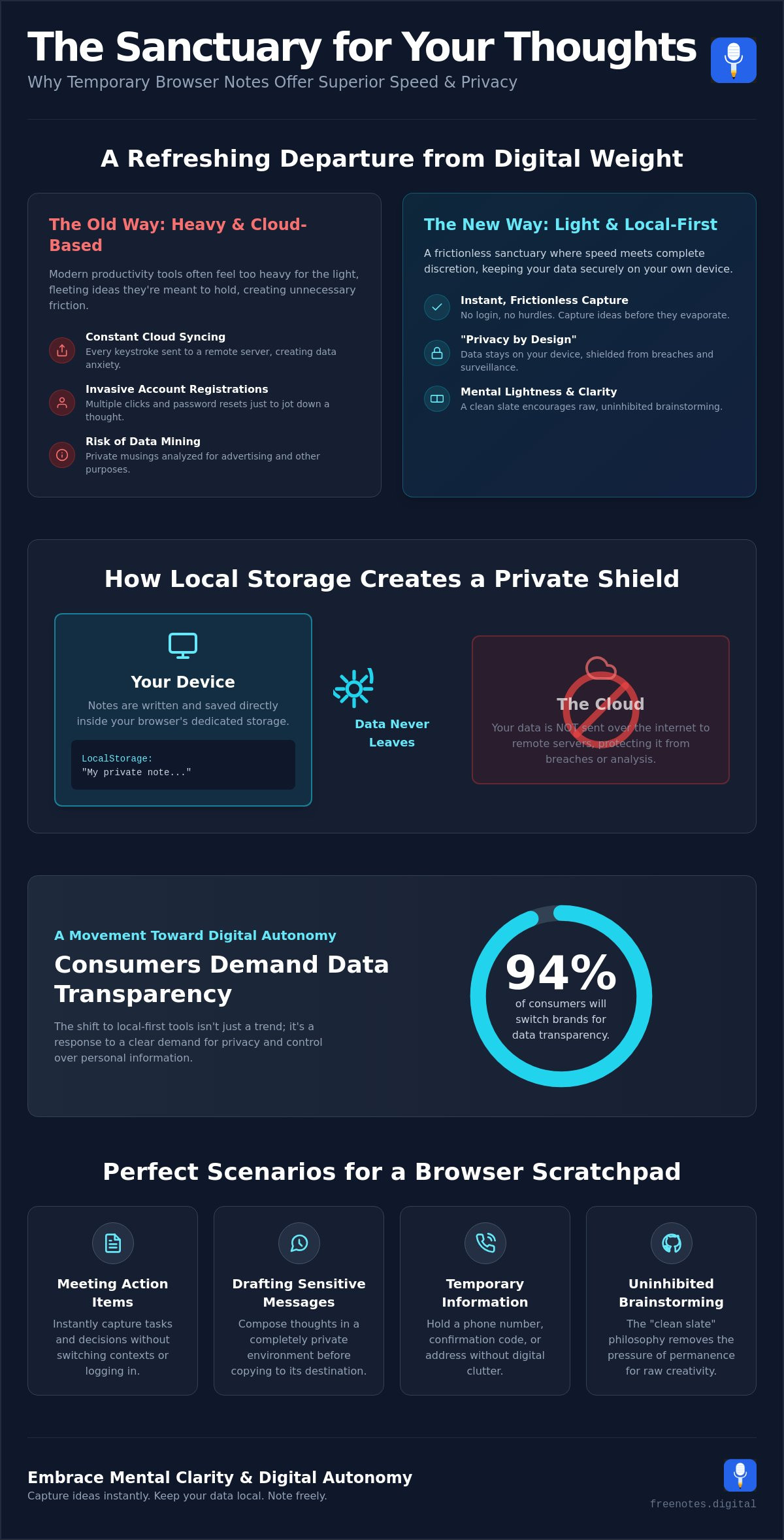
We understand that your most personal sparks of inspiration deserve a space that is as private as it is fast. With 94 percent of consumers stating they’ll switch to brands that offer complete transparency regarding data usage, the shift toward local-first tools is more than just a trend; it’s a movement toward digital autonomy. In this guide, you’ll discover how to use elegant browser-based tools to capture thoughts with effortless movement while ensuring your data remains securely on your own device. We’ll explore the restorative power of a quick notes canvas and show you how to maintain mental lightness through tools that stay out of your way until the exact moment they’re needed.
Key Takeaways
- Understand why a “clean slate” philosophy encourages more honest, uninhibited thought by removing the pressure of permanent storage.
- Learn how browser local storage keeps your data strictly on your device, providing a sophisticated shield against data breaches and surveillance.
- Discover how temporary browser notes allow you to capture ideas instantly without the need for invasive account registrations or the risk of data mining.
- Identify perfect scenarios for a transient scratchpad, such as capturing action items during meetings or drafting sensitive messages in a private environment.
- Explore the restorative benefits of using a quick notes canvas and voice to text technology to achieve a state of mental lightness and clarity.
What are Temporary Browser Notes and Why Do They Matter?
Imagine a digital sanctuary where your thoughts can land without the heavy weight of a permanent record. Temporary browser notes represent a sophisticated shift in how we interact with our own ideas, acting as a web-based scratchpad designed for immediate, transient data entry. Unlike traditional software that insists on syncing every syllable to a distant, invisible server, these tools prioritize your personal space. They often leverage the Web Storage API to keep your words tucked away safely within your own browser environment. This “clean slate” philosophy encourages a more honest, uninhibited flow of thought. When you know a space is temporary, your inner critic falls silent, allowing for a raw and genuine brainstorm that permanent archives often stifle.
Modern productivity is undergoing a quiet transformation. We’re seeing a move toward “Privacy by Design,” where the interface respects the user’s boundaries from the very first click. While permanent cloud archives serve as vital libraries for your life’s work, they often feel too formal for a quick, messy brainstorm. A transient canvas offers a different kind of support; it’s a gentle, mindful companion that doesn’t ask for a lifelong commitment to a database. It’s about the beauty of the fleeting moment and the clarity it brings to your daily routine.
The Psychology of Frictionless Capture
The absence of a “Login” button is a small but powerful revolution for the creative mind. By removing this initial hurdle, the barrier to expression simply vanishes, replaced by a sense of intuitive movement and ease. This lack of friction fosters a state of mental lightness, helping you externalize thoughts before they have a chance to evaporate into the ether. During high-stress tasks, these notes act as a vital buffer for the brain. They hold the “right now” information, such as a phone number or a quick reminder, so your cognitive energy stays focused on the primary task rather than the exhausting effort of remembering.
Transient vs. Permanent Digital Workspaces
There’s a distinct, necessary difference between a long-term database and a transient canvas. Using a permanent archive for every fleeting thought often leads to digital hoarding, where truly valuable insights are buried under a mountain of digital clutter. A mindful workflow uses temporary browser notes as a landing strip for the mind. You capture the spark, refine the edges, and then move only the essential fragments to your permanent filing system. This prevents the “storage anxiety” that often accompanies modern digital life, ensuring your permanent workspace remains a place of high-value wisdom rather than a junk drawer of half-formed ideas.
The Technology of Transient Capture: How Local Storage Protects Your Peace
The quiet magic of temporary browser notes lies in a technology called LocalStorage. Think of it as a small, dedicated shelf inside your browser where your text sits safely, away from the prying eyes of the open web. Unlike cloud services that whisk your data away to a remote server the moment you type a character, local storage keeps every word on your hardware. It’s a form of data sovereignty that ensures your private thoughts remain exactly that; private. By utilizing client-side processing, these tools act as a powerful shield. If a data breach occurs at a major tech company, your locally stored notes are unaffected because they were never part of that company’s database to begin with.
However, it’s essential to understand the “temporary” nature of this sanctuary. Your browser maintains this data until you decide it’s time for a fresh start. If you manually clear your browser cache or site data, these notes will vanish. This isn’t a flaw; it’s a feature designed for those who value a truly clean slate. Most modern browsers, including Chrome and Firefox, provide approximately 5 to 10 MB of space per origin. While that might sound modest in an era of terabytes, it’s more than enough for thousands of lines of text.
Privacy Without the Cloud
When you use a standard cloud service, you’re essentially renting space on someone else’s computer. Your most sensitive brainstorms and raw ideas become part of a massive dataset that could be used for targeted advertising or data mining. The technical difference is simple: a cloud service stores your data on their hardware, while a local-first web app keeps it on yours. Local storage is a private vault that exists only on your device. Choosing a Quick Notes Canvas means you aren’t trading your privacy for convenience. You get the speed of a web app without the invasive tracking of a cloud service.
Managing Data Persistence
To keep your thoughts secure during a session, look for tools that utilize an “AutoSave” feature. This ensures that even if you accidentally close a tab or your browser crashes, your words are waiting for you when you return. It provides a sense of reliable, unobtrusive support. Once you’ve finished a task, the act of clearing your digital workspace can be incredibly restorative. It signals to your brain that a thought has been captured, processed, and released, leaving you with a sense of mental lightness and clarity.
Privacy vs. Convenience: The Case for Non-Cloud Note Taking
Choosing a tool that prioritizes your privacy shouldn’t feel like a sacrifice. In a world where the average commercial website drops 22 cookies on your first visit, the invisible cost of “free” cloud-based services is often your own data. These platforms frequently rely on data mining and targeted advertising to sustain their business models, turning your private brainstorms into marketable insights. Temporary browser notes offer a graceful alternative, allowing you to capture ideas without the lingering worry of who might be watching. By bypassing the need for invasive tracking, you create a restorative space where organization feels like a gift to yourself rather than a transaction with a tech giant.
One of the most common concerns regarding local-only tools is the lack of a cloud backup. Is your data safe if it isn’t stored on a remote server? For transient thoughts, the absence of a permanent cloud record is actually the ultimate security feature. It forces an intentionality that cloud apps often discourage. When you know a space is temporary, you’re more likely to process your thoughts and move the essential pieces to a permanent home, rather than letting them sit in a vulnerable digital pile. This approach ensures that your most sensitive ideas never leave your device, providing a level of certainty that no encrypted cloud service can truly match.
Avoiding the Registration Trap
Every “Sign up with Google” button is a moment of mental friction. These small hurdles accumulate, creating a heavy barrier that can stifle a sudden spark of inspiration. By choosing tools that don’t require personal information, you maintain a clean digital footprint and enjoy a sense of uninhibited creative freedom. If you’ve ever lost a brilliant idea to the sudden friction of a login screen, an instant online notepad no login required offers the frictionless alternative your creative process deserves. Anonymous note-taking allows your mind to move with purposeful grace, unburdened by the weight of another account to manage or another password to remember. It’s a simpler, more human-centric way to interact with your digital environment.
Security in the Modern Browser
Modern browsers are designed to be secure sandboxes. When you use a tool with a “Zero-Knowledge” architecture, the application itself has no way of seeing what you type. Your text is processed locally and protected by HTTPS, ensuring that your data remains within your personal sphere. For those who handle particularly sensitive material, a secure online text editor no login provides the highest level of personal data sovereignty, keeping your private workspace entirely free from third-party access. This is why the Free Notes App prioritizes your privacy above all else. It acts as a quiet, reliable assistant that stays out of the way, providing a sophisticated environment where you can dictate or type your thoughts with the absolute confidence that they remain yours and yours alone.
Ideal Scenarios for Using a Quick Browser Scratchpad
In the steady rhythm of a busy workday, we often encounter fragments of information that don’t yet belong in a permanent home. These transient sparks, whether they’re a phone number shared during a call or a sudden realization during deep work, require a place to land that is both immediate and unobtrusive. Utilizing temporary browser notes provides a quiet, reliable assistant for these moments, ensuring your focus remains on the task at hand rather than on the mechanics of data entry. It’s about creating a landing zone for the mind, a space that respects your creative process by staying out of the way until it is needed.
There are several specific moments where a transient canvas truly shines:
- Drafting sensitive messages: Prepare delicate emails or private communications in a neutral, local environment where no auto-saving cloud drafts can track your progress.
- Research collection: Store snippets of code, reference links, or data points during a deep dive without cluttering your primary workspace.
- Immediate capture: Use your keyboard or voice to record insights the second they occur, preventing the mental friction that comes with opening heavy, complex applications.
Meeting Notes and Professional Clarity
During a high-stakes conversation, the last thing you want is to fight with a slow-loading app or a cluttered interface. A browser scratchpad serves as an elegant “staging area” for professional capture, allowing you to record action items without breaking the flow of dialogue. This minimalist approach significantly reduces meeting fatigue by removing the visual noise of unnecessary features. For those seeking a more structured approach to their professional workflow, exploring a dedicated browser notepad for meeting notes can help maintain focus and ensure no detail is lost to the ether.
Voice Dictation for Fluid Thinking
The synergy between voice technology and transient notes is a powerful tool for achieving mental lightness. When your hands are busy or your thoughts are moving faster than you can type, converting spoken words into text provides instant clarity and relief. You can see this in action by using free voice to text online, which transforms your browser into a serene sanctuary for private thoughts. Voice-to-text technology removes the mechanical barrier between the initial spark of a thought and its appearance on the digital page. This intuitive movement allows your ideas to flow with a purposeful grace, unhindered by the physical constraints of a keyboard.
Experience the restorative power of a clean digital workspace by trying our Quick Notes Canvas for your next brainstorm.
Embracing Mental Clarity with the Free Notes App
True mental clarity isn’t just about clearing your schedule; it’s about clearing the tools you use to navigate it. The Free Notes App serves as a quiet, reliable assistant designed to support your daily thoughts without demanding your attention or your data. By combining a minimalist Quick Notes Canvas with a sophisticated Free Voice to Text Note Taking Tool, we’ve created a space where your ideas can land with purposeful grace. This isn’t just another utility; it’s a mindful enabler that respects the delicate nature of the creative process. Our commitment to local-only processing ensures that every word you type or dictate remains entirely your own, existing only within the private sanctuary of your browser.
Choosing temporary browser notes over heavy, cloud-synced applications allows you to experience a workspace that stays out of the way until the exact moment it’s needed. There is a restorative power in knowing that once your task is complete and your thoughts are filed or released, no digital footprint remains. This philosophy of the “clean slate” prevents the buildup of digital clutter, helping you maintain a state of mental lightness even during your most demanding hours. It’s a sophisticated approach to productivity that prioritizes your well-being over hyper-persistent storage.
A Workspace Designed for You
The aesthetic of our interface is intentionally serene, crafted to reduce cognitive load through harmonious design. We believe that a protective guardian of your ideas should be as elegant as it is functional. By removing visual noise and unnecessary features, the canvas allows you to transition from a cluttered mind to a structured, serene digital environment. Every element is paced to mirror the fluidity of thought, ensuring that your movement through the app feels intuitive and stress-free. It’s a tool that doesn’t shout for attention, opting instead to provide a reliable foundation for your brilliance.
Getting Started with Frictionless Notes
Reclaiming your mental space shouldn’t require a long setup or a complex registration. There are no downloads to manage and no accounts to create; you simply need a browser and the spark of an idea. Integrating the Free Notes App into your daily ritual of mindfulness is as simple as opening a tab. Whether you’re capturing a sudden insight or drafting a sensitive message, you can do so with the certainty that your data remains on your own device. We invite you to experience this sense of digital autonomy today. Start your next brainstorm on a canvas that values your privacy as much as you do, and discover the profound relief of a truly frictionless capture experience.
Step Into a Lighter Digital Workspace
Achieving a state of mental lightness starts with choosing tools that respect your boundaries. Throughout this guide, we’ve explored how moving away from heavy cloud dependencies allows your ideas to flow with a purposeful grace. By prioritizing 100 percent local processing, you ensure that your private brainstorms never leave your device, providing a level of security that traditional apps simply can’t match. Utilizing temporary browser notes transforms your browser into a mindful sanctuary, where the absence of a login button means there’s nothing standing between you and your next great insight.
It’s time to release the weight of digital clutter and embrace a more fluid way of thinking. With integrated voice-to-text technology and a commitment to no registration required, our platform acts as a quiet, reliable assistant for your daily life. You deserve a space that stays out of the way until it’s needed, acting as a protective guardian for your creative process. Reclaim your mental clarity with Free Notes App and discover how restorative a truly frictionless canvas can be. Your thoughts are waiting for a place to land; let them arrive in peace.
Frequently Asked Questions
Are my browser notes saved if I close the tab?
Yes, your thoughts remain exactly where you left them even if you close the tab or your entire browser window. This persistence is powered by LocalStorage technology, which acts as a quiet, reliable assistant by holding your text on your device. Your notes will wait for you until you return, providing a sense of seamless continuity without the need for a cloud account.
Is it safe to type sensitive information into a browser-based notepad?
It’s significantly safer than using cloud services because your data never travels to a remote server. When you use temporary browser notes, every word stays within the secure sandbox of your own browser environment. This client-side processing serves as a protective guardian against data breaches and unauthorized access, ensuring your most private brainstorms remain truly personal and under your control.
Can I access my temporary browser notes from another device?
No, these notes are tied specifically to the browser and device where you originally wrote them. Because the tool prioritizes your privacy by keeping data local, it doesn’t sync across the cloud to other phones or computers. This intentional limitation is what provides the restorative “clean slate” experience and the certainty that your information isn’t being stored on an external server.
How do I clear my temporary notes once I’m finished?
You can clear your notes by simply deleting the text within the interface or by clearing your browser’s site data and cache. The act of manually removing your thoughts can be quite restorative, signaling to your mind that a task is complete. Once cleared, the data is permanently removed from your device, leaving you with a fresh, serene canvas for your next spark of inspiration.
Does the Free Notes App store my voice recordings on a server?
No, your voice recordings are never stored on any external server. Our Free Voice to Text Note Taking Tool processes your speech locally within the browser, converting your spoken words into text in real-time. This ensures that your voice remains as private as your written thoughts, maintaining a sophisticated environment where you can dictate freely without worrying about digital surveillance or data mining.
What is the difference between local storage and cloud storage?
Local storage keeps your data on your physical device, while cloud storage sends your information to a company’s remote servers. The primary benefit of local storage is the removal of mental friction and the enhancement of privacy. You don’t need to create an account or trust a third party with your data; instead, you maintain full sovereignty over every thought you capture on your Quick Notes Canvas.
Do I need an internet connection to use a browser-based notepad?
You don’t need an active internet connection to type or edit notes once the page has loaded in your browser. Since the application runs locally on your device, it remains functional even when you’re offline. This offline-first approach ensures that you can capture sudden insights in any environment, whether you’re traveling or simply seeking a quiet moment away from the constant noise of the web.
Can I export my temporary notes to a permanent file?
Yes, you can easily move your thoughts to a permanent home by copying and pasting the text into your preferred document editor. While temporary browser notes are designed for transient ideas, we encourage you to move high-value insights into a permanent archive once they’ve been refined. This workflow allows you to use the browser scratchpad as a mindful staging area before committing to a long-term filing system.