
What if your most private thoughts could move from your voice to your screen without ever touching a cloud server or training a distant AI model? You likely feel the weight of “free” tools that demand your personal data or lock your transcripts behind hidden paywalls after just a few minutes of use. It’s a common frustration to find that a tool meant to simplify your life actually adds more mental clutter through complex registration processes. If you want to transcribe voice notes online free without the anxiety of data harvesting, you’re looking for a more refined, local approach to digital organization.
We believe that true productivity is born from a sense of security and quiet focus. With new privacy regulations like the California Delete Act taking full effect in August 2026, the demand for transparent, secure tools has never been higher. This guide shows you how to achieve a clean, text-based version of your ideas with zero cost and total privacy. We’ll walk through the essential checklist for a serene transcription workflow that keeps your data local and your mind clear.
Key Takeaways
- Learn how to distinguish between tools that offer genuine freedom and those that trap your data behind restrictive paywalls or complex registration barriers.
- Understand why local, browser-based processing is the only way to ensure your sensitive audio never leaves your device or touches a cloud server.
- Discover the most effective way to transcribe voice notes online free while maintaining a workflow that’s entirely free of mental friction.
- Master simple techniques for speaking with a natural, fluid rhythm to improve transcription accuracy and transform your thoughts into beautifully organized text.
- Transition from digital clutter to a state of mental lightness by adopting a “No-Everything” approach that protects your privacy and creative space.
The Hidden Landscape of Free Online Transcription
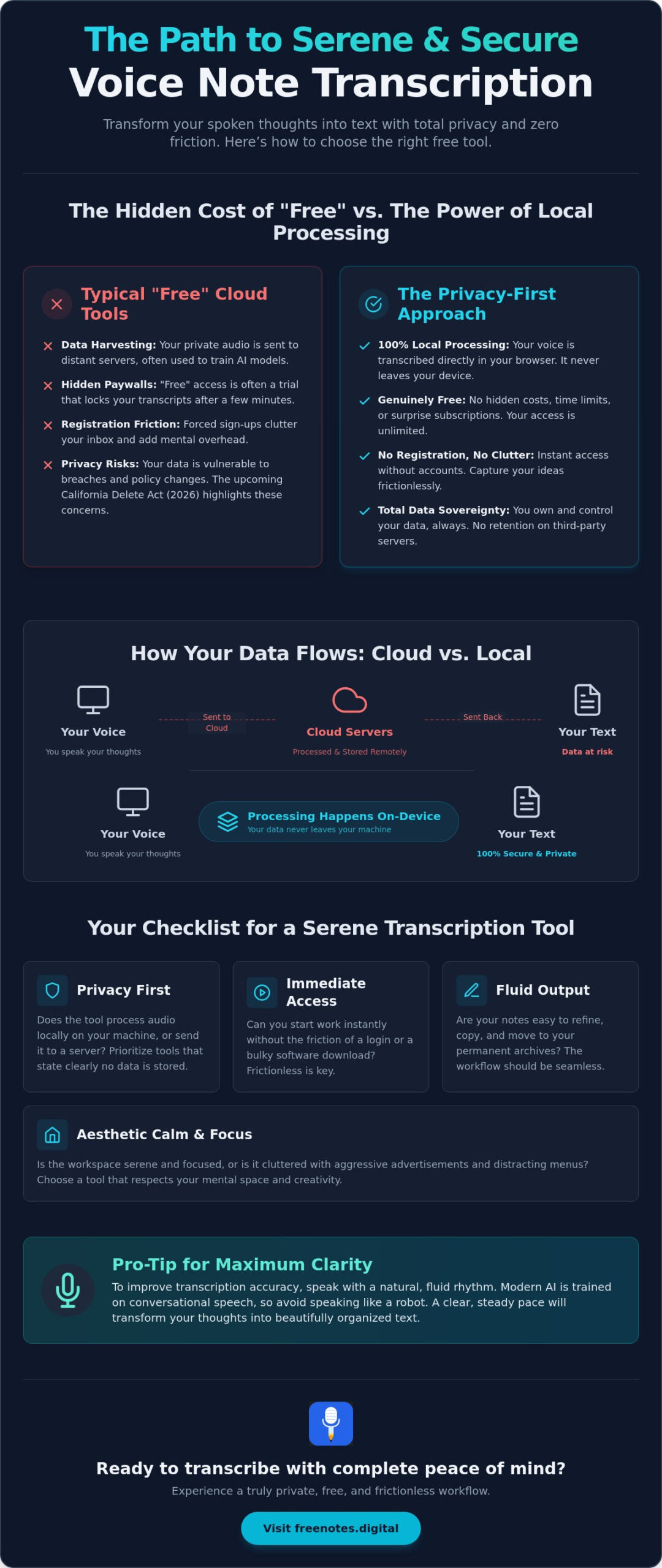
In the current digital environment, the word “free” often carries a hidden cost. Most services that allow you to transcribe voice notes online free require a transaction of personal data, trading your privacy for a few minutes of machine-generated text. By 2026, the global AI transcription market has grown into a multi-billion dollar industry, and with that growth comes a complex web of terms and conditions. True freedom isn’t just about the absence of a price tag; it’s about the absence of mental friction and the assurance that your spoken words remain your own.
Identifying a tool that respects your mental space requires looking past the marketing shine. Many platforms offer convenience through the cloud, but this often means your audio is processed on distant servers. This creates a subtle but persistent background noise of concern regarding data sovereignty. A tool that prioritizes your well-being will offer a sanctuary where you can speak without the fear of your ideas being harvested to train future AI models. It should feel like a quiet, reliable assistant that stays out of your way until it is needed.
The Evolution of Speech-to-Text Technology
We’ve moved beyond the era of clunky, resource-heavy software. Modern speech recognition has transitioned into a state of elegant, browser-based fluidity. High-accuracy AI models are now lightweight enough to run directly within your web browser. This shift toward “Privacy by Design” means that the processing happens on your own device. It democratizes access to professional-grade tools while ensuring that your creative process remains intimate and protected. You don’t need a high-end machine to experience this smoothness; you only need a tool that values efficient, local movement over cloud-based complexity.
Why Registration-Free Tools Are the New Standard
The “No Registration” movement is gaining momentum because creators are tired of inbox clutter. Every time you sign up for a “free” cloud utility, you invite another stream of notifications and promotional noise into your life. Choosing to transcribe voice notes online free without an account provides an immediate psychological benefit. It allows for a frictionless transition from thought to text. There’s a restorative power in being able to capture an idea instantly, knowing you are maintaining complete anonymity. This approach turns a functional task into a mindful ritual, protecting your personal space from the frantic pace of typical tech services. It’s about achieving mental lightness through simplicity.
Your Checklist for Choosing a Free Transcription Tool
Finding the right environment to transcribe voice notes online free should feel like stepping into a quiet, sunlit room. It’s about more than just functionality; it’s about the respect the tool shows for your time and your creative energy. When you evaluate your options, look for an interface that invites clarity rather than one that bombards you with flashing banners or complex menus. A truly sophisticated tool stays out of your way until the moment you need it, providing a seamless bridge between your spoken word and the written page. If you’re unsure where to begin your search, a dedicated guide to finding a browser transcription tool free of friction and cloud anxiety can help you navigate the landscape with confidence.
Here is your essential checklist for selecting a transcription companion that supports your well-being:
- Privacy First: Does the tool process audio locally on your machine, or does it send your voice to a far-off server?
- Immediate Access: Can you begin your work instantly without the friction of a login or a bulky software download?
- Technical Grace: Does the engine understand the nuances of your accent or the specific technical terms of your field?
- Fluid Output: Are your notes easy to refine, copy, and move into your permanent archives?
- Aesthetic Calm: Is the workspace serene and focused, or is it cluttered with aggressive advertisements?
Evaluating the Privacy Policy
When you scan a privacy policy, look specifically for the “Data Retention” clause. Many platforms claim to be secure but still keep a copy of your audio to improve their algorithms. The ultimate gold standard is a tool that offers local processing, where your audio never leaves your browser. It’s a vital step to Protect Your Privacy in an age where voice data is increasingly valuable. If you value absolute data sovereignty, prioritize services that state clearly that no data is stored on their end.
Assessing Accuracy Without the Sales Pitch
Don’t rely on marketing claims of near-perfect accuracy. Instead, test the tool with a short, 30-second clip containing complex terminology or a natural, conversational pace. Modern tools that allow you to transcribe voice notes online free are now capable of handling subtle inflections with surprising elegance. Browser-based engines have become remarkably sophisticated, often matching the performance of heavy cloud-based AI without the privacy trade-offs. An intuitive editor is also essential, allowing you to gently polish the text into its final form. If you are looking for a place to start, using a Free Voice to Text Note Taking Tool can provide that immediate, registration-free experience you need.
Local Processing vs. Cloud Storage: A Privacy Deep Dive
Choosing to transcribe voice notes online free shouldn’t require a leap of faith. In the typical cloud-based model, your audio is sent to a distant server, processed by a company’s AI, and often stored for “quality assurance.” This creates a trail of digital footprints that many creators find unsettling. Local processing offers a different path. It utilizes the power of your own device, turning your browser into a private workstation where the heavy lifting happens within your CPU. Your voice stays with you, ensuring that your most personal reflections never enter a database you don’t control.
When you use a local-first tool, the transcription engine is loaded into your browser’s temporary memory. This mechanism allows the software to function without a persistent connection to a central server. If you want to verify that a tool is truly respecting your boundaries, try a simple test. Once the page is fully loaded, disconnect your internet and begin speaking. If the text continues to appear on your screen, you have found a tool that prioritizes your data sovereignty. This transparency removes the hidden friction of wondering where your recordings are going, allowing you to focus entirely on the flow of your ideas.
Beyond privacy, this approach carries a quiet environmental benefit. Server-side AI requires massive data centers that consume significant amounts of electricity and water for cooling. By shifting the processing to your own hardware, you reduce the carbon footprint associated with your digital workflow. It’s a small but meaningful way to align your productivity with a more mindful, sustainable way of living. You are effectively using energy that your device is already consuming, rather than demanding more from the grid.
The Serenity of Local Storage
There is a profound sense of peace that comes from working in a digital sanctuary. When you use Free Notes App, your intellectual property is protected by the very architecture of the tool. There are no accounts to manage and no cloud storage buckets to secure. This “No-Everything” philosophy acts as a guardian for your creative process, ensuring that your spoken thoughts are converted to text in a completely private environment. It’s a restorative experience to know that your words are for your eyes only, fostering a sense of mental lightness that cloud tools simply cannot replicate.
Potential Limitations of Local Tools
While local processing offers unmatched security, it’s helpful to understand the boundaries of your browser’s memory. Very long recordings, such as multi-hour lectures, may occasionally stretch the limits of your device’s processing power. These tools are ideal for memos, daily reflections, and short interviews where speed and privacy are the primary goals. To ensure the highest accuracy during these sessions, following basic audio recording tips, such as minimizing background noise, will help your local CPU map your thoughts with precision. Balancing the speed of your device with the complexity of the task ensures a harmonious and productive workflow.
How to Transcribe Voice Notes for Maximum Clarity
Achieving high accuracy begins with a calm environment. While the technology is sophisticated, it thrives when you provide it with a clean canvas. To transcribe voice notes online free effectively, you must first quiet the external world. Find a space where your thoughts can flow without the interruption of background noise. This physical stillness allows your mind to settle, ensuring your speech is deliberate and clear. When your voice is the only sound in the room, the AI can map your thoughts with a level of precision that feels almost intuitive.
The movement from thought to text should be as smooth as possible. By reducing mental friction before you begin, you allow your natural voice to emerge. This isn’t just about technical accuracy; it’s about the quality of the ideas you are capturing. When you speak into a tool that respects your privacy and your space, you feel more comfortable expressing your true reflections. This sense of security is the foundation of a productive and serene workflow.
Optimizing Your Audio Input
The quality of your microphone plays a subtle but significant role in browser-based transcription. You don’t need expensive studio equipment; a simple headset or even the built-in mic on a modern laptop is often sufficient. If you find yourself in a public space, try to face away from the wind or heavy traffic to maintain clarity. Speaking with a natural, fluid rhythm helps the engine recognize the cadence of your voice. You can even dictate punctuation like “period” or “new paragraph” to help structure the text as it appears. Using a simple voice to text web interface ensures that your focus remains on your words, rather than a cluttered screen.
Once you have finished speaking, the transition from voice to text is nearly complete. It’s helpful to review the output while the ideas are still fresh in your mind. This is the moment to refine any small errors and ensure the text captures the exact essence of your thought. To experience this seamless process for yourself, you can use our Free Voice to Text Note Taking Tool to start capturing your ideas right now.
The Art of Mindful Review
View your transcript as a gentle rough draft of your inner world. The process of speaking your thoughts aloud acts as a form of mental decluttering, releasing the pressure of unrecorded ideas. This practice turns a functional task into a restorative ritual. By using free voice to text online resources, you can link these new notes to your ongoing projects without the worry of data privacy. Once you are satisfied with the text, copy it into your permanent digital home. This final step ensures your reflections are organized and ready for future inspiration, leaving your mind light and free to move on to the next creative spark. You have successfully used the tool to transcribe voice notes online free while maintaining your absolute mental clarity.
Free Notes App: The Sanctuary for Your Spoken Thoughts
By 2026, the digital world has reached a tipping point where the most valuable feature a tool can offer is its absence. We are surrounded by services that demand our attention, our email addresses, and our personal data. To transcribe voice notes online free shouldn’t feel like a negotiation with a corporation. It should feel like a private moment of reflection. This is why a new generation of creators is turning toward local-first tools that prioritize mental lightness over cloud-based complexity. When you use a service that doesn’t track your movements, you reclaim the freedom to think without boundaries.
Our approach is built on a “No-Everything” philosophy. There are no registration forms to fill out, no software packages to download, and no cloud servers waiting to harvest your recordings. We provide a Free Voice to Text Note Taking Tool that functions as a quiet, reliable assistant. By keeping the entire process within your browser, we ensure that your spoken words remain entirely under your control. This lack of friction allows you to move from a spark of inspiration to a structured text note in seconds, keeping your creative momentum alive and your mind clear of digital clutter.
Elegance in Simplicity
The Quick Notes Canvas is designed with a sensory, minimalist aesthetic that respects your visual environment. It is a clean, open space where your words appear with fluid grace. There are no flashing buttons or aggressive sidebars to pull your focus away from the task at hand. The interface stays out of your way until the exact moment you need to capture a thought. This quiet confidence reflects a deep respect for your personal space. You don’t need to be an expert to transcribe voice notes online free here; you only need to speak your truth and watch it take shape on the screen.
Getting Started with Your First Note
We invite you to experience the restorative power of a truly private digital sanctuary. To begin, simply open the canvas and allow your thoughts to flow. You will notice the immediate response of the local engine as it maps your speech with sophisticated accuracy. Once your thoughts are captured, you can save the note directly from your browser. There is no need for external storage or complex syncing protocols. This is a human-centric way to organize your life, grounded in the belief that simplicity is the ultimate form of sophistication. Experience the serenity of Free Notes App today.
Cultivate Clarity in Your Daily Routine
The transition from a fleeting thought to a permanent note should be a restorative act, not a technical hurdle. By choosing to transcribe voice notes online free through a local-first approach, you protect the sanctity of your ideas while removing the mental friction of managing another cloud account. You’ve learned that true data sovereignty is found when your audio never leaves your device, and that a minimalist interface is the key to deep, uninterrupted focus.
As you move forward, remember that your creative environment is just as important as the ideas themselves. A tool that respects your privacy and stays out of the way allows your most authentic voice to emerge. It’s time to trade the clutter of traditional transcription for a more serene, human-centric workflow. With 100% local processing and zero registration required, your privacy is a promise, not just a policy.
Begin your journey to mental clarity with Free Notes App and experience a distraction-free Quick Notes Canvas designed for your well-being. Trust in the fluidity of your own thoughts and let your ideas find their home in a space that truly values your peace of mind.
Frequently Asked Questions
Is it truly possible to transcribe voice notes online for free without a catch?
Yes, it’s entirely possible when you use tools that leverage local, browser-based processing. Many traditional services have a “catch” because they pay for expensive server costs and pass those on to you through subscriptions or data collection. By using your own device’s CPU to transcribe voice notes online free, you remove the middleman and the hidden costs, resulting in a cleaner and more private experience.
How does local browser processing protect my audio files from hackers?
Local processing creates a protective boundary because your audio never leaves your machine. Since your voice data isn’t transmitted over the internet to a central server, there’s no digital trail for a hacker to intercept. Your thoughts stay within your own digital sanctuary, providing a level of security that cloud-based platforms simply cannot match. It’s a modern approach to privacy that respects your personal space.
Can I transcribe long recordings using a free browser-based tool?
You can use these tools for a variety of lengths, though they’re most elegant when used for memos, daily reflections, and interviews. Because the transcription happens in your browser’s memory, extremely long recordings might be limited by your computer’s available resources. For most creators, the experience remains fluid and responsive, allowing for a steady flow of ideas without the weight of bulky software.
Do I need a high-end computer to use local speech-to-text tools?
No, you don’t need a specialized or high-end machine to enjoy a serene transcription workflow. Modern web browsers are remarkably efficient and the AI models used for local processing are designed to be lightweight and sophisticated. The software moves with a purposeful grace that works comfortably on most standard laptops and desktops, ensuring a stress-free experience for every user.
What happens to my data if I close the browser tab unexpectedly?
If a tab is closed unexpectedly, any unsaved text is typically cleared because local tools don’t use intrusive cloud storage. This is a trade-off for total privacy and data sovereignty. It’s a good practice to cultivate a mindful habit of copying your transcribed text into its permanent home as soon as you’ve finished your session. This ensures your reflections are always safely tucked away.
Are free transcription tools accurate enough for academic or professional use?
Modern AI models have reached a level of craftsmanship where they can match human accuracy in ideal conditions. While background noise can influence the results, the text produced is usually a reliable and sophisticated foundation for professional minutes or academic study. Students in particular will find that using voice to text for students provides a clean rough draft that requires only a gentle, mindful review to perfect. You’ll find that to transcribe voice notes online free provides a clean rough draft that requires only a gentle, mindful review to perfect.
Why do most transcription services require a registration or account?
Most services use registration as a funnel to manage paid subscriptions or to collect data for training their AI models. This often adds unnecessary mental friction to what should be a simple, restorative process. Choosing a registration-free tool allows you to maintain your anonymity and start your work instantly. It’s a more human-centric way to interact with technology, valuing your time and your creative focus. For a deeper look at how to evaluate your options, explore our guide on selecting a browser transcription tool free of cloud anxiety and unnecessary registration barriers.
How can I export my transcribed text once the recording is finished?
The most direct way to move your text is to copy it from the interface and paste it into your preferred organization system. This simple movement avoids the clutter of complex export menus or account-based permissions. By treating the transcript as a fluid piece of text, you can easily transition your ideas into their final home, leaving your mind light and ready for the next moment of inspiration.