What if the greatest barrier to your creativity isn’t a lack of ideas, but the mechanical friction of a keyboard? We’ve all felt that sudden weight when a complex interface or a mandatory login screen interrupts a moment of pure inspiration. It’s exhausting to watch a fluid thought dissolve while you’re navigating digital clutter or worrying about the privacy of your spoken words. Finding a simple voice to text web environment shouldn’t feel like another task on an overcrowded to-do list. It should feel like a deep breath.
You probably believe that technology should stay out of the way until the exact moment it’s needed, acting as a quiet assistant rather than a source of noise. In this article, you’ll discover how to reclaim your mental lightness by using a minimalist, registration-free tool designed for total privacy and immediate use. We’ll explore how to transform your spoken reflections into a restorative writing practice that captures the raw elegance of your thoughts without the cognitive load of typing. It’s time to embrace a digital sanctuary where your voice flows freely and your mind finds its natural rhythm.
Key Takeaways
- Learn how a browser-based bridge allows you to capture ideas instantly without the friction of downloads or account setups.
- Discover how local processing transforms your browser into a private sanctuary, keeping your spoken memos safe from data harvesting.
- Compare the hidden complexity of cloud-based dictation with the serenity of a simple voice to text web tool designed for mental clarity.
- Master restorative workflows like the “morning brain dump” to clear mental clutter and preserve your most fluid, raw thoughts.
- Explore how a quiet, registration-free assistant can support your creative process while maintaining a completely private and focused environment.
What Defines a Simple Voice to Text Web Experience in 2026?
In 2026, the digital world often feels like a crowded room. To find true focus, we need tools that act as a bridge rather than a barrier. A simple voice to text web experience is defined by its ability to disappear. It isn’t a complex software suite with endless menus; it’s a quiet, browser-based canvas that waits for your words. This shift from heavy, multi-purpose applications to elegant, single-purpose canvases reflects a growing desire for mental lightness. We no longer want to manage our tools; we want our tools to support our thoughts.
The underlying Speech recognition technology has matured into something truly seamless. We’ve moved past the era of heavy downloads and system-clogging installations. Today, instant accessibility through the browser means your ideas can move from mind to page without a single installation prompt. This evolution of “no-download” technology ensures that your creative flow remains uninterrupted by technical requirements. When you’re in the middle of a brainstorm, your brain is already working at its limit. Every additional button you have to click adds to your cognitive load. By choosing a refined web assistant, you’re giving your thoughts the space they need to breathe.
The Removal of Mental Friction
The most significant obstacle to capturing a transient insight is often the “log-in wall.” Registration-free tools respect your time and your focus. When you don’t have to remember a password or verify an email, your ideas flow without interruption. There is a deep psychological benefit to starting with a clean, white digital space. It signals to your brain that the environment is safe, open, and ready for whatever you have to say. This “instant-on” dictation becomes a reliable companion for those fleeting moments of brilliance that usually vanish before you can reach for a keyboard. You simply speak, and the simple voice to text web tool does the rest, acting as a mindful enabler for your creativity.
Essential Features for a Quiet Workspace
A serene assistant doesn’t need to shout. It stays out of your way until it is needed. The interface should feel like a high-quality piece of craftsmanship, focusing on the aesthetic experience as much as the function. Real-time transcription that mirrors the natural rhythm of your speech creates a sense of harmony. You aren’t just generating data; you’re engaging in a fluid movement of thought. Key features of this mindful environment include:
- Minimalist design that eliminates visual noise and distractions.
- Zero-setup accessibility through any modern web browser.
- A private, local-first approach that values your personal space.
- A clean, responsive canvas that adapts to your pace.
The Privacy of Local Processing: Your Ideas Stay in Your Sanctuary
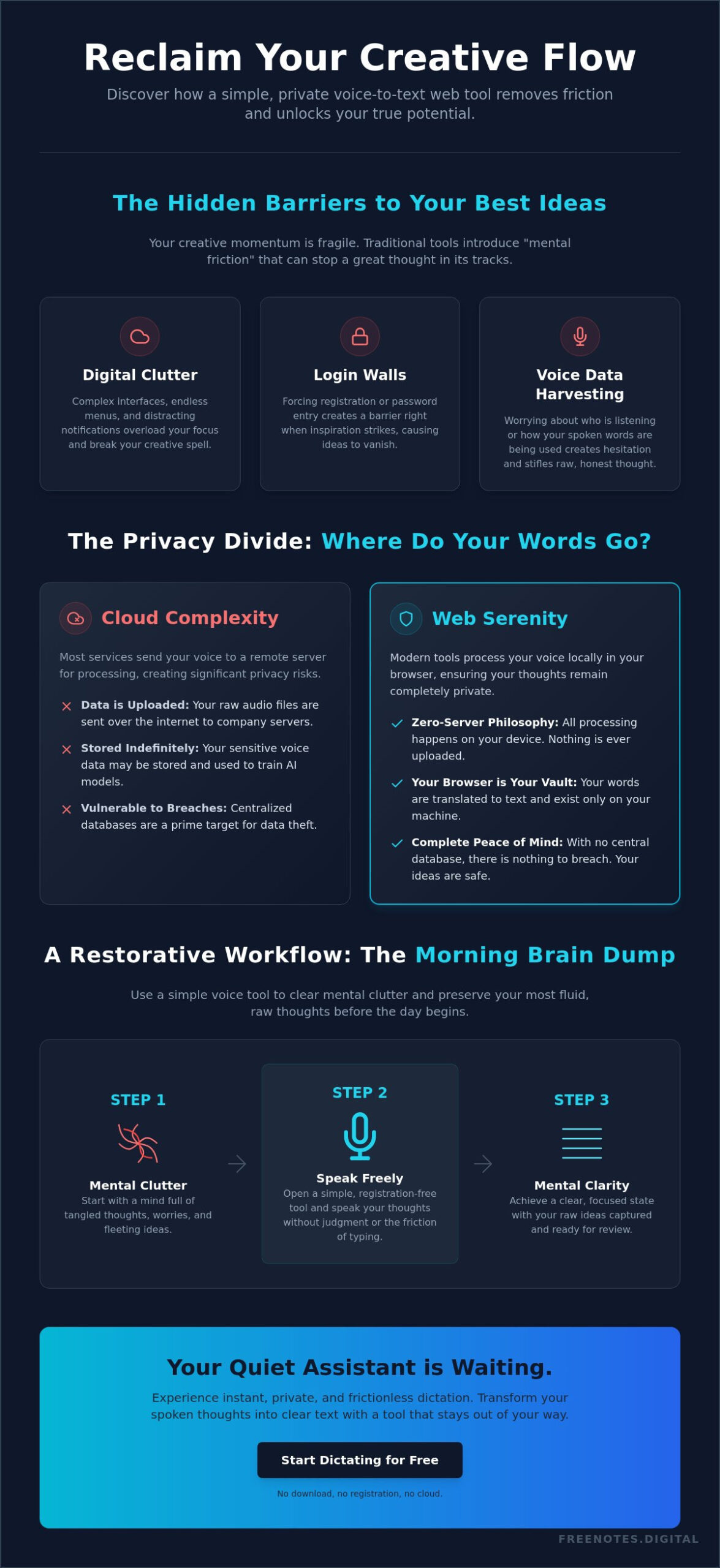
Privacy isn’t just a technical setting; it’s the foundation of a creative sanctuary. When you speak your most vulnerable thoughts, you shouldn’t have to worry about where they land. Most cloud-based services operate on a model of collection. Your data is sent to a remote server, often stored indefinitely, and sometimes used to refine algorithms. Choosing a simple voice to text web tool that prioritizes local processing changes this dynamic entirely. It ensures that your voice remains your own, never harvested as training data for faceless models. Your words stay within the confines of your own device, exactly where they belong.
Recent Advances in speech recognition technology have made it possible to process complex audio directly within your browser. This “Zero-Server” philosophy eliminates the inherent risks of data breaches. If there’s no central database, there’s nothing for an external party to access. Your browser becomes a private vault, a temporary holding space where your memos exist only for your eyes and ears. This isn’t just about security. It’s about the emotional peace that comes from knowing your mental space is unobserved.
How Browser-Based Privacy Works
The Web Speech API acts as the engine for secure, on-device transcription. It translates your spoken words into text without ever needing to upload an audio file to the cloud. To keep your work accessible, the interface utilizes LocalStorage. This is a small, secure portion of your own device’s memory that allows your notes to persist even if you close the tab. Because there’s no registration required, there’s no digital trail linking your thoughts to an identity. This anonymity is the ultimate privacy feature for anyone drafting raw, uninhibited ideas. If you want to transcribe voice notes online free without the anxiety of data harvesting, understanding how local processing protects your words is the essential first step. You can start a session with a Free Voice to Text Note Taking Tool that respects these boundaries from the very first word.
Digital Hygiene for the Mindful Creator
Protecting your creative process from the prying eyes of big tech is essential for true mental clarity. There’s a profound sense of freedom in knowing your draft phase is entirely offline. You can experiment, stumble, and refine your words in a space that feels safe and personal. Local processing is the quiet guardian of your private ideas, ensuring that the bridge between your mind and the page is never crossed by anyone but you. It allows you to maintain a clean digital footprint while focusing entirely on the fluid movement of your thoughts. This level of discretion is a necessity for anyone who values the restorative nature of a truly private workspace.
Comparing Dictation Methods: Cloud Complexity vs. Web Serenity
Selecting a tool for your thoughts often involves a trade-off between power and peace. Many popular cloud-based applications promise infinite synchronization and advanced editing suites, but these features come with a hidden tax on your attention. When you open a heavy word processor, you’re greeted by loading bars, update prompts, and complex ribbons of icons. This environment is designed for formatting documents, not for the delicate act of thinking. Choosing a simple voice to text web interface removes these layers of digital noise, allowing you to move from an impulse to a written word in seconds. Speed isn’t just about technical performance; it’s about how quickly a tool can get out of your way.
The true cost of many “free” cloud apps is often paid in interruptions. Whether it’s a notification to upgrade your storage or an intrusive advertisement, these elements fragment your focus. Mobile applications add another layer of friction with constant requests for microphone permissions, location data, and background updates. In contrast, a browser-based scratchpad offers a temporary workspace that feels inherently lighter. Because modern speech recognition technology now lives directly within the web environment, you can enjoy high accuracy without the baggage of a traditional software installation. This ephemeral nature actually encourages more honest, uninhibited writing. When a workspace feels temporary, you’re less likely to self-censor and more likely to let your raw ideas flow.
Utility vs. Experience
There is a fundamental difference between executing a task and capturing a thought. A professional transcriptionist might require a complex dashboard with time-stamping and multi-speaker identification. However, for most of us, those features are just more clutter. We need a sanctuary. Minimalist web tools are winning the battle against feature bloat because they prioritize the human experience over technical utility. They recognize that a clean, responsive canvas is more valuable than a hundred unused buttons. It’s the difference between working in a busy corporate office and sitting in a quiet, sunlit studio. Students and academics, in particular, can benefit enormously from this approach — learning how to use voice to text for students in a distraction-free environment can bridge the gap between the speed of thought and the limitations of typing.
A Framework for Choosing Your Tool
As you curate your daily tech stack, consider the value of digital lightness. You don’t always need a tool that syncs your every whisper to a global server. Ask yourself if the convenience of cloud access is worth the sacrifice of your personal space. Browser-based tools are the most sustainable choice for 2026 because they leverage the power you already have in your device without demanding more of your data. They offer a reliable, unobtrusive way to manage your mental load. By prioritizing a focused environment, you’re choosing a path that values your well-being as much as your productivity. For a comprehensive look at what to evaluate before committing to any service, the 2026 essential checklist for transcribing voice notes online free offers a refined framework for making the right choice.
How to Integrate Simple Voice to Text into a Restorative Workflow
A restorative workflow begins with the courage to let go of mental clutter. Every morning, your mind is often a flurry of obligations, half-formed ideas, and lingering dreams. Utilizing a simple voice to text web tool for a morning brain dump allows you to externalize these thoughts instantly. It isn’t about creating a polished list or a final draft. Instead, it’s about achieving a sense of mental lightness. By speaking your worries and tasks into a quiet digital space, you create room for actual creativity to flourish throughout the day. You speak. The words appear. The mind clears.
Setting Up Your Tranquil Environment
To truly benefit from this practice, you must first find a quiet space that feels supportive. Preparing your browser for focus means closing unnecessary tabs and silencing notifications that might interrupt your flow. For many, the ritual of clearing the canvas at the start of a session signals to the brain that it’s time for a new beginning. You can ensure this process is seamless by setting up one-click access; bookmarking your favorite Quick Notes Canvas makes the transition from thought to text almost instantaneous. This simple preparation turns a digital tool into a reliable sanctuary for your spoken reflections.
From Spoken Word to Polished Idea
Once your thoughts are captured, you can use “Freeform Text Notes” to begin structuring your brainstorms. This stage is about identifying patterns and themes within your raw dictation. You aren’t editing yet; you’re simply observing the movement of your ideas. A digital scratchpad acts as a vital, temporary workspace for creators, providing a low-stakes environment where the seeds of a project can safely germinate. Whether you’re a professional capturing creative insights or a student looking to leverage voice to text tools for academic success, this approach transforms raw speech into structured, actionable notes. When you’re ready, you can easily transition these notes from the browser to your permanent archives or a formal document. Begin your morning ritual with a Free Voice to Text Note Taking Tool that respects your need for a quiet, focused start.
Free Notes App: Your Quiet Assistant for Instant Dictation
The journey toward mental clarity often ends with finding the right space to breathe. In a digital landscape filled with complex subscriptions and demanding interfaces, the Free Notes App serves as the logical conclusion for mindful capture. It’s a dedicated environment where your voice is the primary focus. This simple voice to text web solution isn’t just another utility; it’s a quiet, reliable companion designed to help you externalize your thoughts without the weight of traditional software. By prioritizing your well-being, we’ve created a tool that stays out of your way until the exact moment it is needed.
We believe that high-quality tools for reflection should be accessible to everyone. Our serene, ad-supported model allows us to keep this service free while maintaining a sophisticated and welcoming atmosphere. These gentle advertisements provide the necessary support to keep the canvas clean and the technology current. Most importantly, we protect your peace of mind through a strict “No-Account” philosophy. You’ll never be asked to manage another password or sacrifice your personal data. Because we utilize local-first technology, your spoken words remain within your own browser, ensuring your sanctuary is never breached by external servers.
The Serenity of the Free Notes App Interface
Our interface is crafted specifically to encourage mental lightness. You won’t find deep menus, cluttered sidebars, or stressful notifications here. Every element is designed to reduce cognitive load and promote a sense of tranquility. This commitment to minimalism makes the Free Notes App a true sanctuary for your ideas. It acts as a sophisticated assistant that facilitates the fluid movement of thought, allowing you to focus entirely on the rhythm of your speech. Whether you’re drafting a quick memo or a long-form reflection, the experience remains smooth, elegant, and entirely private.
Begin Your Journey to Mental Clarity
Reclaiming your focus starts with a single, uninhibited word. We invite you to experience the restorative power of a clear workspace today. Getting started takes only three seconds. Simply turn your microphone on, keep your mind open, and watch as your spoken thoughts transform into text in real time. There’s no setup, no friction, and no delay. It’s time to embrace a simple voice to text web tool that respects your creative process and your personal space. Start your first private voice note now and discover how simple it is to find clarity in a busy world.
Embrace the Clarity of Your Own Voice
Finding a sanctuary for your thoughts shouldn’t require navigating a maze of settings or sacrificing your personal data. You’ve seen how the right simple voice to text web tool transforms your browser into a private vault where ideas remain entirely yours. By choosing 100% local browser processing, you protect the raw integrity of your reflections while enjoying the restorative power of a clean, minimalist canvas. This approach removes the mental friction of logins and technical clutter, allowing you to focus on the fluid movement of your mind.
It’s time to let your creativity flow without the burden of complex software or data privacy concerns. You deserve an assistant that stays out of the way, providing a serene environment for your most honest drafts. Experience a workspace that values your well-being as much as your productivity. Your ideas are precious; give them the quiet space they deserve to grow. If you wish to extend this sense of peace and personalized care to your next vacation, discover Ares Elite Journeys to craft a luxury travel experience that recharges your creative spirit.
Capture your thoughts instantly with Free Notes App
Start speaking today and feel the weight of digital clutter lift away as your words take shape on the page. With no registration required, your journey toward mental clarity is only a single click away.
Frequently Asked Questions
Is simple voice to text web really free?
Yes, this tool is completely free for everyone to use. We utilize a serene, ad-supported model that allows us to maintain a high-quality interface without ever charging a subscription fee. You can enjoy a full-featured experience without worrying about hidden costs or credit card requirements. It’s our way of providing a quiet, accessible sanctuary for your thoughts.
Where are my voice notes saved if I don’t have an account?
Your notes are saved directly within your own browser using secure LocalStorage technology. This means your data stays on your physical device rather than being sent to a remote cloud server. Even if you refresh the page or close your browser tab, your text remains waiting for you. It’s a private, local-first approach that respects your personal space.
Do I need to download any software to use Free Notes App?
No downloads or installations are ever required to use this service. The simple voice to text web experience is designed to run entirely within your existing web browser. This ensures that you can start dictating in seconds without cluttering your computer with heavy applications. It’s the perfect solution for keeping your digital environment light and focused.
How accurate is the browser-based transcription in 2026?
Modern browser-based transcription has reached a level of sophisticated precision that mirrors the natural rhythm of human speech. While accuracy can depend on your microphone quality and background noise, the technology now captures complex thoughts with remarkable clarity. It acts as a reliable, quiet assistant that stays in sync with your voice, allowing your creative flow to remain entirely uninterrupted.
Can I use this for long-form writing or just short memos?
The canvas is perfectly suited for both transient insights and long-form creative sessions. Whether you’re performing a quick morning brain dump or dictating a detailed chapter for a book, the interface remains responsive and stable. There are no arbitrary limits on how much you can speak. It provides an expansive, white space that adapts beautifully to the length of your reflections.
What happens if my internet connection drops while I am dictating?
A stable internet connection is necessary for the browser to process your speech in real time. If your connection drops, the transcription may pause until you are back online. However, any text already captured on your screen will remain safe in your browser’s local storage. We recommend ensuring a steady signal before beginning a long, restorative dictation session for the smoothest experience.
Is my voice data being used to train AI models?
No, your voice data is never harvested or used to train external AI models. We are deeply committed to a “Zero-Server” philosophy that prioritizes your privacy above all else. Your audio is processed solely to provide you with instant text and is never stored for secondary purposes. This ensures that your simple voice to text web sanctuary remains a truly private place for your ideas.
How do I export my notes from the browser to my computer?
Exporting your work is as simple as a quick copy and paste. Once you’ve finished your dictation, you can select the text on the canvas and move it into your permanent archives or a formal document. This manual bridge gives you total control over where your thoughts eventually live. It allows the web tool to remain a light, temporary workspace for your raw, uninhibited drafting.