
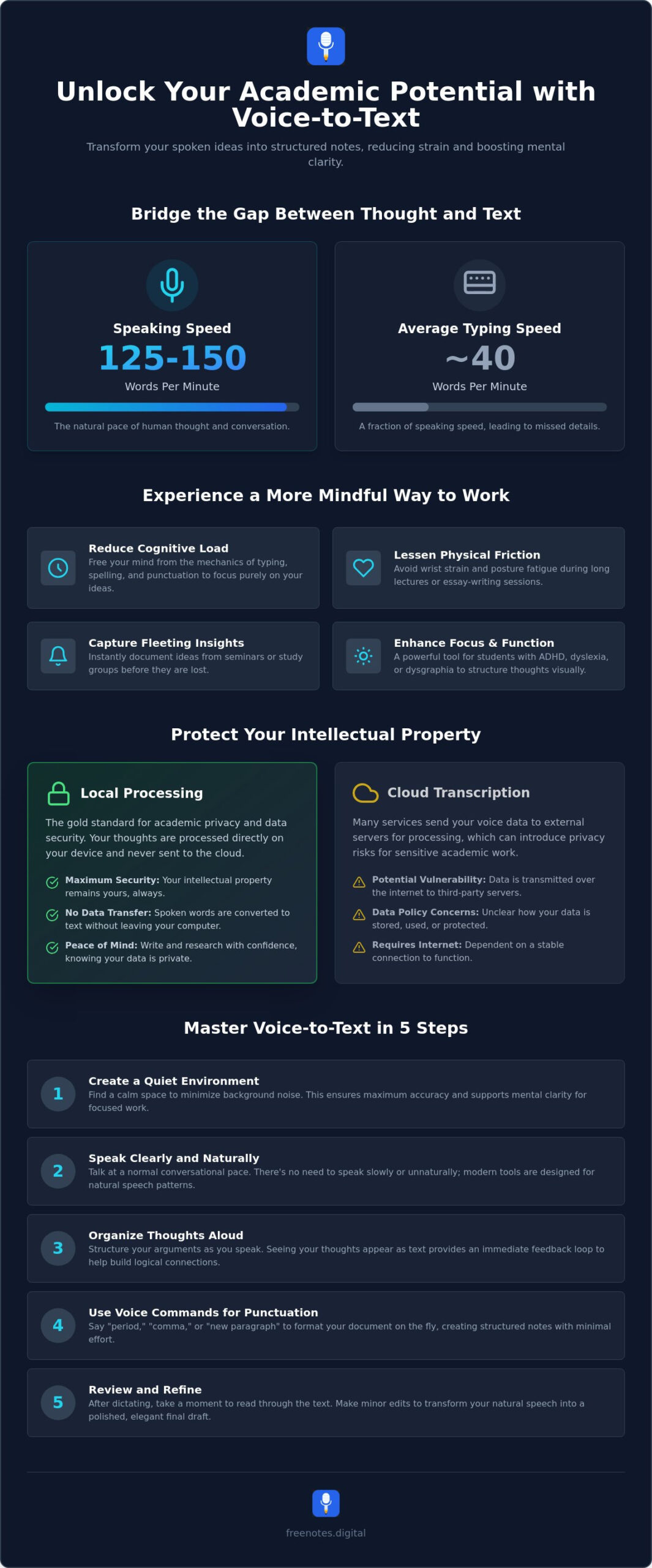
The average person speaks at a pace of 125 to 150 words per minute, yet most students struggle to type at even a third of that speed. This gap often leads to missed lecture points and a lingering sense of mental exhaustion. Finding a reliable way to use voice to text for students isn’t just about efficiency; it’s about reclaiming your mental clarity and letting your ideas flow without the physical friction of a keyboard.
It’s natural to feel protective of your thoughts, especially as new privacy laws in states like Indiana and Kentucky highlight the growing need for data security. You deserve a writing process that feels like a quiet, reliable companion rather than a source of anxiety. This guide will show you how to transform spoken insights into elegant notes using mindful, privacy-first tools designed for the modern academic. We will explore how to reduce physical strain and create a peaceful, distraction-free environment where your voice becomes your most powerful writing instrument.
Key Takeaways
- Discover how a voice-first mindset reduces cognitive load, freeing your mind to focus on creative expression rather than keyboard mechanics.
- Learn why local processing is the most secure way to protect your intellectual property in an increasingly digital academic landscape.
- Master the art of voice to text for students by cultivating a quiet environment that supports both accuracy and mental clarity.
- Explore the five essential steps to transform natural speech into structured, elegant notes with minimal physical strain.
- Uncover the benefits of a no-friction writing experience that allows you to start capturing ideas instantly without the need for downloads or registration.
What Does it Mean to Transcribe Spoken Words to Text?
At its core, transcription is the fluid conversion of oral language into written digital text. It represents a fundamental shift in how we approach the page, moving away from the rigid, mechanical nature of typing toward a more natural, expressive rhythm. For the modern student, this process acts as a bridge between mental clarity and academic output, ensuring that no fleeting insight is lost to the limitations of manual dexterity. It is a way to let your thoughts breathe, allowing them to take shape on the screen with the same ease as a conversation with a trusted friend.
This transition from traditional keyboards to a voice-first approach is not merely a technical upgrade. It is a movement toward a more mindful way of working. By utilizing speech recognition technology, you can bypass the physical barriers that often lead to mental fatigue. This is especially vital for students who manage dysgraphia or dyslexia. For these individuals, transcription is not just an assistive tool; it is a restorative superpower that removes the stress of spelling and syntax, allowing their true intellectual potential to shine without the weight of traditional writing obstacles.
The Evolution of Student Dictation
The history of turning speech into text has evolved significantly. What once required expensive, heavy desktop software and specialized hardware has been replaced by elegant, instant web-based solutions. In the 2026 academic environment, the focus has shifted entirely toward user well-being and speed. We have moved past the era of complex configurations and long training periods. Today, minimalist interfaces prioritize a creative flow, providing a serene digital space where you can begin capturing ideas the moment they arrive. These modern, browser dictation tool solutions require no downloads or cumbersome setups, making them a quiet, reliable companion in your daily studies.
Why Students are Choosing Voice Over Keyboards
The choice to use voice to text for students often stems from a desire to match the speed of thought. Consider the natural pace of learning: we speak significantly faster than we type. When you lean on dictation, you are capturing information at the speed of your own mind. This efficiency offers several distinct benefits for the academic journey:
- Reduced Physical Friction: Long lectures and essay sessions can lead to wrist strain and posture fatigue. Speaking your notes allows your body to remain in a more relaxed, natural state.
- Mental Lightness: When you aren’t focused on the mechanics of a keyboard, your brain is free to explore complex arguments and creative connections.
- Immediate Capture: Voice to text for students ensures that brilliant ideas discussed in seminars or study groups are documented instantly, preserving the nuance of the moment.
By embracing this intuitive movement, you transform the act of writing into a stress-free and harmonious experience that respects your time and your creative energy.
The Cognitive Benefits of Voice-to-Text for Students
Traditional writing often feels like a heavy lift for the mind. When you type, your brain must simultaneously manage spelling, punctuation, and the physical coordination of your fingers. This creates a significant cognitive load that can easily stifle your natural creativity. By choosing to use voice to text for students, you shift this burden away from your working memory. You allow your thoughts to pour out in their rawest, most vibrant form, unburdened by the mechanical constraints of a keyboard. It’s a restorative way to work that prioritizes the quality of your ideas over the speed of your fingers.
Educational experts at leading institutions recognize this shift as a vital form of assistive technology for students. It’s not just about speed; it’s about accessibility and mental lightness. Utilizing a simple voice to text web interface creates a serene space for reflection. In this environment, the act of thinking is no longer interrupted by the constant “click-clack” of keys. Instead, you’re free to explore the depths of your subject matter in a quiet, focused sanctuary.
Enhancing Executive Function
Many students find that they can organize complex arguments much more effectively when they speak them aloud first. This is particularly true for those managing ADHD or other focus challenges. Seeing your spoken thoughts instantly manifest as text on the screen provides a grounding visual anchor. It transforms a tangled internal dialogue into a structured external reality. This immediate feedback loop helps you maintain your train of thought and build logical connections that might otherwise be lost in the friction of manual note-taking.
Reducing Writing Anxiety
The “blank page syndrome” is a common hurdle in academic life. The pressure to produce perfect prose on the first attempt can lead to significant creative blocks. Dictation removes this weight by creating a low-stakes environment for your initial drafting phase. When you speak, your tone is naturally more conversational and authentic. You aren’t worried about perfect grammar or formal syntax yet; you’re simply capturing the essence of your message. This approach encourages a more fluid brainstorming process, making it much easier to begin a difficult assignment. Pairing dictation with a stream of consciousness writing app can further dissolve the inner critic that often freezes your first draft. To start unburdening your creative process, you can explore a free voice to text tool and watch your ideas take shape without the stress of the keyboard.
Privacy in the Digital Classroom: Local vs. Cloud Transcription
In the modern academic environment, your ideas are your most precious currency. As you explore the benefits of Dictation (Speech-to-Text) Technology, it’s essential to consider where those words actually go once they leave your lips. Many popular platforms rely on cloud-based processing, which means your voice data travels across the internet to be analyzed on a distant server. While this happens invisibly, it creates a permanent digital footprint that lives far beyond your control. You should act as a protective guardian of your intellectual property, ensuring that your early drafts and private brainstorming sessions remain truly yours.
The alternative is local browser processing, a method that treats your device as a private sanctuary. When you use voice to text for students that functions locally, the audio is translated into text right within your browser. No data is sent to external servers, and no permanent records are created in a distant database. This approach removes the mental friction of worrying about data breaches or the long-term storage of your academic thoughts. It allows you to speak freely, knowing your environment is secure and your privacy is respected. For students who want to go even further in protecting their creative process, exploring voice notes in browser no login required offers a path to total serenity without surrendering any personal data.
The Security of Local Processing
Modern browser-based tools have become incredibly sophisticated, capable of handling complex transcription tasks without ever needing to “call home.” This local-first philosophy is a hallmark of mindful design. By choosing tools that require no registration, you eliminate the need to hand over personal information before you even begin to write. Your notes stay on your device, providing a level of peace of mind that cloud services simply can’t match. It’s a quiet, reliable way to work that stays out of the way, protecting your creative process from unwanted observation. If you’ve ever felt that sudden hesitation before clicking record on a new app, choosing a browser transcription tool free of friction and cloud anxiety can restore that sense of calm and creative freedom.
Avoiding the Cloud Trap
It’s easy to fall for the allure of “free” cloud services, but often, your data is the actual product being sold. These services may use your transcriptions to train AI models or build profiles of your academic interests. This creates a “permanent record” tied to your student identity that you might not want following you into your professional life. To ensure you’re using a truly private tool, look for explicit “local-only” or “on-device” claims in the privacy policy. You can find a comprehensive guide on what to look for in our transcribe voice notes online free essential checklist. By choosing local voice to text for students, you reclaim control over your digital life, creating a harmonious balance between innovative technology and personal discretion.
How Students Can Master Voice-to-Text in 5 Steps
Mastering the art of voice to text for students is a practice of bringing your internal voice into the physical world with grace. It requires a gentle shift in habit, moving from the rhythmic clicking of keys to the steady flow of spoken thought. To begin this journey toward mental lightness, follow these five essential steps to ensure your ideas are captured with clarity and ease.
- Prepare your environment: Seek a quiet corner where your thoughts can unfold without interruption. This physical stillness fosters the mental clarity needed for deep academic work.
- Articulate with intention: Speak clearly but keep your natural pace. You don’t need to sound robotic; a natural, rhythmic cadence actually helps the software understand your unique voice.
- Use verbal commands: Stay in the flow by speaking your punctuation. Saying “period” or “new paragraph” allows you to format your notes without ever touching the keyboard.
- Review and refine: View your initial transcript as a living canvas. It doesn’t have to be perfect immediately. Polishing your work later is a separate, restorative act.
- Secure your output: Once your session is over, copy your text to your final document or study guide. This ensures your hard work is safely tucked away in your preferred digital home.
Optimizing for Accuracy
Achieving a frictionless experience often depends on the quality of your tools and your personal rhythm. While built-in microphones are often sufficient, using a dedicated headset can significantly reduce background noise. Maintain a methodical speaking pace to give the technology time to process your insights. If you encounter mistranslations, meet them with a calm, non-frustrated attitude. These small errors are simply part of the process, and correcting them later can actually help you engage more deeply with your material. For a comprehensive overview of getting the most from your setup, the 2026 guide to frictionless browser dictation offers practical, privacy-first strategies for every type of student.
Integrating Dictation into Your Study Routine
Voice to text for students is most powerful when it becomes a natural part of your daily academic life. You might use it to record immediate reflections after a long lecture while the information is still fresh. It is also an incredible tool for “spoken brainstorming” sessions, where you can talk through the structure of a long-form essay before you ever sit down to write. Combining this with a dedicated stream of consciousness writing app for mental clarity gives you a powerful end-to-end workflow for capturing and developing your raw ideas. By transcribing research interviews or group study discussions effortlessly, you preserve the nuance of every conversation. Experience this frictionless workflow for yourself by using our Free Voice to Text Note Taking Tool to capture your next big idea without the weight of the keyboard.
Embracing Effortless Idea Capture with Free Notes App
The journey toward academic success doesn’t have to be paved with physical strain or mental exhaustion. Free Notes App serves as a mindful enabler, designed to help you transition from the rigid mechanics of the keyboard to a more fluid, natural way of working. It’s a tool that respects your well-being, offering a sophisticated and welcoming atmosphere for your most important ideas. By choosing voice to text for students that prioritizes simplicity, you remove the mental friction that often stands between a brilliant thought and a finished essay.
The core philosophy of this tool is rooted in a no-friction experience. There are no registration forms to fill out and no complex software downloads to manage. You simply arrive and begin. This immediate access allows you to stay in your creative flow, capturing insights the moment they arise. It acts as a quiet, reliable assistant that stays out of your way until the exact moment it’s needed, providing a sense of unobtrusive support. Because all processing happens locally within your browser, your intellectual property remains entirely yours. It’s a sanctuary for your private thoughts, ensuring that your academic work is never treated as data for external servers.
A Workspace for Mindful Creators
The aesthetic of the Free Notes App is centered on tranquility and clarity. You’re met with a clean, elegant text canvas that encourages a restorative approach to organization. This isn’t just about utility; it’s about the feeling of the interface and the ease of the process. When your digital environment is free of clutter, your mind is free to explore complex arguments with a sense of calm confidence. We invite you to explore free voice to text online to discover how a serene sanctuary can lead to a calmer, more productive academic life.
Getting Started Today
Beginning your first session is as simple as opening your browser. You don’t need to be a technical expert to master this tool. The intuitive movement of the interface guides you through the process, allowing you to focus entirely on your spoken words. For those moments when inspiration strikes suddenly, you can use the Quick Notes Canvas for immediate brainstorming. It’s designed for rapid, elegant capture, ensuring that your fleeting insights are preserved with precision. By integrating this voice to text for students into your daily routine, you’ll find a new sense of harmony in your writing process. Open your mind to the possibilities of a writing environment that values discretion and simplicity, and let your voice lead you toward true mental lightness.
Step Into a More Harmonious Academic Life
Embracing a voice-first approach to your studies is more than a simple productivity hack. It is a commitment to your mental well-being and a way to protect the sanctity of your intellectual space. By moving away from the mechanical strain of typing, you allow your ideas to flow with a grace that matches the speed of your own thoughts. You’ve learned how local processing acts as a guardian for your privacy and how a quiet environment can foster the stillness needed for deep work.
Integrating voice to text for students into your daily routine transforms the act of writing from a source of fatigue into a restorative practice. It’s a quiet assistant that stands ready to support your creative process without ever getting in the way. Our tool is used by students globally for mindful study, offering a sanctuary where zero registration is required and no data is ever stored on external servers. The process is yours. Begin your journey to effortless note-taking at freenotes.digital and experience the lightness of a truly frictionless workflow. Your ideas deserve a space where they can flourish in total peace.
Frequently Asked Questions
Is voice-to-text for students accurate enough for academic essays?
Modern dictation tools are highly accurate, with many reaching levels of 98% precision when used in quiet environments. While you should always review your text for nuanced academic terminology, the initial transcript provides a solid foundation for your essays. This method captures your primary arguments quickly, allowing you to focus on refining your ideas rather than correcting typos. It’s a gentle way to begin the writing process without the friction of a keyboard.
How can I transcribe my lecture notes for free without an account?
You can transcribe your lecture notes instantly by using browser-based tools that prioritize a no-friction experience. These platforms allow you to begin dictating immediately without the need to create an account or provide personal data. It is a quiet, reliable way to turn spoken insights into a digital Quick Notes Canvas while maintaining your focus on the subject matter at hand. This approach respects your time and your need for simplicity.
Does using voice-to-text count as “cheating” or taking a shortcut in school?
Using voice to text for students is a legitimate productivity strategy and a recognized assistive technology rather than a shortcut. It simply changes the medium of input from your fingers to your voice, helping you overcome physical fatigue or creative blocks. Educators often encourage these tools to support diverse learning needs and to help students organize their thoughts more fluidly during the brainstorming phase. It promotes mental lightness and focus.
What is the best way to protect my privacy when using transcription tools?
The most effective way to protect your privacy is to choose tools that utilize local browser processing instead of cloud-based storage. By selecting a service that doesn’t send your audio data to external servers, you act as a protective guardian of your intellectual property. Always look for “on-device” or “local-only” claims to ensure your academic thoughts remain within your personal sanctuary, free from the risks of permanent cloud records.
Can I use voice-to-text if I have an accent or speak a second language?
Contemporary transcription technology is designed to recognize a wide variety of accents and supports numerous global languages. The AI models are trained on diverse vocal patterns, making them inclusive companions for students from all backgrounds. Speaking with a steady, methodical rhythm helps the tool adapt to your unique voice, ensuring that your spoken ideas are captured with elegant precision. It is a modern solution that values the human-centric philosophy of accessibility.
Do I need a special microphone to transcribe spoken words to text effectively?
You don’t necessarily need a high-end microphone to achieve excellent results, as most modern laptop and phone microphones are quite capable. However, using a simple headset can help minimize background noise and improve clarity in less-than-perfect environments. This small addition ensures a frictionless experience, allowing the software to focus entirely on the resonance of your voice without distractions. It helps maintain a peaceful and distraction-free writing environment for your studies.
What happens to my notes once I close the browser tab?
For your security, many privacy-first tools do not store your notes once the session ends or the tab is closed. This ephemeral nature is a deliberate design choice to ensure that no permanent records are left behind on the web. It is a sophisticated way to protect your creative process from unwanted observation. It’s best to copy your text to a permanent document immediately after you finish your session to keep your work safe.
Is there a limit to how much I can dictate using a free online tool?
Many local, browser-based tools offer unlimited dictation because they don’t rely on expensive server-side processing. Unlike some cloud services that may limit you to a specific number of minutes per month, these voice to text for students tools allow you to speak for as long as your creative process requires. This freedom supports a stress-free environment where you can explore complex academic topics without watching a timer. It is a reliable assistant for long study sessions.