
What if the greatest barrier to your next breakthrough isn’t a lack of inspiration, but the very tool you use to save it? We’ve all felt that spark of brilliance flicker and fade while waiting for a login screen to load or a registration form to validate. It’s exhausting to watch a flow state dissolve under the weight of registration fatigue and the quiet anxiety of where your personal reflections actually live. You likely agree that the modern digital world feels cluttered with login walls that interrupt your natural rhythm. This guide shows you how to reclaim that lost time by using a quick voice to do list online that requires no account, no password, and no digital friction.
You’ll discover how to preserve your creative spark through local processing and a minimalist environment, ensuring your mental space remains light and entirely your own. By removing the need for cloud storage, you can finally capture ideas with complete privacy and instant speed. We will explore the restorative power of account-free tools and how a distraction-free canvas can help you achieve a state of effortless, mindful productivity. It is time to embrace a more elegant way of organizing your thoughts, where the technology stays out of the way until the exact moment it is needed.
Key Takeaways
- Understand how login walls disrupt your flow state and why removing registration fatigue is essential for preserving creative sparks.
- Discover how to use a quick voice to do list online to capture thoughts instantly without the distraction of creating yet another account.
- Learn the security benefits of local browser storage, keeping your personal reflections on your device rather than a third-party server.
- Identify your natural capture triggers to build a seamless workflow that moves with the rhythm of your daily life.
- Explore how a minimalist, zero-click environment can act as a mindful companion for your most important ideas.
The Hidden Cost of Login Walls: Why You Need to Capture Ideas Without an Account
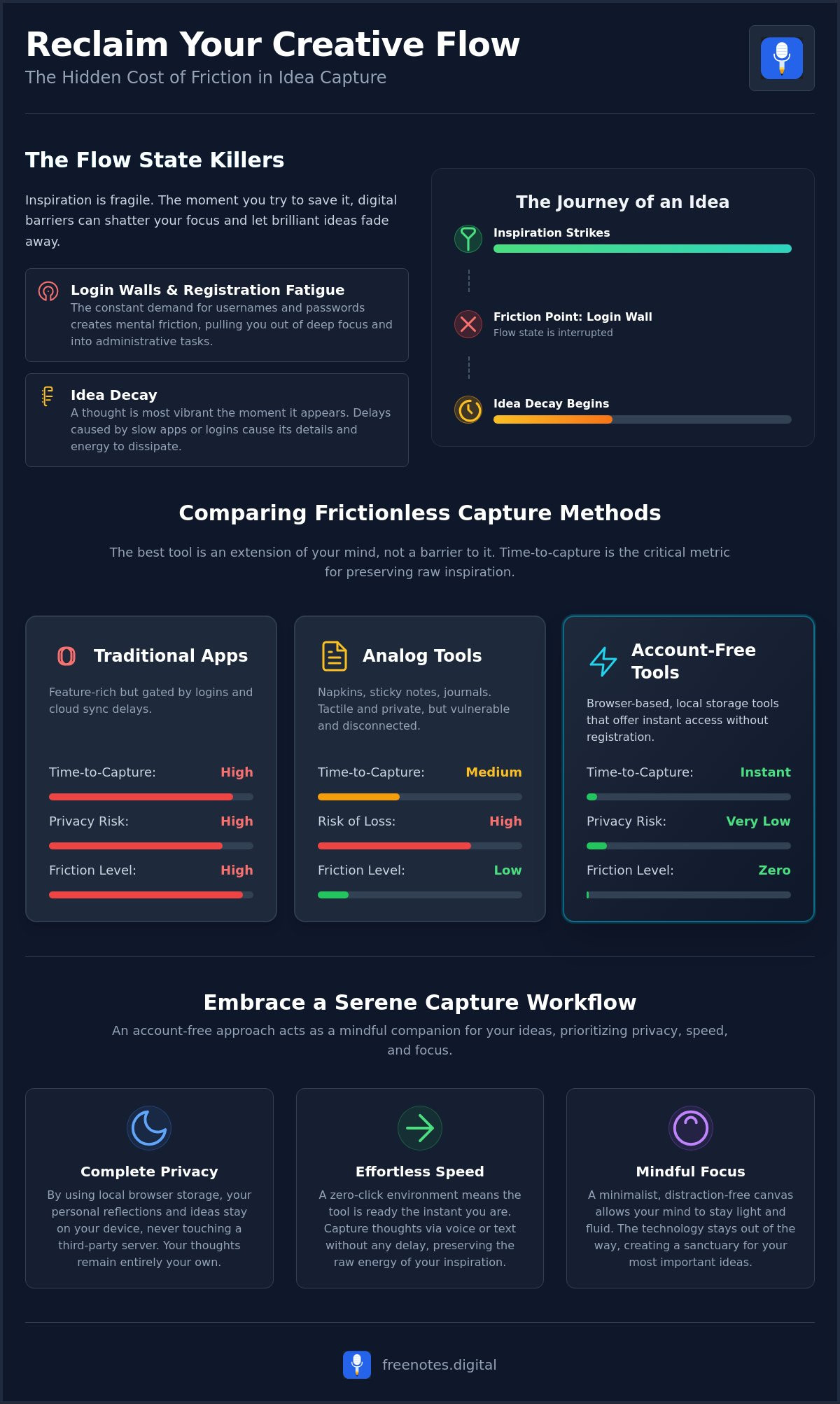
Inspiration arrives like a gentle breeze, often at the most unexpected moments. Yet, the second you reach for a tool to record that thought, you’re frequently met with a rigid demand to sign in. This is the login wall, a digital barrier that shatters your concentration. When you’re in a flow state, your mind moves with a purposeful, rhythmic grace. Registration prompts act as a psychological jolt, pulling you out of deep focus and forcing you into the administrative clutter of your digital life. You aren’t just losing seconds; you’re losing the neurochemical momentum that makes creative work feel effortless.
This interruption leads to registration fatigue, a very real exhaustion born from the endless cycle of creating and managing credentials. We’ve reached a point where the prospect of filling out another form is enough to make us abandon a brilliant thought entirely. This is where Idea Decay begins. A thought is most vibrant and detailed the moment it’s conceived, but it starts to vanish as soon as tech gets in the way. To preserve the brilliance of your insights, you need a quick voice to do list online that acts as a quiet, reliable assistant rather than a gatekeeper.
Breaking the Barrier of Mental Friction
Every extra click placed between an idea and its capture reduces the quality of the thought. When you have to navigate through menus or wait for a cloud sync to finish, the raw energy of your inspiration dissipates. There is also a significant emotional weight to managing another set of credentials. Each password is a tiny anchor, adding to a sense of mental heaviness that weighs down your daily life. A serene, account-free entry point removes these anchors, allowing your thoughts to stay light and fluid. Mental friction is the distance between inspiration and execution.
Preserving the Rawness of Early Inspiration
Uninhibited thoughts need an anonymous, private space to flourish before they’re refined into formal projects. There’s a vital difference between rapid capture and long-term storage. While you might eventually move your tasks to a complex system, the initial moment of capture requires a sanctuary that doesn’t ask who you are or where you’re from. Effective personal knowledge management begins with this act of pure, unburdened recording. Using a quick online scratchpad serves as a temporary sanctuary for your mind. It provides the freedom to speak your truth without the lingering worry of data being stored in a distant cloud, ensuring that your most personal reflections remain entirely your own.
Comparing Frictionless Capture Methods: From Physical to Account-Free Digital Tools
Finding the right vessel for your thoughts is a deeply personal journey. Some find solace in the tactile resistance of a pen gliding across a page, while others seek the immediate, fluid utility of a digital interface. When you need a quick voice to do list online, your primary goal is to minimize the distance between the birth of an idea and its safe preservation. We measure this through time-to-capture metrics. These metrics calculate the exact seconds spent navigating barriers before you can finally express yourself. The goal is to reach a state of effortless movement where the tool becomes an extension of your mind.
Analog Solutions: Napkins, Sticky Notes, and Journals
There’s a certain charm in the Cafe Napkin method. It represents the ultimate low-tech, account-free system, requiring nothing more than a scrap of paper and a moment of clarity. Index cards follow a similar philosophy, acting as the original frictionless capture device for generations of writers and thinkers. However, physical tools carry the inherent risk of loss. A spilled coffee or a misplaced notebook can erase hours of creative labor. While analog tools offer a wonderful tangibility, they lack the immediate accessibility and the security of digital local storage that keeps your insights protected on your own device.
Digital Scratchpads and Browser-Based Canvases
Modern thinkers are increasingly turning to ephemeral web tools for their transient insights. These browser-based canvases offer a level of speed that heavy mobile apps simply can’t match. You don’t have to wait for a complex application to update or navigate through a cluttered home screen. Instead, you can dictate and edit text online instantly, enjoying a process that feels as natural as breathing. This hands-free approach ensures your ideas are preserved without the mental weight of cloud reliance or the distraction of unnecessary features.
The perfect no-account tool must meet three specific criteria: speed, privacy, and exportability. It should stay out of your way until it’s needed, providing a reliable, unobtrusive support system for your mind. If you’re looking for a way to achieve this mental lightness, exploring a minimalist voice to text tool can transform your daily rhythm. By choosing a solution that respects your privacy and operates entirely within your browser, you create a harmonious space where your creativity can truly flourish without distraction.
Privacy in the Browser: Is Idea Capture Without an Account Secure?
A common misconception suggests that a lack of an account implies a lack of security. In reality, the opposite is often true. When you use a quick voice to do list online that operates without a central server, your data doesn’t travel across the open web to a distant database. Instead, it stays exactly where you created it. Modern web technologies like LocalStorage and IndexedDB act as sophisticated, quiet guardians for your thoughts. These systems allow your browser to remember your notes even if you refresh the page or step away for a moment. Your reflections are etched into your device’s local memory, remaining invisible to everyone but you.
The serenity of this approach lies in the absence of data mining. In a world where personal reflections are often treated as commodities, an account-free tool offers a restorative sense of privacy. You don’t have to worry about your private musings being used to train AI models or target you with advertisements. If you’re concerned about what happens when you close a browser tab, rest assured that LocalStorage is designed to persist. Your ideas wait patiently for your return, just like a physical journal left open on a quiet desk. You remain the sole owner of your intellectual space.
Local Processing vs. Cloud Vulnerability
Choosing a minimalist web tool is an act of embracing Privacy by Design. Traditional cloud apps are vulnerable to data breaches and server outages, creating a constant, low-level anxiety about the safety of your information. By contrast, browser-based tools process your input locally on your own hardware. Local processing ensures your voice never leaves your room. This technical boundary creates a digital sanctuary where your creative flow remains uninterrupted by the external world’s noise, ensuring that your quick voice to do list online is as secure as a locked diary.
The Peace of Mind in Anonymous Drafting
Anonymity is a powerful catalyst for honest and creative self-expression. When you aren’t tied to a digital identity, you’re free from the “audience effect,” which is that subtle feeling of being watched that can make your notes feel performative. You can capture raw, unpolished ideas without the weight of judgment. This privacy allows your thoughts to develop in their most natural state, free from the pressure of perfection. Once you’ve nurtured these early sparks into something more substantial, you can then choose to transition from private capture to a larger project on your own terms. It’s a gentle way to protect your creative process during its most vulnerable stages.
Designing Your Serene Capture Workflow in 2026
Designing a personal workflow is an act of self-care. It begins by observing your daily rhythm to identify your unique capture triggers. Perhaps your best thoughts arrive while you’re walking through a park, driving on a quiet road, or reading a thought-provoking book. These moments are sacred. By recognizing them, you can prepare a sanctuary for those ideas before they vanish into the noise of the day. You don’t need a complex system; you just need to be ready when inspiration strikes.
Once you’ve identified these moments, you should select a primary tool that requires zero clicks to start. In 2026, the most effective systems are those that stay out of your way. A quick voice to do list online provides this immediate entry point. You don’t want to navigate menus or manage credentials. You simply want to speak and be heard. This level of accessibility ensures that the distance between a thought and its record is as short as possible.
The draft and dump method is essential for achieving true mental clarity. Instead of trying to organize or edit thoughts as they come, you simply offload them into your digital scratchpad. This practice clears your cognitive load, allowing you to return to your current activity with a lighter heart. Establish a gentle weekly review to move these ideas from your temporary canvas to permanent storage. This ensures nothing of value is lost while keeping your daily workspace clean and focused.
Integrating Voice-to-Text for Effortless Flow
Using free voice to text online allows you to engage in rapid brainstorming without the physical constraint of a keyboard. When you speak your thoughts aloud, you often bypass the inner critic that slows down your writing. Using a quick voice to do list online ensures your thoughts are captured before the moment passes. To improve accuracy, try to minimize loud ambient noise, though modern browser-based tools are now remarkably adept at filtering out a gentle background hum. The goal is to speak with uninhibited honesty and let the tool do the work for you.
Exporting Without Friction
Moving your thoughts from a temporary scratchpad to a final destination should be just as smooth as the capture itself. Instead of relying on a complex sync button that might fail, a simple copy to clipboard remains the most reliable way to transfer text to an email or a formal document. This keeps your digital environment restorative and free from the clutter of unnecessary features. By clearing your canvas regularly, you maintain a fresh space for tomorrow’s inspirations. This methodical approach ensures your digital workspace remains a place of tranquility rather than a source of stress.
To begin your practice of mindful organization, explore our Free Voice to Text Note Taking Tool and feel the weight lift from your mind.
Free Notes App: Your Sanctuary for Account-Free Voice and Text Capture
Finding a space that honors your thoughts without demanding your identity is rare in our connected world. The Free Notes App serves as this rare sanctuary, intentionally designed to remove every barrier between you and your next great idea. By eliminating the need for downloads or registration, it solves the problem of registration fatigue we explored earlier. You don’t need to wait for an installation or remember a complex password. Instead, you simply open a browser tab and begin. It’s a tool that respects your time and your mental energy, providing a quick voice to do list online that feels as natural as a quiet conversation with yourself.
Our philosophy is rooted in the belief that technology should be a quiet, reliable assistant. This is why the Quick Notes Canvas is kept intentionally minimalist. It isn’t a place for cluttered menus or flashing notifications; it’s a space for quiet reflection. By utilizing local processing, the app ensures that your voice-to-text data remains on your device. This technical choice reinforces the privacy we discussed, allowing you to speak freely without the concern of external data mining. It’s a modern solution that remains grounded in a human-centric desire for simplicity and discretion.
Elegant Voice-to-Text Without the Noise
Capturing the subtle nuance of your spoken words shouldn’t feel like a technical chore. Our interface is crafted to transcribe your thoughts instantly, allowing you to see your ideas take shape on the screen in real time. This immediate feedback provides a restorative feeling of progress and clarity. This ease of use makes our tool a favorite for voice to text for students, who often need to offload complex academic concepts quickly during intense study sessions. Whether you’re drafting a thesis or a simple reminder, the process remains fluid and unburdened by digital noise.
A Minimalist Canvas for Your Inner World
The aesthetic of the Free Notes App is one of mental lightness. We’ve stripped away the unnecessary to create a quick voice to do list online that stays out of your way until the exact moment you need it. This design choice reduces cognitive load, mirroring the fluidity of your own thoughts. You can start your next brainstorm in a sanctuary of silence, knowing that the tool is there only to support you. It acts as a protective guardian of your creative process, ensuring that your inner world remains private, organized, and beautifully serene. It’s more than a utility; it’s a mindful companion for your daily life.
Reclaim Your Creative Flow and Mental Lightness
True creative freedom begins when the barriers between your mind and your digital canvas dissolve. We’ve explored how the modern obsession with accounts creates unnecessary friction, leading to registration fatigue and the decay of your most brilliant ideas. By choosing tools that prioritize your privacy and speed, you create a restorative environment where inspiration can flourish without interruption. Using a quick voice to do list online allows you to offload your mental clutter instantly, leaving you with a sense of lightness and control that cloud-heavy applications simply can’t provide.
You deserve a space that respects your process and protects your personal reflections. Our tool offers this sanctuary through 100% private local processing and instant voice-to-text conversion. There is no registration required and no data mining; just a clean, minimalist space for your thoughts to take shape. It’s time to step away from the noise and embrace a more elegant way of organizing your inner world. Capture your first idea now on the Free Notes App canvas and begin your journey toward a more mindful, frictionless workflow. Your ideas are waiting for a place to land.
Frequently Asked Questions
Is it really possible to capture ideas without an account?
Yes, it is entirely possible to capture your ideas without an account by using tools designed for immediate entry. These platforms remove the login wall so you can record your thoughts the moment they arrive. This approach respects your mental energy and prevents registration fatigue from stifling your creativity. By avoiding the sign-up process, you maintain a state of effortless flow that is essential for deep, mindful work.
Where are my notes stored if I do not have a login?
Your notes are stored directly on your own device using local browser storage. Unlike cloud-based services, this method doesn’t send your personal reflections to a distant server. It keeps your data within your browser’s memory, acting as a private, digital sanctuary that only you can access. This technical choice ensures your intellectual property remains under your control at all times, providing a restorative sense of security.
What happens to my ideas if I accidentally refresh the page?
Your content stays protected even if you refresh the browser or close the tab by mistake. Local storage technology is designed to persist, meaning your notes wait patiently for your return. You don’t have to worry about losing a brilliant insight to a technical glitch. This reliability allows you to move through your day with a light heart, knowing your thoughts are safely etched into your device’s memory.
Can I use voice-to-text features without registering?
You can absolutely use a quick voice to do list online without the need for any registration or personal details. The transcription process occurs instantly within your browser, turning your spoken words into text without requiring a login. This hands-free utility allows you to brainstorm uninhibitedly, ensuring that the technology stays out of the way while you focus on the raw energy of your inspiration.
Is capturing ideas in a browser safe for sensitive information?
Capturing ideas in a local browser environment is remarkably safe because it bypasses the vulnerabilities of third-party cloud storage. Since your notes aren’t stored on a server, they aren’t susceptible to external data breaches or unauthorized mining. This privacy by design creates a secure space for your most sensitive reflections, allowing you to express yourself with complete honesty and the peace of mind that your data is yours alone.
How do I transfer my notes from a no-account tool to my main app?
The most reliable way to move your notes is a simple copy to your clipboard. Once your thoughts are captured on the canvas, you can paste them into your preferred permanent storage tool or send them via email. This method avoids the friction of sync buttons and ensures your transition from a temporary scratchpad to a formal project is smooth, methodical, and entirely under your direction.
Does Free Notes App work on mobile browsers without an account?
Free Notes App works beautifully on mobile browsers, providing a quick voice to do list online whenever inspiration strikes on the go. You don’t need to download a heavy application or manage another set of mobile credentials. Simply open the site on your phone to enjoy the same serene, account-free experience you find on your desktop, making it a reliable companion for your walks or daily travels.
Why should I choose a browser tool over a physical notepad?
A browser-based tool provides the immediate utility of voice-to-text and digital editing while maintaining the simplicity of a physical notepad. While paper has its own tactile charm, a digital canvas allows you to transcribe your thoughts much faster than you could write them by hand. It offers a cleaner, more organized way to offload your cognitive load, combining modern efficiency with a sophisticated, distraction-free environment for your mind.