
What if your most complex ideas could reach the page before your fingers even touched the keys, all without a single download or account registration? You likely feel that the act of writing is too often interrupted by the heavy friction of complex software setups and the nagging worry of where your private data is actually being stored. It’s exhausting to manage restricted administrative rights or limited disk space when you simply want to create. By embracing no install voice typing, you can transform your spoken words into text instantly through your browser, maintaining a sense of mental lightness and complete control over your digital environment.
We believe that the most sophisticated tools are those that stay out of your way until the exact moment they are needed. This guide will show you how to establish a frictionless dictation workflow that prioritizes your privacy through local processing and requires zero technical overhead. We provide a methodical checklist to help you master effortless browser dictation in 2026, ensuring your writing process remains as fluid and restorative as your thoughts themselves.
Key Takeaways
- Learn why choosing no install voice typing allows you to capture spontaneous ideas without the heavy burden of software setup or administrative restrictions.
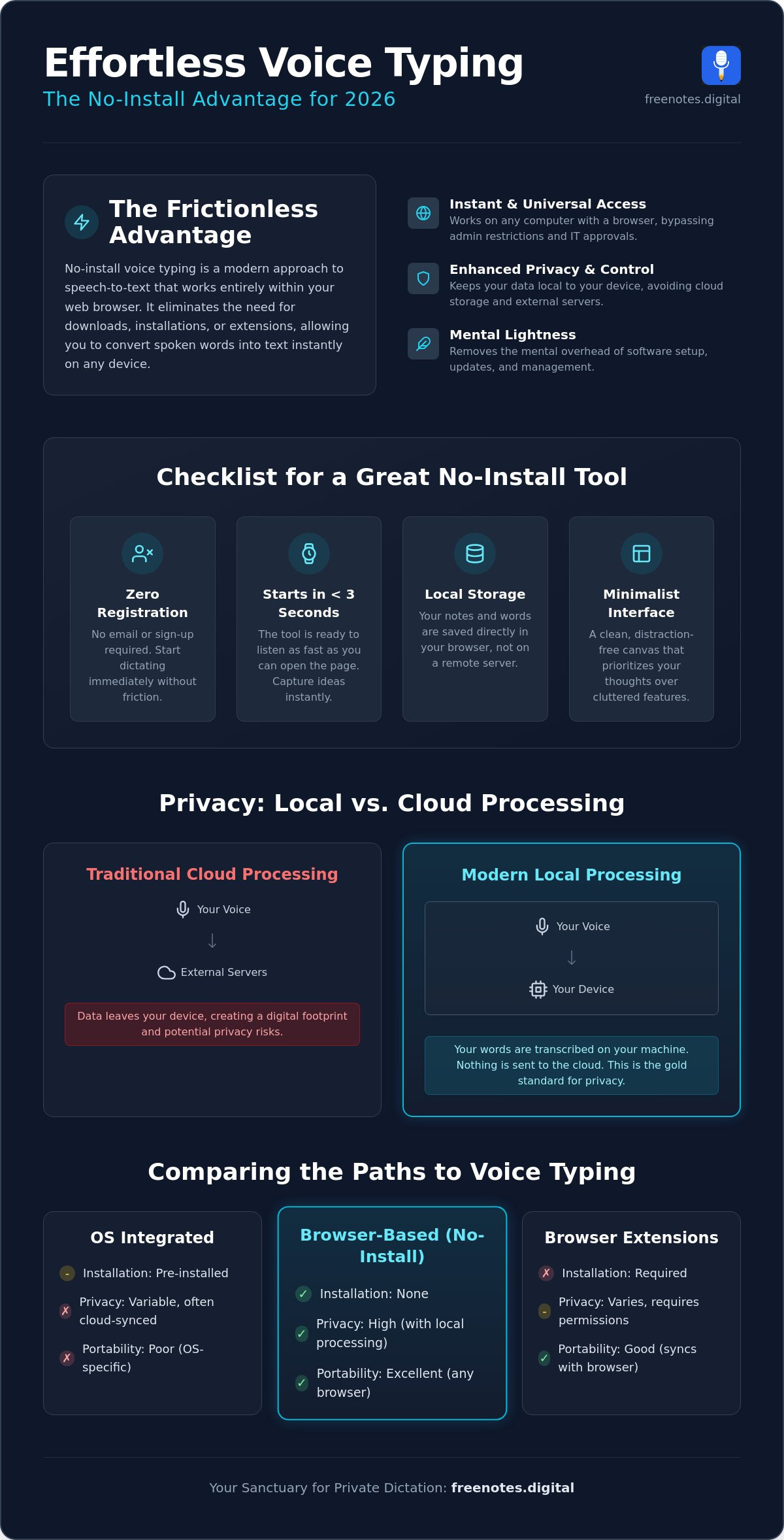
- Identify the essential criteria for a truly frictionless tool, including the ability to start dictating in under three seconds without providing an email address.
- Understand the privacy advantages of browser-based dictation, which keeps your data local and avoids the cloud-syncing requirements of traditional operating systems.
- Master the simple steps to prepare your physical and digital space for a calm, distraction-free writing experience.
- Discover a dedicated Quick Notes Canvas designed to transform your spoken thoughts into clear text within a secure, serene sanctuary.
What is No Install Voice Typing and Why Does it Matter?
Imagine a writing environment that feels as light as a breath. No install voice typing is the realization of this simplicity. It is a method of converting speech to text that resides entirely within your web browser, requiring no executable files, no bulky software suites, and no browser extensions. By eliminating the need to download and install, you remove the invisible walls that often stand between a fleeting thought and a finished sentence. For many, the transition to no install voice typing represents a significant move toward digital autonomy and mental clarity.
This approach matters because it respects your mental energy. Traditional software often demands a setup phase that creates friction. You might have to check for updates, manage permissions, or wait for a splash screen to fade. In contrast, browser-based dictation is ready when you are. It provides a quiet, immediate space for spontaneous idea capture, making it an essential tool for those who value a clean, distraction-free creative process. When the barrier to entry is zero, the path from mind to page becomes effortless.
This accessibility is particularly valuable for professionals using locked-down work laptops or individuals at public terminals. When you lack administrative rights to install new programs, a browser-based tool becomes your primary gateway to efficiency. It bypasses the need for IT approval and storage management, offering a reliable way to work across different hardware without losing the fluid rhythm of your creative flow. It turns any device with a browser into a personal writing station.
The Evolution of Browser-Based Dictation
The landscape of digital writing shifted dramatically with the refinement of the Web Speech API. This technology allows developers to build sophisticated interfaces that tap into your device’s microphone without external dependencies. By 2026, the industry has embraced a local-first philosophy. We’ve moved away from heavy, resource-draining dictation software toward lightweight web canvases, such as a Quick Notes Canvas, that feel like a natural extension of your own mind. These modern utilities stay quiet until you choose to speak, providing a restorative experience that prioritizes user well-being over complex mechanics.
Cloud vs. Local: The Privacy Spectrum
Privacy is often the greatest concern when we speak our private thoughts aloud. When you use traditional cloud-based tools, your voice data is frequently transmitted to external servers for processing, leaving a digital footprint that you can’t always control. To better understand these mechanics, you might explore a comprehensive overview of speech recognition and its various implementations. Choosing a no-cloud path ensures that your sensitive information remains within your personal sphere. Local processing serves as the gold standard for privacy in 2026, ensuring that every word you speak is transcribed on your own device rather than being stored in a distant database. This architectural choice transforms your browser into a serene sanctuary where your ideas are protected and your privacy is absolute.
The Checklist: What Makes a Great No-Install Tool?
Finding the right utility shouldn’t feel like another task on your to-do list. When you seek out no install voice typing, you are looking for more than just a utility; you are looking for a sanctuary for your ideas. The first item on your checklist must be zero registration. A truly frictionless tool respects your time and your inbox by allowing you to speak without first surrendering an email address. This lack of an entry barrier ensures that your creative spark isn’t extinguished by a sign-up form or a verification link.
Speed is the quiet companion of creativity. In the digital landscape of 2026, waiting is a form of friction that we no longer need to tolerate. An excellent browser-based tool must be ready to listen in under three seconds. This immediacy allows you to capture transient insights before they drift away. If you want to explore how to achieve this kind of instant responsiveness, a fast voice to text online approach can show you how to preserve your creative spark without the delays of complex interfaces. Alongside speed, consider where your words reside. A superior tool utilizes local storage within your browser cache. This ensures that your notes stay on your device, not on a remote server, providing a restorative sense of ownership over your own thoughts.
The visual environment plays a vital role in maintaining your focus. A clean, minimalist interface that mirrors the fluidity of your thoughts is essential. When the screen is free from flashing ads and cluttered sidebars, your mind can settle into a state of calm productivity. This aesthetic simplicity isn’t just about looks; it’s about creating a dedicated space where your voice is the only thing that matters. It’s about achieving mental lightness through an interface that stays out of the way.
Essential Features for Seamless Flow
To maintain a steady rhythm, real-time transcription speed is non-negotiable. You shouldn’t have to wait for the software to catch up with your speech. Modern advancements in Dictation (speech-to-text) technology now allow for sophisticated automatic punctuation that understands the natural cadence of your voice. Using a Quick Notes Canvas as your primary workspace helps bridge the gap between spoken word and written record, turning a stream of consciousness into a structured thought with elegant ease.
Security Benchmarks for Web Tools
Even in a serene environment, security remains a cornerstone of confidence. Always look for the SSL encryption “lock” icon in your browser bar to ensure your connection is secure. It’s equally important to verify “No-Log” policies in any free web utility you choose. By prioritizing voice to text local processing, you can be certain that your spoken words never leave your personal sphere. If you’re looking for a reliable and quiet place to begin, you might find that our Quick Notes Canvas offers the perfect balance of simplicity and security for your daily reflections.
Comparing the Paths: Browser vs. OS vs. Extensions
Choosing the right method for digital expression is a deeply personal decision that shapes your daily creative rhythm. While several paths exist to convert speech into text, they offer vastly different experiences regarding privacy, ease, and mental load. OS-level tools, such as the built-in dictation features on Windows or macOS, often provide high accuracy but come with a hidden tether. They frequently require you to be signed into a specific cloud account and are strictly limited to the hardware you currently own. For those seeking a more liberated experience, no install voice typing through a browser offers a more fluid alternative that works gracefully across Mac, PC, and Linux systems alike.
Browser extensions represent another common path, promising a wealth of features and shortcuts. However, these add-ons often introduce a subtle form of digital friction. They require an installation process that can feel intrusive, and many track your browsing habits to fuel third-party advertising models. In contrast, a pure browser-based tool acts as a quiet, reliable assistant that exists only when you need it. It requires no permanent space on your hard drive and leaves no lingering footprint on your system, maintaining the integrity of your personal workspace.
- Browser-Based: Offers the highest level of privacy and works instantly on any device without a setup phase.
- OS-Level: Fast and accurate but often tied to specific hardware ecosystems and cloud storage.
- Browser Extensions: Feature-rich but can slow down your browser and compromise your data privacy.
- Mobile Apps: Excellent for brief notes on the move, yet they often feel cumbersome when you need to transition to a full desktop writing environment.
When to Choose a Browser-Based Tool
There are moments when the sensitivity of your thoughts requires a more protected environment. Browser-based tools are the ideal choice for drafting private journals, capturing meeting minutes, or composing sensitive emails where you prefer your data to stay local. This sense of security and simplicity is why many voice to text for students resources recommend web-based utilities. They allow learners to focus on their academic success without the distraction of complex software management or the worry of data harvesting.
The Hidden Costs of “Free” Extensions
Many “free” extensions come with a cost that isn’t measured in currency. They often contribute to “browser bloat,” a state where too many background processes slow down your computer and interrupt your creative flow. Even more concerning is the tendency for these tools to engage in data harvesting, quietly collecting information about your digital life. Embracing no install voice typing within a standalone web tab provides a sense of serenity. It allows you to speak your mind and then simply close the tab, knowing you’ve left no trace behind and kept your mental environment clean and focused.
Setting Up Your Serene Dictation Environment
Creating a space that supports your creative flow is just as important as the technology you use. When you choose no install voice typing, you are opting for a path of least resistance. To truly benefit from this simplicity, your physical surroundings should reflect the same sense of order and calm. By preparing your environment and your mindset, you can transform a simple browser tab into a powerful extension of your own thoughts.
Follow these gentle steps to begin your session:
- Step 1: Seek stillness. Choose a quiet space to reduce background noise. This minimizes distractions for the browser and provides the mental space you need to think clearly.
- Step 2: Invite the microphone. When you open your tool, your browser will ask for permission. Grant this with a single click. It is the only “setup” required.
- Step 3: Speak with your natural rhythm. There is no need for a robotic or forced “dictation voice.” Modern tools are designed to understand the nuance of human speech. Breathe and let your words flow as they would in a quiet conversation.
- Step 4: Guide the structure. Use simple voice commands like “period,” “comma,” or “new paragraph” to give your thoughts shape. This allows you to stay in the moment without reaching for the keyboard.
- Step 5: Secure your words. Once your thoughts are captured, simply copy your text or save it locally. Since your words aren’t stored on a cloud server, this final step ensures your ideas are safely tucked away in your preferred location.
A quiet environment acts as a catalyst for mental clarity, allowing your voice to be the sole focus of the experience.
Optimizing Hardware for Better Accuracy
While most built-in laptop microphones are sufficient for casual notes, a dedicated headset can offer a more intimate and accurate experience. These devices often feature better echo cancellation, which helps the browser distinguish your voice from ambient sounds. If you find yourself in a larger room, a simple external microphone can provide the crispness needed for a perfect transcription. If you are ready to experience this fluidity right now, our Quick Notes Canvas provides the ideal environment to test your setup.
Troubleshooting Common Browser Hurdles
Occasionally, you might encounter a “Microphone not found” error. This is usually solved by checking your browser’s address bar. Look for the small camera or microphone icon to reset your permissions in Chrome or Firefox. Ensure your browser is updated to the latest 2026 standards to take full advantage of the most recent Web Speech API improvements. If you are using Firefox, remember that you may need to manually enable speech recognition in your settings to enjoy the full benefits of no install voice typing without a hitch.
Free Notes App: Your Sanctuary for Private Dictation
Finding a space that honors your privacy while facilitating your creative flow is the core mission behind the Free Notes App. We’ve designed this tool for immediate, frictionless use, ensuring that your transition from thought to text is as smooth as possible. By embracing no install voice typing, we’ve removed the technical barriers that often clutter the mind. There are no accounts to manage and no downloads to monitor. Instead, you’re greeted by the Quick Notes Canvas, a minimalist space where your spoken ideas can unfold without distraction. It acts as a quiet, reliable assistant that stays out of the way until the exact moment it is needed.
The beauty of this approach lies in its simplicity. When you speak, your words appear on the screen with a purposeful grace, allowing you to see your thoughts take shape in real-time. This immediate feedback loop helps bridge the gap between a transient spoken idea and a finished, polished document. Because the interface is so clean and restorative, you can focus entirely on the nuance of your message rather than the mechanics of the software. It’s a sophisticated tool that values your creative process and respects your personal environment.
Why We Built a “No-Cloud” Tool
Our choice to build a “No-Cloud” tool stems from a deep-seated philosophy of mental lightness. We believe that your digital footprint should be as small as possible, especially when it relates to your private reflections and sensitive professional drafts. Local processing ensures that your spoken words never leave your device, providing a free voice to text online experience that feels like a true sanctuary. This architecture protects you from the vulnerabilities of external servers and gives you absolute control over your intellectual property. It is a human-centric approach to no install voice typing that prioritizes discretion and user well-being above all else.
Getting Started with Free Notes
Beginning your first session is a gentle, one-click process. When you arrive at the app, a single tap on the microphone icon opens the gate to your dictation session. Many of our users find the Quick Notes Canvas to be a mindful companion for daily reflections or restorative journaling. It allows you to speak your worries or your dreams into existence, watching them settle onto the page without the physical strain of typing. Once your session is complete, you can easily move your text to its final destination, knowing your privacy has been guarded throughout the entire journey. Experience the tranquility of Free Notes App today and rediscover the joy of effortless, private expression.
Embracing a Lighter Path to Creative Expression
Digital clarity begins when you remove the barriers between your voice and the page. By following the essential checklist for browser-based tools, you’ve discovered how to reclaim your creative focus without the burden of cloud accounts or heavy software installations. Choosing no install voice typing is a commitment to a more serene and private way of working, where your data stays local and your mind remains unburdened by technical clutter. You now possess the knowledge to optimize your physical space and select a tool that acts as a quiet, reliable guardian for your most sensitive ideas.
The freedom to speak your thoughts instantly is a restorative practice for the modern creator. With no registration required and local-only data processing, our Quick Notes Canvas remains 100% free in 2026, providing a secure sanctuary for your daily reflections. We invite you to Start Dictating Privately on the Free Notes App today. Let your words flow with the grace they deserve, knowing you’ve chosen a path of absolute simplicity and discretion. Your next great insight is just a spoken sentence away, waiting to be captured in a space that truly respects your peace of mind.
Frequently Asked Questions
Is voice typing without downloading safe for my privacy?
Yes, browser-based dictation is remarkably secure when you choose tools that prioritize local processing. Because your spoken thoughts are transcribed directly on your own device, the audio data never travels to an external server. This “no-cloud” approach creates a secure sanctuary where your private reflections remain entirely within your control, allowing you to speak freely without leaving a digital footprint.
Do I need a high-end microphone for browser-based voice to text?
You don’t need expensive equipment to enjoy a smooth and accurate experience. Most built-in laptop microphones are more than capable of capturing the clarity needed for a successful transcription session. If you are working in a space with gentle background noise, a simple pair of earbuds with an inline microphone can help isolate your voice and maintain the fluidity of your creative rhythm.
Can I use no-install voice typing on my mobile phone browser?
You can certainly access these tools through a mobile browser, though the experience is most restorative on a desktop. While mobile access is convenient for capturing brief insights while you move, a larger screen provides the mental space needed to see your thoughts unfold clearly. The Quick Notes Canvas is specifically designed to offer a distraction-free environment that feels most elegant on a traditional monitor.
What happens to my notes if I close the browser tab?
Your notes will typically vanish when the tab is closed to ensure your digital environment stays clean and uncluttered. Since these tools value your privacy and don’t store data on remote servers, it’s a mindful practice to copy your text to a permanent home once your session ends. This ritual ensures that your ideas are safely preserved while your browser remains a fresh, empty space for your next inspiration.
Are there any time limits on free voice typing sessions?
Most browser-based utilities allow for unlimited dictation sessions to support your natural flow of thought. You can speak for as long as necessary to capture a complex idea or a lengthy journal entry without the pressure of a ticking clock. This lack of restriction is central to our philosophy of removing mental friction, allowing you to focus entirely on the restorative act of expression.
Does “no install” mean it works on any computer?
No install voice typing works gracefully on any computer equipped with a modern, compatible browser such as Chrome, Edge, or Safari. This includes restricted work laptops or public terminals where you lack administrative rights to install new software. It effectively turns any available device into a personal, private writing station that is ready to support your creative process in an instant.
How accurate is browser-based speech recognition compared to software?
Browser-based recognition has advanced significantly and now rivals the precision of traditional, heavy software suites. By 2026, many high-end platforms utilizing the Web Speech API achieve up to 99% accuracy by understanding the natural cadence and nuance of human speech. This ensures that your spoken words are captured with elegant precision, reflecting your ideas exactly as you intended them to appear on the page.
Can I use voice typing in different languages without an account?
You can easily dictate in a wide variety of languages without ever needing to create an account or provide an email address. Most browser tools offer a simple menu to switch between languages, tapping into global recognition libraries to support your unique voice. This inclusive approach ensures that everyone can find a serene and accessible space to transform their spoken thoughts into written text with ease.