
What if your most intimate brainstorms and private reflections never actually touched the internet? It’s a natural concern in 2026, especially as new privacy regulations begin to recognize the deep sensitivity of our personal data. You might feel the heavy weight of subscription fatigue or the technical frustration of tools that feel more like a chore than a help. It’s time to move toward a lighter, more mindful way of working. By utilizing voice to text local processing, you can capture your thoughts with the serene confidence that your voice remains entirely private, processed only within the safety of your own browser.
I understand the desire for a tool that supports your well-being rather than just your output. You’ll learn how to convert speech to text for free while maintaining total data sovereignty over every word you speak. We’ll explore how modern, browser-based dictation creates a frictionless experience for effortless note-taking without the need for complex software or hidden fees. This is your invitation to a more elegant way of creating, where technology serves as a quiet, reliable assistant that protects your ideas while clearing your mental clutter.
Key Takeaways
- Discover how to reclaim absolute data sovereignty by keeping your voice data entirely on your own device, far from the reach of cloud surveillance.
- Master the use of voice to text local processing through your browser’s native engine to ensure your private thoughts are never stored on external servers.
- Learn to distinguish between truly private local tools and cloud-based services that may harvest your personal metadata under the guise of convenience.
- Uncover the subtle art of creating a mental sanctuary through rhythmic, mindful dictation techniques that enhance both transcription accuracy and internal clarity.
- Experience the restorative ease of the Quick Notes Canvas, designed to let you begin brainstorming instantly without the friction of registration or logins.
The Privacy Revolution: Why Voice to Text Local Processing Matters
In 2026, the digital landscape has reached a significant turning point. We’ve spent more than a decade feeding our most personal data into the cloud, only to realize that true ownership of our thoughts is becoming a rare luxury. Data sovereignty isn’t just a technical term; it’s the right to keep your inner monologue private. As Speech recognition technology continues to evolve, the shift toward voice to text local processing offers a necessary retreat from the prying eyes of centralized servers. By processing audio on your own device, you’re not just securing your data. You’re also reducing the massive energy consumption required by giant data centers, making your productivity a quieter, greener act of creation.
The Anxiety of Cloud-Based Dictation
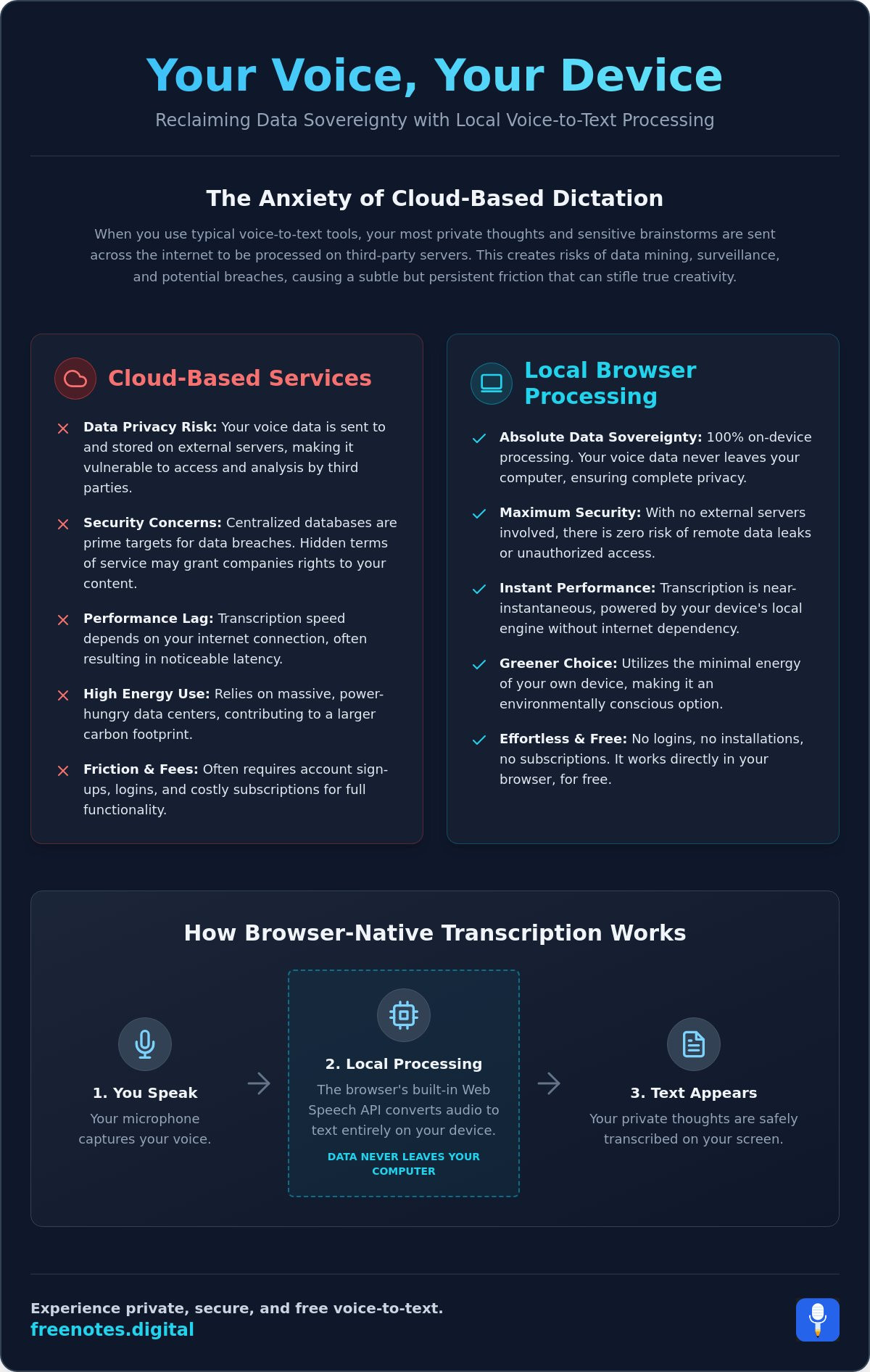
When you speak into a cloud-connected tool, your voice often becomes a data point in a vast, distant repository. Hidden terms of service can grant companies rights to use your recordings for model training or marketing. This constant surveillance creates a subtle, persistent friction. You might hesitate to speak your boldest ideas or your deepest vulnerabilities. Choosing a private note taking no cloud approach eliminates this anxiety. It ensures that no matter how sensitive your brainstorm is, it remains between you and your screen. This shift protects you from the rising risks of data breaches in centralized transcription databases, where a single leak can expose thousands of hours of private dictation.
Restoring Mental Stillness through Security
True creativity requires a feeling of safety. When you know your words are processed locally, your mind can finally let go of the “what ifs” associated with digital surveillance. This security acts as a silent assistant, standing guard over your intellectual property while you focus on the fluid rhythm of your thoughts. Voice to text local processing transforms a functional utility into a restorative practice. It allows you to move with a sense of mental lightness, knowing that your digital environment is a protected sanctuary. It’s a modern way to find stillness in a noisy world, positioning local processing as a vital tool for the mindful professional who values discretion as much as efficiency.
The Mechanics of Browser-Native Transcription
Understanding how your browser transforms sound into text is the first step toward reclaiming your digital peace. In this setup, your own device acts as the central engine. Rather than relying on distant, energy-hungry servers, your laptop or tablet uses its internal power to handle the heavy lifting. This is the essence of voice to text local processing. It’s a shift that replaces the complexity of cloud APIs with the quiet efficiency of your existing hardware, ensuring that your words never have to travel across the open web to be understood.
The primary bridge for this experience is the Web Speech API. This built-in browser feature allows for a fluid transition from spoken thought to digital ink with almost zero latency. Local browser processing serves as a secure, invisible vault where your spoken reflections are transformed into text without ever crossing the threshold of your personal device. Because voice to text local processing is already woven into modern browsers, there’s no need for external installations or technical CLI tools. You simply open a page and begin the process of unburdening your mind.
How Your Browser Protects Your Voice
The technical magic happens through a local “handshake” between your microphone and your device’s memory. Your audio data stays within the temporary RAM of your browser, never touching a hard drive or a remote database. This process is most effective when paired with a no-registration model. By utilizing voice notes in browser no login, you remove the final layer of tracking. There’s no account to link to your voice, no email to harvest, and no profile to build. It’s just you and your ideas in a clean, temporary workspace that disappears the moment you close the tab.
Hardware Requirements for 2026 Local AI
By 2026, major browsers have refined their engines to support real-time transcription with minimal impact on performance. You don’t need a high-end workstation to enjoy this serenity. Modern web standards ensure that local processing is light on battery life, allowing you to dictate for long periods without the heat or noise of a struggling processor. This efficiency contributes to a sense of mental lightness; the interface stays responsive and out of your way. If you’re ready to experience this clarity for yourself, you might try a free voice to text note taking tool that prioritizes your privacy from the very first word.
Comparing Local Browser Tools to Cloud and Desktop Alternatives
Choosing the right environment for your thoughts is a decision that impacts your mental clarity as much as your data security. In the current landscape, cloud-based solutions still hold about 59% of the market share. However, many users are beginning to realize that these “convenient” services often feel like a glass room. They offer speed, yet the walls are transparent. When you rely on voice to text local processing, you’re choosing a sanctuary over a public square. Unlike cloud models that rely on server-side encryption, local processing ensures your data never exists on a third-party server in the first place. This isn’t just a security benchmark; it’s a fundamental shift in how we own our digital lives.
The “Free Trap” is a common hurdle for those seeking privacy. Many services offer transcription at no cost, but they often harvest personal metadata or even neural data to refine their models. Under 2026 updates to the California Privacy Rights Act (CCPA), the definition of sensitive information now explicitly includes this type of neural data. By keeping your processing local to the browser, you bypass these complex legal mazes entirely. You don’t have to audit a company’s data-sharing terms when your voice never leaves your device.
The Hidden Costs of Cloud Transcription
Subscription fatigue is a real weight on the modern creative mind. Even with OpenAI’s 2026 Whisper API pricing at approximately $0.003 to $0.006 per minute, the transactional nature of cloud tools creates a mental “meter” that discourages long, flowing brainstorms. There’s also the emotional cost of the “upload wait.” In a busy life, those few seconds of syncing can break a delicate state of flow. Registration-free tools remove this friction, offering a sophisticated experience where you can simply speak and be heard without checking a balance or managing a login. For those who need both speed and privacy, exploring fast voice to text online options that keep your data local can be a transformative step toward a truly frictionless creative workflow.
Desktop vs. Browser: The Battle for Convenience
While desktop applications offer local power, they often come with the burden of installation, frequent updates, and platform-specific limitations. A browser-based approach is the gold standard for quick idea capture because it’s truly cross-platform. Whether you’re on a shared library computer or your personal tablet, the experience remains consistent and serene. For those who want a complete, step-by-step approach to setting up a frictionless workflow, exploring no install voice typing offers a practical checklist for getting started without a single download. This immediate access is especially beneficial as a voice to text for students tool, where the ability to instantly capture a lecture or a sudden insight can be the difference between academic success and a lost opportunity. You gain the power of local AI without the heavy lifting of software management.
Best Practices for Mindful and Accurate Dictation
Mastering the art of dictation is as much about your internal state as it is about the technology you use. While voice to text local processing provides the secure foundation you need, the quality of your experience depends on how you approach the act of speaking. Dictation should feel like a natural extension of your thoughts, a gentle flow that moves from your mind to the screen without resistance. By treating this process as a mindful exercise, you transform a simple task into a restorative practice that clears mental clutter and fosters true creativity.
Finding a rhythmic flow is essential for both accuracy and clarity. Instead of rushing to finish a sentence, adopt a steady, methodical pace. This allows the local processing engine to capture every nuance of your speech with precision. You can also use spoken punctuation commands like “period,” “comma,” or “new paragraph” to structure your inner monologue in real time. This practice helps you visualize your words as they appear, turning a stream of consciousness into a well-organized document. The final, restorative act is the review; refining your captured thoughts allows you to engage deeply with your ideas, ensuring they reflect your true intent.
Optimizing Your Vocal Environment
Creating a sanctuary for your voice is the first step toward a clean start. Background noise, such as a humming fan or distant traffic, can introduce subtle friction into the transcription process. Finding a quiet, low-noise environment isn’t just about technical accuracy; it’s about the psychological benefit of having a dedicated space for reflection. When your surroundings are still, your mind can focus entirely on the task at hand. While modern browser engines are highly resilient, using a quality microphone can provide professional-level clarity, ensuring that even your softest reflections are captured with elegance and ease.
The Fluidity of Thought: Speaking Your Mind
Visualize the screen as a canvas for your creative process. As you speak, allow yourself to pause for breath; these moments of silence are not interruptions but essential parts of a mindful exercise. This rhythmic breathing helps you maintain mental lightness, preventing the frantic feeling often associated with high-pressure productivity tools. Organized spoken notes act as a mirror for your thoughts, helping you see patterns and insights that might remain hidden in a cluttered mind. To begin your own journey toward clearer thinking and total data sovereignty, you can use this free voice to text note taking tool to start capturing your ideas today.
Embracing Serenity with the Free Notes App Workspace
Stepping into a digital workspace shouldn’t feel like entering a busy office; it should feel like walking into a quiet library. After exploring the technical and ethical reasons for keeping your data close, the final step is to find a tool that embodies these values. The Free Notes App is designed to be that quiet, reliable assistant. By prioritizing voice to text local processing, this workspace ensures that the moment you begin to speak, your thoughts are captured with purposeful grace and absolute discretion. There are no loud notifications or complex menus to navigate. There is only you and the canvas.
Immediacy is the cornerstone of a stress-free creative process. The Quick Notes Canvas is built for those moments when an insight strikes and you need to capture it before it fades. Because the system relies on voice to text local processing, the transcription happens instantly within your browser. You don’t have to wait for a server to wake up or for a file to upload. This fluidity reduces cognitive load, allowing you to stay in your flow state longer. It’s a modern, human-centric approach that respects your time and your mental energy.
Your Private Sanctuary for Ideas
Registration is often the first point of friction in tech services. It’s a subtle demand for your personal data before you’ve even typed a single word. Our “No Registration” philosophy is a deliberate choice to protect your personal space. You can experience the lightness of a tool that stays out of your way because there are no accounts to manage and no passwords to remember. This minimalist interface supports your mental clarity by removing the clutter of traditional software. Local-only storage is perfect for transient insights; your notes exist only as long as you need them, providing a truly private sanctuary for your most honest reflections.
Next Steps to Effortless Organization
Integrating this serene practice into your daily life is simple and rewarding. You can bookmark your canvas to ensure that a private, secure dictation session is always just one click away. This instant access helps turn mindful note-taking into a consistent habit rather than a technical chore. As you find your own rhythm, consider sharing the gift of private dictation with your creative community. In a world saturated with cloud surveillance, the knowledge that a secure, local alternative exists can be a powerful relief for fellow writers, students, and thinkers. You’re ready to unburden your mind and reclaim your data sovereignty.
Begin your journey to mental clarity with Free Notes App and discover the profound peace of a workspace that truly belongs to you.
Reclaiming Your Digital Peace
The journey toward true data sovereignty begins with a single, mindful choice. You’ve seen how the modern landscape demands a more protective approach to our digital reflections. By embracing voice to text local processing, you aren’t just choosing a tool; you’re building a sanctuary for your ideas. This transition removes the heavy weight of cloud surveillance and the mental friction of complex setups, leaving you with a workspace that feels as light and clear as your own thoughts.
It’s time to move beyond the limitations of subscriptions and the anxiety of data tracking. Every word you speak should belong solely to you. Our workspace honors this belief by ensuring zero data ever leaves your browser. With no registration required and no software to download, you can begin your practice of effortless organization immediately. It’s a completely free way to restore your focus and protect your creative process. Your voice is the most authentic expression of your inner self; keep it safe, keep it private, and let it flow.
Dictate your thoughts in our private, local-only sanctuary
Frequently Asked Questions
How does voice to text local processing protect my privacy?
Voice to text local processing protects your privacy by ensuring that your audio data never leaves your computer or mobile device. Instead of sending your voice to a remote server for transcription, the browser handles everything internally. This setup eliminates the risk of data breaches in cloud databases and ensures your private thoughts remain entirely under your control.
Is there a free voice to text tool that works without an account?
You can use our Free Voice to Text Note Taking Tool to capture your ideas without ever creating an account. This registration-free model removes the friction of logins and prevents the collection of personal metadata. It’s a simple, elegant way to begin dictating immediately while maintaining your anonymity and mental lightness.
Do I need a high-end computer for local browser transcription?
You don’t need a high-end workstation to enjoy smooth, local transcription in 2026. Modern browsers are highly optimized to run these processes efficiently on standard laptops and tablets. The system is designed to be light on your device’s resources, providing a responsive experience that doesn’t drain your battery or cause your processor to struggle.
Can I convert speech to text free without downloading software?
You can absolutely convert speech to text for free without downloading any external software or complex tools. By using a browser-based interface, you access powerful transcription capabilities through the Web Speech API. This no-download approach ensures your workspace remains clean and uncluttered, allowing you to focus entirely on the creative flow of your thoughts.
How accurate is local browser processing compared to cloud AI?
Local browser processing has reached impressive accuracy rates that rival traditional cloud-based services. While cloud AI once held a significant lead, modern local models now provide exceptional precision for clear speech in quiet environments. The difference in performance is often imperceptible for daily note-taking, offering a reliable experience that prioritizes your privacy without sacrificing quality.
Does local voice to text work on mobile browsers?
Most modern mobile browsers in 2026 fully support local voice-to-text functionality. This allows you to capture transient insights while on the move without relying on a dedicated mobile app. Whether you’re using a smartphone or a tablet, the experience remains consistent and secure, providing a portable sanctuary for your private brainstorms and reflections.
What happens to my notes if I close the browser tab?
Because the tool prioritizes absolute privacy, your notes are not stored on any external servers. If you close the browser tab without saving your text, the data is cleared from your device’s temporary memory. This transient nature ensures that no trace of your private thoughts remains behind, so you should always copy your completed notes before finishing your session.
How do I add punctuation while using local dictation tools?
You can easily add punctuation by speaking specific commands like “period,” “comma,” or “new paragraph” as you dictate. These verbal cues allow you to structure your inner monologue in real time without needing to touch your keyboard. It’s a methodical way to organize your thoughts, helping you maintain a steady, creative rhythm during your voice to text local processing session.