
What if the most private place for your fleeting thoughts wasn’t a locked drawer, but a digital canvas that respects your silence? For many, the search for a reliable free voice to text online tool ends in frustration, blocked by mandatory accounts or the nagging worry that personal reflections are being harvested on a distant server. You deserve a space that feels like a quiet room, where the only thing that matters is the rhythm of your own voice. It’s exhausting to navigate cluttered interfaces and restrictive time limits, like the 30-minute caps found on some popular platforms, when you simply need to think out loud.
We understand that mental clarity requires a lack of friction, which is why we’re showing you how to reclaim your creative flow. You’ll learn how to transform your spoken words into text with absolute privacy, no registration, and zero cloud storage anxiety. This article explores the beauty of local browser processing and how a minimalist approach can turn a simple utility into a restorative sanctuary for your ideas. By removing the barriers between your voice and the page, you can finally experience a dictation process that is as fluid and natural as thought itself.
Key Takeaways
- Learn how local browser processing keeps your voice data entirely on your device, ensuring your most private reflections never reach a cloud server.
- Discover why capturing your thoughts with free voice to text online in real-time is more effective for creative flow than the cumbersome process of recording and uploading files.
- Understand how to use digital dictation as a restorative tool for mental decluttering, making it easier to maintain habits like morning pages or evening reflections.
- Find out how to bypass the friction of traditional software by using a “no registration, no download” canvas that is ready the moment an idea strikes.
- Contrast the serene, minimalist atmosphere of browser-based dictation with the noisy, ad-heavy interfaces of conventional note-taking applications.
The Search for a Serene Free Voice to Text Online Experience
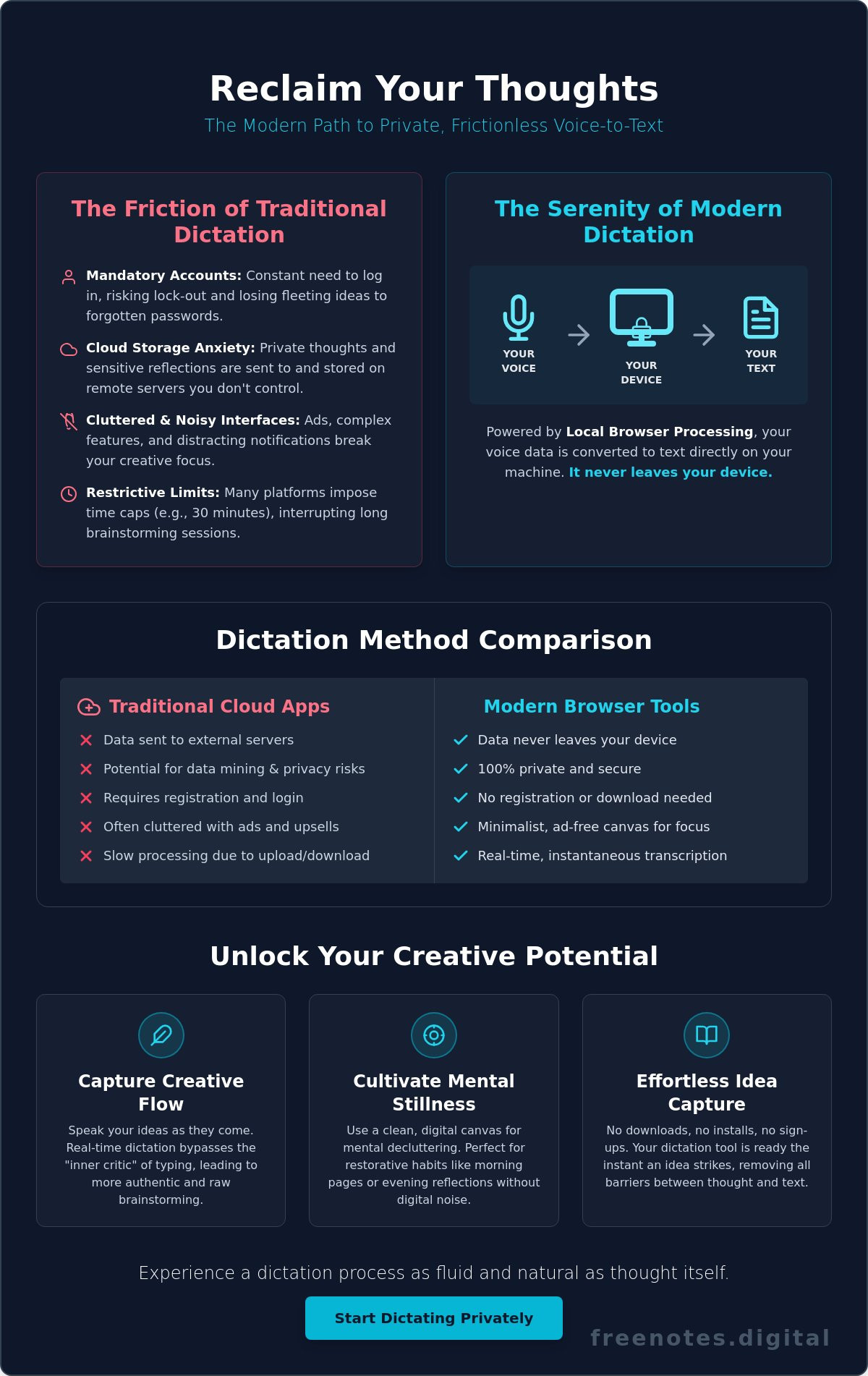
Think of free voice to text online as a bridge between the fluid, often chaotic nature of human thought and the structured clarity of a digital record. For many, the act of typing feels like a barrier, a mechanical filter that slows down the vibrant pulse of an original idea. Traditional note-taking applications often exacerbate this tension. They’re frequently noisy, cluttered with unnecessary features, and laden with advertisements that fragment your attention. When you’re trying to capture a delicate insight, the last thing you need is a flashing banner or a complex sidebar competing for your focus.
By June 2026, a significant shift has occurred in how we interact with our devices. Users are moving away from heavy, cloud-dependent ecosystems that feel like they’re constantly watching or harvesting data. There’s a growing desire for private, minimalist tools that stay out of the way. This movement toward “mental lightness” is about removing every possible point of friction. It’s the difference between struggling with a heavy door and walking through an open archway. A truly serene dictation experience provides that open path, allowing your thoughts to land softly on a clean digital canvas without any technical static.
Why Voice is the Most Natural Way to Capture Ideas
Speaking your thoughts aloud offers a profound psychological benefit. It reduces the cognitive load required to translate an abstract feeling into a physical action like typing. Modern Speech recognition technology has become a sophisticated companion in this process, listening with the kind of precision that was once reserved for human transcriptionists. It allows you to maintain a state of creative flow, where the transition from mind to screen is nearly instantaneous.
Dictation is particularly effective because it bypasses the “inner critic.” When we type, we’re often tempted to backspace, edit, and perfect each sentence as it forms. This self-censorship can kill a brilliant idea before it’s fully born. When you speak, you’re encouraged to keep moving, letting the ideas tumble out in their rawest, most honest form. This leads to more authentic brainstorming and a deeper connection to your own creative voice.
The Problem with Traditional Cloud-Based Dictation
Searching for a free voice to text online tool that respects your boundaries shouldn’t be another chore on your to-do list. Many “free” services come with hidden costs, such as extensive data mining or the risk that your private reflections are being stored on a server you don’t control. There’s also the persistent friction of the digital world: forgotten passwords, mandatory account registrations, and the constant pressure to upgrade to a premium tier.
These barriers turn a simple act of reflection into a bureaucratic process. If you have to spend two minutes logging in just to record a thirty-second thought, the thought is often lost. Choosing a no registration note app provides a modern solution for these transient insights. It offers a sanctuary where you can begin speaking the moment you arrive, ensuring that your mental energy is spent on your ideas rather than on navigating a login screen. It’s a more respectful, human-centric way to live in a digital world.
Understanding Local Browser Processing: How Privacy Meets Technology
The technical magic of client-side processing is what transforms a simple browser into a sophisticated recording studio. When you use a high-quality tool for free voice to text online, the heavy lifting happens right within your own machine. This is a departure from the traditional model where audio is bundled, encrypted, and sent to a massive data center miles away. By keeping the translation of sound to text local, the process becomes nearly instantaneous and remarkably secure; it offers a level of protection that cloud-based alternatives simply cannot match.
Your voice data never leaves the safety of your hardware. This is made possible through local browser processing, a method that leverages the power of your device to interpret speech patterns without an external mediator. Since there is no transit of audio files across the internet, the risk of interception or server-side vulnerabilities is essentially eliminated. For a comprehensive look at how this technology protects your privacy, the guide on voice to text local processing explores the full scope of data sovereignty in modern browser-based dictation.
Local-only storage is the safest way to dictate private thoughts in 2026.
The Security of Web Speech APIs
Modern browsers like Chrome and Safari have built-in Web Speech APIs that handle voice recognition with incredible grace. This technology allows for a seamless free voice to text online experience that feels responsive and intuitive. It’s helpful to distinguish between two distinct actions:
- Processing: The active translation of your spoken words into text in real-time.
- Storing: The act of saving that resulting text to a physical or digital drive.
This distinction is why local processing remains the gold standard for a private note taking no cloud experience. You get the benefit of advanced AI without the baggage of a permanent digital footprint on a corporate server.
Zero-Server Architecture Explained
Zero-server architecture means that the developer of the tool never sees your words. When you close your tab, the temporary memory holding your session is cleared unless you’ve specifically chosen to save it to your own device. This setup fosters a sense of absolute freedom. You can express uninhibited thoughts and engage in honest self-reflection, knowing that no one, not even the developer, is looking over your shoulder. If you want to see how this technical discretion can clear your mind, you can start using a Free Voice to Text Note Taking Tool right now.
Comparing Dictation Methods: Why Real-Time Flow Outperforms Uploads
When choosing a free voice to text online solution, the methodology matters as much as the accuracy. Many traditional services rely on asynchronous file transcription, which requires you to record audio, save the file, and then wait for an AI queue to process it. This creates a noticeable lag between the birth of an idea and its digital capture. In contrast, real-time dictation allows for an immediate, fluid exchange. You speak, and the words appear instantly on the screen. There is a specific kind of magic in seeing your spoken reflections manifest without delay. It provides a sense of closure to the thought process, allowing you to move to the next insight with a clear mind.
This real-time interaction changes the way we perceive our own thoughts. Instead of a multi-step technical process, it becomes a conversation with a digital canvas. This immediacy is restorative; it removes the anxiety of “forgetting” the next point while waiting for a file to upload. It turns the act of capturing notes into a serene, meditative practice rather than a high-pressure productivity task. For those who want to establish a truly frictionless workflow, the no install voice typing checklist for effortless browser dictation offers a practical guide to setting up this kind of seamless, download-free dictation environment.
Real-Time Dictation vs. File Transcription
Speed is the primary differentiator here. While file transcription is useful for long interviews or pre-recorded lectures, it lacks the intimacy required for personal journaling or rapid brainstorming. If you’re capturing a morning reflection, you don’t want to wait several minutes for a server to return your text. Real-time tools provide instant feedback, which serves as a psychological anchor. It keeps you present in the moment. This is why a digital scratchpad for ideas is far superior for daily use. It prioritizes the “now,” ensuring that your creative momentum isn’t interrupted by a loading bar or a complex file management system.
The Aesthetic of the Canvas
The environment where you dictate is just as important as the technology itself. A cluttered interface filled with menus and formatting buttons acts as visual noise, pulling your focus away from your internal dialogue. A “Quick Notes Canvas” should be a serene, open space. It shouldn’t demand that you choose a font or a header style before you begin speaking. By stripping away these distractions, a mindful note taking app creates a sanctuary for deep focus. This “less is more” philosophy respects your mental energy. It allows the free voice to text online process to remain a restorative act rather than just another digital chore. When the UI is quiet, your thoughts can finally be heard.
Cultivating Mental Stillness Through Digital Dictation
Digital tools often feel like sources of noise, but they can be transformed into instruments of peace. Using free voice to text online isn’t just about speed; it’s about the psychological relief of externalizing your internal world. When your brain is swirling with half-formed ideas or lingering worries, the act of speaking them aloud provides immediate mental decluttering. This process shifts the burden of memory from your biological hardware to a digital canvas, allowing you to breathe more deeply and focus on the present moment.
Adopting a regular practice of digital dictation can fundamentally change your relationship with your thoughts. Whether you’re engaging in “morning pages” to clear the cobwebs of sleep or an evening reflection to let go of the day’s stress, speaking is a powerful release. It marks a transition from frantic productivity, where every word is a struggle, to purposeful writing, where every word is a discovery. This shift is essential for maintaining long-term psychological well-being in an increasingly loud world. For a deeper look at how to achieve this without any digital barriers, explore the concept of voice notes in browser no login required, which takes this philosophy of frictionless capture even further.
This relief also prevents the “cognitive itch” that occurs when a brilliant insight remains unrecorded. That small, nagging feeling of “I need to remember this” can drain your mental energy throughout the day. By capturing transient insights the moment they arise using free voice to text online, you effectively scratch that itch. You can move through your afternoon with the confidence that your best ideas are safely held, leaving your mind free to engage with the task at hand, whether that involves personal creative projects or managing professional leads from Landvoice.
A Distraction-Free Environment for Quiet Minds
Modern interfaces are often designed to capture your attention through notifications and complex menus. In contrast, a serene browser-based notepad prioritizes “white space” to give your mind room to expand. To set the stage for a successful session, find a quiet corner, take a single deep breath, and let the silence guide you. The absence of buttons and traditional formatting tools leads to a mindful note taking app experience that feels more like a sanctuary than a software program. When there is nothing to click, there is nothing to pull you away from your own voice.
From Spoken Word to Actionable Clarity
Transforming a raw “brain dump” into actionable clarity doesn’t have to be overwhelming. Use your dictated notes as a temporary staging area for big projects, allowing you to see the broad strokes before diving into the details. Reviewing your words at a later time, when your mind is calm, helps you identify patterns and priorities that were invisible in the heat of the moment. Use this Free Voice to Text Note Taking Tool to start your journey from a cluttered headspace to an organized, peaceful mind today.
Effortless Idea Capture with Free Notes App
Free Notes App serves as the quintessential realization of a more mindful digital experience. It’s a dedicated space for free voice to text online that honors your need for silence, speed, and absolute discretion. Unlike conventional platforms that demand a subscription or a complex login before you can even begin, this tool operates on a “no registration, no download” philosophy. You arrive at the page, and the page is ready for you. It’s a refined Quick Notes Canvas designed to capture the sparks of your imagination before they fade. It feels less like a software application and more like a fresh sheet of high-quality paper, waiting for the first mark of your thoughts.
By removing the traditional barriers of entry, we provide a tool that supports your well-being rather than taxing your attention. The core offerings are simple yet profound: an intuitive voice-to-text interface, a clean canvas for your notes, and a technical architecture that prioritizes your privacy above all else. It’s the perfect companion for a mindful start to your day or a restorative evening brainstorm.
The Sanctuary of Local-Only Processing
In an era where your digital footprint is often tracked and analyzed, having a private corner for your thoughts is a rare luxury. Your ideas stay on your device, ensuring total peace of mind as you speak. This isn’t just a technical feature; it’s a promise of tranquility. Free Notes App acts as a quiet, reliable assistant that stays out of the way until it’s needed. There’s a certain beauty in a tool that requires nothing from you. No email address to verify, no password to remember, and no long-term commitment to manage. It’s simply there, a supportive presence that respects your boundaries and your creative process, allowing you to achieve a sense of mental lightness. If you’re curious about the deeper principles behind keeping your spoken words entirely within your own browser, the detailed exploration of voice to text local processing as a path to private dictation offers valuable insight into how this technology safeguards your data sovereignty.
Getting Started with Your First Private Note
Beginning your first session is as easy as taking a deep, restorative breath. Open your browser, navigate to the tool, and click the microphone icon to initiate the free voice to text online process. As you speak, watch your words flow onto the clean, white background in real-time. There’s no pressure to be perfect or to format your thoughts as they arrive. Once you’ve finished your session, you have total control over the output. You can easily copy the text to your clipboard for use in another document or download the note directly to your local drive. When you’re done, clearing the canvas is a simple, cleansing act that prepares you for your next brainstorm. We invite you to experience Free Notes App today for a clutter-free mind and a more harmonious digital life.
Embracing a Lighter Way to Think
Reclaiming your mental space starts with choosing tools that respect your boundaries. We’ve explored how local browser processing ensures your voice never leaves your device, providing a level of security that cloud-heavy platforms simply can’t match. By choosing a real-time flow over slow file uploads, you allow your creative momentum to remain unbroken and fluid. This shift toward a minimalist, quiet digital environment isn’t just about productivity; it’s about protecting your inner peace from the constant noise of the modern web.
Finding a reliable free voice to text online solution shouldn’t feel like another digital chore or a compromise on your privacy. You deserve a sanctuary that is 100% free, requires no registration, and uses local-only browser processing to keep your thoughts entirely your own. Begin your journey to mental clarity with Free Notes App and experience the restorative lightness of a truly distraction-free canvas. It’s time to let your voice guide you toward an organized, peaceful mind today.
Frequently Asked Questions
Is there a truly free voice to text online tool that doesn’t require a subscription?
Yes, Free Notes App provides a truly free voice to text online tool that doesn’t require any subscription or hidden fees. It’s designed as a restorative space for your ideas, prioritizing accessibility and mental clarity above all else. Unlike platforms that cap your minutes or require credit card details, this tool focuses on providing a clean, unlimited canvas for your spoken thoughts without any financial barriers.
How do I convert speech to text in my browser without downloading any software?
You can convert speech to text by using a browser-based Quick Notes Canvas that leverages built-in Web Speech APIs. Simply visit the site, grant microphone permission, and begin speaking to see your words appear instantly. This method eliminates the need to install bulky software or browser extensions, keeping your digital environment light and helping you maintain a state of creative flow. For a step-by-step approach to building this kind of workflow, the guide on no install voice typing for effortless browser dictation walks you through every consideration for a seamless, download-free experience.
Is my data safe when using a free online notepad with voice typing?
Your data is remarkably safe when using tools that prioritize local browser processing over cloud storage. Because the speech recognition happens entirely on your own device, your voice never travels to a remote server where it could be intercepted. This architecture ensures that your private reflections remain your own, providing a secure sanctuary for your thoughts and eliminating the risks of server-side data breaches.
Can I use voice to text online for private journaling without cloud storage?
You can absolutely use voice to text for private journaling without cloud storage by choosing a tool that processes audio locally. This approach is perfect for morning pages or evening reflections where you want the speed of digital text without the privacy concerns of external syncing. Since the data isn’t stored in the cloud, you have total control over where your final journal entries are saved.
What is the best way to dictate notes anonymously without creating an account?
Using a no-registration web app is the most effective way to dictate notes anonymously. By bypassing the login process, you remove the mental friction of account management and ensure your identity isn’t linked to your personal notes. It’s a quiet, reliable way to capture insights without leaving a digital trail, acting as a protective guardian for your most spontaneous and private ideas.
Does free voice to text work on both mobile and desktop browsers?
Yes, most modern free voice to text online tools work across both mobile and desktop browsers, including Chrome and Safari. You can transition seamlessly from your laptop at a desk to your phone while walking in a park or even while sitting in a car upgraded by Safe & Sound Mobile, capturing ideas whenever inspiration strikes. This flexibility ensures that your creative momentum isn’t limited by your choice of device, allowing for a more harmonious and intuitive experience.
How accurate is browser-based speech recognition for different accents?
Browser-based speech recognition is highly accurate, with leading AI platforms often reaching accuracy rates of over 99% in 2026. These systems are designed to understand a diverse range of global accents and dialects by constantly refining their recognition algorithms. For the best results, speak at a natural pace in a quiet environment, allowing the tool to capture the unique rhythm and nuance of your voice.
What happens to my notes if I accidentally close my browser tab?
Your notes are generally cleared from the browser’s temporary memory if you accidentally close the tab. This is a deliberate part of a zero-server architecture designed to protect your privacy and ensure no data lingers on the device after your session. It’s helpful to copy or save your text periodically if you’re working on a significant reflection, ensuring your mental lightness isn’t interrupted by a loss of work.