
What if the path between a fleeting thought and a permanent record was completely free of digital barriers? We’ve all experienced that frustrating moment where a creative spark flickers out because we’re stuck behind a login screen or a complex interface. Finding a way to record voice notes in browser no login required shouldn’t feel like a compromise on your privacy or your time. It’s natural to feel a sense of fatigue when every simple task demands a new account and another slice of your personal data stored in a distant cloud.
You deserve a digital sanctuary that respects your boundaries and moves at the speed of your own reflection. This article introduces you to a more graceful approach to dictation, focusing on a Free Voice to Text Note Taking Tool that keeps your information strictly local. We’ll explore how using a Quick Notes Canvas can provide instant mental clarity without the weight of external servers. By the end of this guide, you’ll understand how to achieve complete data sovereignty while maintaining the fluid, effortless flow your ideas require.
Key Takeaways
- Discover how taking voice notes in browser no login creates an immediate bridge between your spoken thoughts and a digital canvas without any setup hurdles.
- Learn why local-only storage acts as a protective guardian of your privacy by ensuring your personal reflections never touch an external server.
- Explore how a minimalist Quick Notes Canvas reduces cognitive load, helping you achieve mental lightness and an uninhibited flow of ideas.
- Understand when to choose a privacy-first sanctuary over standard cloud-based sharing tools to protect your most sensitive creative processes.
- Gain insights into integrating a free voice to text note-taking tool into your daily rituals, from morning intentions to efficient academic summaries.
The Freedom of Voice Notes in Browser with No Login
The moment a brilliant realization strikes, your focus is a fragile thing. If you have to pause to recall a password or verify an email address, that spark often fades before it can be captured. Choosing to use voice notes in browser no login requirements allows you to bypass these digital hurdles entirely. It’s about creating a direct path from your mind to the screen. This immediate access fosters a state of uninhibited thought, where your mental fluidity isn’t interrupted by the mechanics of the tool you’re using. You can simply exist in the moment of creation.
Many productivity apps create a subtle sense of pressure. They ask you to categorize, tag, and archive every word, turning a simple reflection into a structured chore. In contrast, an account-free experience offers a rare kind of lightness. It doesn’t demand your identity or your data; it simply offers a space to speak. Because it’s browser-based, this sanctuary is available on any device with a web connection, yet it remains fundamentally private. You get the convenience of the web without the exposure of the cloud. It is a quiet, reliable assistant that stays out of your way until it is needed.
Why Registration-Free Tools Reduce Mental Friction
Account fatigue is a silent thief of creativity. Every time we encounter a “Sign Up” button, our brains perform a micro-calculation of effort that can stall our momentum. When you use a tool that skips the profile creation, you reclaim that energy for your ideas. There is a profound difference between clicking “record” and filling out a form. By avoiding unnecessary subscriptions, you also maintain a cleaner digital footprint. You won’t have to worry about your personal thoughts being linked to a marketing profile or lost in a database. It’s a sophisticated way to keep your creative process lean and focused.
A Sanctuary for Transient Insights
Not every thought is meant for a permanent archive. Some insights are transient, serving as stepping stones to a larger goal or simply as a way to clear mental space. Using your browser as a temporary, secure scratchpad for these moments provides a sense of restorative clarity. This is possible through modern technology that keeps your data on your own device. You can learn more about How Local-Only Browser Storage Protects Your Privacy by storing information directly in your browser’s memory rather than on a remote server. This approach allows you to organize your inner world without leaving a trail in the cloud. It’s a way to capture the essence of a thought, refine it, and then clear the canvas when you’re ready to move forward into a more organized day.
How Local-Only Browser Storage Protects Your Privacy
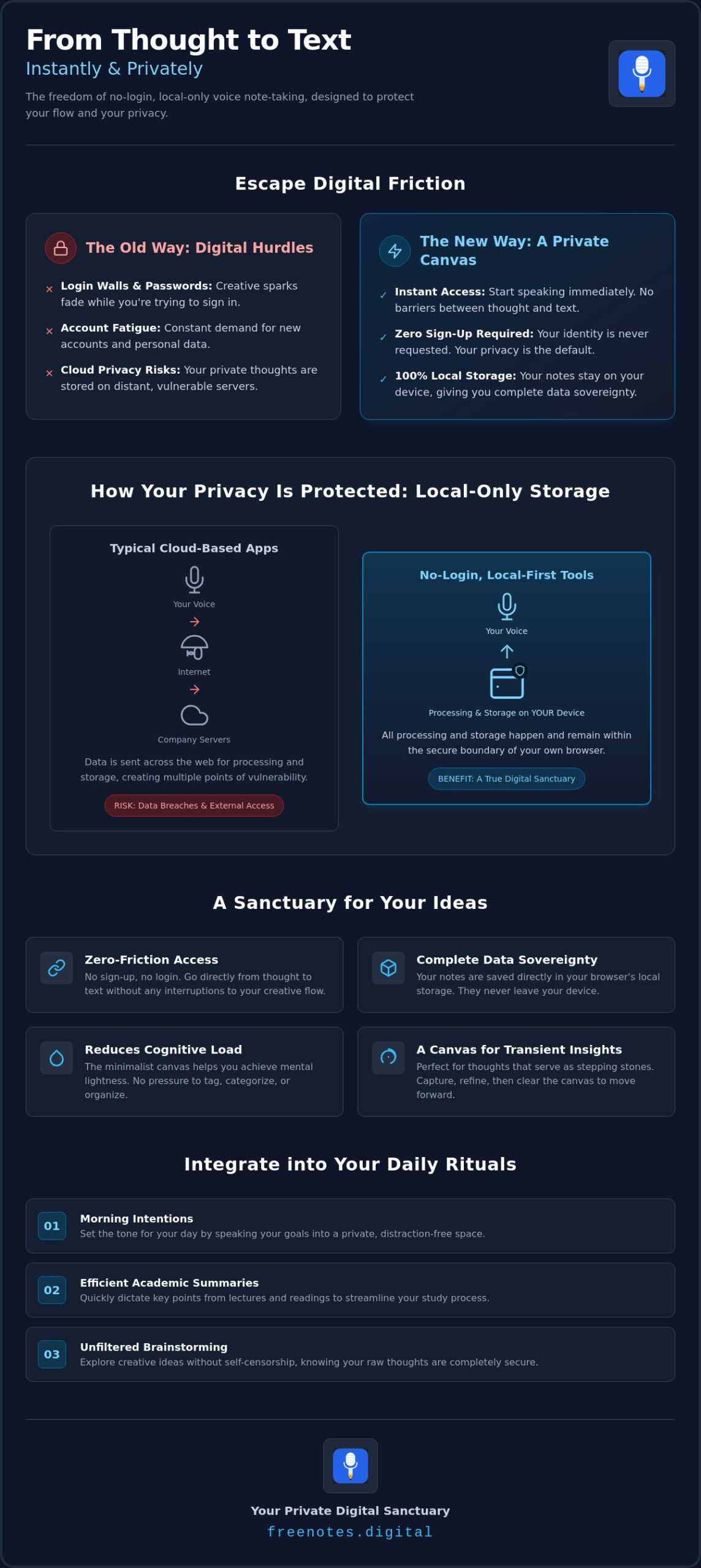
When you capture voice notes in browser no login required, your device transforms into a private island. The heavy lifting of converting your spoken words into text happens entirely on your own hardware, using the processing power of your phone or laptop. This local processing ensures that your voice never travels to a distant server for analysis. Because there is no account to sign into, no user profile exists on a remote database to store your history or personal patterns. Your browser acts as a private terminal rather than a gateway to a corporate data center. Local-only storage is the digital equivalent of a locked physical diary.
Traditional cloud services often treat your data as a commodity, but a local-first approach treats it as a sacred trust. You don’t have to worry about data breaches on a company’s server because your data isn’t there. It lives within the temporary memory of your session, giving you the freedom to express yourself without the lingering shadow of a permanent digital trail. This setup respects your boundaries and your creative process, allowing you to speak freely in a space that you alone control.
The Mechanics of Private Dictation
The Free Voice to Text Note Taking Tool utilizes advanced browser APIs to provide instant, accurate transcription. By leveraging Local-Only Browser Storage, the application can save your text temporarily so you don’t lose your place. This method is inherently safer than downloading third-party software, which often requires invasive permissions or runs background processes that drain your battery and track your activity. The zero-server philosophy means that what happens in your browser stays in your browser. It’s a clean, elegant solution for those who value both speed and discretion.
Safeguarding Your Private Thoughts
Choosing local-only storage is the most secure way to dictate private thoughts today. It removes the risk of your reflections being used to build advertising profiles or being indexed by search engines. You gain a profound sense of peace knowing that your most vulnerable ideas are shielded from the prying eyes of the broader internet. If you are looking for a Free Voice to Text Online: A Serene Sanctuary for Your Private Thoughts, this method provides the restorative clarity you need. You can find this level of quiet, reliable support by visiting freenotes.digital, where your mental lightness is the highest priority. It’s a sophisticated tool that stays out of the way, acting as a protective guardian for your every word.
Cloud-Based Sharing vs. Local Privacy: Choosing Your Space
The digital world often feels like a crowded room where every whisper is recorded and archived. Many voice note tools operate on a “Share-First” model, encouraging you to create links and embed your thoughts across the web. While this is helpful for team collaboration, it often ignores the human need for a quiet sanctuary. When you choose to capture voice notes in browser no login required, you are choosing a “Privacy-First” path. This isn’t about hiding; it’s about honoring the sanctity of your internal dialogue. It’s a deliberate shift from performance to reflection.
Public links created by cloud-based competitors can carry hidden risks. Often, these links never expire, leaving your private thoughts vulnerable to accidental discovery or future data leaks. The Quick Notes Canvas offers a different philosophy. It values discretion over distribution, providing a workspace where your ideas can breathe without the pressure of being “sent” or “shared.” It’s a space designed for the creator, not the audience. This distinction is vital for anyone who views their notes as a restorative tool rather than a public commodity.
When to Choose Local Storage
There are moments when the internet’s memory is a burden rather than a benefit. If you are drafting a sensitive personal email, recording meeting minutes with confidential details, or simply journaling your morning intentions, local storage is the wiser choice. It allows you to brainstorm without creating a permanent digital record that follows you for years. Using a minimalist writing app online provides a focused environment that settles a noisy mind, ensuring your transient thoughts remain exactly that: transient. For those who want to go even deeper into unfiltered idea capture, a dedicated stream of consciousness writing app can help you bypass your inner critic entirely and achieve a genuine flow state. It’s the perfect companion for those seeking mental lightness.
Evaluating Tool Security
Finding a reliable partner for your thoughts requires a discerning eye. A sophisticated tool should feel like a protective guardian of your ideas. Use this simple checklist when choosing a browser-based notepad:
- Is it truly no-login? If it asks for an email, it’s building a profile.
- Does it process locally? Your voice should never leave your device for transcription.
- What is the revenue model? A transparent model, like non-intrusive display advertising, ensures that “free” doesn’t mean your personal data is the actual product.
A high level of craftsmanship in software design prioritizes the user’s peace of mind. By focusing on local processing and registration-free access, the Free Voice to Text Note Taking Tool acts as a quiet, reliable assistant. It respects your personal space, providing a professional yet gentle environment where you can organize your inner world without friction. This approach ensures that your creative process remains your own, shielded from the complexities of the cloud-based sharing economy.
Practical Ways to Use a No-Login Voice Note Tool
The true value of a tool is found in how it weaves into the fabric of your daily life. While earlier we explored the sanctuary of privacy, it’s equally important to see how this discretion enables specific, restorative habits. For many, the journey begins with daily journaling. Dictating your morning intentions as soon as you wake allows you to capture thoughts in their most raw, honest form. By using voice notes in browser no login required, you ensure that these personal reflections remain entirely yours. There is no account to check and no cloud history to manage; there is only the immediate relief of unburdening your mind.
This effortless approach also transforms how we handle creative sparks. Whether you’re a novelist capturing a sudden line of dialogue or a songwriter humming a lyrical rhythm, the speed of access is vital. You don’t have to navigate a complex app structure or wait for a sync to complete. You simply speak, watch your words appear, and refine them in the moment. It is a sophisticated way to respect the fleeting nature of inspiration.
Dictation for Students and Researchers
In the academic world, efficiency and privacy are often at odds. Students frequently use shared computers in libraries or labs where leaving a personal account logged in poses a significant security risk. A registration-free tool solves this problem elegantly. You can use a Free Voice to Text Note Taking Tool to summarize a lecture or draft an essay outline, then simply copy your text and close the tab. This process leaves no digital footprint on the public machine. For a deeper look at how this technology supports your studies, you can explore our guide on how to Transcribe Spoken Words to Text for Academic Success: A Student’s Guide. It is about turning spoken research into structured text with purposeful grace.
The Creator’s Digital Scratchpad
The Quick Notes Canvas acts as a mindful enabler for those who think best while speaking. It serves as a digital scratchpad where the interface essentially disappears, allowing you to move from voice to text to a final draft in one seamless session. This fluidity is essential when you’re trying to organize your inner world without the friction of traditional word processors. Because the tool stays out of the way, you can focus entirely on the rhythm of your thoughts. It’s a reliable, unobtrusive assistant that helps you achieve mental lightness, ensuring that your creative flow remains uninterrupted from start to finish.
Experience the Serenity of Free Notes App
The digital landscape is often characterized by a frantic pace and constant demands for your attention. In this environment, finding a space that respects your boundaries is a rare and restorative experience. When you choose to use voice notes in browser no login required, you are stepping into a workspace designed with your well-being in mind. The interface of the Free Notes App is sophisticated and welcoming, offering a visual clarity that mirrors the mental lightness you seek. It doesn’t shout for your attention with notifications or complex menus; instead, it waits quietly. It is a tool that stays out of your way until the exact moment it is needed, providing a reliable and unobtrusive support system for your thoughts.
We invite you to take a moment for quiet reflection today. In a world that constantly asks you to share, categorize, and archive, there is profound power in a tool that simply lets you be. Whether you are unburdening your mind after a long day or capturing a delicate creative insight, the experience should feel as natural as breathing. By removing the friction of account creation and the anxiety of cloud storage, we provide a sanctuary where your ideas can exist in their purest form. This is the essence of total serenity in a digital age.
Our Human-Centric Philosophy
At the heart of our service is a commitment to simplicity and discretion. We believe that a tool should be a mindful enabler, not a source of stress. While competitors often focus on complex cloud features and social sharing, we prioritize a harmonious user experience. We act as a protective guardian of your ideas by ensuring that every word you speak is processed locally on your own device. This philosophy is grounded in a deep respect for your personal space and your creative process. We don’t believe you should have to trade your privacy for productivity. Instead, we offer a high level of craftsmanship that values your peace of mind above all else.
Start Your Frictionless Session
Your journey toward mental clarity doesn’t require a download, a subscription, or a profile. It only requires a browser and a moment of your time. There are no accounts to manage and no passwords to remember. You can simply open the canvas and begin to speak. As you watch your thoughts transform into text, you can rest easy with the gentle reminder that your data stays on your device. It is a clean, elegant, and entirely private way to organize your inner world. We encourage you to Experience the tranquility of our Free Voice to Text Note Taking Tool right now. Reclaim your focus, protect your privacy, and discover the restorative nature of a truly frictionless session.
Embrace a More Mindful Way to Capture Thought
Reclaim your mental space by choosing tools that respect your boundaries. We’ve explored how local-only storage transforms your browser into a secure diary, ensuring your reflections stay on your device. By removing the barrier of accounts, you can enjoy the fluidity of voice notes in browser no login required, allowing your ideas to flow without interruption. This approach isn’t just about efficiency; it’s about creating a restorative sanctuary where your creativity can breathe. You deserve a workspace that stays out of your way until you need it, acting as a quiet guardian for your most personal insights.
It’s time to experience the lightness of a clean, distraction-free interface. With 100% local processing for ultimate privacy and instant access, you can start unburdening your mind right now. Begin your mindful dictation on the Quick Notes Canvas and discover how serene organization can truly be. Your thoughts are precious, and they deserve a home that values their sanctity as much as you do.
Frequently Asked Questions
Do I really not need an account to use this voice note tool?
You don’t need to create an account, provide an email address, or set a password to begin. We believe that the path to mental clarity should be free of digital barriers. By offering a registration-free experience, we ensure that you can start capturing your thoughts the very second they arrive, preserving your creative momentum without the weight of another login.
Is my voice recording stored on your servers at all?
Your voice recordings never touch our servers. The Free Voice to Text Note Taking Tool uses your device’s own processing power to convert your spoken words into text locally. This approach acts as a protective guardian for your privacy, ensuring that your most personal reflections and sensitive ideas stay exactly where they belong: with you.
How accurate is the browser-based speech-to-text conversion?
The conversion is remarkably precise, utilizing sophisticated browser APIs to interpret your speech in real time. While clarity depends on your microphone and environment, the tool is designed to handle natural rhythms and nuances with purposeful grace. It provides a steady, reliable way to see your thoughts take shape on the screen without the need for manual typing.
Can I use this tool on my mobile browser without an app?
You can use this tool on any modern mobile browser without downloading or installing anything. It’s a lightweight, web-based solution that fits perfectly into your life, whether you’re at a desk or out for a walk. This accessibility makes it easy to record voice notes in browser no login required on any device with a web connection.
What happens to my notes if I close the browser tab?
Your notes are cleared from the temporary local session once the browser tab is closed or the cache is cleared. Because we don’t use cloud sync and storage, your data isn’t permanently archived on the web. We recommend copying your text to a permanent document once you’ve achieved the clarity you need, keeping your digital footprint lean and intentional.
Is there a limit to how long my voice notes can be?
There is no fixed limit on the length of your dictation, allowing you to speak until your mind feels light and unburdened. Your device’s memory is the only practical constraint. For longer sessions of deep reflection, we suggest moving your text to a saved file periodically to ensure your progress is preserved as you continue to flow.
Can I convert my voice notes into a text file to save elsewhere?
You can easily move your transcribed words to any other platform by copying them directly from the Quick Notes Canvas. This allows for a seamless transition from a private, spoken brainstorm to a more formal project or permanent journal entry. It’s a sophisticated way to bridge the gap between a fleeting insight and a lasting record.