
If your private thoughts live on a distant cloud server, they aren’t truly yours. It is a subtle, persistent weight, that feeling of hesitation before you type a sensitive idea into a standard browser window. You likely worry about data breaches or the unsettling possibility of your personal reflections being harvested for AI training. This friction stifles creativity and replaces the joy of expression with a lingering sense of vulnerability.
Finding a confidential notes app online should bring you a sense of relief, not more technical complexity. You deserve a frictionless way to capture ideas that guarantees your words are processed locally on your own device. This guide will help you evaluate secure drafting tools that combine serene, minimalist design with the certainty of total data ownership. We will explore how to prioritize local-first architecture and identify the quiet, reliable features that protect your mental space while keeping your most important notes strictly between you and your screen.
Key Takeaways
- Learn why data sovereignty is the foundation of modern privacy and how it protects your sensitive information from external breaches.
- Understand the vital difference between cloud-based storage and local-first processing to keep your private thoughts off remote servers.
- Discover how to select a confidential notes app online that offers a serene, minimalist interface to reduce mental clutter.
- Explore the value of zero-registration tools that let you begin capturing ideas instantly without the friction of a complex login process.
- Identify essential features like in-browser processing that ensure your voice-to-text drafts remain securely on your own device.
Defining the Secure Note Drafting Tool: Why Privacy Matters in 2026
A secure note drafting tool is more than a digital container; it is a sanctuary for your rawest ideas. In previous years, we might have viewed a digital notepad as a simple utility. By 2026, the stakes have shifted. True confidentiality now demands data sovereignty, which means you alone hold the keys and the location of your information. Many traditional services act as vaults, designed for long-term storage, but they often overlook the vulnerability of the drafting phase. When you use a confidential notes app online, you should feel the lightness of a transient canvas where thoughts can breathe before they are ever committed to a permanent archive.
The term “online” often triggers a reflex of concern, as if every keystroke is immediately flying toward a distant server. Modern browser technology has changed this narrative. It’s now possible to use a web-based interface that processes everything within your device’s local memory. This ensures that while you are “online” to access the tool, your data remains within your personal perimeter. It is a sophisticated way to work that respects your boundaries.
The Evolution of Confidential Note Taking
We have traveled a long path from the ink-stained pages of physical journals to the convenience of early cloud-based clipboards. While the cloud offered accessibility, it introduced a layer of surveillance and the risk of data harvesting. Today, sophisticated web APIs allow for high-performance tools that function entirely in your browser. This shift restores the psychological benefit of knowing your thoughts remain in your physical space. When reviewing a comparison of note-taking software, it becomes clear that the most advanced tools are those that prioritize this local-first approach, removing the anxiety of the “save” button.
Who Needs a Confidential Notes App Online?
Privacy is a universal need, yet it takes different forms depending on your journey. Journalists and researchers often find themselves protecting sensitive source material or early drafts that are too delicate for standard cloud storage. Business leaders require a quiet space to brainstorm strategic pivots without the prying eyes of corporate surveillance or AI training models. Even for the individual seeking a mindful moment, a confidential notes app online provides a space for private reflection and mental decluttering. It is about reclaiming your mental space, ensuring that your creative process remains as private as a whispered thought.
The Architecture of Confidentiality: Cloud Encryption vs. Local-Only Processing
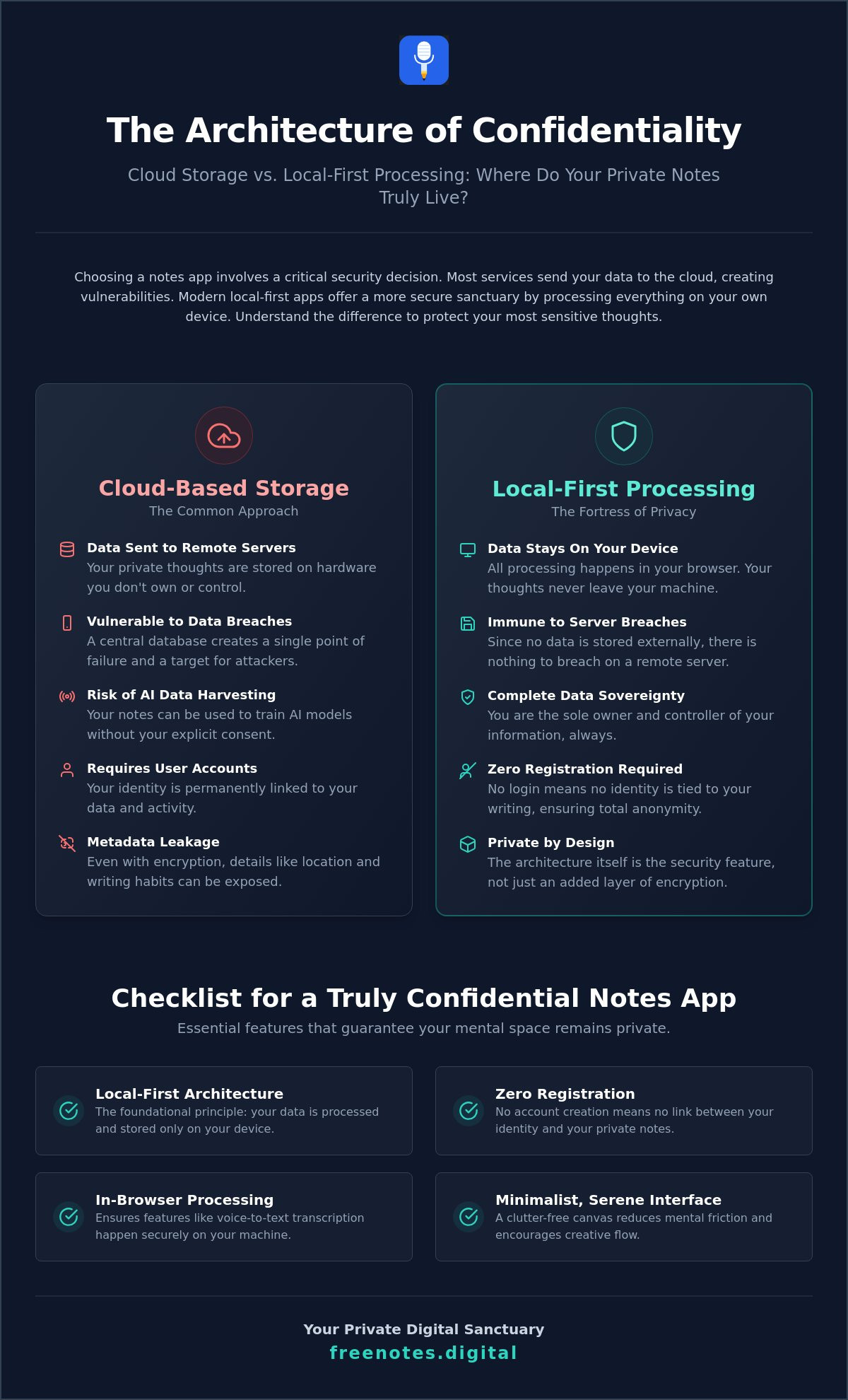
Encryption is a sophisticated shield, but local processing is a quiet fortress. Most digital security conversations focus on End-to-End Encryption (E2EE), which secures your data while it travels to a remote server. While this is a vast improvement over unencrypted storage, it still requires your private thoughts to exist on hardware you don’t control. A local-first philosophy shifts this dynamic entirely. By keeping the drafting process within your browser’s immediate memory, you ensure that your words never begin that journey to the cloud in the first place.
When you choose a confidential notes app online, the most secure option is often the one that asks the least of you. The absence of a user account is not a missing feature; it’s a deliberate security choice. Without a login, there is no identity to link to your prose and no central database for a malicious actor to target. This architecture removes the middleman, creating a direct and private path from your mind to the screen without any external observers.
How Local Browser Storage Protects You
Your browser contains private digital pockets known as LocalStorage and SessionStorage. These environments allow a confidential notes app online to function with high performance without ever exporting your text to an external entity. Because these tools operate without registration, they prevent identity-linked data harvesting. It’s a technical reality that provides immense comfort. If a service doesn’t store your data on its own servers, a traditional data breach becomes a mathematical impossibility for your specific notes.
The Hidden Risks of Cloud Synchronization
Cloud synchronization, while convenient, introduces subtle vulnerabilities known as metadata leakage. Even if the content of your notes is encrypted, the “wrapper” around that data can reveal your writing habits, your location, or the frequency of your entries. There is also the very human risk of account lockout or losing a master password, which can lead to the permanent loss of your work. Additionally, cloud providers often face growing pressure to use stored data for AI training, a concern that simply doesn’t exist when your information never leaves your device. Local drafting tools bypass these anxieties by offering a transient, “burn-after-reading” experience. If you value a space that prioritizes your immediate creative flow over long-term server storage, trying a Quick Notes Canvas can be a restorative change to your workflow.
Evaluating Your Workflow: When to Use a Vault vs. a Digital Canvas
Your creative process is a journey that often begins with a quiet, unformed spark. Choosing between a permanent vault and a transient canvas depends entirely on the stage of your thought. A vault is built for longevity; it’s a place for refined ideas and archived projects. However, the initial act of drafting requires a different kind of environment. When you use a confidential notes app online, you shouldn’t feel the weight of complex folder structures or the pressure to tag every syllable. You need a space that acts as a mindful companion, allowing you to capture raw insights without the friction of long-term storage.
Many secure applications suffer from “feature bloat.” They try to be everything at once, adding task managers, calendar integrations, and database links that clutter the visual field. This complexity can be a distraction when you simply need to record a sensitive observation. A minimalist digital scratchpad serves as a quiet, unobtrusive assistant. It provides a clean environment where the focus remains on your words. By choosing a tool that prioritizes simplicity, you ensure that your mental energy is spent on your ideas rather than on navigating a dense interface.
The Case for the Temporary Scratchpad
Fleeting notes are the building blocks of larger projects, yet they don’t always need to live in a permanent database. A temporary scratchpad reduces cognitive load by removing the need to categorize or organize your thoughts immediately. It offers a sense of tranquility, knowing that your draft is held in a private, local space until you decide its next destination. This approach protects your mental clarity, ensuring that your digital environment remains as light and open as a fresh sheet of paper. It’s about giving yourself permission to think without the burden of organization.
Integrating Secure Drafting into Your Routine
A browser-based tool is ideal for quick brainstorming during meetings or capturing sudden bursts of inspiration. It fits seamlessly into your daily rhythm, providing a secure bridge between a thought and its final home. Once your draft is complete, you can naturally move it to a final destination, such as a secure document or an encrypted archive. This habit maintains a clean digital environment by avoiding unnecessary cloud clutter and ensuring that only your most valuable, finished thoughts are kept for the long term. Using a confidential notes app online in this way keeps your workflow fluid and your private reflections protected.
Key Features to Look for in a Confidential Notes App Online
Selecting a tool for your private thoughts is a deeply personal decision that should prioritize both technical security and mental ease. When searching for a confidential notes app online, the first feature you should encounter is zero-registration. The ability to start writing the moment the page loads is not just a convenience; it’s a privacy shield. It ensures that no email address or password links your identity to your reflections. This immediate access removes the friction of account management and prevents the creation of a digital paper trail.
True security also relies on in-browser processing. This means that every action, from formatting text to converting speech, happens entirely on your device. By avoiding the need for third-party software downloads, you maintain a clean and secure environment. You don’t have to trust an installer or worry about background processes. Instead, the tool stays within the controlled environment of your browser, acting as a quiet guardian that remains unobtrusive until the exact moment it is needed.
The Power of Private Voice-to-Text
Dictation is often the most natural way to capture uninhibited thoughts before they slip away. However, many traditional tools send your audio recordings to the cloud for processing, which creates a significant privacy risk. A modern confidential notes app online uses browser-based speech recognition APIs to transcribe your words locally. This allows you to achieve instant clarity through effortless, private voice typing online without your voice ever leaving your physical space. It is a restorative way to brainstorm that values your spoken word as much as your written text, ensuring your most sensitive ideas are never stored as audio files on a remote server.
Design as a Security Feature
A serene, minimalist interface is more than just an aesthetic choice. It is a functional component of a secure workflow. By reducing the stress of organization and removing unnecessary buttons, a clean design fosters honest and confidential reflection. It avoids the high-pressure urgency found in traditional productivity suites, replacing it with a sense of mental lightness. When the interface is elegant and sensory, it respects your creative process and reduces the cognitive load of drafting. If you are ready to experience this level of privacy and focus, you can start using our Free Voice to Text Note Taking Tool right now.
Free Notes App: Your Sanctuary for Private Voice and Text Drafting
True mental clarity arrives when you stop worrying about where your data is going and start focusing on what your thoughts are saying. Choosing a confidential notes app online shouldn’t feel like a compromise between utility and safety. Our Free Notes App serves as a mindful enabler for your creative process, providing a sophisticated space where your ideas can flourish without external observation. By design, our web-based tool ensures that your notes never leave your browser. This local-only approach transforms your device into a private sanctuary, allowing you to move from thought to text with absolute confidence.
The experience of using our platform is defined by a unique harmony of voice-to-text and free-form typing. You can speak your mind, watch your words appear on the screen, and then refine them with the keyboard, all within the same secure canvas. Because there’s no account to create and no commitment to make, our confidential notes app online ensures that your words remain entirely under your control. It’s a tool that stays out of your way, acting as a quiet, reliable assistant that values your privacy as much as you do.
Mindful Idea Capture Without the Noise
Drafting in a quiet environment allows your most honest reflections to surface. Our interface is built to be a reliable assistant that respects your personal space, removing the notifications and clutter that often plague traditional apps. You can dictate notes in browser with complete serenity, knowing the transcription happens locally. There is a restorative power in having a clean start every time you open your browser. It’s a fresh sheet of digital paper, ready for whatever your mind needs to release.
Your Data, Your Device, Your Peace of Mind
Our commitment to local processing is the foundation of a truly free voice to text online experience. We believe that your data belongs on your device, not on a remote server. This philosophy makes our Quick Notes Canvas the ideal partner for your next confidential project or personal brainstorming session. By stripping away the need for registration, we’ve removed the final barrier between your inspiration and its capture. You can take the first step toward mental lightness by trying our registration-free tool today, reclaiming your creative process in a space that is truly yours.
Reclaiming Your Digital Sanctuary
Reclaiming your mental space starts with a simple, intentional choice. We’ve explored why true privacy in 2026 relies on local-first architecture rather than distant cloud servers. By prioritizing tools that offer zero-registration and in-browser processing, you ensure your private reflections never leave your own device. A confidential notes app online should act as a quiet assistant that stays out of your way; it allows your creativity to flow without the friction of passwords or the fear of data harvesting. This transition from cloud-based anxiety to local sovereignty provides the restorative clarity you need to draft your best ideas.
You deserve a workspace that values your well-being and protects your intellectual boundaries with sophisticated simplicity. Our platform offers a serene, distraction-free interface where 100% of the processing happens right in your browser. There are no accounts to manage and no commitments to make. It’s simply a place for your thoughts to exist in peace. Begin your journey to mental clarity with our Free Voice to Text Note Taking Tool and experience the lightness of a truly secure drafting process. Step into a more mindful way of writing today.
Common Questions About Secure Note Drafting
Is it safe to use a web-based note app for confidential information?
It’s safe as long as the tool utilizes local-first architecture. This means your text is processed entirely within your browser window rather than being transmitted to an external server. By choosing a confidential notes app online that avoids cloud synchronization, you eliminate the risk of server-side data breaches. Your private thoughts remain within your physical control, providing a secure environment for sensitive brainstorming.
How does local browser storage differ from cloud storage for my notes?
Local storage keeps your information tucked away in your device’s own memory, acting like a private digital pocket. Cloud storage, by contrast, requires your notes to travel across the internet to a third-party server. Using local storage ensures that your data is never accessible to anyone but you. It’s a more restorative approach that prioritizes your privacy over the complexities of remote syncing.
Can I use a confidential notes app without creating an account?
Yes, the most secure tools often require no registration at all. Starting your draft without an account prevents your identity from being linked to your personal reflections. It removes the friction of managing passwords and ensures there is no profile for data brokers to harvest. This zero-knowledge entry is a hallmark of a truly confidential notes app online designed for your peace of mind.
What happens to my notes if I close the browser tab?
Closing your tab typically clears the transient memory used for your session. Because your data isn’t saved to a cloud database, you should copy your work to a permanent destination before finishing your session. This burn-after-reading nature is a deliberate security feature. It ensures that no digital traces of your sensitive drafts linger on the web after you’ve completed your creative work.
Are voice-to-text notes as private as typed notes?
Voice-to-text notes are entirely private when the app uses local browser-based APIs for transcription. This technology converts your spoken words into text right on your device without sending audio files to the cloud. It allows you to speak freely, knowing your voice remains in your personal space. It’s a sophisticated way to capture uninhibited thoughts while maintaining the highest standards of confidentiality.
Does the Free Notes App store any of my audio or text on its servers?
No, the Free Notes App never stores your audio or text on any external server. All processing happens 100% locally within your browser’s environment. This commitment to your privacy means we don’t have access to your thoughts, and we don’t use your data for AI training or analytics. Your notes are yours alone, held securely on your own hardware throughout the entire drafting process.
Can I use this secure note drafting tool on my mobile phone browser?
You can easily access our Quick Notes Canvas through your mobile phone’s web browser. While we don’t offer a downloadable mobile app, our web-based tool is fully responsive and designed for elegant use on smaller screens. This allows you to capture ideas on the go with the same level of security and local processing you enjoy on a desktop. It’s a fluid way to maintain your privacy wherever inspiration strikes.
How do I transfer my confidential notes from the browser to a permanent file?
The simplest way to move your notes is to copy the text and paste it into your preferred local document or encrypted vault. This manual step ensures that you remain the sole guardian of your information’s journey. By moving the text yourself, you bypass the risks associated with automated cloud backups. It’s a methodical, intentional way to transition from a transient draft to a permanent, secure archive.