
What if the most intimate corners of your mind didn’t have to live on a distant server just because you chose to speak them aloud? You’ve likely felt that subtle friction, a hesitation before clicking record, wondering if your whispered reflections are being harvested or stored in a cluttered cloud you don’t control. It’s exhausting to navigate complex signups or intrusive ads when you simply crave a quiet space for your thoughts. Using secure browser based voice memos offers a restorative shift, providing a way to capture your voice through local processing that respects your boundaries.
You deserve a digital sanctuary that prioritizes your well-being and data residency above all else. In this guide, you’ll discover how to transform your speech into text using a minimalist environment designed for mental lightness and creative flow. We’ll walk through the process of setting up a private reflection practice that keeps your ideas safe, elegant, and entirely under your own guardianship.
Key Takeaways
- Transform your digital experience into a private sanctuary by embracing local-first tools that prioritize your mental serenity and data residency.
- Understand the science of client-side processing, where your own computer handles the conversion of speech to text without sending data to a distant server.
- Discover how to use secure browser based voice memos to capture ideas instantly, bypassing the mental friction caused by complex signups and intrusive ads.
- Learn a mindful, step-by-step approach to preparing your environment and activating dictation tools with total confidence in your privacy.
- Experience the restorative power of a minimalist, no-registration environment that protects your creative flow and ensures your thoughts belong solely to you.
Understanding Secure Browser Based Voice Memos: A Private Sanctuary for Thought
Imagine a workspace that exists only when you need it and vanishes the moment you’re done. Secure browser based voice memos are designed to be that space; they are tools that live entirely within your web window, processing your speech on your own device rather than in the cloud. This shift toward local-first digital sanctuaries is more than a technical upgrade. It’s a return to a more mindful way of interacting with technology. By choosing registration-free tools, you embrace a high level of identity protection. Your ideas belong to you from the very first second, and they never leave the safety of your local environment.
The Evolution of Private Dictation
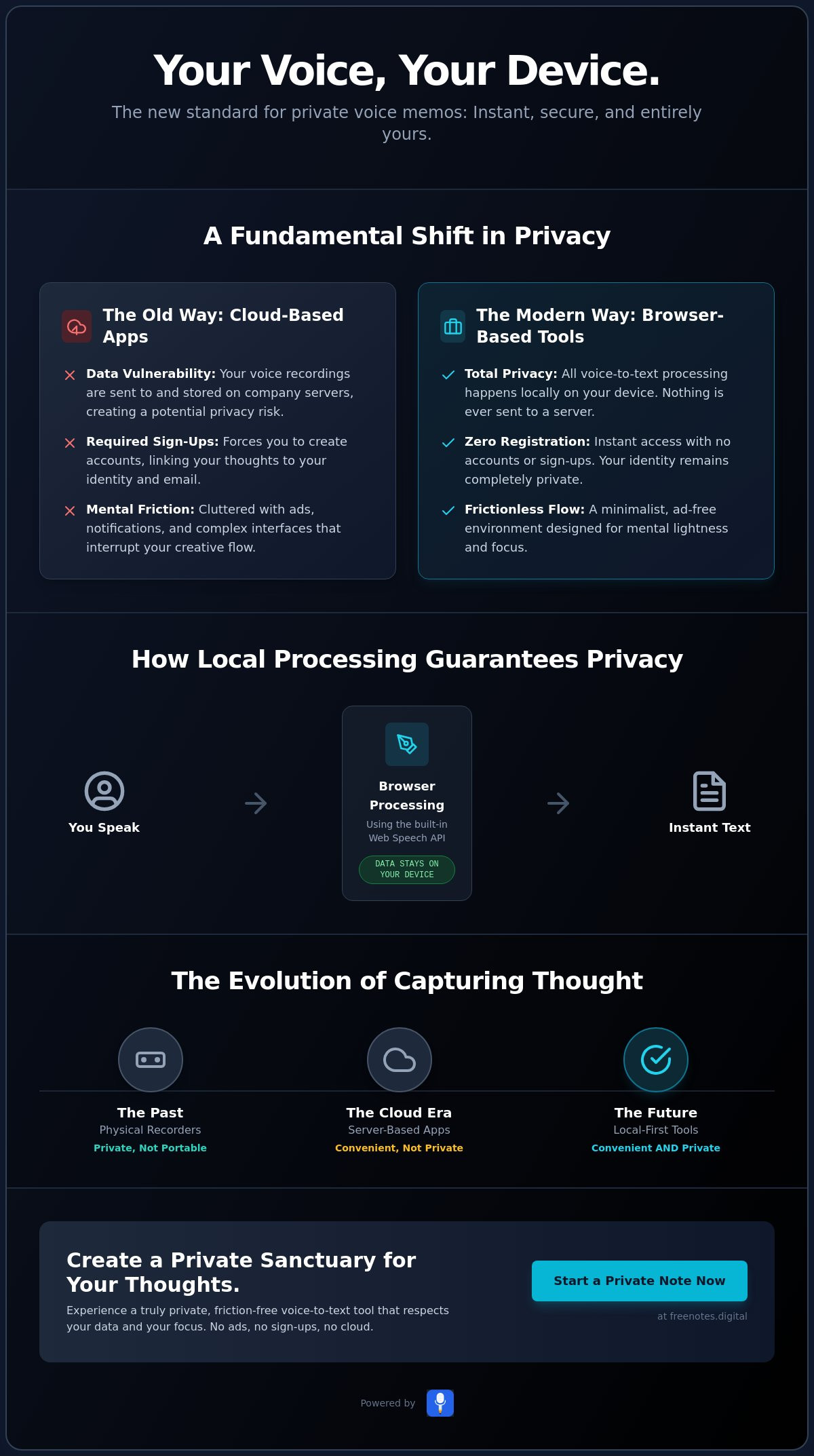
Reflecting on the history of capturing thought reveals a significant arc. We began with physical tape recorders, where privacy was as simple as holding the cassette in your hand. The early cloud era traded that simplicity for convenience, but it introduced a quiet vulnerability by storing personal audio on distant servers. Today, the local-only movement in modern web development brings back that original sense of security. Professional-grade speech recognition technology is now built directly into the browser’s architecture. This allows for sophisticated transcription without an internet handshake. Your computer does the heavy lifting, keeping your voice within your personal space.
Why Browser-Based Means Frictionless Freedom
Technology should support your creative flow rather than interrupt it with download fatigue or app store barriers. Browser-based tools offer instant access; a single URL becomes a dedicated workspace for your mind. There’s a profound psychological benefit to an ephemeral environment. When you don’t have to worry about long-term storage or cluttered accounts, you feel a sense of mental lightness. This minimalist approach removes the friction of complex setups. It allows you to focus purely on the fluidity of your thoughts and the elegance of the process.
Knowing your voice stays within your personal environment provides a restorative power. It’s the difference between speaking in a crowded room and reflecting in a quiet garden. Secure browser based voice memos provide that garden. They act as a quiet, reliable assistant, staying out of the way until the exact moment they are needed. This is the essence of a modern, human-centric approach to digital privacy. It values your personal space as much as your productivity.
The Science of Local Processing: Why No Cloud Means Total Privacy
Privacy isn’t just a setting you toggle in a menu; it’s a fundamental architectural choice. When you engage with secure browser based voice memos, you’re stepping into a world of “client-side” logic. This means your own computer handles the heavy lifting of processing your voice, rather than delegating that task to a distant server. Local processing is the execution of scripts entirely within the user’s browser environment, ensuring zero data transmission to external databases. By keeping your data within your own hardware, you eliminate the risk of server-side breaches and unauthorized data harvesting. It’s a clean, elegant solution for those who value mental serenity.
Decoding the Web Speech API
The magic behind this privacy-first approach lies in the Web Speech API. This technology allows modern browsers to interpret audio signals and convert them into text directly on your device. Unlike traditional dictation apps that often send your recording to a company’s server for analysis, this API functions locally. It’s a significant leap forward for both accessibility and privacy. You aren’t making a “handshake” with the internet; you’re simply using the power already present in your browser. This distinction between browser-native transcription and third-party API calls is the key to maintaining a truly private sanctuary for your thoughts.
The Myth of Cloud Necessity
Many people believe that a “save” button on a server is essential for productivity. However, this often creates a hidden mental cost. The constant awareness of being “synced” can lead to a subtle hesitation in your creative flow. Local storage allows your notes to persist within your browser’s cache without ever needing to create an account. This “data at rest” remains on your machine, under your total control. It’s a sophisticated way to manage your private reflections without the vulnerability of a shared cloud. If you want to experience this sense of mental lightness, using a free voice to text note taking tool can provide the quiet, reliable support you need.
The absence of permanent server storage means there is no “honey pot” for hackers to target. Your thoughts aren’t stored alongside millions of others in a massive database. They exist only where you are. This creates a restorative environment where you can speak freely, knowing your words aren’t being archived for future advertising or data mining. Secure browser based voice memos act as a protective guardian of your ideas, staying out of the way until the exact moment they are needed. It’s an innovative approach that remains grounded in a human-centric philosophy of simplicity and discretion.
Comparing Voice Memo Methods: Browser Simplicity vs. App Complexity
Choosing the right tool for reflection is often a balance between utility and tranquility. Many mobile applications prioritize professional editing features like trimming or multi-track recording, which can inadvertently create a sense of pressure. If you’re simply looking to capture a fleeting thought, these layers of complexity become obstacles. Secure browser based voice memos offer a minimalist canvas instead. They provide a serene environment where the primary focus is your voice and the immediate conversion of that voice into text. This lack of “feature bloat” allows you to maintain your creative flow without the distraction of navigating a dense interface.
The Hidden Costs of “Free” Apps
The digital landscape is filled with “free” applications that actually come with a significant hidden price. When you use traditional apps that store your data in the cloud, you’re often trading your privacy for the service. This is the “if it’s free, you are the product” reality. Many of these tools harvest your data to build advertising profiles. In contrast, a mindful approach breaks this cycle. By using tools that prioritize anonymity and avoid registration, you ensure that your private reflections remain truly yours. Some platforms choose to support their services through simple, non-intrusive ads rather than by monetizing your personal identity. This preserves the sanctity of your digital vault. If you’re evaluating your options more broadly, understanding what to look for in a confidential notes app online can help you make a more informed and peace-of-mind-centered choice.
When to Choose a Browser Tool Over a Mobile App
There are specific moments when a browser-based environment is clearly superior to a mobile app. If you’re preparing for a sensitive meeting or journaling at your desk, the larger screen and keyboard allow for immediate refinement of your captured thoughts. It’s about creating a seamless transition from speech to a polished note. This is particularly useful for rapid brainstorming where you want to see your ideas take shape in real-time. For these desktop-first workflows, choosing free voice to text online provides a more expansive and focused experience than a small mobile interface.
The choice ultimately comes down to who you want holding the keys to your thoughts. Traditional apps often require you to trust their server security and privacy policies. Secure browser based voice memos return that trust to you. They act as a quiet, reliable assistant that stays out of the way, allowing you to focus on the restorative nature of organization. By removing the barriers of app stores and account creation, you gain the freedom to think, speak, and reflect without friction. It’s a modern way to protect your personal space.
A Step-by-Step Guide to Mindful Dictation in Your Browser
Capturing your thoughts is an act of self-care. It deserves a quiet moment and a clear intention. While the technical side of secure browser based voice memos is sophisticated, the actual practice of dictation should feel as natural as a conversation with a trusted friend. Transitioning from a state of mental clutter to one of focused reflection begins with a few intentional steps. By creating a dedicated ritual, you allow your creative flow to emerge without the heavy weight of digital distraction.
Setting the Scene for Clarity
Your environment acts as the foundation for your reflection. Background noise doesn’t just confuse the software; it fragments your focus. Research from September 2025 indicates that speaking clearly at a moderate pace can improve automated transcription accuracy from around 80% to over 95%. This improvement is restorative, as it reduces the need for manual corrections later. Consider using headphones to create a more intimate, focused recording experience. This simple tactile change helps signal to your brain that it’s time to turn inward. Before you begin, clear your digital space by opening a single, clean browser tab. This ritual helps remove the mental friction caused by lingering notifications or open tasks.
Capturing the Flow
When you are ready, activate your tool by granting microphone permissions with confidence. Remember that you are in a protected sanctuary where your data remains local. As you speak, don’t stop to fix typos or minor errors. The Quick Notes Canvas is designed for flow, not immediate perfection. Let your ideas tumble out in their rawest form. You can maintain a steady rhythm of thought by using simple voice commands for punctuation, such as saying “period” or “new paragraph” aloud. This keeps your hands off the keyboard and your mind on the message. Once your thoughts are captured, you can transition to typing for a final, elegant polish. This two-step process ensures that the speed of your voice is never hindered by the slower pace of your fingers.
Using secure browser based voice memos allows you to move with purposeful grace through your daily reflections. It’s a modern way to protect your personal space while remaining productive. If you’re ready to experience a more harmonious way to record your ideas, start using our Free Voice to Text Note Taking Tool today. It stays out of the way until the exact moment it’s needed, providing the reliable, unobtrusive support you deserve for your most private thoughts.
Creating Without Friction: Why Free Notes App is Your Quiet Assistant
Technology should feel like a gentle, mindful companion rather than a source of persistent pressure. Free Notes App is designed as a mindful enabler for your creative process, bridging the gap between sophisticated technology and a serene user experience. By utilizing secure browser based voice memos, you ensure that your most private thoughts remain exactly that: private. There are no accounts to create and no passwords to remember. This “no registration” promise means your ideas belong to you from the very first second you speak them. It’s an elegant solution for those who value both their time and their mental sanctuary.
A Tool That Stays Out of Your Way
Most digital tools demand your attention with constant alerts, intrusive pop-ups, or high-pressure notifications. Our philosophy is rooted in the concept of “invisible” software. We believe a tool should stay out of your way until the exact moment it’s needed. This quiet, reliable support is essential for the mindful note taker who prioritizes privacy above all else. Because we rely on local processing, your notes never touch our servers. This isn’t just a technical feature; it’s a commitment to your personal space. You can record, transcribe, and reflect without the lingering anxiety of data harvesting or server-side vulnerabilities.
Your Next Step Toward Mental Clarity
The journey toward a lighter mind often starts with a single spoken word. We invite you to experience this for yourself by trying a session of uninhibited dictation. Notice how the absence of clutter allows your thoughts to flow more smoothly. When you use a private digital workspace free of cloud anxiety, you regain control over your creative environment. Secure browser based voice memos provide the restorative power of organization without the mental friction of traditional, feature-heavy apps. The focus remains entirely on your voice and your vision. For those who want to go even deeper into hands-free writing without compromising their data sovereignty, exploring private voice typing online offers a thoughtful guide to dictating your most sensitive reflections in a browser that forgets you the moment you leave.
Security is the foundation of true creative freedom. When you know your data residency is local, you’re free to explore the deepest corners of your imagination without hesitation. Free Notes App remains your quiet assistant, acting as a protective guardian of your ideas in a noisy digital world. Embrace the elegance of a modern writing environment that respects your boundaries and supports your well-being. Your thoughts are precious; give them the sanctuary they deserve.
Cultivate Your Personal Sanctuary for Thought
Your private reflections deserve a space that is as respectful and quiet as your own mind. We’ve explored how shifting away from cloud-dependent apps toward local-first tools can restore your sense of digital agency. By choosing secure browser based voice memos, you eliminate the mental friction of complex setups and the subtle anxiety of server-side storage. This approach isn’t just about security; it’s about creating a restorative environment where your creativity can flow without hesitation or interruption.
It’s time to experience the mental lightness that comes from a tool designed with your well-being in mind. Our platform offers 100% Local Processing, ensuring that your voice stays on your device. With No Registration Required and Zero Data Stored on Servers, you can speak freely, knowing your ideas belong entirely to you. You deserve a workspace that stays out of the way until the exact moment it is needed.
Begin your journey to mental clarity with Free Notes App today. Step into a world where technology acts as a quiet, reliable assistant, protecting your personal space while enabling your most profound insights. Your voice is a powerful tool for self-discovery, and it’s finally safe to let it be heard.
Common Questions About Private Voice Dictation
Are browser-based voice memos really secure?
Yes, browser-based tools are highly secure when they utilize local processing to keep your data on your own machine. By choosing secure browser based voice memos, you avoid the risks associated with cloud storage and third-party servers. Your voice never leaves your device; this creates a protective guardian for your most private thoughts and reflections.
Where are my voice memos stored if there is no cloud?
Your notes are stored within your browser’s local memory or cache rather than on a remote server. This ensures that you have total control over your data residency at all times. Because nothing is uploaded, your privacy remains intact, providing a sense of mental lightness and restorative organization in your daily workflow.
Do I need to download any software or extensions?
No downloads or installations are required to begin your reflection practice. These tools function entirely within your existing web window by utilizing native browser technologies. This removes the friction often associated with traditional apps, allowing you to access a minimalist environment for creative flow with just a single URL.
What happens to my notes if I close the browser tab?
Most local-first tools save your progress in the browser’s persistent storage, meaning your text is often still there when you return. However, it’s a mindful practice to copy your final reflections to a permanent document if you plan to clear your browser cache. This ephemeral workspace is designed to reduce cognitive load while protecting your immediate ideas.
Can I use secure voice memos on my phone browser?
Yes, you can access secure browser based voice memos on most modern mobile browsers that support speech recognition. This allows you to maintain your private reflection practice while on the move without the need for a dedicated mobile app. It provides a seamless transition between your desktop and mobile environments while keeping your data local.
How does local processing differ from traditional voice apps?
Traditional voice apps typically send your audio to a company’s server to be processed and stored in the cloud. Local processing performs the entire conversion on your own hardware, ensuring zero data transmission to external databases. This difference is fundamental to protecting your identity and ensuring that your whispered thoughts stay within your personal space.
Is there a limit to how long I can record?
There are generally no artificial time limits on your recording sessions within the browser. You’re free to speak for as long as you need to find clarity and creative flow. The only practical constraints are your device’s available memory and your own comfort, allowing for deep, uninhibited sessions of private reflection.
Can I convert my voice memos to text automatically?
Yes, the primary function of these tools is to convert your spoken words into written text in real-time. By using professional-grade transcription technology built into the browser, your speech is transformed into an elegant note instantly. This allows you to focus on the fluidity of your thoughts rather than the mechanics of typing.