
What if the safest place for your most sensitive ideas wasn’t a locked cloud account, but a digital space that doesn’t even know who you are? We’ve all felt the heavy weight of account fatigue and the persistent worry that follows storing personal reflections on a distant, vulnerable server. It’s often exhausting to manage yet another password when you simply want to clear your mind and capture a passing spark of inspiration before it fades away into the noise of the day.
You deserve a serene sanctuary where your words remain entirely within your own control, flowing as freely as your thoughts. By choosing a secure online text editor no login, you can bypass the digital clutter and reclaim your focus the moment it strikes. This article explores how to utilize a minimalist Quick Notes Canvas that processes your data locally on your device, ensuring your privacy is never a compromise. We’ll also examine how 2026 privacy standards and zero-knowledge architectures are shaping these tools into the ultimate restorative workspace for your private ideas.
Key Takeaways
- Understand how local-only processing creates a sophisticated foundation for privacy by keeping your notes strictly on your own hardware.
- Discover how a secure online text editor no login helps you bypass account fatigue and begin writing instantly without leaving a digital trail.
- Adopt gentle habits like using private browsing modes and exporting your work to ensure your temporary workspace remains clean and secure.
- Explore the restorative benefits of a Quick Notes Canvas that uses voice-to-text to capture your ideas with effortless, mindful movement.
- Learn why 2026 zero-knowledge standards are essential for protecting your creative process from the risks of modern data breaches.
Why Privacy-First Writers Seek a Secure Online Text Editor with No Login
Imagine a moment of pure inspiration. It’s fragile and fleeting. Most digital tools ask you to pause that flow to verify your identity, solve a captcha, or navigate a cluttered dashboard. This interruption is more than a minor annoyance; it’s a barrier to the natural fluidity of thought. Choosing a secure online text editor no login is a deliberate act of reclaiming your creative space. By removing the gatekeeper of a registration screen, you preserve the immediate connection between your mind and the digital page.
Privacy is a feeling as much as it’s a technical standard. It’s the quiet assurance that your most delicate ideas aren’t being cataloged by a distant algorithm. In a world where every click is tracked, an anonymous workspace feels like a restorative breath of fresh air. This approach treats “no login” as a sophisticated security feature rather than just a convenience. If there’s no account to breach and no password to reset, your personal identity remains entirely disconnected from the words you produce.
The Problem with Traditional Cloud-Based Notepads
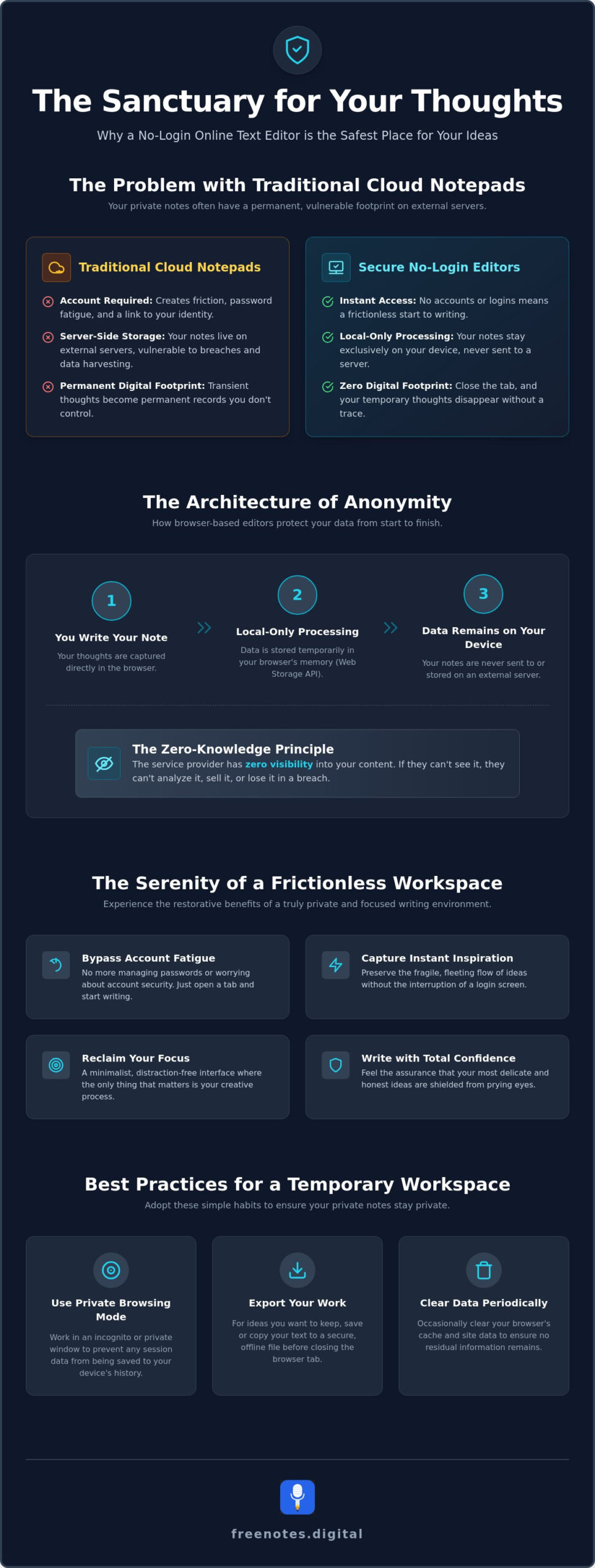
Traditional cloud services often come with a hidden emotional tax. When you use a registered service, your “private” notes are frequently stored on external servers where they’re subject to data harvesting or accidental exposure. For transient thoughts or temporary brainstorms, this creates a permanent digital footprint that lives long after the idea has served its purpose. These platforms often prioritize complex features that increase cognitive load, leading to the very creative blocks you’re trying to avoid. Relying on established browser-based data protection allows you to bypass these vulnerabilities entirely.
The Serenity of a Frictionless Writing Space
True mental lightness comes from a tool that knows when to stay out of the way. A Quick Notes Canvas provides that rare, distraction-free environment where the interface recedes into the background. It’s a mindful creative process where the only thing that matters is the movement of your ideas. This minimalist approach ensures that your workspace remains a serene sanctuary, free from the noise of notifications or the pressure of “productivity” metrics. When you don’t have to worry about who is watching or where the data is going, your writing becomes more honest, brave, and focused.
Using a secure online text editor no login means your data stays on your hardware. It’s a local-first philosophy that respects your personal boundaries. You can capture a fast-moving idea, refine it, and then simply close the tab, knowing you haven’t left a trail behind for others to follow. It’s the digital equivalent of writing on a clean slate that disappears when you’re finished, leaving your mind clear and your privacy intact.
The Architecture of Anonymity: How Browser-Based Editors Protect Your Data
Local-Only Processing is a security standard where your data remains exclusively on your own hardware rather than being transmitted to or stored on an external server. This approach transforms your device into a private digital vault, shielding your words from the prying eyes of the broader web. By utilizing the Web Storage API, a secure online text editor no login can hold your thoughts in temporary memory without ever sending a single character to a database. It’s a fundamental shift from the “save to cloud” model, ensuring that your words exist only where you can see them.
This architecture relies on “Zero-Knowledge” principles, meaning the service provider has zero visibility into your creative process. The storage and any necessary encryption happen entirely within your browser’s reach. It’s a restorative way to work, knowing that your mental sanctuary is protected by the very code you’re interacting with. When you remove the server from the equation, you remove the most common point of failure in modern data security.
Where Does Your Text Go? Understanding Local Storage
Your browser is more than a window to the internet; it’s a sophisticated environment capable of managing data securely on its own. When you write in a local-first editor, your text is stored in client-side memory. This is fundamentally different from server-side databases where information is pooled and managed by a third party. Because the processing happens locally, the service provider has no technical way to view, access, or sell your notes. You can further enhance this protection by reviewing your secure browser settings to ensure your local environment is as resilient as possible.
The Security of “No Login” Systems
The most powerful shield you can have is to remain invisible. By choosing a system that requires no email address, you eliminate the risk of targeted data breaches. If a company doesn’t have your identity, they can’t lose it. This “Trustless Security” model means you don’t have to rely on a corporation’s ethical promises or their latest security patch. Instead, you rely on the inherent architecture of the web. Without the need for session cookies or tracking tokens, your session remains a clean, isolated event that leaves no digital residue behind. If you’re ready to experience this level of privacy, you might find peace of mind using a Quick Notes Canvas designed for immediate, anonymous capture.
This combination of local storage and anonymity creates a workspace that is both fast and incredibly secure. You aren’t waiting for a server to respond or for a login page to load. You simply arrive, write, and exist in a space that respects your boundaries. It’s a modern solution for those who value discretion as much as they value the fluidity of their own ideas.
Essential Resources: Features to Look for in a Private Digital Workspace
Finding the right balance between functionality and discretion is a delicate art. Many modern tools offer advanced features like AI analysis or cloud syncing, but these often require your data to leave your side and travel to distant servers. A truly secure online text editor no login prioritizes your peace of mind by keeping every keystroke local to your own device. When you evaluate a potential workspace, look for a Quick Notes Canvas that feels light and responsive. This type of environment allows you to capture rapid-fire ideas without the heavy cognitive load of complex menus or invasive tracking scripts.
The beauty of a minimalist tool lies in its ability to recede into the background. It should act as a quiet, reliable assistant that supports your creative process without demanding your personal information. By choosing a workspace that values simplicity, you create a restorative environment where your thoughts can unfold with purposeful grace.
Core Privacy Features for Secure Note Drafting
Security is often found in what a tool does not do. A high-quality editor should explicitly verify that all input methods, including voice and text, are processed entirely on your hardware. This ensures that temporary browser notes remain exactly what they should be: private, fleeting, and entirely within your control. You should also seek out ad-free environments. Advertisements are more than just a visual distraction; they often act as vehicles for third-party tracking that can compromise the sanctuary of your digital workspace.
Workflow Enhancements for Mindful Creators
Capturing the fluid movement of thought requires a tool that adapts to your natural rhythm. Using an instant online notepad no login is ideal for quickly recording meeting minutes or sudden bursts of inspiration. One of the most significant advancements in this space is local voice-to-text integration. By speaking your thoughts directly into the canvas, you can maintain a stream of consciousness flow that typing sometimes interrupts. This hands-free approach reduces mental friction and allows for a more sensory, intuitive writing experience.
The role of auto-save is equally vital in a local-first environment. It should function seamlessly without a server connection, storing your progress in your browser’s memory until you are ready to export your work. This ensures that even if you lose your connection, your words remain safe. Finally, consider the level of complexity you truly need. While rich formatting has its place, plain text often provides the mental clarity required for deep work. It removes the temptation to fiddle with fonts and margins, leaving you alone with your ideas in a space that feels both modern and grounded.
Best Practices for Using a Temporary Browser Notepad Safely
Privacy is a practice. While the architecture of a local-first tool provides a robust foundation, your own browsing habits complete the circle of protection. Using a secure online text editor no login allows you to write without an account, but managing your local environment is what ensures no digital residue remains after you finish. It’s about creating a intentional, temporary space that serves its purpose and then vanishes, leaving your mind clear and your data untouched.
One often overlooked aspect of browser security is the difference between clearing your cache and clearing local storage. While many editors use the Web Storage API to keep your notes persistent across a single session, this data can sometimes linger if the browser isn’t instructed to let go. Maintaining a pristine writing environment requires a few mindful steps to ensure your private reflections don’t become permanent fixtures on your hardware.
Securing Your Session from Start to Finish
To achieve the highest level of discretion, begin by opening a private or “Incognito” window. This simple action ensures that any data stored locally is automatically wiped the moment you close the tab. Within this protected window, you can use a browser notepad for meeting notes to capture the ebb and flow of a conversation without distraction. Once your session is complete, simply copy your final draft to its permanent home and close the window. The digital slate is wiped clean instantly.
When to Use a No-Login Editor vs. a Permanent App
A no-login editor is your “Digital Scratchpad.” It’s the ideal sanctuary for sensitive journaling, raw brainstorming, or quick memos that don’t need to live in the cloud. Think of it as a restorative space for thoughts that are still in motion. If you’re working on a project that requires long-term collaboration or multi-device syncing, a permanent app might be necessary, though it often comes at the cost of your anonymity. For everything else, the mental lightness of an account-free canvas is unmatched. You don’t have to worry about data breaches or password resets; you only have to focus on the words in front of you.
Even when using a secure online text editor no login, be cautious about your connection. Avoid public Wi-Fi for sensitive work. Even if the editor processes data locally, the initial loading of the site can be intercepted if the network is compromised. If you’re ready to start your next session in a truly private environment, open a Quick Notes Canvas and experience the ease of frictionless writing.
Finding Serenity with Free Notes App: Your Secure Voice-to-Text Canvas
Finding a space where technology feels like a gentle companion rather than a demanding taskmaster is rare. Free Notes App is designed to be that quiet, reliable assistant for your creative process. By offering a secure online text editor no login, it removes the mental friction that often accompanies digital productivity. Here, your privacy is a foundational promise. Because no accounts are required and no data is stored on external servers, you can speak or type your thoughts with the absolute certainty that they remain yours alone. It’s a sophisticated environment where the only priority is your mental clarity.
The emotional style of this workspace is centered on tranquility. It avoids the high-pressure urgency found in most tech services, opting instead for a welcoming atmosphere that supports your well-being. This commitment to discretion means your spoken words and written notes are processed locally. You don’t have to worry about data breaches or permanent digital footprints; you only have to focus on the fluidity of your own ideas.
Voice to Text Without the Noise
Capturing the fluid rhythm of a passing idea shouldn’t feel like a chore. With our Free Voice to Text Note Taking Tool, you can transform spoken words into written notes with elegant, local-only transcription. This approach to free voice to text online provides a serene sanctuary for uninhibited expression. Your voice is never recorded or stored on our servers. The transcription happens in real-time within your browser, ensuring a seamless movement from voice to word. This hands-free method allows for a stream-of-consciousness style that bypasses the limitations of a keyboard, helping you maintain a focused, mindful creative process.
Your Mindful Companion for Daily Organization
Integrating the Quick Notes Canvas into your morning or evening routine can be a restorative practice. Use it to clear your mind before sleep or to set intentions at the start of a busy day. This simple act of organizing your inner world in a private space provides a sense of mental lightness that cloud-synced apps often fail to deliver. The interface is purposefully minimal and ad-free, ensuring that nothing interrupts your focus or compromises your privacy. It feels like a high-quality tool that stays out of the way until the exact moment it is needed, providing reliable and unobtrusive support.
Embracing a secure online text editor no login is more than a security choice; it’s a commitment to your well-being. By utilizing a tool that respects your personal space, you allow your creative sparks to catch fire without the weight of digital clutter. You can start every project with a clean, secure, and quiet mind. Close your session with a sense of peace, knowing your ideas have been captured safely and your privacy remains entirely within your own control.
Step into Your Restorative Digital Sanctuary
Reclaiming your creative focus starts with choosing tools that respect your personal boundaries. By opting for a secure online text editor no login, you eliminate the mental friction of account management and the persistent worry of data exposure. You now understand how local-only processing ensures your thoughts remain strictly on your own hardware, providing a restorative environment where your creativity can flourish without the weight of external surveillance.
Whether you’re capturing fleeting insights or dictating a stream of consciousness brainstorm, the right workspace acts as a quiet, reliable assistant. It’s time to experience the mental lightness that comes from a tool that stays out of the way until the exact moment it’s needed. Begin your serene writing session with Free Notes App today to enjoy local-only data processing and free voice-to-text integration with no registration required. Step into your new private sanctuary and let your ideas flow with purposeful grace.
Frequently Asked Questions
Is an online text editor with no login really secure?
Yes, a secure online text editor no login provides a high level of security by removing the most common point of failure: the user account. Because there’s no password to steal and no email address to leak, your identity remains completely anonymous. By processing every keystroke locally on your hardware, the editor ensures your data never touches a third-party server, creating a private digital sanctuary that even the service provider cannot access.
What happens to my notes if I accidentally close the browser tab?
Your notes are typically preserved in your browser’s local memory through the Web Storage API, allowing them to remain available if you refresh the page. However, if you close a “Private” or “Incognito” window, the browser automatically wipes this temporary storage to protect your privacy. It’s a gentle reminder to always export your final reflections to a permanent location once your mindful writing session has reached its natural conclusion.
Can anyone else access my notes if I don’t have a password?
No one can access your notes remotely because there’s no cloud database storing your information. Since the data lives strictly on your own device, the only way someone could view your work is by having physical access to your hardware and your specific browser session. This architecture acts as a protective guardian, ensuring your private thoughts stay within your personal space and under your direct control at all times.
Does Free Notes App store my voice recordings or text on its servers?
Free Notes App never stores your voice recordings or text on external servers. Every spoken word captured through our Free Voice to Text Note Taking Tool is processed locally within your browser’s environment. This commitment to total privacy means your uninhibited expressions remain fleeting and secure, existing only on your screen until you decide to move them elsewhere. We prioritize your mental lightness by ensuring no digital residue remains on the web.
Is it better to use a no-login notepad or an encrypted cloud app?
It depends on your need for anonymity versus synchronization. An encrypted cloud app is useful for long-term storage across multiple devices, but it still requires a registered account and leaves a digital footprint. A secure online text editor no login is the superior choice for capturing transient thoughts or sensitive journaling where you want to remain completely invisible. It offers a friction-free experience that prioritizes your immediate well-being and absolute privacy.
Can I use this secure editor on my mobile phone without an app?
Yes, you can access the Quick Notes Canvas through any modern mobile browser without downloading an additional app. The interface is designed to be responsive and elegant, providing the same serene writing experience on your phone as it does on a desktop. This allows you to capture sudden bursts of inspiration while on the move, maintaining your privacy without the need for intrusive mobile permissions or account logins.
How do I save my work from a no-registration note app?
You can save your work by simply copying the text and pasting it into your preferred permanent document or by using the built-in export features. Since the editor is a temporary workspace, it’s a mindful practice to transfer your finalized ideas once your brainstorming is over. This “Digital Scratchpad” philosophy encourages you to use the space for raw creation and then clear it, keeping your digital environment organized and light.
Are there any character limits for a free online notepad?
There are typically no strict character limits for your writing, though the total amount of text is governed by your browser’s local storage capacity. For standard note-taking and brainstorming, you’ll find more than enough space to capture your most complex ideas. This freedom allows you to write or dictate as much as you need, ensuring the tool stays out of the way of your creative flow and supports your fluid movement of thought.