
What if the greatest obstacle to your next big idea isn’t a lack of inspiration, but the “Sign In” button standing in your way? In a digital landscape where every creative spark seems to require a password, the simple act of capturing a moment of clarity has become surprisingly heavy. Choosing a dedicated in-browser dictation tool allows you to bypass this friction entirely, turning your workspace into a quiet sanctuary for reflection. You deserve a digital space where your voice is heard but your data is never harvested.
It’s natural to feel a sense of unease when private thoughts are stored on distant corporate servers, or to feel drained by the cognitive load of managing complex note-taking software. We understand that technology should act as a mindful companion rather than a demanding manager. This article explores how no-registration, local-only processing preserves your creative flow while keeping your data under your absolute control. You’ll discover how to achieve instant mental offloading and total data sovereignty, ensuring your digital environment remains as serene and focused as your best ideas.
Key Takeaways
- Learn why the first five seconds of an idea are vital and how to protect them by removing the mental friction of registration walls.
- Discover how an elegant in-browser dictation tool uses local-only processing to ensure your private thoughts never leave your personal device.
- Master the art of mental stillness by using voice-to-text to bypass your inner critic and maintain a fluid stream of consciousness.
- Identify strategic workflows for capturing sensitive memos and creative brainstorms within a secure, distraction-free environment.
- Understand the restorative power of choosing a sophisticated assistant that values your digital sovereignty and mental clarity above all else.
The Mental Friction of the ‘Sign-In’ Wall
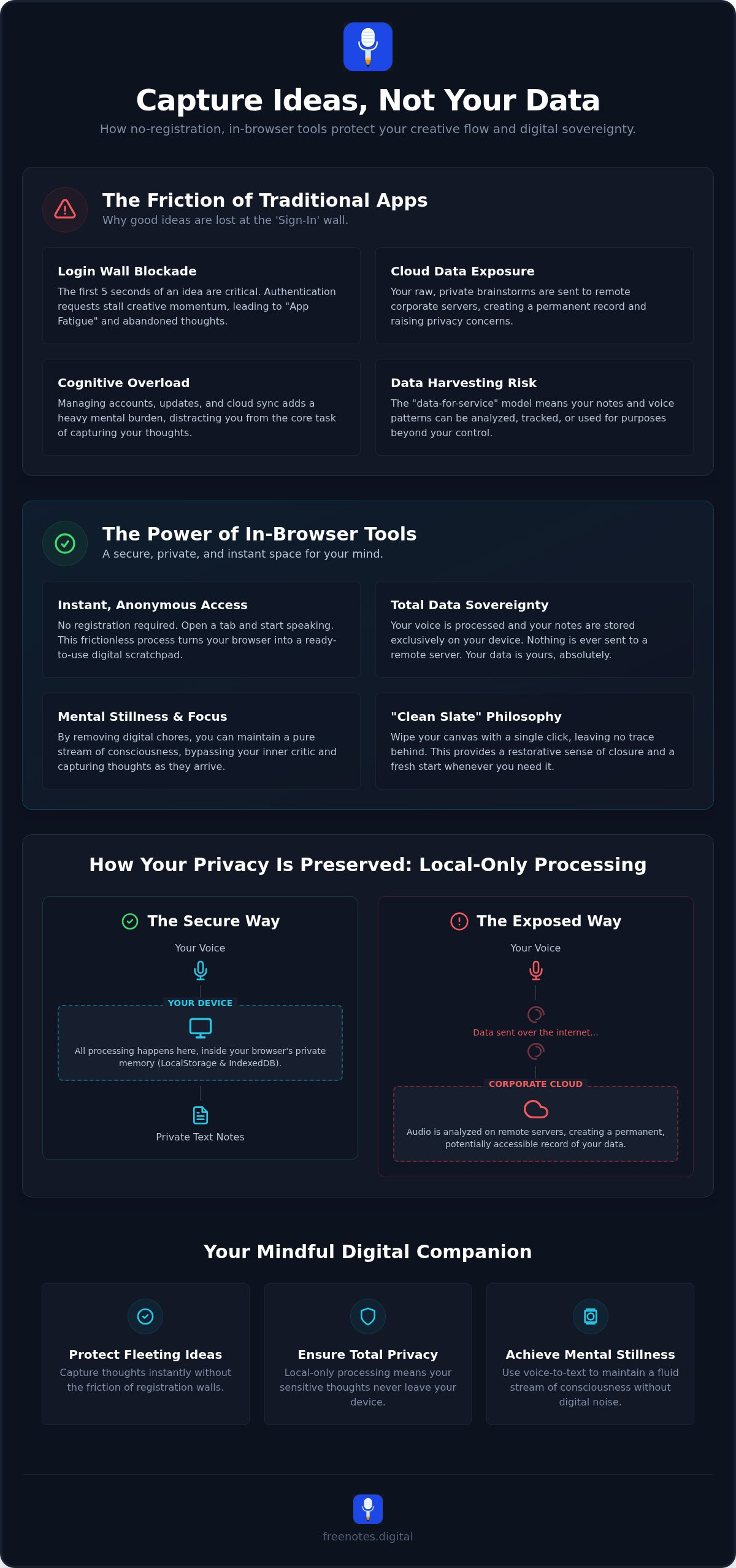
Every creative mind knows the fragile nature of a fleeting thought. It arrives like a whisper, vivid and clear, but it begins to dissolve the moment we hesitate. Research suggests that the first five seconds of an idea are the most critical for capture. If you don’t anchor that thought immediately, the mind often moves on, leaving only the vague memory of something brilliant. Unfortunately, modern software often acts as a gatekeeper rather than a gateway. We’ve entered an era of “App Fatigue,” where the simple act of taking a note is preceded by a gauntlet of updates, loading wheels, and authentication requests.
When you use a dedicated in-browser dictation tool, you choose to remove these barriers. This approach values your mental lightness over the data-harvesting needs of large corporations. Instead of wrestling with a password manager while your inspiration fades, you simply speak. The transition from thought to text becomes a seamless, fluid movement. It’s a restorative way to work, allowing you to offload the cognitive burden of digital maintenance so you can focus entirely on the substance of your reflections.
Why We Abandon Ideas at the Login Screen
The “Sign-In” wall is more than just a minor inconvenience; it’s a psychological friction point that signals to your brain that the task ahead is heavy. When you’re met with a login form, your creative momentum stalls. You aren’t just capturing a thought anymore; you’re managing an account. Many users find themselves abandoning their most spontaneous ideas simply because the effort to access the tool exceeds the perceived value of the moment. By capturing ideas without an account, you preserve the purity of your creative process. Modern Speech recognition technology has advanced to a point where this capture can happen instantly within your browser, providing a lightweight alternative to cumbersome, cloud-sync dependent applications.
The Freedom of Anonymous Digital Drafting
There is a profound sense of safety in knowing that your raw brainstorms aren’t being instantly synced to a permanent cloud profile. Anonymity fosters a unique kind of honesty. When you speak into a temporary sandbox, you’re free to explore half-formed concepts or sensitive reflections without the feeling that someone, or some algorithm, is watching. This in-browser dictation tool creates a private sanctuary for your “unfiltered” notes. It serves as a digital scratchpad for ideas that aren’t quite ready for the permanence of a formal document. This discretion allows for a more authentic stream of consciousness, ensuring your digital workspace remains a supportive companion in your daily life. For those who want to go even further in protecting their reflections, an anonymous web notepad offers a space that never asks who you are, providing the ultimate foundation for honest, unguarded expression.
How an In-Browser Dictation Tool Protects Your Peace
In 2026, digital privacy isn’t just a feature; it’s a necessity for mental well-being. The cornerstone of this security is local-only processing. When you use a sophisticated in-browser dictation tool, your voice is converted into text entirely within the confines of your own browser. Unlike traditional apps that send your audio to remote servers for analysis, this local approach ensures that your spoken words never leave your device. It creates a digital vault where your most personal reflections exist only on your internal storage, far from the reach of corporate data harvesting.
This architecture supports a “Clean Slate” philosophy that many high-pressure tools ignore. You have the power to wipe your entire canvas with a single click, leaving no trace behind. There are no “deleted items” folders hiding on a server and no lingering logs of your activity. This level of control provides a restorative sense of closure. It allows you to use a Free Voice to Text Note Taking Tool as a temporary harbor for your ideas, knowing you can clear the space whenever you need a fresh start.
Local Storage vs. Cloud Exposure: A Serene Comparison
The technology that makes this possible is as elegant as it is effective. Instead of the cloud, these tools utilize quiet corners of your browser known as LocalStorage and IndexedDB. Think of these as a private, temporary memory that stays on your computer. You might worry about losing your work if a tab closes, but modern browser tools include gentle auto-save functionality. This ensures your progress is preserved locally without ever needing to “sync” with an external account. You, and only you, hold the key to your data. There is no middleman and no hidden repository, just a direct connection between your voice and your screen.
The Ethics of Data-Free Software
The dominant “data-for-service” model in tech often feels like a heavy trade-off. We’ve grown accustomed to paying for productivity with our personal information, but this shouldn’t be the standard. A human-centric approach values your space more than your data. By choosing tools that operate without registration or external storage, you’re opting for a more respectful digital relationship. This transition can transform your workflow into the ultimate tool for mental stillness, allowing you to focus on the work itself rather than the security of the platform. A private in-browser dictation tool acts as a sanctuary where thoughts remain truly yours. It’s a quiet assistant that stays out of the way, providing reliable support while remaining deeply respectful of your personal boundaries.
Voice-to-Text: The Ultimate Tool for Mental Stillness
There is a unique tranquility in watching your thoughts materialize on a screen without the rhythmic, often distracting clicking of a keyboard. For many of us, the act of typing is inextricably linked to the “inner critic.” We type a sentence, pause, backspace, and rephrase, effectively stalling our creative engine before it can truly warm up. Choosing an in-browser dictation tool changes this dynamic. It shifts the focus from the mechanics of writing to the purity of expression. Speaking allows for a fluid stream of consciousness that typing often interrupts, helping you maintain a state of mental stillness while you work.
This sensory experience is particularly restorative. As you speak, the words appear instantly on a clean, unburdened canvas. This immediate visual feedback provides a sense of accomplishment and clarity. For those who find physical typing cumbersome or those who struggle with the cognitive load of managing a complex interface, dictation offers a graceful alternative. It levels the playing field, ensuring that the speed of your fingers never limits the depth of your ideas. By adopting a frictionless digital scratchpad, you allow your creative process to unfold at the natural pace of your own voice.
Capturing the Speed of Thought
Voice is the most natural medium for “brain dumping” or emotional venting. When your mind is racing with a new project or a complex problem, your hands often can’t keep up. This lag creates a bottleneck where ideas are lost. If you know how to dictate and edit text online, you can bypass this frustration. You achieve a flow state where technology moves in harmony with your mind. It’s a method of capturing raw inspiration that feels less like work and more like a gentle conversation with yourself, leading to instant clarity and a lighter mental load. Writers especially benefit from this approach, and if you’re looking to deepen your practice, exploring a dedicated online dictation tool for writers can help you bridge the gap between the speed of thought and the pace of the page.
Privacy in Every Spoken Word
In 2026, browser standards have reached a point where high-accuracy speech recognition no longer requires a trip to the cloud. You can speak freely, knowing your voice isn’t being harvested for advertising or used to train distant algorithms. Contrast this with common “Smart Assistants” that often listen more than they help. An in-browser dictation tool provides a transient environment where your voice memos exist only as long as you need them. In a no-registration space, your spoken words are treated with the respect they deserve. They are captured, reflected back to you, and then held in your private control, ensuring your sanctuary for ideas remains truly undisturbed.
Strategic Workflows for a Frictionless Digital Scratchpad
Integrating an in-browser dictation tool into your daily life isn’t just about typing faster; it’s about creating a dedicated rhythm for your thoughts. Many of us find that a “Meeting Scratchpad” workflow is an ideal way to begin. Instead of struggling to keep up with a fast-paced conversation, you can use dictation to capture the essence of a discussion in its rawest form. Once the meeting ends, you have a solid foundation of notes ready to be refined and moved into a more structured system. This process ensures that nothing is lost in the transition from ear to page.
Another restorative practice involves using the tool for “Morning Pages.” Clearing your mental clutter at the start of the day can set a tone of tranquility for the hours ahead. By speaking your intentions or anxieties into a clean digital space, you externalize them, making them easier to manage. This isn’t about creating a perfect document; it’s about the act of release. You can offload the weight of your thoughts and start your workday with a sense of lightness and clarity. It’s a simple, methodical way to prepare your mind for the tasks to come.
The Creator’s Sandbox: Unfiltered Brainstorming
A blank, account-free canvas acts as a safe space for imperfect ideas. During the creative brainstorm phase, structure and accounts are often obstacles that stop the flow of inspiration. Using a quick online scratchpad allows you to experiment without the pressure of permanence. For maximum security and mental hygiene, we suggest the “Copy-Paste-Clear” method. Once you’ve captured your breakthrough, simply copy the text to your final destination and clear the canvas. This leaves you with a fresh, unburdened environment for your next spark of genius.
Drafting Sensitive Content with Confidence
There are times when you need to draft content that feels deeply personal or vulnerable. Whether you’re writing a journal entry, reflecting on a difficult conversation, or even temporarily holding onto a complex password, you need a space that doesn’t sync. A tool that stays local to your browser is the safest place for a first draft of your life. You can speak your truth without worrying about an edit history existing on a distant server. This discretion provides a profound sense of tranquility, knowing that your words remain entirely under your control until you choose to move them elsewhere. If you’re ready to experience this level of privacy, you can start your next session on our Quick Notes Canvas to see how effortless capture truly feels.
Free Notes App: Your Mindful Enabler for Idea Capture
Choosing a dedicated in-browser dictation tool should feel like stepping into a quiet, well-lit room. It is a space designed for you, where the only priority is the preservation of your thoughts. At Free Notes App, we’ve built a platform that acts as a sophisticated assistant, staying out of your way until the exact moment you need it. We don’t believe that productivity should come at the cost of your digital privacy or mental energy. Instead, we offer a harmonious environment where technology supports your well-being rather than demanding your data.
Our philosophy is grounded in three core values: zero registration, local-only processing, and a serene design. We understand that the modern thinker is often overwhelmed by “app fatigue” and the constant pressure of cloud-based surveillance. By removing the sign-in wall and ensuring that your voice stays on your device, we act as a protective guardian of your creative process. This human-centric approach allows you to engage with your ideas in their rawest form, providing a sense of reliable, unobtrusive support that is rare in the current tech landscape.
Elegant Design for Focused Minds
The visual serenity of our interface is a deliberate choice. There are no complex menus to navigate and no cluttered sidebars to distract you from your work. We’ve focused on a level of craftsmanship that mirrors the fluidity of thought itself. This 100% free service is supported by non-intrusive, respectful advertisements that never interrupt your flow or compromise your experience. We believe that professional-grade tools can be both accessible and elegant. In 2026, the most powerful tool is the one that respects your boundaries while providing the mental lightness you need to thrive.
Begin Your Frictionless Journey
Getting started is as simple as a single click. There are no forms to fill out and no confirmation emails to wait for. You simply open the browser and begin. This immediacy is the ultimate antidote to the cognitive load of modern life, offering a restorative power that helps you transition from a cluttered mind to a clear, organized canvas. Whether you are drafting a sensitive memo or capturing a midnight spark of inspiration, you can do so with absolute peace of mind. Your thoughts are yours alone, and we are here to ensure they stay that way. Experience the serenity of frictionless capture at Free Notes App and discover how an in-browser dictation tool can become your most trusted digital sanctuary.
Embrace the Lightness of Frictionless Thought
In 2026, the most valuable digital space is one that asks for nothing and gives you everything you need to flourish. By choosing an in-browser dictation tool, you prioritize your mental well-being and creative flow over the heavy demands of traditional software. You’ve seen how removing the sign-in wall protects those vital first seconds of an idea, and you’ve explored how local-only processing ensures your most sensitive reflections remain entirely under your control. This shift transforms your digital environment from a source of friction into a sanctuary for reflection.
Reclaiming your tranquility is a methodical process that starts with the right companion. With 100% local-only data processing and zero registration required, your workspace becomes a private harbor for raw inspiration. The sophisticated, distraction-free design of our platform ensures that your focus remains exactly where it belongs: on the beauty of your own evolving thoughts. It’s time to experience a tool that respects your boundaries while supporting your growth and mental clarity.
Start your mindful dictation journey now at Free Notes App. You deserve a workspace that feels as light and clear as your best ideas.
Frequently Asked Questions
Do I really not need an account to use this in-browser dictation tool?
You don’t need to create an account or provide any personal information to use this in-browser dictation tool. We’ve deliberately removed the registration wall to ensure you can capture your ideas the moment they arrive. This approach eliminates the heavy friction of password management, allowing you to focus entirely on your creative flow without the burden of unnecessary digital barriers or account maintenance.
Where are my dictated notes stored if there is no login?
Your notes are stored securely within your own web browser’s local memory using technologies like LocalStorage. This means your data stays on your physical device rather than being uploaded to a remote server. It’s a private, temporary harbor for your thoughts that gives you absolute sovereignty over your information until you choose to move it elsewhere for permanent storage.
Is my voice data being recorded or used to train AI models?
Your voice data is never recorded, stored, or used to train external AI models. The speech-to-text conversion happens locally through your browser’s built-in capabilities, ensuring your spoken words remain entirely private. This human-centric design respects your personal space and protects your ideas from corporate data harvesting, allowing you to speak freely in a protected digital sanctuary.
What happens to my notes if I accidentally close the browser tab?
Most modern browsers will preserve your text through local auto-save features even if you accidentally close the tab. When you return to the page, your notes should still be waiting for you on the canvas. However, we always recommend copying your most important reflections to a permanent location once you’ve finished your brainstorming session to maintain your mental clarity and peace of mind.
Can I use the voice-to-text feature on my smartphone browser?
Yes, you can use the voice-to-text feature on most modern smartphone browsers that support standard speech recognition APIs. This allows for a seamless transition between your desktop and mobile environments. It’s a graceful way to offload thoughts while you’re on the move, maintaining your mental lightness and ensuring your best ideas are captured regardless of where you are.
How do I save my notes permanently if I decide I want to keep them?
To save your notes permanently, simply copy the text from the canvas and paste it into your preferred document editor or email client. Since this tool is designed as a frictionless scratchpad, it doesn’t maintain a permanent cloud archive. This “Copy-Paste-Clear” method ensures your digital environment stays tidy and your sensitive data remains under your direct, personal control at all times.
Is Free Notes App compatible with all modern browsers like Chrome and Safari?
Free Notes App is designed to work beautifully with modern browsers like Chrome, Edge, and Safari that support advanced web standards. While most updated browsers are compatible, we recommend using the latest version to ensure the highest accuracy for your in-browser dictation tool experience. It’s a reliable, quiet assistant that stays ready to support your creative process whenever inspiration strikes.
Why is local-only storage better than cloud syncing for private notes?
Local-only storage is superior for private notes because it eliminates the risk of data breaches on external servers. It provides a sense of tranquility by ensuring no “edit history” or “deleted items” exist in a cloud you don’t control. This approach values your digital sovereignty, offering a sophisticated sanctuary where your rawest thoughts stay truly yours without the weight of corporate oversight. If you’re seeking the deepest level of privacy for your reflections, exploring an anonymous web notepad designed as a sanctuary for private thoughts can help you understand just how far this philosophy of data-free writing can take you.