
How many brilliant ideas have you lost to the sudden friction of a login screen or the visual noise of a cluttered interface? It’s a common frustration in our hyper-connected world, where the simple act of writing something down often requires a password and a prayer for privacy. Finding an instant online notepad no login required shouldn’t feel like a compromise; it should be the standard for anyone who values their mental clarity and creative flow.
You likely agree that the best tools are the ones that stay out of your way, acting as a quiet companion rather than a demanding gatekeeper. While 76% of users cite searchability as their most valued feature according to Worldmetrics data, that convenience shouldn’t come at the cost of your digital footprint. This guide will show you how to reclaim your focus with a clean, registration-free canvas that keeps your thoughts exactly where they belong. We’ll explore how local-browser processing and voice-to-text tools create a sanctuary for your mind, allowing your ideas to flow from thought to text without a single barrier. Discover how to turn your browser into a private, frictionless workspace that honors your need for both speed and silence.
Key Takeaways
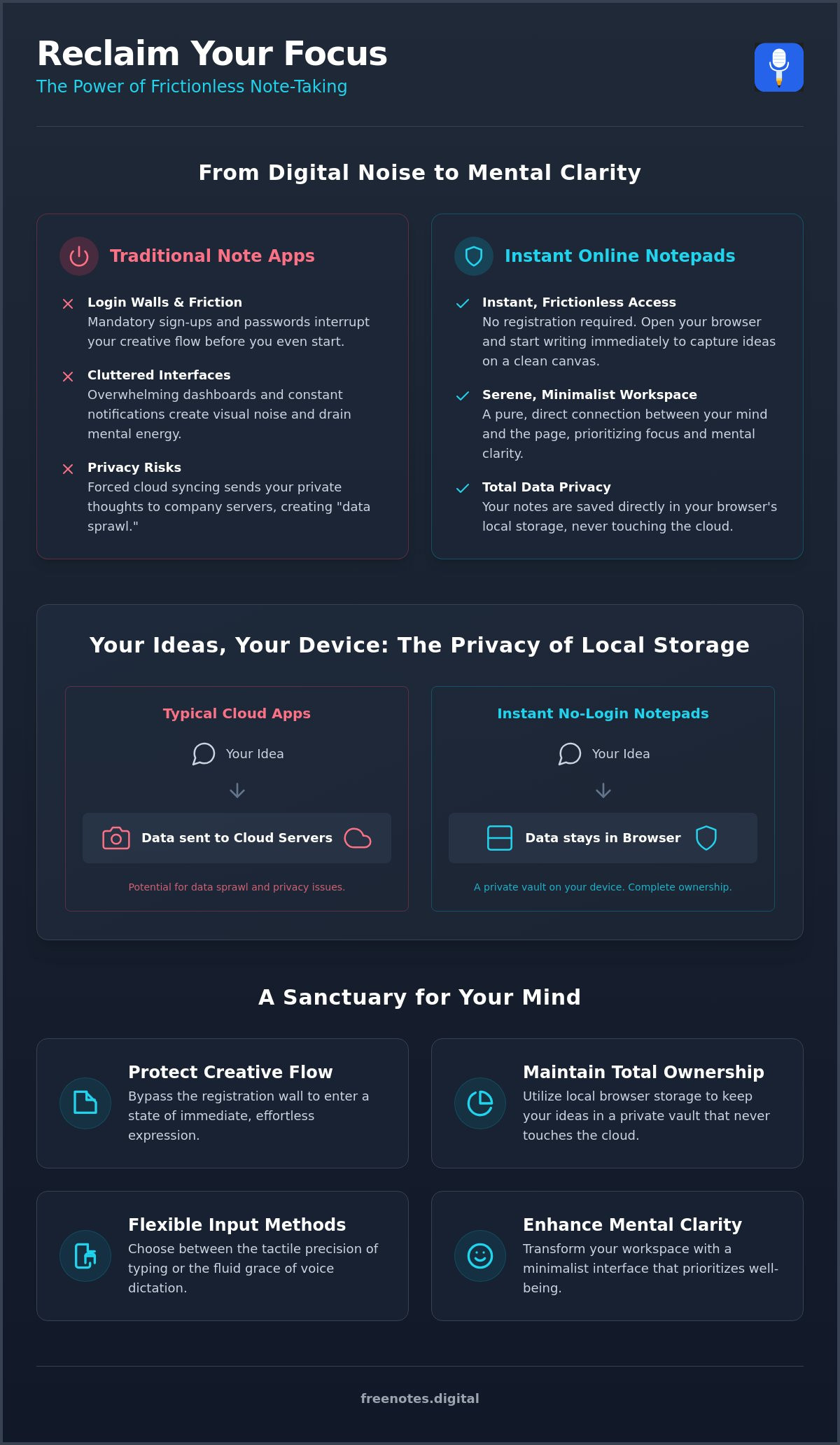
- Protect your creative flow by bypassing the registration wall and entering a state of immediate, effortless expression.
- Experience the tranquility of an instant online notepad no login needed, where your thoughts are captured on a clean canvas with zero mental friction.
- Choose between the tactile precision of typing and the fluid grace of voice dictation to remove the physical barriers between your mind and the page.
- Maintain total ownership of your data by utilizing local browser storage, keeping your ideas in a private vault that never touches the cloud.
- Transform your workspace into a serene sanctuary with a minimalist interface that prioritizes your well-being and mental clarity.
Why Choose Quick Browser Notes Without the Friction of a Sign-Up?
Imagine your mind as a quiet lake. Every interruption is a stone cast into the water, creating ripples that distort your focus and clarity. When a sudden insight arrives, you need a place to capture it before it drifts away into the depths of your subconscious. This is where an instant online notepad no login becomes more than just a utility; it’s a sanctuary for your creative energy. Unlike traditional tools that demand your email address before allowing you to type a single word, these browser-based canvases offer a local-first workspace. Your thoughts stay on your device, existing in a transient state that respects the ephemeral nature of inspiration.
By removing the “login wall,” you preserve the delicate state of flow that creators cherish. There is no password to remember, no two-factor authentication to interrupt your rhythm, and no cluttered dashboard to navigate. It’s a pure, direct connection between your mind and the digital page. This approach treats your ideas with the respect they deserve, providing a space that is as immediate as a physical sticky note but with the elegance of a modern digital tool.
The Problem with Modern Note-Taking Apps
The digital landscape is often cluttered with “noise” that drains our mental reserves. Many creators feel a growing fatigue from constant notifications and the pressure of forced cloud syncing. When every small thought is stored in a permanent cloud account, it leads to “data sprawl,” where your digital life becomes a tangled web of half-finished ideas and forgotten lists. Account creation acts as a heavy barrier. It forces you to pause and interact with a system rather than your own thoughts. This friction doesn’t just slow you down; it can actively dissolve your creative momentum before you’ve even begun to write.
The Serenity of Zero Friction
Choosing a tool like a Quick Notes Canvas provides a refreshing sense of a clean slate. There’s an undeniable speed to browser-based tools that heavy desktop applications simply can’t match. By removing the registration process, you’re invited into a more mindful and intentional writing experience. These temporary browser notes serve as a protective guardian for your insights, ensuring that the transition from thought to text is as fluid as a breath.
The magic behind this privacy-first approach lies in Understanding Local Storage. Instead of sending your data to unknown servers, the browser keeps the information within its own environment. This ensures that you can use an instant online notepad no login with total confidence. Your workspace remains as private as a physical journal tucked away in a drawer, offering a sophisticated way to achieve mental lightness in an increasingly loud digital world.
A Step-by-Step Guide to Creating an Instant Digital Workspace
Setting up a digital workspace shouldn’t feel like a bureaucratic task. It should be a gentle ritual that signals your mind to enter a state of focused presence. By using an instant online notepad no login, you bypass the digital noise and move straight to the signal. This process is designed to be as light as a breath, ensuring that your ideas are captured the moment they surface.
Step one is simple. Open your browser and navigate to a dedicated, minimalist notepad like the Free Notes App. When you arrive at a clean, white canvas, you’ll feel an immediate sense of mental lightness. Step two involves calibrating your environment. Depending on your current energy, you might choose the tactile rhythm of typing or the fluid ease of voice dictation. Embracing a Frictionless Way to Capture Ideas is a vital part of modern digital literacy, as it empowers you to manage information without being overwhelmed by the tools themselves.
Preparing Your Mind and Browser
Before you begin, create a sanctuary within your browser. Close unnecessary tabs that compete for your attention. You can bookmark your preferred notepad for one-click access, which is especially helpful during browser notepad for meeting notes sessions where every second counts. Ensure your browser settings allow for local storage. This technical detail is what enables the magic of step three: the local autosave. This feature acts as a silent guardian, ensuring your thoughts are preserved in real-time without ever leaving your device.
Step four is about bringing a gentle order to the chaos. You can organize your thoughts using simple text markers or multi-page structures if your reflection session grows deep. Don’t worry about perfection in this stage. The goal is movement and clarity rather than rigid structure.
Capturing and Refining Your Thoughts
During a “brain dump,” allow yourself the freedom to write without judgment. You don’t need to worry about grammar or perfect syntax. Use simple symbols, like asterisks for tasks or dashes for fleeting insights, to differentiate your notes at a glance. This creates a visual rhythm that’s easy to navigate later. When your session of reflection is complete, step five is to export or transcribe your notes. You can then move these refined ideas from your temporary scratchpad into a permanent project folder or a long-term archive.
This methodical yet fluid approach ensures that your workspace remains a restorative environment. You can begin this journey toward mental clarity today by exploring the Quick Notes Canvas for your next creative project. By treating your digital environment with intention, you turn a simple browser tab into a powerful ally for your creative process.
Choosing Between Voice Dictation and Typing for Seamless Idea Flow
The journey from a fleeting thought to a digital record can often be interrupted by the mechanics of the tool itself. When you use an instant online notepad no login, you gain the freedom to express yourself in the way that feels most natural in the moment. Some thoughts arrive with a rhythmic pulse that demands the tactile click of a keyboard, while others flow with a conversational grace that is better captured through speech. This choice is vital for maintaining your mental lightness throughout the day.
Choosing free voice to text online creates a serene sanctuary where your private reflections aren’t limited by your typing speed. This method removes the physical barrier between your mind and the page, allowing for a more emotive and nuanced recording of your ideas. The Free Notes App honors this process by ensuring that voice data is processed locally on your device. This local processing maintains the speed and privacy that modern creators expect, ensuring your spoken words never leave the safety of your own browser.
When to Use Voice-to-Text
Speech is the most intuitive form of communication we possess. It’s ideal for rapid brainstorming sessions where you want to capture a high volume of ideas without the fatigue of repetitive typing. For those in academic settings, using voice to text for students can transform the way lecture summaries and initial essay drafts are composed. It’s an inclusive approach that prioritizes accessibility, ensuring that everyone can participate in the creative process regardless of physical constraints. It allows you to speak your truth as quickly as it forms in your mind.
The Precision of Manual Typing
While voice is fluid, typing offers a different kind of satisfaction. It provides a structured precision that is essential for creating detailed task lists, writing code snippets, or documenting complex meeting minutes. Within the Quick Notes Canvas, your typed thoughts act as visual anchors, providing a stable foundation for your projects. Many users find success in a hybrid approach. They might dictate the core essence of a new idea to keep the momentum going, then switch to typing to refine the specific details and formatting. This combination ensures that your instant online notepad no login adapts to your needs, rather than forcing you to adapt to the software. It’s about finding a harmonious rhythm that supports your well-being and productivity in equal measure.
Understanding Local Storage: Why Your Notes Are Safest on Your Device
Imagine a private vault that exists only within the sanctuary of your own computer. This is the essence of local storage. When you use an instant online notepad no login, your browser creates a small, dedicated space to hold your words. Unlike traditional cloud services that transmit your data across the globe, this technology ensures your ideas never leave your sight. It’s a philosophy of “Privacy-by-Design,” where the tool itself is built to respect your boundaries. You don’t have to trust a third-party corporation with your reflections because they never receive them in the first place. For those who handle particularly sensitive material, a secure online text editor no login takes this privacy-first philosophy even further, offering a dedicated workspace where your most confidential ideas remain entirely beyond the reach of unknown servers.
A common question arises: what happens if I clear my browser cookies? Since your notes live in this local vault, clearing your cache or browsing data will remove them. Think of it like a physical blackboard; it’s a perfect space for transient thoughts, but you should transcribe anything you wish to keep permanently. This transient nature is exactly why an instant online notepad no login feels so light and unburdened. It encourages a focus on the present moment without the weight of digital clutter.
Cloud Storage vs. Local Processing
In a cloud-based app, the service provider technically holds the keys to your data. Local processing flips this dynamic, placing you in total control of your own intellectual property. This also eliminates the “lag” often associated with syncing to a server, giving the interface a responsive feel that mirrors the speed of your own thoughts. There is no account to hack and no password to lose, providing a silent security that cloud platforms simply can’t offer. It’s a more elegant, human-centric way to interact with technology.
Maintaining Your Digital Privacy
If you’re using a shared or public computer, always remember to export your work before closing the session. You can manually “save as” a text file to create a permanent local backup on a thumb drive or personal folder. This simple habit ensures your private thoughts remain for your eyes only, even in a shared environment. You can experience this secure, quiet workspace for yourself by trying the Quick Notes Canvas today. It’s a sophisticated way to capture insights without the lingering shadow of data breaches or unauthorized access. The restorative peace of knowing your mind is protected allows you to reach deeper levels of creative expression.
Free Notes App: Your Serene Sanctuary for Instant Idea Capture
In a digital world that often feels loud and demanding, finding a space for quiet reflection is a necessity for the modern creator. Free Notes App is designed to be more than just a functional utility; it’s a mindful enabler that honors your need for mental lightness. By providing an instant online notepad no login, we’ve stripped away the barriers that typically stand between a spark of inspiration and its digital record. This is a tool that understands the value of your focus, acting as a quiet, reliable assistant that stays out of the way until the exact moment you need it.
Our core offerings, the Free Voice to Text Note Taking Tool and the Quick Notes Canvas, work in harmony to support your unique creative rhythm. Whether you are speaking your thoughts into existence or typing with rhythmic precision, the experience is crafted to feel fluid and restorative. We believe that organization shouldn’t feel like a chore; instead, it should be a process that leaves you feeling supported and at ease.
Designed for Mental Lightness
The aesthetic of the interface is a deliberate choice, intended to mirror the clarity of an empty journal. We’ve avoided the clutter of ads, sidebars, and unnecessary notifications that define so much of high-pressure tech. This lack of noise reinforces a human-centric philosophy that values your well-being over engagement metrics. The result is a gentle companion that provides a visual sanctuary for your ideas. When the interface is clean and the process is intuitive, your mind is free to reach deeper levels of insight without the weight of digital friction. It’s a “quiet” tool built for a world that’s often too loud.
Start Your Journey to Frictionless Note-Taking
Every transient thought or sudden brainstorm deserves a safe place to land. We encourage you to try the app for your next project, whether it’s a simple grocery list or the first draft of a complex essay. Remember that your ideas remain entirely yours. Because we utilize local browser storage, your private reflections never touch a cloud server or an unknown database. You can write, speak, and organize with the absolute confidence that your privacy is protected by design. Experience the restorative nature of a workspace that respects your boundaries and encourages your growth. Experience the tranquility of Free Notes App today and discover how simple and elegant your creative process can truly be.
Embracing a Simpler Way to Capture Your Thoughts
True productivity isn’t about doing more; it’s about removing the obstacles that prevent you from starting. We’ve explored how a local-first approach transforms your browser into a private sanctuary, keeping your data secure without the need for cloud accounts or complex passwords. By choosing an instant online notepad no login, you protect your focus from the noise of the modern web while ensuring your insights stay entirely yours. Whether you’re utilizing the Free Voice to Text Note Taking Tool for fluid reflections or the Quick Notes Canvas for structured thoughts, you’re choosing a path of mental lightness. This mindful approach to digital organization allows you to move with a purposeful grace throughout your day.
Your ideas are precious, and they deserve a tool that honors their importance without standing in their way. You can reclaim your mental space by opting for a workspace that prioritizes your privacy and speed above all else. Start your frictionless note-taking journey at freenotes.digital today. Experience the tranquility of a tool with zero ads, instant dictation, and the quiet confidence of local-only processing. Step into a more harmonious digital environment and watch your creativity flourish in the silence.
Frequently Asked Questions
Is it safe to use an online notepad without a login?
Yes, it is very safe because tools like Free Notes App utilize local-only processing. This architectural choice means your text never travels to a central server where it could be intercepted or leaked. Your data remains safely tucked within your browser’s local storage, ensuring your privacy is as secure as the device you are using. It provides a peaceful sense of ownership over your own creative output.
Do I lose my notes if I close the browser tab?
You typically don’t lose your work because most modern browser notepads use the LocalStorage API to save your content automatically as you type. Even if you accidentally close the tab or experience a browser crash, your notes will usually be there when you return. Just be mindful that clearing your browser’s cache or cookies will remove this local data; it’s a good idea to move permanent thoughts elsewhere once your session is complete.
Can I use voice-to-text in a no-sign-up notepad?
Absolutely, you can use voice-to-text features to capture your ideas with ease. The Free Notes App includes a dedicated Free Voice to Text Note Taking Tool designed for those moments when speaking is more natural than typing. This allows you to dictate your thoughts directly into an instant online notepad no login required, creating a fluid transition from spoken word to digital text without the need for complex software or account registration.
How do I save my notes permanently if there is no cloud sync?
To save your notes permanently, you should periodically copy your text into a long-term document or use your browser’s “Save As” function. Since the notes are stored locally in your current browser session, exporting them ensures you have a reliable backup on your hard drive. This simple ritual allows you to clear your temporary workspace while keeping your most valuable insights safe for future reference in a permanent archive.
Is there a limit to how much I can write in a browser notepad?
Most browsers allow for several megabytes of local storage, which translates to thousands of pages of plain text. While specific limits vary by browser, this capacity is more than sufficient for daily scratchpad needs and extensive brainstorming sessions. You can write freely without worrying about hitting a wall, allowing your thoughts to unfold at their own natural pace within your private digital sanctuary.
Why should I use a no-registration app instead of a traditional one?
No-registration apps offer a frictionless experience that allows you to capture a thought the very moment it occurs. They are perfect for private reflections or quick meeting notes where you want to avoid the distraction of logins and cloud-based tracking. Using an instant online notepad no login helps maintain your mental lightness by removing the digital noise that often clutters traditional, account-heavy note-taking platforms.