What if the most intimate space for your thoughts isn’t a locked diary but a simple, open tab in your web browser? Most of us have felt that sudden hesitation before clicking record on a new app, wondering if our private reflections are being harvested to train a distant AI model. It’s exhausting to face a wall of registration forms and complex settings when you just want to capture a fleeting idea. You deserve a browser transcription tool free of these digital weights, one that respects your creative flow as much as your privacy. Finding a way to capture your voice shouldn’t feel like a transaction with a data broker; it should feel like a breath of fresh air.
We’re here to help you reclaim that sense of mental lightness and clarity. In this guide, you’ll discover how to transform your spoken thoughts into elegant text with absolute privacy and zero technical friction. We will explore the path to a clean, instant experience that requires no downloads or hidden costs. You’ll learn how to identify a tool that acts as a quiet, reliable assistant, ensuring your ideas remain yours alone while your mind stays focused on what truly matters.
Key Takeaways
- Learn why local-first processing is the new standard for privacy in 2026, ensuring your voice notes never leave your device.
- Discover how to select a browser transcription tool free from registration walls and hidden costs to maintain your creative momentum.
- Understand the subtle differences between cloud-based trials and browser-native tools to protect your data from being used for AI training.
- Master best practices for clear dictation that transform your spoken reflections into structured text with effortless precision.
- Find out how a minimalist interface can remove mental friction, acting as a quiet guardian for your personal thoughts.
The Landscape of Browser Transcription Tool Free Options in 2026
Imagine a digital space that asks for nothing and gives you everything. In 2026, finding a browser transcription tool free of hidden agendas has become a priority for those who value their mental peace. This isn’t just about converting audio into characters. It’s about creating a sanctuary where your spoken thoughts can land softly and take shape without judgment. Unlike the high-pressure tools of the past that demanded immediate action and constant upgrades, today’s landscape favors a more mindful, assistant-based model. It’s a shift from seeing software as a taskmaster to seeing it as a gentle companion in your creative journey.
The most significant evolution this year is the widespread adoption of local-first processing. Modern speech recognition technology now allows your browser to handle the heavy lifting directly on your device. This shift ensures your personal reflections never touch a remote server or feed a hungry AI training set. It’s a quiet revolution that replaces cloud anxiety with a profound sense of security. When you know your data is safe within your own browser, the friction of hesitation disappears, leaving only the clarity of your own voice. A truly free tool should never mean your data is the price of admission.
Why Browser-Based Tools are the Modern Choice
Choosing a browser-based solution means embracing a cleaner digital environment. There are no heavy software packages to install or complex updates to manage; the tool is simply there when you need it. This instant accessibility across your laptop, tablet, or desktop removes the friction of syncing and the clutter of extra icons. When you can speak freely, your thoughts flow with a natural rhythm that typing often interrupts. It’s about capturing the essence of an idea in the moment it blooms, without the weight of technical hurdles slowing you down. The simplicity of a web-based interface acts as a mindful enabler, keeping your focus on the content of your thoughts rather than the mechanics of the capture. For a deeper look at how modern technology achieves this, our easy speech to text web guide to frictionless browser dictation walks you through every step of the process.
The Distinction Between Free Trials and Forever Free
Many services today use a registration trap, where a seemingly free tool quickly reveals limitations or demands an account after just a few minutes of use. These are often extended trials designed to lead you toward a subscription, creating a sense of urgency that disrupts your mental flow. In contrast, a genuine browser transcription tool free from these walls, such as a Free Voice to Text Note Taking Tool, prioritizes your experience over a recurring fee. By utilizing a Quick Notes Canvas that stays out of your way, these platforms respect your time and your creative process. While some might use gentle, non-intrusive ad models to remain accessible, the core promise remains the same. Your thoughts are your own, and the tool remains a reliable, unobtrusive assistant that costs you nothing but your time and attention.
The Pillars of a Serene Transcription Experience
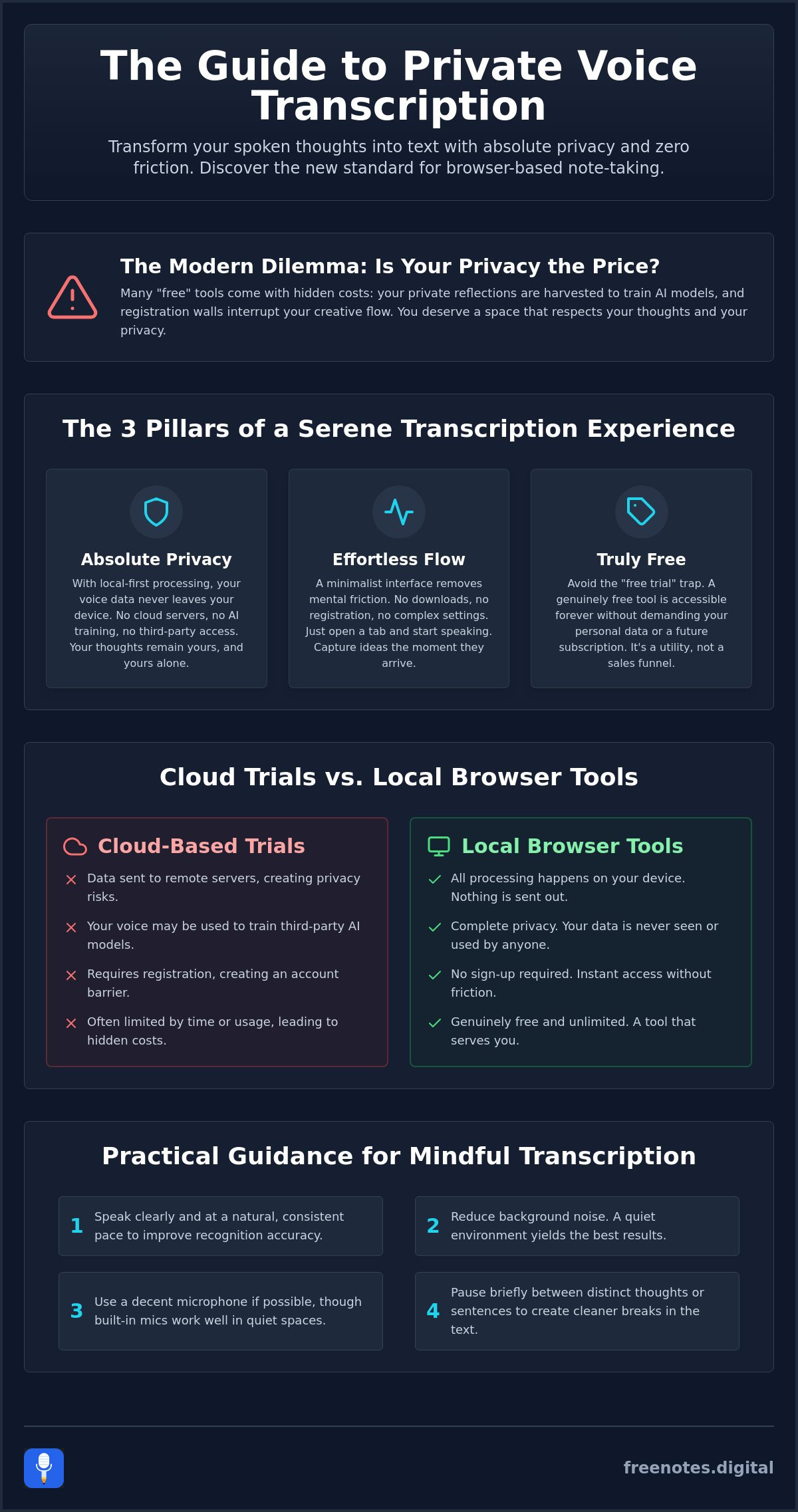
True tranquility in a digital workspace begins with the removal of barriers. When you use a browser transcription tool free of cloud dependencies, you create a private harbor for your thoughts. This experience is built on three essential pillars: absolute privacy, effortless accuracy, and a design that honors your mental space. By focusing on these foundations, the process of capturing your voice becomes a restorative act rather than another technical chore. It’s about finding a tool that feels like a quiet, reliable assistant, standing ready to listen without ever intruding on your creative process.
Privacy is the most vital of these pillars. In an era where data is often treated as currency, the peace of mind that comes from local processing is invaluable. Understanding the FTC guidance on voice recordings helps clarify why keeping your data local is so critical for personal security. When your spoken words stay within your browser, you eliminate the anxiety of third-party storage or AI training models. This security is essential for organizing your inner world, allowing you to speak with total candor and vulnerability.
Local Processing: The Guardian of Your Ideas
Local processing ensures that your voice notes are strictly confined to your own device. This “non-cloud” environment offers a unique psychological benefit; it feels safe, like writing in a physical journal that only you can open. Because there is no data transmission to external servers, the risk of interception or unauthorized access is virtually removed. It’s the safest way to dictate private reflections, ensuring that your most sensitive ideas remain entirely under your control. This local-first approach transforms your browser into a protective guardian of your intellectual property.
Minimalism as a Functional Feature
A minimalist interface isn’t just about aesthetics. It’s a functional choice that reduces cognitive load, allowing your mind to focus on the fluidity of thought rather than the mechanics of a complex app. The presence of intentional white space fosters creative breakthroughs by providing room for your ideas to breathe. When you move away from cluttered dashboards and hidden menus, you enter a state of fluid thought capture. This is why a simple Free Voice to Text Note Taking Tool is so effective; it stays out of your way until the exact moment it’s needed. By using a minimalist Quick Notes Canvas, you can bridge the gap between a fleeting thought and a permanent record with purposeful grace.
Cloud-Based Trials vs. Local Browser Tools: A Comparison
When you search for a browser transcription tool free of charge, you often encounter two very different worlds. On one side, cloud-based platforms offer “free trials” that eventually lead to subscriptions, often storing your recordings on remote servers. On the other side, local browser tools prioritize your immediate needs and long-term privacy. The true cost of a cloud-based trial isn’t just the eventual monthly fee. It’s the subtle anxiety of knowing your personal thoughts reside on a server you don’t control. For those who value their mental space, the shift toward local tools represents a move toward digital sovereignty and peace of mind.
Students and academic researchers are increasingly moving away from heavy, complex transcription suites in favor of lighter, more agile alternatives. These users need fast voice to text online that allows them to capture insights as they happen, without the distraction of navigating a multi-layered interface. A tool that respects your personal space doesn’t demand your attention with notifications or storage alerts. Instead, it acts as a quiet enabler, providing the speed and accuracy required for deep work without the overhead of a traditional software ecosystem. It stays out of the way until the exact moment it’s needed.
The Registration Barrier
Account fatigue is a modern reality that drains our creative energy. Every registration form and email verification acts as a barrier to spontaneous thought. When you have a fleeting insight, a five-minute setup process can cause that idea to vanish before it’s ever recorded. A mindful browser transcription tool free of login requirements offers a setup time of exactly zero seconds. This instant access is superior for capturing transient insights, ensuring that the technology stays out of the way of the human process. It’s the difference between starting a conversation and filling out a bureaucratic form. A well-designed browser dictation tool eliminates this barrier entirely, letting you move from thought to text in a single, uninterrupted motion.
Data Sovereignty and Security
While cloud services often tout synchronization as a benefit, “no-sync” can actually be a powerful feature for privacy-conscious users. Cloud storage carries inherent risks, including data breaches and the use of your voice to train large language models without your explicit consent. In contrast, local browser caches keep your data exactly where it belongs: on your device. This approach ensures your voice is never treated as a commodity. Knowing your reflections aren’t being processed by a distant AI provides a level of tranquility that no cloud-based service can match. It’s about maintaining a clean, private environment where your ideas are protected by default.
Practical Guidance for Mindful Transcription
Capture is the first step toward creation. To make the most of a browser transcription tool free from digital clutter, you must approach the process with intention. It’s about more than just technology; it’s about setting the stage for your thoughts to emerge clearly. Whether you’re a student looking to transcribe spoken words to text for academic success or a creative professional mapping out a new project, the way you interact with your tools defines the quality of your output. Moving from a scattered digital scratchpad to a polished, organized project requires a methodical yet gentle touch.
Integrating voice-to-text into your daily life can become a restorative ritual. For many, a morning mindfulness session or an evening journaling habit is more effective when spoken aloud. It allows your ideas to breathe and expand without the physical constraint of a keyboard. By using a quiet, reliable assistant to catch these words, you free up your mental energy for deeper reflection. You don’t need to worry about the mechanics of the software; you only need to focus on the rhythm of your own voice.
Optimizing Your Environment for Accuracy
A serene environment is the foundation of high-quality transcription. Find a quiet space where you feel comfortable speaking without interruption. While modern browsers are adept at filtering out minor background sounds, a dedicated microphone can significantly reduce transcription errors. This doesn’t require expensive studio equipment; even a standard headset can provide the clarity needed for a seamless experience. Use simple voice commands like “period” or “new paragraph” to guide the flow of your text. These small directives help maintain the structure of your thoughts as they appear on the screen, reducing the need for heavy editing later.
From Spoken Word to Organized Notes
Once your thoughts are captured, the transition to organized text should be effortless. You can use a transcribe voice notes online free checklist to audit your current setup and ensure your tools are respecting your privacy. After dictating, take a moment to review and refine your local notes. This isn’t just about fixing typos; it’s about distilling your spoken insights into actionable ideas. The act of clearing your digital canvas once a task is complete provides a profound sense of mental lightness. It signals to your brain that the thought has been safely stored, allowing you to move on to your next creative challenge with a clean slate.
Ready to experience the tranquility of frictionless capture? Begin your journey today with our Free Voice to Text Note Taking Tool and see how elegant transcription can be.
Free Notes App: Your Sanctuary for Spoken Ideas
Finding a digital space that truly respects your creative process is rare. At freenotes.digital, we have crafted an environment that serves as the ultimate browser transcription tool free of the noise and anxiety typical of modern software. This platform is more than just a functional utility; it’s a sanctuary designed to support your well-being. By removing the pressure of high-octane productivity, we provide a place where your thoughts can land softly and take shape with purposeful grace. It’s the embodiment of everything we’ve explored: privacy, speed, and mental clarity.
Our Quick Notes Canvas is the heart of this experience. It’s an interface that understands the value of silence and white space. Instead of overwhelming you with buttons and menus, it remains unobtrusive, acting as a quiet, reliable assistant that only appears when you’re ready to speak. We’ve made a firm commitment to zero registration and zero cloud storage. Your voice stays on your device, ensuring that your most personal reflections remain entirely your own. This isn’t just about technology; it’s about providing a protective guardian for your ideas.
Frictionless Creation
Dictate your thoughts the moment they arrive, with no hurdles between your voice and the screen. The elegance of a web-based tool lies in its simplicity. You don’t have to worry about heavy downloads or the clutter of another app icon on your desktop. Because the service is accessible directly through your browser, it’s always ready to help you capture a fleeting insight or a deep reflection. We believe that access to high-quality tools should be universal. To keep this service accessible to everyone without a premium subscription, we utilize a model of respectful advertising that never interrupts your creative flow or compromises your focus.
The Future of Mindful Note-Taking
As we move through 2026, our focus remains on fostering deeper mental stillness. We are constantly evolving to ensure that our Free Voice to Text Note Taking Tool remains a mindful enabler for your daily life. The restorative nature of organization shouldn’t feel like a chore; it should feel like a breath of fresh air. We encourage you to embrace the simplicity of voice-to-text as a way to reduce cognitive load and find your natural rhythm. When you speak your truth into a safe, private space, you unlock a level of clarity that typing simply cannot match.
Your ideas deserve a home that honors their importance. Experience the tranquility of freenotes.digital today and discover how effortless capturing your inner world can be.
Embrace a Lighter Way to Capture Thoughts
The journey toward mental clarity begins with choosing tools that honor your privacy and peace of mind. By prioritizing local-only data processing, you ensure that your most personal reflections remain strictly yours. We have explored how the right technology acts as a quiet guardian, removing the friction of registration walls and the persistent anxiety of cloud storage. A browser transcription tool free of these digital burdens allows your creativity to flow without hesitation. This web-based simplicity means you can finally focus on the rhythm of your voice rather than the mechanics of a complex interface. It’s about finding a reliable assistant that respects your space.
It’s time to move away from cluttered dashboards and embrace a sanctuary for your spoken ideas. You deserve a workspace that stays out of the way until the exact moment it is needed. Start your journey toward mental clarity at freenotes.digital and experience the restorative power of zero-friction note-taking. No registration is required; just a clean, private canvas waiting for your voice. Step into a world where your thoughts are captured with purposeful grace and absolute security. Your mind is ready for the lightness that follows.
Common Questions About Serene Transcription
Is a browser transcription tool free really as accurate as paid software?
Yes, many browser-based solutions utilize the same sophisticated Web Speech APIs that power premium services. Accuracy is primarily determined by the quality of your microphone and the stillness of your environment rather than the cost of the software. By focusing on clear dictation, a browser transcription tool free from complex settings can deliver results that rival expensive, high-pressure alternatives.
How does local processing protect my privacy when transcribing?
Local processing ensures that your spoken words never leave your personal device. Instead of being transmitted to a remote server where they might be stored or used for AI training, your audio is converted to text directly within your browser engine. This local-first approach acts as a protective guardian, removing the cloud anxiety often associated with traditional transcription suites and keeping your reflections private.
Do I need to create an account to use freenotes.digital?
No, you don’t need to register or provide any personal information to begin capturing your thoughts. We believe that a truly frictionless experience should allow you to start dictating the moment an idea arrives. By removing the registration wall, we protect your mental flow and ensure that your creative process remains uninterrupted by the fatigue of managing another digital account.
Can I use this tool on my mobile browser without an app?
Yes, the Quick Notes Canvas is designed to function elegantly within your mobile browser. While we don’t offer a dedicated mobile app, the web-based interface is optimized for intuitive movement on smaller screens. This allows you to transform your voice into text wherever you are, providing a reliable, unobtrusive assistant that travels with you without the need for additional downloads.
Will my notes be saved if I close my browser tab?
Notes are often stored in your local browser cache, but it’s wise to move them to a permanent home before closing your session. Because we prioritize your privacy and don’t offer cloud storage, we don’t save your data on our servers. This ensures that you remain the sole owner of your ideas, maintaining a clean digital environment that respects your personal space.
Is there a limit to how much I can transcribe for free?
There are no hidden limits or tiered restrictions on how much you can dictate. Our browser transcription tool free model is built on the philosophy of being a mindful enabler for your daily life. You can use the canvas as often as needed to clear your mental clutter, ensuring that the tool stays out of the way of your creative breakthroughs and remains a constant companion.
What happens to my data if the website uses advertising?
Your voice data remains completely separate from any advertising efforts. Because all transcription happens locally on your device, your spoken words are never shared with third parties or used for targeted ads. We use non-intrusive advertising solely to keep the service accessible to everyone, ensuring that your sanctuary for ideas remains both private and free of charge for the long term.
How can I export my transcriptions once I am finished?
Exporting your work is as simple as copying the text from the canvas and pasting it into your preferred document or project. This minimalist approach allows for a smooth transition from a digital scratchpad to a more formal record. By keeping the process simple, we help you maintain the mental lightness achieved during your dictation session, making it easy to move your thoughts with grace.