
What if the distance between a fleeting thought and a finished sentence was as light as a single breath? For many, the act of writing feels more like a technical hurdle than a creative release, especially when you’re forced to navigate heavy software or hand over your privacy to distant cloud servers. You likely feel that the tools meant to help often add more noise to your day, creating a sense of mental friction rather than clarity. Finding a reliable browser dictation tool shouldn’t require you to sacrifice your personal space or manage a cluttered interface, particularly as digital privacy becomes increasingly vital in 2026.
We believe your digital environment should be a sanctuary for your ideas. With the Free Notes App, you can transform your spoken thoughts into text with a serene, private, and entirely browser-based experience that puts you back in control. You’ll gain access to instant transcription without the burden of registration or software downloads. This guide explores how to cultivate a distraction-free writing space where your data stays local and your mind stays clear. We’ll show you how to move from spoken word to written page with effortless grace, ensuring your creative process remains as fluid as your thoughts.
Key Takeaways
- Define the essence of frictionless dictation as the complete removal of downloads and registration, allowing your thoughts to flow without technical interruption.
- Learn to identify a serene browser dictation tool by filtering out the mental clutter of cloud-based tracking and intrusive advertisements.
- Gain a practical understanding of how to optimize your physical space and browser settings to achieve effortless, high-accuracy transcription.
- Discover the peace of mind that comes with local-only data processing, where your voice is transformed into text entirely on your own machine.
- See how minimalist tools like Free Notes act as a quiet assistant, providing a clean writing canvas that stays out of your way until it is needed.
What Makes an Easy Speech to Text Web Tool Truly Frictionless?
Friction is the subtle, heavy weight that accumulates when technology demands too much of your attention. In the context of writing, it’s the frustration of a forced update, the anxiety of a forgotten password, or the nagging worry that your private musings are being harvested by a cloud server. A truly frictionless browser dictation tool removes these barriers entirely, allowing your voice to become text with the same ease that a thought enters your mind. It’s about creating a space where the tool itself disappears, leaving only you and your ideas in a state of quiet, productive flow. This approach shifts the focus from managing software to nurturing your own well-being.
The sensory experience of such a tool is intentionally minimalist. Instead of a dashboard cluttered with buttons and notifications, you encounter a clean, white canvas that mirrors the clarity you seek. This experience is made possible by modern Speech recognition technology, specifically the Web Speech API, which allows your browser to process your voice instantly. Speaking your thoughts becomes a restorative act, freeing your hands from the mechanical rhythm of typing and allowing for a more natural, fluid expression of your inner voice. It’s a gentle way to bridge the gap between thinking and documenting.
The Three Pillars of Browser Serenity
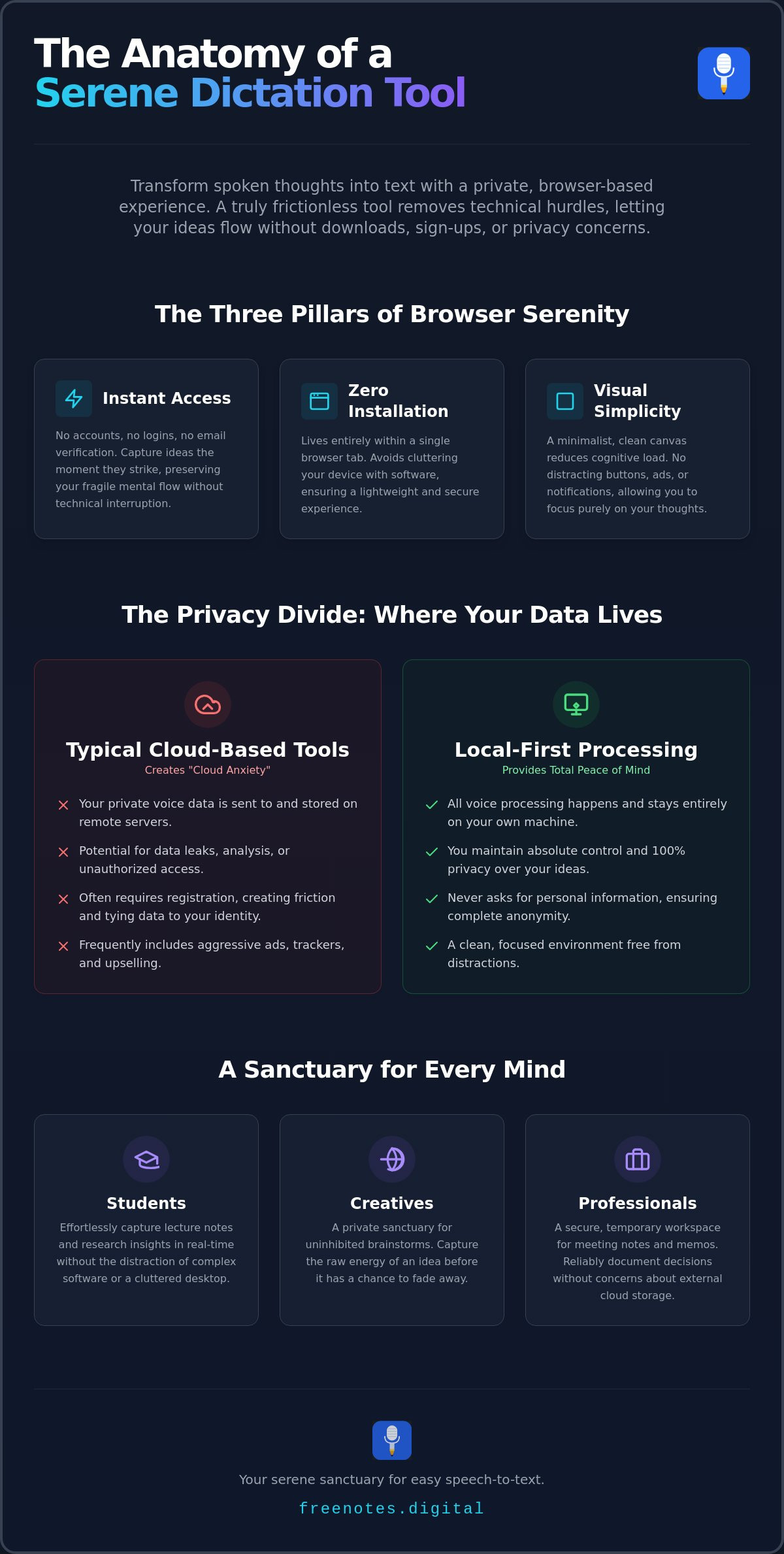
To achieve true mental lightness, a dictation environment must rest on three essential foundations. First is Instant Access. Mental flow is fragile. If you have to stop to create an account or verify an email, the spark of an idea often vanishes. Second is Zero Installation. There is a profound sense of security and simplicity in using a tool that lives entirely within a single browser tab, requiring no downloads that might clutter your hard drive. Finally, Visual Simplicity is paramount. A minimalist interface reduces cognitive load, ensuring that your eyes aren’t distracted by unnecessary features while you focus on the rhythm of your speech.
Who Benefits from a Simple Dictation Space?
- Students: Capturing the nuance of a lecture becomes effortless when you aren’t fighting with complex software. A simple browser-based tool allows for a digital scratchpad that records insights in real-time without the distraction of a cluttered desktop.
- Creatives: For writers and artists, the Free Notes App serves as a sanctuary for uninhibited brainstorms. It provides a space where the goal is to capture the raw energy of a thought before it has a chance to fade.
- Professionals: In a world of constant meetings, having a secure, temporary workspace for memos provides a sense of order. It’s a reliable way to document decisions without the “cloud anxiety” often associated with permanent, external storage.
Evaluating Web-Based Dictation Tools: A Decision Guide
Selecting a browser dictation tool is an exercise in mindfulness. You aren’t just choosing a utility; you’re choosing a partner for your creative or professional process. Many traditional free tools are laden with hidden noise, such as aggressive upselling or trackers that monitor your usage patterns. This creates a jarring experience that pulls you away from your flow. To find a tool that truly respects your personal space, look for one that values silence and simplicity over constant engagement. The goal is to find a sanctuary for your voice, not another source of digital distraction.
Cloud vs. Local: The Privacy Divide
Many popular apps rely on cloud synchronization, which often leads to “cloud anxiety.” This is the subtle, persistent worry that your most private reflections are being stored, analyzed, or potentially leaked from a distant data center. Local processing changes this dynamic entirely. By keeping your voice data within the confines of your own browser, you maintain absolute control. You don’t need a heavy “Premium” subscription to feel complete when the tool respects your boundaries from the very first word. It’s a more sophisticated way to handle sensitive ideas without the weight of external storage.
For those in academia, the stakes are often higher. Utilizing voice to text for students can be a transformative way to manage heavy workloads without feeling overwhelmed by the mechanics of writing. It allows for a more fluid capture of complex ideas during study sessions or lecture reviews, keeping the focus on learning rather than formatting. This mental lightness is essential for maintaining long-term academic success.
Functional Requirements for Ease of Use
Accuracy is the cornerstone of any dictation experience. Most modern web tools leverage Google Speech Recognition, which remains the gold standard for understanding diverse accents and nuances. As noted in the W3C’s explanation of speech recognition, this technology is vital for making the web more accessible and intuitive for everyone. Beyond accuracy, look for features like local auto-saving. It’s a quiet safety net that ensures your work isn’t lost if a tab accidentally closes, storing your progress safely in your browser’s local memory.
When evaluating a potential browser dictation tool, use this simple checklist to ensure it supports your well-being:
- Account-Free Access: Does the tool allow you to start immediately without a login?
- Data Sovereignty: Is your voice processed locally on your device rather than a cloud server?
- Minimalist Design: Is the interface free of flashing ads and “Pro” upgrade buttons?
- Graceful Exporting: Can you easily move your text to another document without friction?
If you’re looking for a place to begin your practice, you might explore a Free Voice to Text Note Taking Tool that prioritizes this elegant, registration-free simplicity. It’s designed to stay out of your way, providing a clean canvas for your thoughts to take shape naturally.
How to Dictate with Fluidity: A Step-by-Step Guide
Transitioning from typing to speaking is more than a change in mechanics; it’s a shift in how you relate to your own creativity. To begin this journey, you first need to establish a physical and digital environment that supports your focus. A quiet room isn’t just a technical requirement for a browser dictation tool to function accurately. It’s a psychological boundary that signals to your mind that it’s time to release thoughts without interruption. When you remove background noise, you aren’t just helping the software; you’re clearing the path for your own mental clarity.
Once you’ve found your quiet corner, the technical setup is remarkably brief. Most modern browsers like Chrome, Edge, and Safari have built-in support for the Web Speech API, making the process almost instantaneous. When you first open your dictation canvas, your browser will gently ask for permission to access your microphone. Clicking “Allow” is the final step in inviting this mindful assistant into your workflow. This simple gesture establishes a secure connection between your voice and the screen, ensuring that your words are captured with precision and grace.
Setting the Stage for Mental Clarity
While built-in laptop microphones have improved significantly by 2026, using a basic headset can further enhance the serenity of the experience. A dedicated microphone stays at a consistent distance from your mouth, which helps maintain high transcription accuracy even if you shift in your seat. Beyond the hardware, consider creating a mindful routine. Perhaps you take three deep breaths before speaking or light a candle to mark the start of your session. These small rituals transform a simple task into a restorative practice, making your daily note-taking feel like a calm retreat rather than a chore.
Mastering the Art of Spoken Writing
Finding your rhythm is the key to achieving a sense of flow. Many people find success with the “Stream of Consciousness” method, where the goal is to speak first and refine later. Don’t worry about perfect grammar in the moment. Instead, focus on the fluidity of your ideas. You can use simple commands like “period,” “comma,” or “new paragraph” to structure your text without breaking your train of thought. This approach reduces the cognitive load of writing, allowing you to stay present with your ideas. For a deeper look at how this process can reduce mental friction, you might explore the benefits of a simple voice to text web experience.
Refining the output is the final stage of the process. Once your thoughts are visible on the canvas, use your keyboard to polish them into clear, elegant prose. This dual approach, combining the speed of speech with the precision of manual editing, offers the best of both worlds. It ensures that your final document is both authentic to your voice and professional in its presentation. By treating dictation as a partnership between your voice and your hands, you create a writing process that is as efficient as it is peaceful.
Privacy in the Browser: Why Your Data Should Stay Yours
The most common objection when using a browser dictation tool is the fear of being heard by the wrong ears. It’s a valid concern. Many of us have felt that slight hesitation before speaking into a device, wondering if our private thoughts are being packaged and sent to a distant data center for analysis. However, the architecture of modern web tools has evolved to prioritize your sanctuary. By choosing a tool that utilizes local processing, your voice never leaves your machine. The transcription happens entirely within the browser’s own memory, ensuring that your spoken words remain as private as a whispered secret.
Anonymity is the ultimate form of digital respect. When a service doesn’t ask for your name, email, or credit card, it isn’t just saving you time; it’s protecting your identity. This no-registration model means there’s no account to hack and no profile to build. Your data stays under your control, right where it belongs. To help you verify the security of any service you use, we’ve compiled a transcribe voice notes online free checklist that outlines the essential safeguards every user deserves in 2026.
The Myth of “Free” Cloud Storage
Many “free” cloud services aren’t actually free. They often monetize your data by training AI models or selling behavioral insights, which creates a hidden cost that compromises your mental peace. A browser transcription tool free of cloud sync offers a different, more mindful path. It provides the utility you need without the persistent worry of permanent, external storage. Your notes live in the moment, existing only as long as you need them and disappearing the moment you decide to clear your browser’s cache.
Maintaining Sovereignty Over Your Thoughts
True sovereignty means having the power to decide when your ideas should be preserved and when they should vanish. Using a “Quick Notes Canvas” allows you to draft sensitive meeting memos or personal reflections in a temporary, secure space. It’s the digital equivalent of a whiteboard in a locked room. Once you’ve moved your text to its final home, a simple act of clearing your site data ensures total privacy. This philosophy of “ephemeral notes” recognizes that not every insight needs to be archived forever; some are meant to be transient, helping you reach clarity before being let go.
If you’re ready to experience a writing environment that respects your boundaries and protects your creative process, try our Free Voice to Text Note Taking Tool today. It’s designed to be a quiet, reliable assistant that stays out of your way while keeping your thoughts entirely yours.
Free Notes App: Your Serene Sanctuary for Easy Speech to Text
The Free Notes App is more than a functional utility; it’s a quiet, reliable assistant that stays out of your way until the exact moment you need it. While many tech services push for constant engagement and hyper-productivity, we opt for a sophisticated, welcoming atmosphere that respects your mental space. This browser dictation tool acts as a gentle, mindful companion in your daily life, helping you achieve a sense of mental lightness. By removing the technical hurdles that typically surround speech recognition, we allow you to focus entirely on the restorative nature of organizing your thoughts.
Our commitment to your well-being is built on a “No Registration, No Download, No Cloud” promise. You don’t have to navigate a cluttered interface or manage a complex set of permissions to get started. There is no software to install and no account to create, which means your creative flow remains uninterrupted from the very first word. This approach eliminates the “cloud anxiety” discussed earlier, ensuring that your experience is as private as it is seamless. It’s a clean start every time you open a new tab, providing a sanctuary where your voice is the only thing that matters.
A Tool Designed for Your Well-Being
The sensory appeal of the minimalist text canvas is intentional. We’ve stripped away the flashing ads and intrusive buttons found in traditional tools to provide a space that mirrors the fluidity of your own thoughts. The Free Notes App acts as a protective guardian of your creative process, ensuring that the interface feels elegant and thoughtfully paced. Our local-only approach makes us a unique ally in a noisy digital world. Because your data never leaves your machine, you can speak freely, knowing that your most transient, private insights are handled with the highest level of craftsmanship and discretion.
Start Your Journey to Mental Clarity Today
You can begin your practice of mindful dictation right now. There’s no need to wait for a confirmation email or a lengthy download to finish. Your first note is only a single click away, allowing you to move from a state of mental friction to one of purposeful grace. Whether you’re capturing a fleeting brainstorm on your Quick Notes Canvas or drafting a complex professional memo, the process remains steady and methodical. We invite you to step away from the frantic pace of modern software and discover how effortless writing can truly be when the tool stays out of the way.
If you’re ready to transform your spoken thoughts into clear, elegant text without the usual digital noise, we are here to support you. Experience easy speech to text web at Free Notes App and see how a serene, registration-free environment can restore your focus and enhance your creative output.
Embrace a Lighter Way to Express Your Ideas
Choosing a modern browser dictation tool is about more than just efficiency; it’s about reclaiming your mental space. We’ve explored how moving away from heavy, cloud-dependent software allows you to focus on the restorative act of speaking your thoughts. By prioritizing tools that offer local processing and a minimalist interface, you ensure your data remains entirely yours while reducing the cognitive load of a cluttered screen. The absence of registration hurdles means you can start whenever inspiration strikes, keeping your creative flow undisturbed and pure.
You deserve a writing environment that acts as a quiet, reliable assistant rather than a source of distraction. Experience the ease of a tool that respects your privacy and supports your well-being. Start your serene dictation session now at Free Notes and discover how all processing happens locally in your browser with no registration or login required. It’s time to let your thoughts take shape naturally in a space designed for clarity and peace. Your next great idea is waiting to be spoken into existence.
Frequently Asked Questions
Is an easy speech to text web tool actually as accurate as paid software?
Yes, modern web-based tools provide professional-grade accuracy that rivals expensive desktop applications. By 2026, the underlying speech recognition engines used by a browser dictation tool have matured to handle diverse accents and subtle nuances with ease. You get the same high-level performance without the weight of a complex installation or a recurring subscription fee.
Do I need to download any plugins to use browser-based dictation?
You don’t need to download any plugins, extensions, or software to begin. The technology lives natively within your browser, allowing for a clean and immediate start. This “no-download” approach ensures your digital environment remains uncluttered and your creative flow stays entirely uninterrupted from the moment you open the page.
Where are my notes stored if there is no cloud sync?
Your notes are stored locally within your browser’s internal memory on your own device. This local-only storage is a deliberate choice to protect your privacy and ensure your thoughts remain your own. Because there is no cloud sync, your data never travels to a remote server, giving you complete sovereignty over your personal reflections.
Can I use easy speech to text web tools on my mobile phone browser?
Yes, you can access these serene writing spaces through most modern mobile browsers like Chrome and Safari. The experience is designed to be as fluid on a smartphone as it is on a desktop, providing a portable sanctuary for your ideas. It’s a reliable way to capture insights while you’re on the move without needing a dedicated mobile app.
What happens to my text if I accidentally close the browser tab?
Most mindful dictation tools include a local auto-save feature that keeps your text in the browser’s cache. If you reopen the page, your words will often still be there waiting for you. However, it’s always a good practice to move your text to its final home once you’ve finished your session to ensure your work is fully preserved.
Are there any hidden costs or “pro” features I should know about?
Free Notes is designed to be a complete experience from the start, with no hidden tiers, ads, or “pro” subscriptions. We believe that a browser dictation tool should be a supportive companion rather than a source of financial friction. You receive the full utility of the tool immediately, allowing you to focus on your writing rather than your budget.
How do I add punctuation like periods and commas using my voice?
You can add punctuation simply by speaking the name of the mark you wish to use. For example, saying “period,” “comma,” or “new paragraph” will instantly structure your text without requiring you to touch the keyboard. This method allows you to maintain the fluidity of your thoughts while still producing clear, organized prose.
Is my voice data used to train AI models when I use Free Notes?
No, your voice data is never collected or used to train AI models. Since all processing happens locally on your machine, your spoken words are transient and private. We act as a protective guardian of your ideas, ensuring that your voice remains a tool for your own expression rather than a data point for someone else.