
What if the most intimate space for your thoughts isn’t a locked diary, but a browser tab that forgets you the moment you leave? Most of us feel a lingering unease when we speak into a device, wondering if our personal reflections are being harvested to train the next generation of AI models. Finding a reliable way to access private voice typing online often feels like a search for a needle in a digital haystack, yet it’s essential for anyone who values their creative privacy. You shouldn’t have to trade your data sovereignty for the convenience of hands-free writing, nor should you have to navigate cluttered interfaces or mandatory logins just to capture a fleeting idea.
It’s frustrating when technology feels like a barrier rather than a bridge to your own creativity. This article will show you how to dictate your most private reflections using browser-based tools that keep your voice data entirely on your own device. We will explore how a minimalist workspace can restore your mental clarity and provide a restorative environment for your ideas. You’ll learn to achieve total data sovereignty through a process that requires no registration, providing a serene experience where your spoken thoughts remain truly your own.
Key Takeaways
- Learn how client-side processing ensures your audio data remains strictly on your own device, protecting you from the security risks of external databases.
- Discover the freedom of private voice typing online through browser-native tools that require no registration, downloads, or personal accounts.
- Understand the role of the Web Speech API in creating a secure, real-time dictation experience that prioritizes your privacy over cloud-based convenience.
- Master a restorative workflow for your daily journaling by utilizing a minimalist interface designed to remove mental friction and digital noise.
- Explore how the Quick Notes Canvas acts as a sanctuary for your spoken thoughts, offering a quiet and reliable space for immediate brainstorming.
The Silent Need for Private Voice Typing Online
We often feel a quiet weight when speaking into our devices. It is the subtle, lingering awareness that our words might be traveling across oceans to sit on a distant server. True private voice typing online offers a different path. It is a method of speech-to-text where your audio never leaves your physical space. This local-only approach isn’t just a technical preference; it’s a vital boundary that protects your most honest reflections. When you remove the threat of digital surveillance, you create a sanctuary for your spoken thoughts.
Most people have grown accustomed to “always-listening” assistants that wait for a wake word. These tools are designed for utility, but they often lack the discretion required for deep, personal work. Intentional dictation tools should feel like a quiet, reliable assistant that stays out of the way until you need it. By choosing a private workspace, you allow yourself to speak without inhibition. You can explore raw ideas, process complex emotions, and organize your day without the mental friction of wondering who else might be listening.
The Distinction Between Cloud and Local Processing
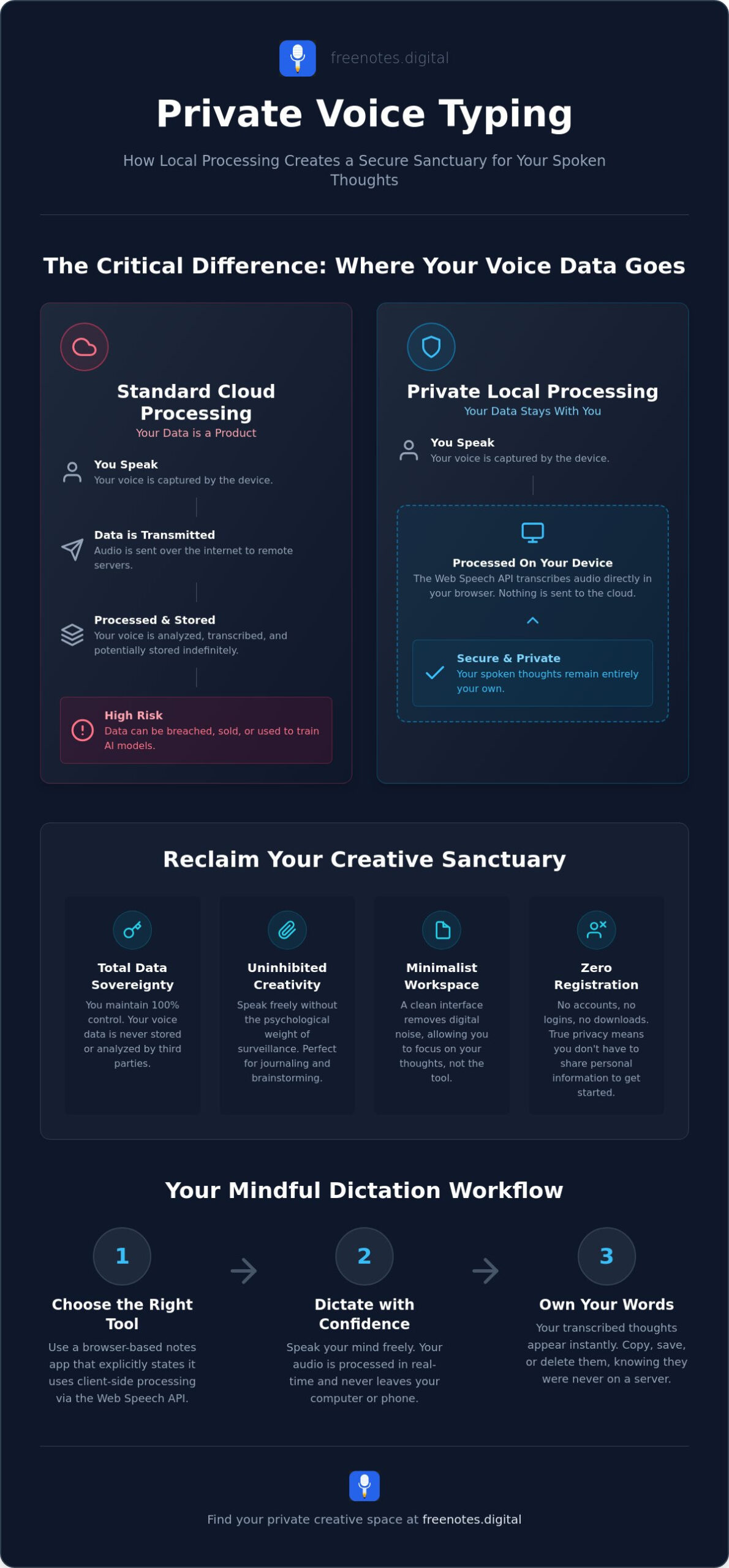
The primary difference between standard tools and a private experience lies in where the “thinking” happens. Most mainstream services rely on cloud-based systems. When you speak, your audio is compressed and sent to a remote data center for analysis. While Speech recognition technology has become incredibly accurate, this journey through the cloud creates a vulnerability. If the data is transmitted, it can be intercepted, stored, or used for purposes you didn’t intend.
Local processing changes the narrative. It uses the power of your own browser to translate speech into text instantly. Your voice stays on your device, and the transcription happens in real-time without an external server ever seeing your audio logs. This ensures that privacy is the default state of your workspace, not an optional setting hidden deep within a menu. It’s a sophisticated way to achieve mental lightness, knowing your data remains entirely under your control.
Removing the Friction of Digital Surveillance
Knowledge of being recorded alters your creative flow. It’s a psychological weight that can make your speech feel performative rather than authentic. When you use private voice typing online, that weight vanishes. You aren’t just using a tool; you’re entering a restorative environment. This local-only boundary acts as a protective guardian for your ideas, allowing you to cultivate a sense of sanctuary in your digital life.
A private workspace is essential for honest reflection. It allows you to speak your mind as if you were writing in a locked journal. There is a profound serenity in knowing that your brainstorms and private memos won’t be used to train AI models or build a consumer profile. This freedom leads to better ideas and a more peaceful creative process. By removing the friction of surveillance, you reclaim your personal space and ensure your spoken thoughts remain your own.
Why Most Dictation Tools Fail the Privacy Test
The allure of “free” software often masks a quiet, invisible exchange. Most mainstream voice-to-text services operate on a cloud-first model where your spoken words are processed on remote servers. This creates a digital trail that you don’t fully own or control. When you seek private voice typing online, you’re usually trying to avoid this specific trade-off. These tools often store audio logs in centralized databases, making them potential targets for data breaches or unauthorized access. It’s a high price to pay for a simple convenience.
Beyond the servers, there is the hidden cost of OS-level tools integrated into your phone or computer. These systems often feed your speech data back into global AI training models to improve their recognition accuracy. While this sounds helpful, it means your private reflections are being used to refine a commercial product without your explicit, granular consent. This “always-listening” environment creates a sense of being monitored, which is the antithesis of a creative sanctuary. It’s difficult to speak honestly when you feel like your words are being harvested.
The Vulnerability of Voice Data in the Cloud
Voice data is inherently more sensitive than typed text. Your voice contains unique biometric signatures, often called “voiceprints,” which can be used to identify you beyond the literal words you speak. Centralized repositories of this data represent a significant security risk. The FTC guide to voice assistant privacy highlights how these systems can be vulnerable if they aren’t managed with extreme care. To truly protect your reflections, you need a confidential notes app online that prioritizes local security over cloud convenience. Keeping your audio on your own device eliminates the risk of it being swept up in a server-side breach.
Breaking the Account-Based Productivity Habit
Mandatory registration is another barrier to mental lightness. Every time you’re forced to log in, a permanent link is forged between your identity and your private thoughts. This requirement creates mental friction. It interrupts the fluidity of your creative process by demanding your attention before you can even begin. There’s a profound sense of freedom in using a tool that requires no account. Anonymity becomes the guardian of your ideas, allowing you to speak freely without a digital footprint following you.
Choosing a “no-login” tool allows for spontaneous brainstorms that feel uninhibited. You can simply open a tab and start speaking, knowing your brainstorms aren’t being indexed or tracked. If you’re ready to experience a workspace that respects your silence and your space, you might find solace in a Free Voice to Text Note Taking Tool that simply stays out of your way until it’s needed. This approach turns your browser into a clean slate, free from the weight of persistent accounts and surveillance.
The Technology of Tranquility: How Local Processing Works
True tranquility comes from understanding that your tools are working for you, not on you. The engine behind modern private voice typing online is the Web Speech API. This is a native feature built directly into your browser. Instead of relying on a distant, energy-hungry data center, it uses the existing intelligence of your own device to translate sounds into symbols. It is a quiet, efficient process that respects the boundaries of your digital workspace. By keeping the “brain” of the operation on your own computer, you eliminate the need for an internet-based server to listen to your voice.
Because the processing is client-side, your words aren’t broken down into data packets and sent across the web. They stay within the confines of your hardware. This architecture provides a level of responsiveness that cloud tools simply can’t match. There is no lag while waiting for a server to respond; the text appears as quickly as you can speak it. This immediacy helps maintain the fluidity of thought, allowing your ideas to bloom without technical interruption. It creates a sense of mental lightness where the technology feels like an extension of your mind rather than a middleman.
Persistence doesn’t have to mean a lack of privacy. Even when you finish a session, HTML5 local storage allows your text notes to stay exactly where you left them. This technology keeps your data in the browser’s memory on your physical machine. Unlike cloud sync, which mirrors your data onto a company’s drive, local storage ensures your notes remain private and inaccessible to anyone without physical access to your device. It is a sophisticated balance of convenience and absolute discretion. If you’re considering making this a permanent part of your workflow, exploring a note taking app that doesn’t sync can help you understand why disconnecting your thoughts from the internet entirely is one of the most restorative choices you can make for your mental clarity.
The Browser Sandbox as a Protective Shell
Modern browsers are designed with a sandbox architecture. This means that what happens in one tab is isolated from the rest of your system and the wider internet. A tool that leverages this environment requires no download and no installation. You don’t have to worry about background processes or hidden files cluttering your drive. Every time you open a new tab, you get a clean start. It is a minimalist approach that values simplicity, ensuring that your temporary workspace remains untainted by previous sessions or external trackers.
Ensuring Data Sovereignty on Your Hardware
Your own CPU is the safest place for your spoken words. When transcription happens locally, you exercise total data sovereignty. There is no risk of a server-side breach because there is no server involved in the transcription. To maintain total control, you can manage your browser cache with a few simple clicks. Clearing your history or site data provides a sense of closure and security. It confirms that your most private reflections exist only as long as you wish them to, putting you in charge of your digital footprint.
Establishing a Mindful Dictation Workflow
Creating a restorative environment for your thoughts requires more than just the right software; it requires a deliberate practice. When you embrace private voice typing online, you’re choosing to step away from the noise of the traditional internet and into a space designed for clarity. A mindful workflow allows you to capture ideas as they happen, ensuring that the technology supports your creative rhythm rather than dictating it. By setting intentional boundaries for your digital hygiene, you can maintain the mental lightness needed for honest reflection.
Daily journaling is one of the most powerful ways to use these tools. Many people find that speaking their reflections aloud helps them process emotions more deeply than typing. You can learn how to use secure browser based voice memos to build a consistent habit of private reflection. This practice turns your computer into a quiet sanctuary where your spoken words are instantly transformed into text, ready for your eyes only. It’s a simple, elegant way to bridge the gap between thought and record.
Steps for a Serene Writing Session
Before you begin, clear your mental space. Close unnecessary browser tabs and silence notifications that might interrupt your flow. This reduces cognitive load and allows you to focus entirely on the act of expression. Once you initiate the voice typing process, allow yourself the freedom to speak without judgment. Focus on the physical act of speaking your truth. Don’t worry about perfect grammar or punctuation in the moment. The goal is to capture the essence of your ideas. When you finish, take a quiet moment to transition from speaker to editor. This pause allows you to review your text with fresh eyes, turning raw thoughts into a polished digital draft.
Managing Ephemeral vs. Persistent Notes
Not every thought needs a permanent home. Some insights are transient, serving as a digital scratchpad for immediate brainstorms that you’ll likely discard. For these ephemeral moments, “clearing the canvas” is a vital part of achieving mental lightness. It provides a sense of closure and keeps your workspace uncluttered. However, for those ideas that deserve to be kept, establish a routine for data management. Since your notes are stored locally in your browser, you should download your most important drafts to a permanent physical drive or a secure local folder. This ensures your data sovereignty remains intact while providing a reliable backup for your work.
If you’re ready to begin your journey toward a more peaceful writing practice, you can start today with a Free Voice to Text Note Taking Tool that respects your privacy and your process. This simple step can transform how you interact with your own spoken thoughts.
Free Notes App: Your Registration-Free Haven for Voice Notes
The digital world often feels crowded with demands for your attention and your data. When you discover the elegance of the Free Notes App, you find a different kind of experience. It is a minimalist interface designed specifically for those who value mental clarity above all else. By offering private voice typing online without the burden of an account, this tool acts as a quiet sanctuary for your spoken thoughts. It’s a space where the technology fades into the background, leaving only you and your ideas in a state of perfect fluidity.
Our commitment to your privacy is absolute. While other services might offer “free” tools in exchange for your information, we provide a zero-cloud storage environment. Every word you speak is processed locally, ensuring that your audio never touches an external server. This approach removes the weight of digital surveillance and replaces it with a sense of reliable, unobtrusive support. You don’t have to worry about data breaches or AI training models; you can simply focus on the restorative nature of organizing your mind.
A Tool That Stays Out of Your Way
The Free Notes App projects the personality of a quiet assistant. It doesn’t need to shout to be heard, and it never interrupts your creative process with pop-ups or login prompts. This no-registration model allows for instant, frictionless idea capture. Whether you’re struck by a sudden insight or need to process a complex emotion, you can begin dictating the moment you open the tab. The sensory appeal of the clean, aesthetic environment helps reduce cognitive load, making the act of writing feel like a gentle, mindful companion in your daily life.
The “Quick Notes Canvas” is the heart of this experience. It provides a smooth, elegant workspace that mirrors the fluidity of your own thoughts. There is a high level of craftsmanship in its simplicity, ensuring that the interface feels refined yet accessible. By removing the mental friction of mandatory accounts, we’ve created a tool that respects your personal space and your time.
Start Your Journey to Mental Clarity
This sanctuary is built for researchers, students, and creative thinkers who need a secure place to brainstorm. It’s a modern and innovative solution grounded in a human-centric philosophy. When you use private voice typing online through our platform, you’re choosing a path of discretion and speed. You can convert your spoken words into text with the confidence that your data sovereignty is protected by your own hardware. It is the ultimate expression of digital hygiene.
We invite you to explore the serenity of local-only note taking. Experience how a professional Free Voice to Text Note Taking Tool can transform your workflow from a source of stress into a source of harmony. Clear your mind, speak your truth, and enjoy the mental lightness that comes from knowing your spoken thoughts are entirely your own. Your journey to a more peaceful, private digital life starts with a single spoken word.
Reclaiming Your Digital Quiet
Your spoken thoughts deserve a space that is as private as your own mind. We’ve explored how local processing ensures your voice never leaves your device and why a registration-free workflow serves as the ultimate guardian of your creative flow. By moving away from cloud-based surveillance, you reclaim the freedom to speak without inhibition. Embracing private voice typing online is more than just a technical choice; it’s a step toward achieving lasting mental lightness in an increasingly noisy digital world.
True tranquility in your workflow comes from knowing your data is secure and your interface is uncluttered. You can now enjoy a restorative environment where no data ever leaves your browser and zero registration or login is required to begin. This minimalist design is crafted specifically for deep focus, allowing your ideas to bloom in a protected sanctuary. When you’re ready to experience the serenity of a zero-friction interface, you can begin your private dictation session on Free Notes App. Your ideas are precious. Give them the quiet, secure home they deserve and let your spoken reflections flow freely.
Frequently Asked Questions
Is private voice typing online as accurate as cloud-based dictation?
Local processing has reached a level of precision that rivals cloud services. Many modern browsers use the same underlying engines for both. You’ll find that private voice typing online captured through the Web Speech API delivers high accuracy without the delay of sending audio to a remote server. This ensures your thoughts are transcribed with clarity and speed while maintaining the sanctity of your digital workspace.
Do I need a high-speed internet connection for local voice processing?
You don’t need a high-speed connection once the tool is loaded in your browser. Since the transcription happens on your device’s CPU, the process is independent of your bandwidth. This makes it a reliable choice for creative work in areas with unstable internet. You can speak freely knowing that your digital sanctuary doesn’t depend on a constant, fast connection to a distant data center to function effectively.
Can I use private voice typing on my mobile browser?
Yes, you can access these tools through most modern mobile browsers on your smartphone or tablet. The same local-processing technology applies, allowing you to capture ideas while on the move without sacrificing your privacy. It provides a seamless way to maintain your mindful dictation practice whether you’re at your desk or enjoying a quiet moment outdoors. This flexibility supports a restorative lifestyle of spontaneous reflection.
What happens to my notes if I accidentally refresh the browser tab?
Your notes are typically preserved through HTML5 local storage, which saves the text to your device’s memory. If you refresh the page, your content should reappear exactly as you left it. However, it’s a good practice to periodically copy your draft to a permanent location. This simple habit ensures that your spoken reflections remain safe and your mind stays light, free from the worry of technical mishaps.
Are my voice notes encrypted if they are processed locally?
Encryption is technically unnecessary for the transmission phase because your audio never leaves your hardware. Local processing eliminates the “data in transit” risk entirely. Your notes exist only within the secure sandbox of your browser on your physical machine. This architecture provides a level of protection that even the strongest cloud encryption can’t match by simply omitting the need for external storage or transmission.
How do I save my dictated notes if there is no cloud sync?
You can save your work by simply copying the text and pasting it into your preferred local document editor or by downloading it as a file. This manual step is a deliberate part of a mindful workflow. It gives you total sovereignty over your data, ensuring that your private memos only live where you choose to keep them. It’s a purposeful act that reinforces your role as the guardian of your ideas.
Is it possible for other websites to access my local browser notes?
No, modern web browsers use a “Same-Origin Policy” to isolate data between different sites. This means that information stored by one tool cannot be read or accessed by another website. Your Quick Notes Canvas remains a private haven, shielded from external trackers or prying eyes through the browser’s own security architecture. This isolation is a fundamental part of the technology that ensures your private voice typing online remains truly confidential.
Does Free Notes App support multiple languages for private dictation?
Yes, the tool supports a wide range of global languages and regional dialects. It leverages the extensive linguistic capabilities built into your browser’s native speech engine. You can speak in your most comfortable tongue, knowing the system will recognize your voice with precision and respect for your personal space. This allows for a more natural and fluid creative process regardless of the language you choose to use.