
What if the most restorative thing you could do for your mental clarity is to disconnect your thoughts from the internet entirely? We’ve been taught that convenience requires a constant connection, yet that very “syncing” feature often introduces a subtle, persistent anxiety about data breaches and big tech overreach. You might feel a flicker of hesitation before capturing a private realization, wondering if your digital journal is truly yours or just another file on a distant, vulnerable server. Finding a reliable note taking app that doesn’t sync is no longer just a niche preference for the tech-savvy; it’s a vital step toward reclaiming your personal sovereignty in 2026.
You deserve a space where your ideas can breathe without the weight of forced account creation or the lag of cloud processing. In this article, you’ll learn how to transition to local-only tools that prioritize your privacy and provide a “clean slate” for every session. We will explore why moving away from the cloud reduces mental friction and how local-first processing creates a secure, elegant environment for your most important work. It’s time to trade the noise of the global network for the quiet confidence of a private digital sanctuary.
Key Takeaways
- Recognize the true cost of constant cloud synchronization and how it compromises your personal data sovereignty.
- Master the criteria for selecting a note taking app that doesn’t sync, focusing on tools that prioritize local browser processing over server storage.
- Reclaim your mental space by adopting a zero-data footprint philosophy that leaves no trace of your private brainstorms behind.
- Follow a practical checklist to verify that your chosen tools are truly offline-first and free from the friction of mandatory logins.
- Learn how a local-only voice-to-text canvas can act as a quiet, reliable assistant for capturing your most transient and sensitive insights.
The Hidden Cost of Constant Cloud Synchronization
We’ve been conditioned to believe that if a note isn’t synced across every device, it doesn’t exist. This belief has created what many call the “Cloud Tax.” It’s a hidden cost where we trade our most intimate reflections for the convenience of multi-device access. Every time you type into a standard cloud-based service, your data is often harvested to train algorithms or stored in a way that creates a subtle, background anxiety. You start to wonder who else might eventually see these words. Choosing a note taking app that doesn’t sync is a deliberate act of setting digital boundaries. It allows you to reclaim your personal space without the feeling of being monitored.
The paradox of choice also plays a role in our digital lives. When we have infinite, synced storage, we tend toward digital hoarding. We collect fragments of ideas that we never revisit, creating a cluttered mind rather than a clear one. Sometimes, the most valuable thoughts are ephemeral. They are meant to be processed in the moment and then let go, rather than archived in a permanent, searchable database that lives forever on a distant server. Embracing the ephemeral moment allows your brain to focus on creation rather than curation.
The Security Vulnerabilities of Centralized Storage
Centralized storage is inherently fragile. Cloud databases are high-value targets for data breaches, and a single leak can expose years of personal history. There’s also the very real risk of account lockouts. If a provider decides your account is flagged for any reason, you could lose access to your own intellectual property instantly. This “sync-by-default” culture creates a permanent digital trail that often conflicts with the fundamental principles of information privacy. By opting for a note taking app that doesn’t sync, you ensure that your history remains your own, immune to the vulnerabilities of global server farms.
Mental Clarity and the “Offline” Mindset
True mental clarity comes from removing the friction of management. You shouldn’t have to navigate a labyrinth of passwords or account recovery emails just to jot down a deep realization. There is a profound serenity in using a tool that doesn’t demand your identity before it allows you to think. It provides a dedicated sanctuary, much like a confidential notes app online that respects your need for a clean, local-only environment. By shifting to an offline mindset, you reduce cognitive load and return to the simple joy of capturing thought for its own sake. This approach turns your device into a quiet, reliable assistant rather than a gateway to a monitored ecosystem.
Understanding Local-Only Processing: How Your Data Stays Yours
To truly reclaim your privacy, you must understand what happens behind the screen. Local processing is a fundamental shift in how we interact with software. It means your data never leaves your device’s active memory or local cache. When you use a note taking app that doesn’t sync, your browser acts as a private, temporary canvas rather than a window into a remote server. This setup creates a secure environment where your thoughts are processed entirely within the confines of your own machine. It’s a return to a more human-centric way of working, where the tool serves you without reporting back to a central authority.
The beauty of this approach lies in its simplicity. By removing the need for registration, you create the ultimate firewall. There are no accounts to hack, no passwords to lose, and no personal identifiers linked to your creative output. Encryption happens locally, ensuring that your transcriptions and drafts remain invisible to anyone outside your physical space. This architectural choice protects you from the inherent risks of data syncing, which often expands your digital footprint in ways you cannot control.
The Mechanics of a Private Digital Workspace
Modern web technology has evolved to a point where sophisticated tasks, like voice-to-text transcription, can happen entirely on the client side. This means your voice is turned into text by your browser’s internal engine, not by a distant AI server. There is a vital distinction between “online access” and “online storage.” You can access a tool through the web while keeping every byte of data on your own hard drive. This concept of a private digital workspace free from cloud ties represents the future of mindful tech. It prioritizes your peace of mind over the data-hungry needs of traditional software ecosystems.
The Myth of the “Insecure” Browser
Many believe the browser is inherently less secure than a dedicated app, but the opposite is often true. By utilizing local storage, you control the lifecycle of your information. You can choose to clear your cache after a session, effectively wiping the slate clean, or keep your notes persistent for your next visit. Local processing keeps your data within your hardware’s physical perimeter. This ensures that your intellectual property is never floating in a vulnerable cloud database. If you value this level of quiet sovereignty, you might enjoy experimenting with a private note-taking canvas that stays out of your way and keeps your secrets safe.
Why a Non-Syncing App is the Ultimate Privacy Power Move
Mainstream tech often positions synchronization as a “premium” necessity, yet this constant tethering is exactly what compromises your peace of mind. Reaching for a note taking app that doesn’t sync is a deliberate choice to prioritize your internal world over external accessibility. It transforms your device from a broadcast station into a private vault. When you operate without a cloud connection, you effectively bypass the “Terms of Service” trap. Since there is no account to create, there are no data-sharing agreements to navigate and no fine print that grants a corporation the right to analyze your brainstorms for advertising or AI training.
This approach also grants you a zero-data footprint. The moment you close your browser tab, your temporary workspace vanishes, leaving no traces on the web for others to find. It’s a “clean slate” experience that encourages a higher level of uninhibited expression. You can write freely, knowing that not even the software developer has the keys to your thoughts. This immunity extends to technical failures as well. While others are frustrated by server downtimes or “Syncing…” spinners, your local tools remain steady and reliable, functioning perfectly regardless of the company’s cloud status.
Sovereignty Over Your Spoken Thoughts
Voice data is perhaps the most intimate form of information we generate. In an era where voice recordings are highly prized for training massive AI models, keeping your spoken reflections local is essential. Choosing a tool that refuses to upload your audio to a server protects the unique nuances of your identity. This is why private voice typing online has become such a vital resource for those who think out loud. It ensures that the intimacy of your voice remains within your physical perimeter, shielded from the impersonal analysis of cloud-based algorithms.
Speed and Frictionless Flow
Beyond privacy, the removal of sync features provides a significant boost to your creative rhythm. You no longer have to wait for a database to handshake with a server before you can start typing. The experience is instant. This lack of friction fosters a deeper state of “flow,” allowing you to move from a sudden insight to a recorded note in a single click. By choosing a note taking app that doesn’t sync, you eliminate the cognitive load of managing passwords and loading delays. The interface stays out of your way, acting as a quiet, reliable assistant that respects the speed of your thought and the sanctity of your time.
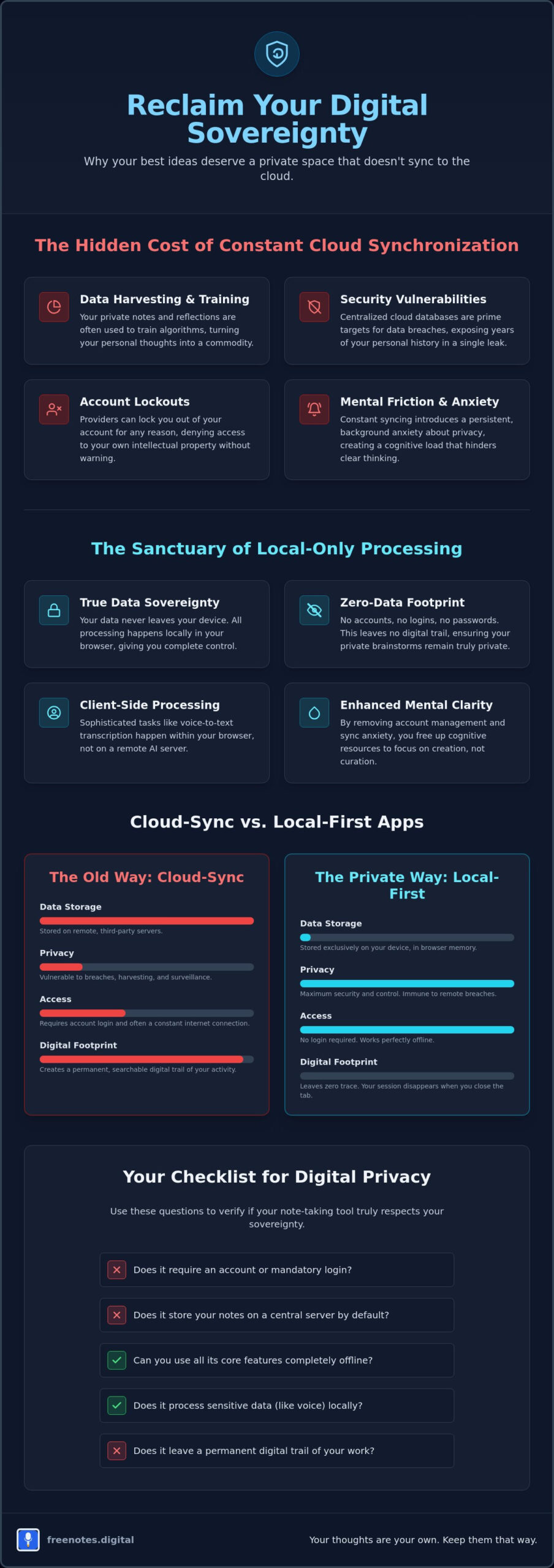
Evaluating Offline-First Tools: A Checklist for Digital Privacy
Choosing a note taking app that doesn’t sync requires a discerning eye and a commitment to your own digital boundaries. It isn’t enough for a tool to claim it values your privacy; the very architecture of the software must reflect that promise. When you move away from the “always-on” ecosystem of big tech, you begin to see the subtle ways that synchronization creates friction in your creative process. To find a truly secure environment, you need a methodical way to peel back the layers of marketing and see how a tool actually handles your thoughts.
A mindful assistant should stay out of your way and respect your personal space. Use this checklist to ensure your next workspace is a true sanctuary for your ideas:
- Step 1: Check for mandatory login requirements. If a tool insists on an email address or social media connection, it’s often a red flag for local privacy. This is the first step toward building a data profile you didn’t ask for.
- Step 2: Verify where the processing happens. A genuine note taking app that doesn’t sync performs its heavy lifting, such as voice-to-text conversion, entirely within your browser’s local memory.
- Step 3: Look for clear “No Data Collection” statements. Your peace of mind depends on a simple, transparent policy that values your silence over their statistics.
- Step 4: Test for “Offline Capability.” Disconnect your network and see if the tool still breathes. If it demands a cloud heart-beat to function, it isn’t a true sanctuary.
- Step 5: Assess the “Export” options. Total sovereignty means you can move your ideas to your own physical storage on your own terms, without being locked into a specific vendor.
Red Flags in Modern Note Apps
Even apps that offer “offline” modes often hide telemetry and usage tracking in the background. These small, persistent streams of data can eventually paint a detailed picture of your habits and preferences. Be wary of “Free” apps that don’t display ads; if there is no clear revenue source, your data profiling is likely the product. While “End-to-End Encryption” is a valuable security layer, it can sometimes be a distraction from the simpler, more robust security of a local-only workflow that never puts your data on a server in the first place.
The Importance of Browser-Based Flexibility
A web-based secure note drafting tool often provides a higher level of protection than a downloaded executable file. Browsers use a specialized environment to isolate your activities and protect your system. The sandbox is a protective layer that limits what a web app can see on your computer. This isolation ensures your notes stay within their own elegant environment, far removed from the rest of your operating system. If you’re ready to experience this level of discretion, you can start your first private session here and reclaim your focus immediately.
Free Notes App: A Serene Canvas for Private Voice and Text Notes
In a digital world that often feels crowded and monitored, freenotes.digital offers a breath of fresh air. This platform is more than just a functional utility; it’s a tool designed for mental lightness and absolute discretion. By choosing this note taking app that doesn’t sync, you’re opting for a “Z-zero data footprint” philosophy. There are no accounts to manage and no databases waiting to archive your fleeting thoughts. Instead, you’re greeted with a sophisticated and welcoming space that exists only when you need it and vanishes the moment you’re done, leaving your digital life uncluttered and secure.
The Quick Notes Canvas serves as your immediate, local-only scratchpad. It’s built to capture transient insights before they slip away, providing a restorative environment where organization feels natural rather than forced. Because all data is processed locally in your browser, you never have to worry about server vulnerabilities or data harvesting. This mindful assistant stays out of your way, allowing you to focus entirely on the fluidity of your own thoughts. It’s a reliable companion that respects your personal space and your creative process in equal measure.
Effortless Voice-to-Text Without the Cloud
Capturing your spoken reflections shouldn’t require a trade-off with your privacy. Our Free Voice to Text Note Taking Tool converts your words into text in real-time, right within your browser sanctuary. Unlike traditional apps that send your audio to remote servers for analysis, these secure browser based voice memos are handled with quiet confidence on your own hardware. You can experience the true fluidity of thought without the noise of registration or the anxiety of being recorded by a third party. It’s a seamless movement from voice to text that prioritizes your well-being and your silence.
A Human-Centric Philosophy of Organization
We believe in moving away from the high-pressure, hyper-productive urgency that defines modern tech. A “no-sync” approach isn’t a limitation; it’s a feature that encourages you to focus on the now. By removing the burden of long-term data management, you create a dedicated sanctuary for mindful reflection. This philosophy turns the act of note-taking into a restorative ritual rather than another chore on a digital to-do list. It’s about achieving mental lightness and reclaiming your time from the ecosystems that demand your constant attention.
You have the power to decide where your ideas live and who has access to them. Embracing a note taking app that doesn’t sync is the ultimate step toward total data sovereignty. It’s time to experience the peace of mind that comes with a truly private workspace. We invite you to visit freenotes.digital today and discover the quiet joy of a canvas that is yours and yours alone.
Embrace the Clarity of a Private Digital Sanctuary
The journey toward a more mindful digital existence starts with a single, intentional choice. You’ve seen how local processing acts as a guardian for your intellectual property and why bypassing the cloud removes the subtle weight of constant surveillance. By prioritizing tools that function entirely within your hardware’s perimeter, you transform your device into a restorative sanctuary for thought. Choosing a note taking app that doesn’t sync isn’t about rejecting modern innovation; it’s about refining your relationship with technology to ensure your most private reflections remain entirely your own.
You deserve a workspace that respects your time and your silence. With 100% local processing and no registration required, you can finally capture your insights with purposeful grace. It’s time to trade the anxiety of data harvesting for the fluid movement of a clean slate. We invite you to begin your private brainstorm on the Free Notes App and discover a free voice-to-text sanctuary designed for your mental well-being. Your ideas are precious, and they deserve a home that protects them with quiet, reliable confidence.
Frequently Asked Questions
Is it safe to take notes in a browser without an account?
Yes, taking notes without an account is often safer than using traditional login-based systems. It eliminates the risk of credential theft or account hijacking on a remote server. By removing the need for a registration, you ensure that no personal identifiers are ever linked to your creative output, keeping your session anonymous and secure within your browser’s environment.
What happens to my notes if I close my browser tab?
Your notes typically remain stored in your browser’s LocalStorage, meaning they stay exactly where you left them when you return. This allows you to resume your work later without needing a cloud account. Because the data is local, it won’t appear on other devices, which preserves the privacy of that specific workstation and ensures your thoughts don’t wander onto unintended screens.
Can I use a note app that doesn’t sync while I am offline?
Yes, tools designed with an offline-first philosophy remain fully functional even when you don’t have an internet connection. Since a note taking app that doesn’t sync relies on local processing rather than a server handshake, it doesn’t need to “call home” to save your work. This makes it a reliable companion for deep work in remote areas or during flights.
How does local-only voice-to-text processing work?
Local-only processing uses your browser’s internal engine to convert your spoken words into text directly on your device. Your audio never travels to a distant AI server for analysis, which protects the unique nuances of your voice from being harvested. It’s a sophisticated way to enjoy modern convenience while maintaining a zero-data footprint on the web.
Why would I want a note-taking app that doesn’t have cloud backup?
You might prefer a tool without cloud backup to avoid the mental clutter of a permanent digital trail. Sometimes, thoughts are meant to be ephemeral; they help you process a moment and then can be safely let go. This approach encourages a more mindful way of working where you only choose to archive what is truly essential to your long-term goals.
Does a non-syncing app protect me from data breaches?
It provides a robust layer of protection because there is no central database for a hacker to target. If a company doesn’t store your notes on their servers, they simply cannot lose them in a large-scale leak. Your information stays decentralized on your own hardware, making it nearly impossible for mass-data harvesters to access your private brainstorms.
How do I save my work if the app doesn’t sync to the cloud?
You can save your work by using local export features or simply copying your text into a document on your own hard drive. This puts you in total control of your data’s lifecycle. Instead of a passive, automated sync, you make a conscious decision about which insights are worth preserving in your personal archive.
Are there any hidden costs to using a free, no-sync note tool?
No, there are no hidden “data taxes” because these tools don’t require expensive server storage to maintain. Since we don’t host your files, we don’t need to monetize your personal habits or profile to cover infrastructure costs. You receive a high-quality, professional experience that respects your well-being without any underlying financial or privacy-related catches.