What if the most powerful tool for your creativity wasn’t a complex piece of software, but a simple, empty space that listens? For many writers and thinkers, the struggle isn’t finding ideas. It’s finding a place to put them without the constant noise of notifications, cluttered menus, or the nagging fear of where your personal data actually goes. A zen mode dictation tool offers a sanctuary from this digital friction. It replaces the overwhelming interface of traditional apps with a clean, white-space canvas that prioritizes your mental clarity over features you’ll never use.
You likely feel that your best thoughts deserve a private, undisturbed environment to unfold. Technology should act as a quiet, reliable assistant that stays out of the way until the exact moment it’s needed. In this guide, you’ll discover how to transform your spoken words into clear text using tools that put privacy and flow first. We’ll explore the most elegant browser-based options for 2026, examine why local processing is the ultimate security feature, and show you how to claim a minimalist space where your voice is the only thing that matters.
Key Takeaways
- Learn how to identify “dictation friction” and why removing digital clutter is the first step toward regaining your creative clarity.
- Discover the essential features of a zen mode dictation tool, including minimalist interfaces that protect your mental space from unnecessary noise.
- Understand the privacy advantages of local, browser-based tools that ensure your spoken thoughts remain entirely under your control.
- Master the “Zero-Friction” approach to note-taking by bypassing registrations and downloads for instant, effortless thought capture.
- Explore how to build a mindful dictation practice using a simple, white-space canvas designed to support your natural flow of ideas.
The Digital Noise: Why We Crave a Zen Mode Dictation Tool
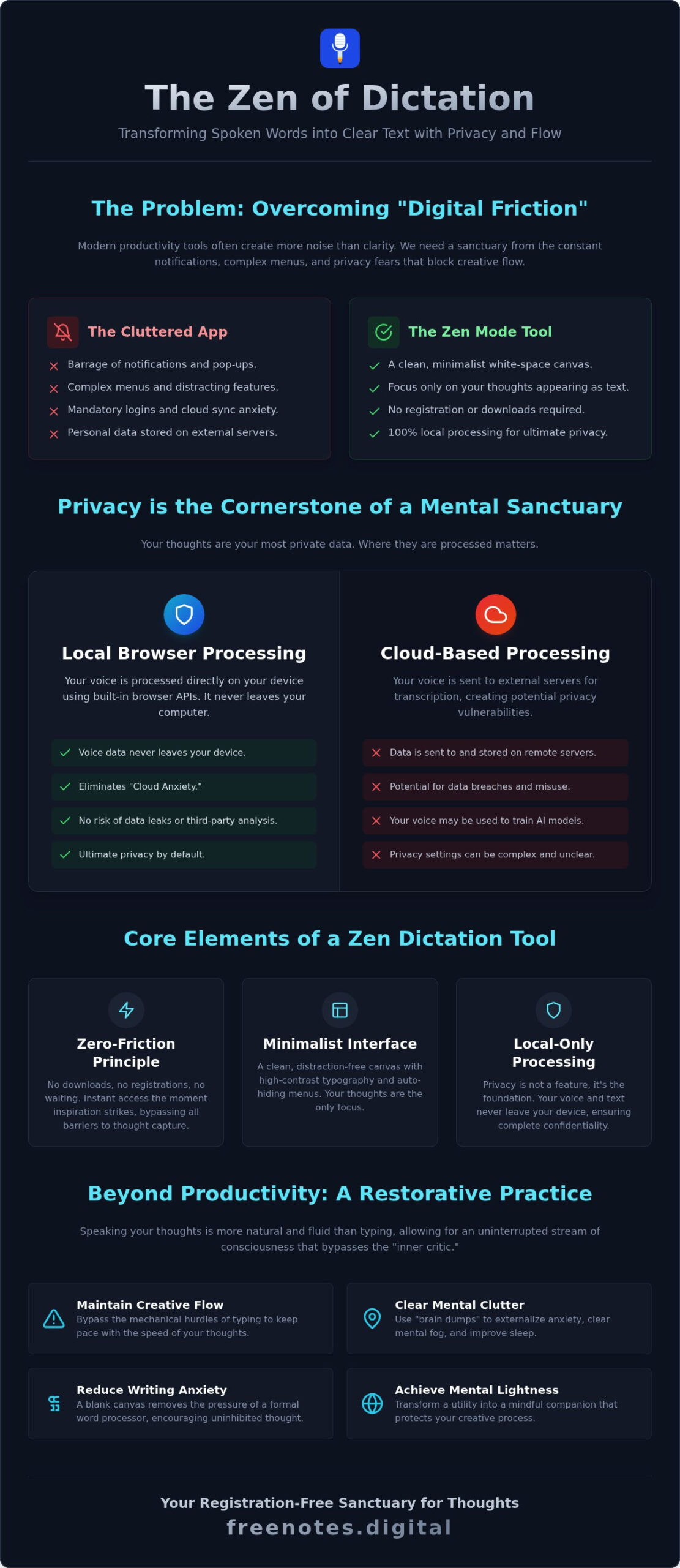
The modern digital environment is often a paradox. We have more productivity tools than ever, yet we feel increasingly overwhelmed by the very systems meant to help us. Every new app seems to come with a barrage of notifications, complex menus, and the constant demand for a login. This creates what we call “dictation friction.” Instead of capturing a fleeting thought, you’re forced to navigate a cloud sync pop-up or a registration screen. By 2026, this digital burnout has led to a significant shift toward mindful technology that respects personal space. A zen mode dictation tool acts as a visual sanctuary for the brain. It strips away the noise, leaving only a minimalist interface where your ideas can breathe without the pressure of external storage or tracking.
The Psychology of Speech and Mental Clarity
Speaking your thoughts is naturally more fluid than typing. When you type, your fingers often struggle to keep pace with the rapid movement of your mind. This gap allows the “inner critic” to intervene, leading to self-editing before an idea is even fully formed. A clean, white-space canvas encourages an uninhibited stream of consciousness. By using speech recognition technology to convert your voice to text in real-time, you bypass the mechanical hurdles of a keyboard. This process allows you to maintain a state of flow where creativity isn’t interrupted by the blinking cursor of a cluttered word processor. It’s a way to let your voice lead the way, making the transition from thought to text feel effortless and organic.
Beyond Productivity: Dictation as a Restorative Practice
While efficiency is a benefit, the true value of a zen mode dictation tool lies in its restorative potential. Many users now use dictation as a way to externalize anxiety and clear mental clutter. A quick brain dump before bed can clear the mental fog that causes restlessness, helping you achieve better sleep. The key is a tool that stays out of the way until you need it. It shouldn’t demand your attention with updates or storage warnings. Instead of a frantic race to produce content, the experience becomes a purposeful, serene capture of your inner world. It’s about achieving mental lightness, transforming a functional utility into a gentle, mindful companion that protects your creative process.
Defining the Sanctuary: Core Elements of a Zen Dictation Tool
A true sanctuary isn’t just a place where you work; it’s a space that actively protects your focus. A zen mode dictation tool is a minimalist interface designed to convert speech to text without the intrusion of visual distractions or data privacy concerns. It operates on the “Zero-Friction” principle. This means no downloads, no account registrations, and no waiting for updates. It’s an immediate response to a thought, allowing you to begin speaking the moment inspiration strikes. When you remove the barriers of logins and setups, you allow your mind to remain in a state of tranquil readiness. This immediacy is what separates a mindful companion from a standard utility.
Visual Elements of a Distraction-Free Canvas
Visual minimalism isn’t about the absence of features. It’s about the presence of clarity. High-contrast, clean typography reduces eye strain, while hidden menus and auto-hiding toolbars ensure that the only thing on your screen is your emerging thought. This “Quick Notes Canvas” acts as a digital tabula rasa. By removing complex ribbons and sidebars, the interface allows for decreased anxiety around writing, as the brain no longer has to filter out irrelevant stimuli. It’s a visual reset that helps you stay in the moment. The focus remains on the movement of your ideas, not the mechanics of the software. Each word appears on the screen with a purposeful grace, mirroring the fluidity of your own thinking.
The Essential Role of Local-Only Processing
Privacy is the cornerstone of any mental sanctuary. In 2026, savvy users are moving away from tools that monetize voice data or store it on external servers. Local browser processing means your voice never leaves your device. The tool uses built-in browser APIs to handle transcription instantly. This technical elegance eliminates “Cloud Anxiety”, the fear that personal reflections might be leaked or analyzed by third parties. Your voice remains yours alone. This approach treats privacy not as a setting to be toggled, but as a foundational element of the user experience. You don’t have to worry about data breaches when the data never exists on a server. It provides a sense of reliable, unobtrusive support that respects your personal space.
If you’re ready to experience this level of focus, you can start capturing your thoughts on a Free Voice to Text Note Taking Tool that respects your need for silence and security. It stays out of the way until the exact moment it’s needed, acting as a quiet, reliable assistant for your creative journey.
Local vs. Cloud: Why Browser Serenity Wins for Privacy
The trust gap between traditional cloud-synced applications and local browser tools has widened significantly by 2026. Many people now recognize that “free” cloud services often come with a hidden price. Your voice data, filled with personal reflections and proprietary ideas, frequently serves as training fuel for massive AI models. A zen mode dictation tool offers a different path by keeping your data exactly where it belongs: on your own device. This local approach doesn’t just protect your privacy; it enhances the entire creative experience. Because the transcription happens within your browser, the process feels remarkably fluid. There’s no waiting for a distant server to process your audio, which means your words appear on the screen with almost zero latency. This speed is essential for maintaining a state of flow. Even if your internet connection becomes intermittent, the tool continues to function reliably, providing a consistent sanctuary for your thoughts.
The Myth of Cloud Superiority
In the past, cloud-based systems were favored for their superior accuracy. By 2026, that advantage has vanished. Modern browser-based AI models now match the precision of heavy cloud systems without the associated privacy risks. When you use a local tool, you’re no longer contributing to a database that could be compromised or sold. This shift is part of a broader movement toward digital sovereignty. People want to own their output without the constant tether of a sync service. For a deeper dive into the specific benefits of working without cloud dependencies, you might enjoy reading The Sanctuary of Private Note Taking. It explains why a note app that doesn’t sync is actually a more secure and restorative choice for your daily workflow.
Security Without the Complexity
True security shouldn’t require a thirty-page manual or a complex password manager. In fact, the most robust security feature for your private thoughts is the total absence of registration. When there’s no account to create, there’s no password to leak and no profile to hack. You can simply open a tab and start speaking. This anonymity creates a unique environment for uninhibited brainstorming. You don’t have to worry about how your rough ideas look to an algorithm or whether they’ll be associated with your permanent digital identity. It’s a return to the simplicity of an anonymous web notepad, where the focus remains entirely on the quality of your ideas. This lack of friction allows you to transition from a frantic mental state to one of purposeful, serene idea capture.
Mastering the Flow: How to Use Zen Dictation for Clarity
Creating a focused environment for your thoughts is more than a productivity hack; it’s a ritual that honors your creative energy. To truly benefit from a zen mode dictation tool, you should begin by establishing a “Sacred Space” for your daily practice. This involves more than just finding a quiet corner. It’s about preparing your mind to transition from the external noise of the world to the internal rhythm of your own voice. When you treat dictation as a mindful exercise, the technology becomes a bridge between your intuition and the written word, allowing ideas to surface that might otherwise remain buried under the pressure of manual typing.
To begin your practice, follow these simple steps to ensure a seamless experience:
- Step 1: Open your browser to a minimalist canvas like the Free Notes App. The lack of buttons and sidebars immediately signals to your brain that it’s time to focus.
- Step 2: Engage “Zen Mode” by clearing your physical and digital workspace. Close unnecessary tabs and silence your phone to remove any potential for interruption.
- Step 3: Start speaking and purposely look away from the screen. This prevents the urge to self-correct and keeps you in a state of pure thought flow.
- Step 4: Review and refine your text only after the initial capture is complete. This separation of creation and editing is vital for mental lightness.
Creative Brainstorming and Stream of Consciousness
Using your voice is a powerful way to overcome writer’s block and the intimidating presence of a blank page. When you speak without the friction of a keyboard, you bypass the inner critic that often halts progress. This method is particularly effective for those seeking The Best Stream of Consciousness Writing App to capture raw, unedited inspiration. As you talk, you’ll notice a natural transition into a “Flow State” where sentences form with a purposeful grace. Once your spoken words are captured on the canvas, you’ll find it much easier to organize them into a structured draft later.
Academic and Professional Reflection
For students and professionals, dictation serves as a quiet, reliable assistant for organizing complex information. You can dictate meeting summaries or lecture notes immediately while the details are still fresh, ensuring instant clarity. If you’re looking for ways to Transcribe Spoken Words for Academic Success, using a browser-based tool allows for quick reflection without the weight of complex software. It functions as a simple voice to text web assistant that stays out of the way, letting you focus on the substance of your work rather than the mechanics of the tool.
If you’re ready to clear the mental clutter and find your focus, it’s time to try our Free Voice to Text Note Taking Tool. Experience the tranquility of a workspace that values your privacy and your creative flow above all else.
Free Notes App: Your Registration-Free Sanctuary for Thoughts
The search for a truly peaceful digital workspace often leads through a maze of complex features and intrusive requirements. Free Notes App is the logical conclusion of that search. It represents the practical realization of every principle we’ve discussed, from privacy-first processing to the removal of visual clutter. Our “Instant-On” technology ensures that your creative flow is never interrupted by a login screen or a download prompt. You simply arrive and begin. As a zen mode dictation tool, it acts as a quiet, reliable assistant that stays out of your way until the exact moment you need to capture an insight. By eliminating accounts and external dependencies, we provide a space where your thoughts are protected by the very architecture of the tool.
Local-only processing is not just a technical choice; it’s a commitment to your mental sovereignty. When you use our platform, your voice never leaves the safety of your browser. This creates a unique sense of security that allows for deeper, more honest reflection. You don’t have to worry about data breaches or third-party analysis. Instead, you can focus entirely on the movement of your ideas. This sophisticated approach to privacy ensures that your most personal insights remain entirely yours, fostering an environment of trust and tranquility.
The Quick Notes Canvas Experience
The Quick Notes Canvas is designed to be a serene, sensory experience that mirrors the fluidity of your own thought. It’s a digital tabula rasa that welcomes your voice with elegant, balanced phrasing and high-contrast clarity. Every element of the interface is crafted to reduce cognitive load, allowing your words to appear on the screen with a purposeful grace. We’ve positioned our Free Voice to Text Note Taking Tool as a mindful companion for your creative journey. It doesn’t shout for your attention with notifications or complex ribbons. It simply listens, providing a stable and restorative environment where your stream of consciousness can unfold without inhibition or judgment.
A Human-Centric Philosophy for 2026
In 2026, we believe that technology should be a restorative force rather than a source of stress. We prioritize user well-being over high-pressure tech features that often lead to digital burnout. This human-centric philosophy is reflected in the restorative nature of our organization. You’ll find that capturing your thoughts on a minimalist canvas provides a sense of mental lightness that cloud-synced, feature-heavy apps simply cannot match. It’s about achieving clarity through simplicity and discretion. If you’re ready to leave the noise behind and reclaim your focus, experience the serenity of Free Notes App today and discover the power of a workspace that truly respects your creative process.
Embracing a Future of Mindful Thought Capture
Finding clarity in 2026 doesn’t require complex systems or expensive subscriptions. It begins with the decision to simplify your digital environment and protect your creative flow. By choosing a zen mode dictation tool, you’ve learned how to bypass the friction of logins and the anxiety of cloud storage. You’ve discovered that true focus comes from a minimalist interface that respects your privacy and mirrors the natural fluidity of your thoughts.
The transition from a cluttered mind to a structured draft is much smoother when your tools stay out of the way. With local-only processing and a registration-free canvas, you can capture every insight the moment it arrives. This restorative approach to note taking isn’t just about speed; it’s about honoring your personal space and mental well-being. Our completely free, web-based platform is designed to be your quiet, reliable assistant.
Begin your journey to mental clarity with Free Notes App today. Your ideas deserve a sanctuary where they can grow without distraction.
Frequently Asked Questions
Is my voice data safe when using a browser-based dictation tool?
Yes, because your voice data is processed locally within your browser. Unlike cloud-based services that transmit audio to external servers for analysis, this local-first approach ensures that your spoken thoughts never leave your device. This architecture provides a high level of security by design, as there is no central database for hackers to target. You maintain total control over your insights in a private, protected environment.
Can I use a Zen mode dictation tool without an internet connection?
While you need an initial connection to load the web page, many modern browser-based tools can function offline once the necessary scripts are cached. Since the transcription occurs on your device rather than a remote server, you don’t need to worry about losing your progress if your signal drops. This makes it a reliable companion for deep work in quiet locations where connectivity might be intermittent or unavailable.
Why should I choose a no-registration note app over a cloud-based one?
Choosing a no-registration app eliminates the digital friction of creating accounts and managing passwords. It also serves as a critical privacy feature, as there is no user profile or email address linked to your private brainstorming sessions. This anonymity allows you to use a zen mode dictation tool with complete freedom, knowing that your rough ideas aren’t being tracked, analyzed, or stored on a third-party server.
How accurate is browser-based speech-to-text compared to professional software?
By 2026, browser-based speech-to-text APIs have reached parity with high-end desktop software. These tools utilize sophisticated neural models that run efficiently on your device’s hardware, providing near-instant transcription with remarkable precision. You get the same level of accuracy found in expensive professional suites without the heavy installation or the high-pressure urgency of subscription models. It’s a modern, innovative solution that remains grounded in simplicity and ease of use.
What happens to my notes if I close the browser tab?
Because we prioritize privacy and don’t store data on our servers, closing the tab will clear your current session. This is an intentional security feature designed to keep your thoughts transient and under your total control. To preserve your work, you should simply copy and paste your text into your preferred permanent document or save the text locally before you finish your session on the Quick Notes Canvas.
Is there a limit to how much I can dictate for free?
Our Free Voice to Text Note Taking Tool does not impose artificial word counts or time limits on your sessions. We believe that creativity shouldn’t be metered or restricted by a paywall. You are free to dictate for as long as you need, whether you’re capturing a quick reminder or a long-form creative draft. The focus is on providing a generous, supportive environment for your mental clarity.
How does a minimalist UI actually improve focus and mental clarity?
A minimalist UI reduces cognitive load by removing the visual noise of ribbons, sidebars, and notifications. This white-space environment acts as a visual reset for the brain, allowing you to enter a flow state more quickly. When the interface stays out of the way, your mind stops filtering out distractions and starts focusing on the rhythm of your thoughts. It transforms the screen into a serene sanctuary for your voice.
Can I export my dictated notes to other writing programs?
Your dictated notes can be easily copied and moved into any other writing software or email client. Since the output is standard text, it remains compatible with all your favorite professional tools. This flexibility allows you to use our zen mode dictation tool for the initial, uninhibited capture of ideas before moving them into a more structured environment for final editing and formatting.