Why does every spark of inspiration have to begin with a login screen and an email verification? We have all felt that sudden, fragile moment of clarity dissolve while waiting for a heavy application to load or a cloud server to sync. It’s exhausting to navigate digital barriers when you simply need to record a fleeting idea. Finding a reliable no registration note app shouldn’t feel like a compromise between speed and security. You deserve a sanctuary that respects your time and your privacy without demanding your personal data in exchange for a simple, elegant page.
You can rediscover your creative rhythm with a browser-based environment that prioritizes immediate access and local security. This guide shows you how to capture your ideas instantly with a tool that values your mental flow and keeps your private thoughts exactly where they belong: on your own device. We will explore how a minimalist approach to note-taking can restore your focus, offering everything from a clean writing canvas for deep work to the effortless grace of speaking your thoughts directly into text through intuitive voice tools. Discover how to maintain your momentum in a space designed for quiet, uninterrupted thought.
Key Takeaways
- Understand how removing login screens preserves your creative momentum. Eliminating digital friction allows your thoughts to flow without interruption or delay.
- Learn how a no registration note app secures your privacy by using a local-only storage model. This ensures your data stays on your device rather than on a distant cloud server.
- Discover the restorative power of voice-to-text tools for capturing stream-of-consciousness ideas. Speaking your notes allows for a more natural and fluid expression of your inner dialogue.
- Identify the essential features of a frictionless workspace that acts as a quiet assistant for your thoughts. A well-chosen tool provides immediate access to a clean canvas whenever inspiration strikes.
- Explore how a browser-based sanctuary can simplify your digital life. You can organize your mind with ease without the burden of downloads or account management.
The Rise of the No Registration Note App: Why Friction Matters
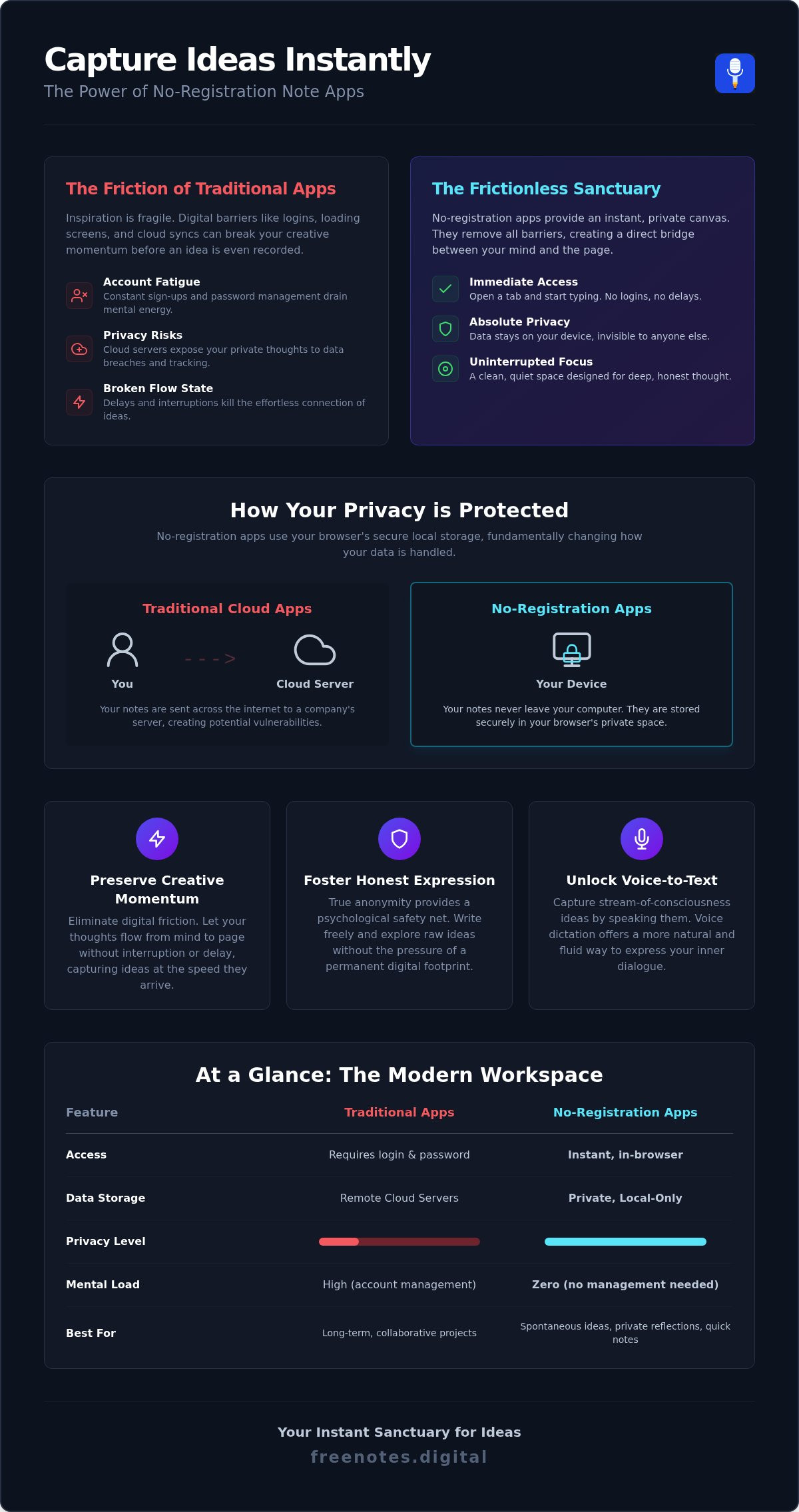
A no registration note app is more than just a convenience; it’s a browser-based sanctuary designed for the immediate capture of your inner world. Unlike traditional software that requires accounts, passwords, and multi-factor authentication, these tools exist as open canvases waiting for your input. By removing the need for a digital identity, they create a direct bridge between your mind and the page. This approach treats your attention as a finite, sacred resource. It acknowledges that the time spent navigating a login screen is time stolen from your creative process. This simplicity allows you to focus entirely on the substance of your thoughts rather than the mechanics of the interface.
The Problem with Account Fatigue
The modern internet often feels like a series of locked doors. Every time you encounter a sign-up form, your brain performs a small, taxing context switch. This digital friction is the silent killer of the flow state, which is that precious mental space where ideas connect effortlessly. When you use a no registration note app, you bypass these hurdles entirely. Spontaneous ideas don’t wait for email verifications. While services like Anosim help users manage mandatory SMS verifications for other accounts, a dedicated no-registration tool removes that step entirely for your notes. They require a Quick Notes Canvas that loads instantly, allowing you to record a dream, a business idea, or a personal reflection before the spark fades away. Choosing a tool that demands nothing from you helps you reclaim lost time and maintain your momentum.
The Problem with Account Fatigue
True productivity is often hindered by the feeling of being watched or tracked. When every word you type is linked to a permanent profile, a subtle form of self-censorship begins to take root. An anonymous web notepad provides a psychological safety net that cloud-based alternatives simply cannot match. There is a profound sense of freedom in drafting without the pressure of a permanent digital footprint. This anonymity fosters a deeper level of honesty in your writing, as it allows you to explore raw, unpolished concepts without worrying about data leaks or invasive tracking. By choosing a space that doesn’t know who you are, you give yourself the permission to think more clearly and write more bravely. It creates a restorative environment where organization feels like a relief rather than another digital chore.
How Account-Free Tools Protect Your Privacy and Mental Flow
Privacy isn’t just about hiding information; it’s about the freedom to think without an invisible audience. Most mainstream applications treat your thoughts as data points to be synced, scanned, or monetized by third parties. A no registration note app fundamentally changes this dynamic by keeping your words on your device. This local-only model ensures that your sensitive reflections never touch an external server or cross a network where they could be intercepted. You don’t have to worry about the next big cloud leak or corporate oversight. Instead, you can enjoy the quiet confidence that comes from having physical control over your digital environment, allowing your mind to wander without the weight of surveillance.
Understanding Browser-Based Local Storage
You might wonder how a tool remembers your text without a login or a password. Modern web browsers use a secure, internal memory space to hold your information locally. When you use a local storage notepad online, your browser acts as a private vault. Your notes remain intact even if you close the tab or restart your computer. They only disappear if you intentionally clear your browser’s cache, which gives you the power to decide when a draft is finished. This provides a reliable, temporary workspace for capturing sensitive ideas before they’re ready for a more permanent home. It’s a sophisticated way to manage your mental clutter without leaving a permanent digital trail behind you.
Why No-Cloud is the New Gold Standard for Privacy
Cloud synchronization was once seen as a luxury, but it often carries a heavy mental load. Every sync event is a potential point of failure or a security risk that you have to manage. By removing the cloud from the equation, you remove the anxiety of data breaches and server downtime. This creates a true sanctuary for your private thoughts. There’s a restorative quality to working in a closed loop where your data stays exactly where you created it. It allows you to breathe easier, knowing your internal dialogue isn’t being used to train an algorithm or fill a marketing database. It’s a return to the simplicity of a paper notebook, enhanced by the speed of the digital age.
If you’re ready to experience this level of digital serenity, you can start your next brainstorm in a space that respects your boundaries. Using a clean, account-free environment allows you to focus on what truly matters: the clarity of your own ideas. When you eliminate the need for registration, you open the door to a more harmonious and secure creative process.
Beyond Typing: The Power of Browser-Based Voice Dictation
Sometimes the keyboard feels like a barrier between your mind and the page. Typing requires a specific kind of motor coordination that can occasionally interrupt the delicate flow of a deep thought. A no registration note app that incorporates voice-to-text technology offers a more fluid alternative. By speaking your ideas aloud, you bypass the physical friction of a keyboard and allow your thoughts to manifest as text in real-time. This hands-free approach is especially helpful for busy creators who need to capture insights while moving through their day or during a quiet walk. Most importantly, this voice processing occurs locally within your browser, ensuring that your spoken words remain as private as your written ones. There is a profound sense of relief in knowing that your voice isn’t being recorded on a distant server.
Capturing Ideas at the Speed of Thought
Traditional writing often forces us to slow down our thinking to match our typing speed. Utilizing free voice to text online allows for a true stream-of-consciousness experience. This method is incredibly effective at overcoming “blank page syndrome” or the paralysis of writer’s block. When you speak, you aren’t worried about punctuation or perfect syntax; you’re simply letting the ideas breathe. It’s a restorative way to organize your tasks while maintaining a sense of mental stillness. You can narrate your to-do list or describe a complex project without the pressure of staring at a blinking cursor. This fluidity helps you maintain a state of mental lightness, transforming a potentially stressful brainstorm into a graceful, meditative exercise.
The Technology of Serene Dictation
Modern browsers have evolved to handle sophisticated speech recognition without requiring external software or heavy downloads. This means you can enter a no registration note app and begin dictating immediately. The experience is designed to be a quiet, reliable assistant that stays out of your way. A clean, distraction-free interface is essential during this process, as it helps you stay focused on your internal dialogue. By providing a safe and private space for your voice, these tools encourage you to speak your mind with total honesty. It’s a modern, innovative solution that remains grounded in the human need for simplicity and discretion. You don’t have to navigate complex settings or menus; you simply click and speak, allowing the technology to fade into the background while your ideas take center stage.
Choosing the Right Frictionless Workspace for Your Needs
Finding the perfect digital environment is a deeply personal journey. It’s not just about a list of technical specifications; it’s about how a space makes you feel when you first open it. A high-quality no registration note app should feel like a fresh sheet of paper, offering a quiet invitation to begin. When evaluating your options, consider whether you prefer the stark clarity of a plain-text editor or the gentle structure of rich-text formatting. While complex suites offer endless buttons, they often create a subtle background noise that distracts from your primary goal: capturing a thought. Mobile responsiveness is also vital, as your most profound insights often arrive when you’re away from your desk. Your chosen workspace should transition seamlessly from your laptop to your phone, maintaining its elegance and ease of use across every device.
Minimalism vs. Feature Bloat
There is a common misconception that more features lead to more productivity. In reality, a minimalist writing app online is often more effective because it honors your need for focus. A clean, uncluttered user interface has a direct, restorative impact on your stress levels. By stripping away unnecessary sidebars, you create room for your ideas to expand. However, simplicity shouldn’t mean a lack of essential tools. Look for a balance that includes these fundamental elements:
- Autosave: The silent assurance that your work is preserved instantly.
- Word Count: A subtle metric to track your creative progress.
- Export Options: The freedom to move your notes to a permanent home whenever you’re ready.
The Essential Checklist for a Secure Note App
To ensure your chosen tool truly supports your well-being and privacy, use this brief framework as your guide. It helps you identify a workspace that acts as a quiet, reliable assistant rather than a demanding platform.
- No registration required: You should have immediate access to your canvas without the barrier of an account.
- Local processing: Your private thoughts must stay on your device, providing total privacy assurance.
- Voice-to-text capability: The tool should offer a way to capture insights at the speed of speech.
- No-download required: A browser-based experience ensures ease of use without adding weight to your system.
If you’re looking for a space that embodies these principles, you can access your private note canvas here and begin your journey toward a more harmonious digital life. By choosing a no registration note app that values your peace of mind, you protect your creativity and your personal space.
Free Notes App: Your Instant Sanctuary for Ideas
Free Notes App is more than just a functional utility; it’s a harmonious solution for those who value their mental clarity and digital independence. It stands as the definitive no registration note app for 2026, offering a space where your creativity isn’t bound by sign-up forms or invasive data collection. By integrating the Quick Notes Canvas with a sophisticated Free Voice to Text Note Taking Tool, it provides a dual-pathway for expression that adapts to your needs. Whether you prefer the rhythmic click of keys or the natural flow of spoken word, your input is processed entirely on your own device. This commitment to local-only storage ensures that your sanctuary remains private, restorative, and entirely under your control.
A Workspace Designed for Your Inner World
The interface of Free Notes App is crafted with a deep respect for your personal space and well-being. It doesn’t shout for attention with notifications, pop-ups, or complex menus. Instead, it stays out of the way until the exact moment you need it, acting as a quiet, reliable assistant. There is something profoundly restorative about clearing your mental clutter onto a clean digital canvas. It allows you to achieve a sense of mental lightness, transforming a chaotic brainstorm into an organized, elegant reflection. The design is modern and innovative, yet it remains grounded in a human-centric philosophy that values simplicity over feature bloat. It’s a tool that respects your environment and your time.
Getting Started with Your First Note
Beginning your journey toward a more mindful digital life is as simple as opening a new tab in your browser. You can use the in-browser dictation tool for instant capture when your ideas are moving faster than you can type. This is perfect for rapid brainstorming or gentle, mindful journaling at the end of a long day. You don’t need to worry about technical jargon or complicated setups. Just speak or type, and watch your thoughts take shape. Remember the core promise of this space: there is no account to manage, no cloud to monitor, and no data to lose. It’s just you and your ideas in a secure, local environment that demands nothing from you in return.
You can open your Quick Notes Canvas now and experience the tranquility of a truly frictionless workspace. By choosing a no registration note app that prioritizes your privacy and mental flow, you’re not just taking notes; you’re protecting your creative spark. Start your first note today and discover how effortless organization can feel when the technology stays in the background.
Reclaiming Your Mental Space
Embracing a simpler way to capture your thoughts is the first step toward a more balanced digital life. You’ve seen how removing the barrier of a login screen preserves your creative momentum while local storage ensures your most private reflections remain under your own control. By choosing a no registration note app, you prioritize your mental well-being over the demands of complex, cloud-heavy ecosystems.
Whether you’re drafting a quick list or narrating a deep brainstorm via integrated voice-to-text tools, the focus remains entirely on your ideas. This restorative approach to organization allows you to clear your mind without the weight of permanent digital footprints or security anxieties. It’s time to experience the tranquility of a workspace that values your privacy as much as your productivity.
You can start your private note on the Free Notes App now and enjoy the immediate relief of a clean, account-free canvas. Every thought you record is a step toward greater clarity and peace of mind. Your ideas deserve a sanctuary that’s ready whenever you are.
Frequently Asked Questions
Is a no registration note app safe to use for private information?
A no registration note app is exceptionally safe because your data never leaves your personal device. Unlike cloud-based tools that store your thoughts on external servers, this model uses local-only processing. This means your sensitive reflections are physically contained within your browser’s secure memory. You don’t have to worry about data breaches or corporate surveillance, as there is no central database for hackers to target or scan.
Will my notes disappear if I refresh the page or close my browser?
Your notes remain intact even if you refresh the page or close your browser. The tool utilizes persistent local storage, which functions like a digital vault inside your browser. Your text is automatically saved as you write or dictate. However, it’s important to remember that clearing your browser’s cache or history will remove these files, so you should export any essential thoughts before performing any deep system maintenance.
Do I need to download any software to use the voice-to-text feature?
You don’t need to download any software or plugins to use the voice-to-text feature. The tool leverages modern browser APIs to process your speech directly within the web interface. This ensures a frictionless experience where you can start speaking your ideas immediately. By avoiding downloads, you keep your system light and maintain a serene, uncluttered digital environment that respects your computer’s resources and your valuable time.
Can I access my notes from a different device later?
You cannot access your notes from a different device because the data is stored locally on the specific hardware you used. This is a deliberate choice to prioritize your privacy and security. By avoiding cloud synchronization, we ensure that your private thoughts aren’t traveling across the internet. If you need your notes on another machine, simply export them as a text file and move them manually via your preferred secure method.
What is the difference between a no-registration app and a traditional notepad?
A no registration note app combines the tactile immediacy of a paper notepad with the powerful efficiency of digital tools. While a traditional notepad requires a pen and physical storage, this digital sanctuary offers instant access from any browser and includes voice-to-text capabilities. It provides a clean, distraction-free canvas that allows your ideas to flow at the speed of thought without the clutter of physical notebooks or the friction of accounts.
How does local storage work in a browser-based note tool?
Local storage works by utilizing a dedicated portion of your browser’s memory called Web Storage. When you type or speak into the Quick Notes Canvas, the browser writes that data to a local file on your hard drive that only your browser can access. This process happens instantly and silently in the background. It ensures that your private thoughts remain local, private, and accessible whenever you return to the site on the same device.
Is the voice-to-text feature free to use forever?
The voice-to-text feature is completely free to use and does not require any premium subscriptions. Our philosophy is centered on providing a restorative and accessible tool for everyone who needs a quiet space for their ideas. You can dictate as often as you like without worrying about hidden fees or usage limits. This commitment to a free, high-quality experience helps you maintain a state of mental lightness and total creative freedom.
Can I export my notes once I have finished writing or dictating?
You can easily export your notes once you’ve finished your creative session. The interface provides simple options to copy your text to your clipboard or save it as a document on your device. This allows you to move your refined thoughts to a permanent home or share them with others whenever you’re ready. It’s a graceful way to transition from a spontaneous brainstorm to a finished project while keeping your original drafts private.