Your most brilliant ideas shouldn’t have to wait for a password reset or a mandatory registration screen. When inspiration strikes, the friction of a sign-up form acts like a wall, often causing that fleeting thought to slip away before you can record it. This is why a browser scratchpad no login required is such a vital tool for the modern thinker. It offers a rare moment of digital peace, allowing you to move from thought to text in a single, fluid motion without the anxiety of cloud syncing or data harvesting.
You likely value your privacy as much as your productivity, and you’re tired of complex interfaces that clutter your mental landscape. We understand that a truly helpful tool should feel like a quiet assistant rather than a demanding manager. In this article, you’ll discover how to utilize a frictionless, private writing space that processes everything locally on your device. We’ll show you how to maintain your focus and protect your creative process with a sanctuary designed for immediate, registration-free expression.
Key Takeaways
- Discover how a browser scratchpad no login preserves your creative flow by removing the mental friction of mandatory sign-ups and passwords.
- Learn how local storage technology ensures your thoughts remain entirely private and never leave your own device.
- Compare minimalist browser hacks with dedicated digital canvases to find the perfect balance between simplicity and functionality.
- Explore practical ways to use a digital scratchpad for everything from spontaneous brainstorming to recording quick meeting action items.
- Uncover the benefits of combining traditional text editing with voice-to-text features for a truly effortless capture experience.
The Rise of the Frictionless Browser Scratchpad
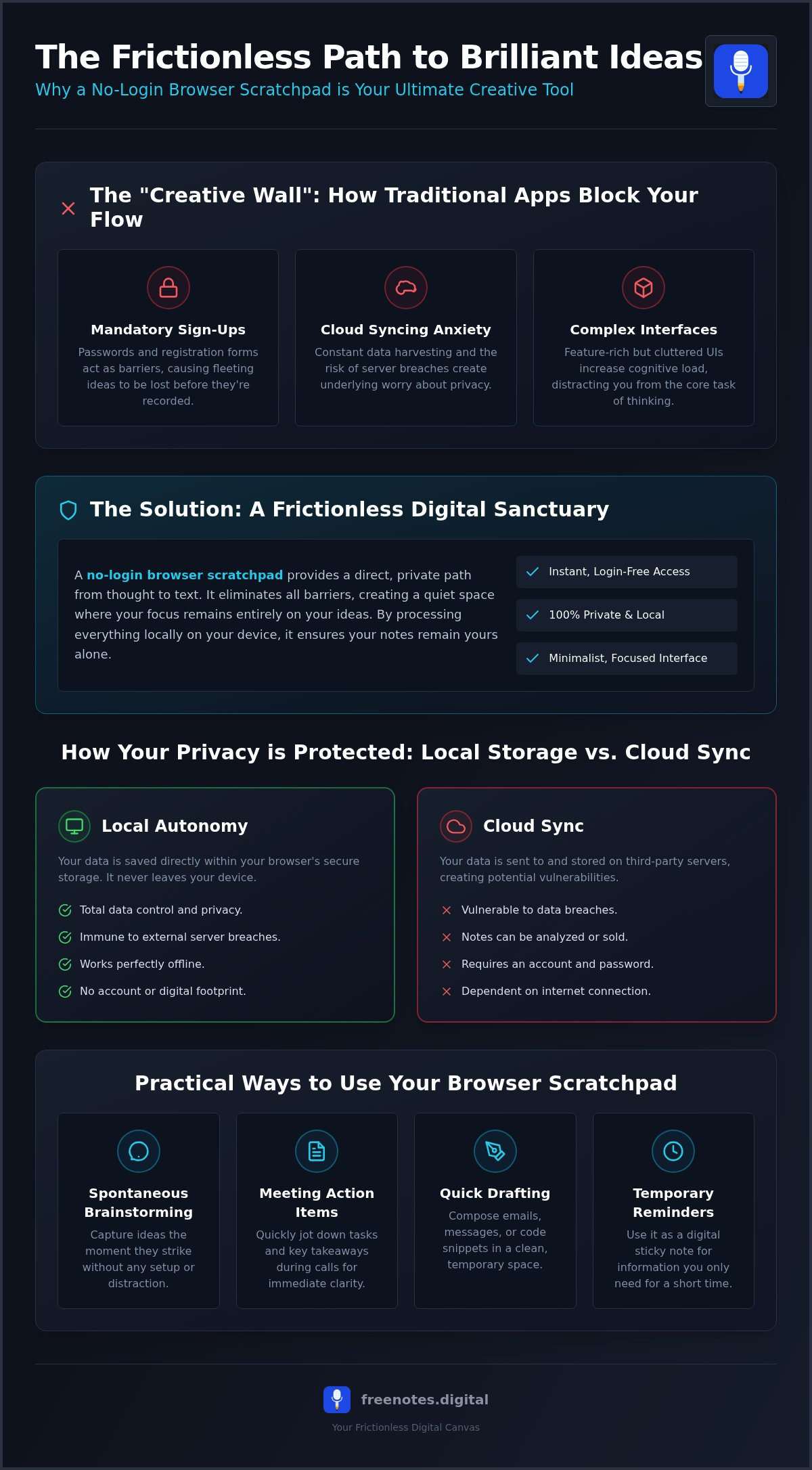
A browser scratchpad is a transient, web-based writing canvas designed for the immediate capture of ideas. Unlike complex software that requires an account before you can type a single word, a browser scratchpad no login provides a direct path from your mind to the screen. It acts as a digital sanctuary where thoughts can land safely without the interruption of an “onboarding wall.” Most modern productivity apps demand your email, a password, and a multi-step tutorial, which often smothers a creative spark before it has a chance to grow. By removing these hurdles, you create a space where your focus remains entirely on the substance of your thoughts.
In a world filled with digital noise, the ability to open a tab and start writing immediately is more than just a convenience. It’s a method for maintaining creative flow. When you use a browser scratchpad no login, you aren’t just saving time; you’re protecting your mental energy. This frictionless entry allows for a seamless transition into deep work, ensuring that your most fleeting inspirations are preserved exactly as they occur. It is a tool for those who value movement and clarity over the heavy weight of feature-rich but distracting applications.
Why “No Login” is the New Privacy Gold Standard
Managing endless passwords and user accounts has become a source of significant mental fatigue. Every new registration expands your digital footprint and increases the risk of data exposure. By choosing a registration-free tool, you reclaim a sense of digital autonomy. These tools utilize Web storage technology to keep your data local, ensuring that your private reflections never touch an external server. This approach creates a sanctuary of private note taking where you can remain truly anonymous. It’s a quiet, secure way to work that respects your personal space and your time.
The Emotional Impact of a Clean Slate
There is a profound sense of relief that comes from working within a minimalist interface. A cluttered screen often leads to a cluttered mind, but a clean, temporary writing space helps reduce cognitive load. This environment encourages uninhibited drafting and brainstorming because the stakes feel lower. You aren’t building a permanent monument; you’re simply giving your ideas room to breathe. This pursuit of mental lightness is essential for restorative organization. When your tools stay out of the way, you can achieve a state of purposeful grace in your daily life, moving from one task to the next with clarity and ease.
How Local Browser Storage Protects Your Privacy
When you use a browser scratchpad no login, your data is handled through elegant, invisible technologies known as LocalStorage and IndexedDB. Think of these as personal, digital drawers within your browser that only you can open. Unlike traditional apps that send every keystroke to a distant server, these tools keep your information strictly on your own device. This local-first approach ensures that your private reflections remain yours alone. It creates a quiet space where you can work without the constant, underlying worry of who might be watching or analyzing your data.
Security in the modern era is often about what doesn’t happen. By avoiding cloud synchronization, you eliminate the risk of your notes being exposed in a centralized data breach. With deepfake phishing and AI-powered scams occurring as frequently as every five minutes as of late 2025, keeping sensitive thoughts off the internet is a sophisticated act of self-protection. A high-quality browser scratchpad no login allows you to refresh your page or even restart your computer without losing your progress. Your words stay exactly where you left them, providing a reliable and stable environment for your ideas to flourish.
Cloud Sync vs. Local Autonomy
The convenience of cloud syncing often comes with hidden costs. Centralized servers are attractive targets for bad actors, and even the most reputable services can suffer from vulnerabilities. There is a restorative power in choosing a note taking app that doesn’t sync. It grants you total autonomy over your creative output. Some ideas are simply too precious or too raw to be stored on a third-party server. By keeping them local, you ensure that your digital sanctuary remains uncompromised and entirely within your control.
Maintaining Your Digital Sanctuary
While local storage is incredibly stable, it’s wise to understand how to manage offline data to prevent accidental loss. Browsers are designed to protect your storage, but aggressive cleaning settings or clearing your cache can sometimes remove local files. To maintain your mental lightness, use your scratchpad as a mindful buffer. It’s the perfect place to refine sensitive information before moving it to a permanent home. If you’re looking for a gentle companion for these moments, you might enjoy using a private text canvas that honors your need for discretion and speed.
Comparing Scratchpad Methods: Hacks vs. Dedicated Tools
Choosing between a raw browser hack and a dedicated tool is a matter of finding the right balance for your creative process. While both offer a browser scratchpad no login experience, they serve different mental states. A technical hack is for the momentary, the ultra-fast, and the immediately disposable. A dedicated tool, however, acts as a more stable companion, providing the quiet confidence that your words won’t vanish the moment you accidentally close a tab. The goal is to find a space that feels like a natural extension of your mind, rather than a technical hurdle to overcome.
The Technical Hack: Pros and Cons
The “data:text/html” hack is a favorite among ultra-minimalists and developers. By typing a single line of code into your address bar, you transform your browser into a blank, editable canvas. It’s elegant and requires zero bytes of software. But this simplicity comes with a significant risk. There is no auto-save or persistence. If your browser crashes or you hit the refresh button, your ideas disappear. It’s a useful solution for quick copy-pasting or temporary jotting, but it lacks the protective qualities needed for meaningful brainstorming. For those who value their creative output, the lack of a “save” function can create a subtle, persistent anxiety that disrupts the restorative nature of writing.
The Dedicated Online Scratchpad
Dedicated tools like Free Notes App or mdedit offer a more sophisticated environment designed specifically for the fluidity of thought. These platforms provide a purpose-built interface that honors the craftsman’s need for clean typography and intuitive movement. Unlike a raw window, a dedicated browser scratchpad no login includes essential features like character counts and local auto-save. This ensures that your mental lightness isn’t interrupted by the fear of data loss. You get the speed of a hack with the reliability of a professional application.
Some tools even expand the definition of a scratchpad to accommodate different styles of thinking. For instance, using private voice notes in browser allows you to capture ideas when your hands are busy or your thoughts are moving too fast for typing. This blend of text and voice functionality creates a truly frictionless digital canvas. It allows you to move seamlessly from a spoken spark of inspiration to a structured draft, all within a private, registration-free sanctuary. This versatility ensures that no matter how your ideas arrive, you have a serene place for them to land.
Ultimately, the best tool is the one that stays out of your way. Whether you prefer the raw edge of a technical hack or the refined support of a dedicated app, the goal is the same: to remove the friction between you and your ideas. By prioritizing a space that requires no login, you protect your focus and your privacy. You aren’t just choosing a tool; you’re choosing a more mindful way to interact with your own thoughts.
Practical Ways to Use Your Browser Scratchpad
A browser scratchpad no login is a versatile companion that adapts to the rhythm of your day. It serves as a quiet corner for raw thoughts before they are polished or moved to more permanent homes. Because it requires no account, you can use it as a spontaneous brainstorming tool, capturing a stream of consciousness without the pressure of a formal document. It is also an ideal space for recording quick meeting notes. Instead of waiting for a heavy application to load, you can jot down action items and decisions with immediate clarity, ensuring that nothing important is forgotten in the heat of the moment.
Privacy remains a central benefit when using this digital canvas for sensitive tasks. You might use it as a buffer for drafting confidential emails or personal reflections. By writing your first draft in a local-only environment, you ensure that your initial, unedited thoughts aren’t being tracked or saved by a mail client’s auto-save feature. Additionally, the inclusion of dictation tools allows for hands-free idea generation. If you find that your thoughts move faster than your fingers, speaking your ideas aloud can help you maintain a state of mental lightness while still capturing every detail.
For Writers and Creatives
Writers often face the daunting challenge of the blank page. A browser scratchpad no login acts as a low-stakes environment where perfection isn’t the goal. Many find success using it as a stream of consciousness writing app to clear mental clutter before starting a major project. It’s a perfect place to draft social media snippets or blog post outlines with ease. Because the space is temporary, it invites experimentation and uninhibited drafting, helping you move past writer’s block with purposeful grace.
For Students and Researchers
Academic life requires both speed and precision. Students can benefit from transcribing spoken words to text during lectures or study groups, creating a reliable record of complex discussions. It’s also a helpful zone for organizing research citations and raw data before final formatting. This distraction-free environment allows for focused study sessions, where the only thing on the screen is the information that matters most. When you’re ready to experience this frictionless process for yourself, you can start using our free voice to text note taking tool to capture your next brilliant insight instantly.
Free Notes App: Your Frictionless Digital Canvas
Free Notes App stands as a quiet, reliable assistant for your most spontaneous thoughts. It is designed to be the ultimate browser scratchpad no login requires, focusing entirely on the restoration of your mental clarity. By removing the need for accounts and passwords, it provides an immediate sanctuary where you can record ideas the moment they arrive. This platform isn’t just a simple text box; it is a sophisticated Quick Notes Canvas that respects your personal space. Everything you write or dictate stays on your device, honoring a deep commitment to user privacy and digital autonomy.
The experience of using this tool is centered on achieving mental lightness. When you open the interface, you’re greeted by a clean, elegant space that invites reflection rather than distraction. It functions as a mindful companion, staying unobtrusively in the background until the exact second you need it. By prioritizing local processing, we ensure that your creative process remains uninterrupted by the anxieties of data harvesting or external server breaches. It is a modern solution grounded in a human-centric philosophy that values simplicity above all else.
The Power of In-Browser Dictation
While many basic editors offer only text input, our platform includes a powerful, integrated voice-to-text feature. This in-browser dictation tool transforms your spoken words into text instantly, allowing you to capture insights even when your hands are busy or your mind is racing. It fills a critical gap found in most simple scratchpads, providing a fluid way to move from thought to record without touching a keyboard. This feature is a gentle enabler for those who find that their best ideas often come during moments of movement or quiet conversation.
Getting Started with Your New Scratchpad
Beginning your journey toward a more organized and serene digital life is effortless. There are no downloads or installations required. Simply open the canvas and begin typing or speaking. The interface is intuitive, moving with a purposeful grace that reduces cognitive load. Once your brainstorming session is complete, you can easily export your notes or copy them to a permanent home. We invite you to experience the tranquility and effortless movement of Free Notes App today, and discover how a truly frictionless tool can support your creative well-being.
Embracing a More Mindful Way to Capture Ideas
Reclaiming your mental clarity begins with choosing tools that honor your focus and your privacy. You’ve seen how a browser scratchpad no login allows you to bypass the noise of modern software; it provides a direct path for your creativity to flow. By prioritizing local storage and avoiding the risks of cloud synchronization, you ensure that your digital sanctuary remains entirely under your control. Whether you’re drafting sensitive snippets or transcribing a sudden spark of inspiration, the right environment makes all the difference in achieving a state of mental lightness.
Finding a space that moves with you doesn’t have to be complicated. With no registration required and local-only data processing, you can work with the confidence that your ideas are secure and private. The addition of free voice-to-text means you’ll never lose a thought to a slow keyboard or a busy hand. It’s time to let your tools stay out of the way so your mind can lead. Start your serene note-taking journey with Free Notes App today. May your thoughts always find a peaceful place to land.
Frequently Asked Questions
Do I really not need an account to use this scratchpad?
You don’t need an account, email address, or registration of any kind to begin writing. This tool is designed to be a frictionless sanctuary where you can record your thoughts the moment they arrive. By removing the mandatory sign-up process, we help you maintain your creative flow and avoid the mental fatigue of managing yet another password.
Will my notes disappear if I close the browser tab?
Your notes will remain safe even if you close the tab or restart your browser. The interface uses local web storage to ensure your text persists across sessions without the need for cloud syncing. Just remember that manually clearing your browser’s site data or cache may remove these temporary files, so it’s wise to export your final drafts once they are complete.
Is my voice data or text being saved on your servers?
Your data never touches an external server and remains strictly on your own device. This local-only processing is what makes a browser scratchpad no login such a powerful tool for privacy. Your private reflections and voice recordings are processed locally, providing a secure environment where your digital footprint stays as small as possible.
Can I use this browser scratchpad on my mobile phone?
You can use the scratchpad on any modern mobile device through your preferred web browser. There’s no need to download a heavy app or worry about storage space on your phone. The responsive design ensures that the quick notes canvas feels smooth and intuitive, whether you’re jotting down a thought at your desk or dictating an idea while on a walk.
How do I save my notes permanently if there is no cloud sync?
To save your notes permanently, simply copy your text and paste it into a long-term storage tool or document. This scratchpad acts as a mindful buffer for raw ideas, allowing you to refine them before they move to a permanent home. This intentional step helps you curate your thoughts and keeps your main workspace free from unnecessary clutter.
Is there a limit to how much text I can write in the scratchpad?
There is no strict character limit, though the tool is most effective for capturing transient ideas and short brainstorms. It provides a clean slate for your immediate needs without the weight of complex formatting tools. If you find your thoughts expanding into a longer project, you can easily transition your text to a dedicated processor once the initial spark is recorded.
Does the voice-to-text feature work in different languages?
The voice-to-text functionality relies on your browser’s built-in capabilities, which generally support a wide variety of global languages. It will typically recognize the language you have set as your primary preference in your browser settings. This flexibility ensures that you can speak your mind naturally and achieve mental lightness in whichever language feels most comfortable to you.